Categories
Website

Web Usability: Boosting Engagement and Sales

Over 94 percent of Australian and New Zealand online consumers admit that a confusing website makes them leave before buying. For small to medium businesses, every frustrated visitor is a lost sale or opportunity. Effective web usability shapes how easily people find products, navigate information, and complete purchases. This article explains the principles and testing methods behind smart usability, giving local owners practical steps to increase customer satisfaction and conversion rates.

Table of Contents

Key Takeaways

PointDetails
Importance of Web UsabilityWeb usability is essential for engaging online visitors and enhancing sales by ensuring intuitive user interactions.
Tailored StrategiesEach business should adopt a customised approach to web usability that aligns with its unique audience and digital goals.
Continuous ImprovementRegular user testing and analytics are vital for identifying usability issues and refining the user experience.
Common Usability ChallengesAddressing slow loading speeds, complex navigation, and poor mobile responsiveness can significantly improve customer engagement.

Defining Web Usability for Businesses

Web usability represents a critical digital strategy that determines how effectively businesses can engage online visitors and convert potential customers. At its core, web usability measures how intuitively users can interact with a website, navigating through content and completing desired actions with minimal friction. Understanding this concept goes beyond aesthetic design – it’s about creating meaningful, accessible digital experiences that align with user expectations and business objectives.

In the digital landscape of New Zealand, web usability directly impacts customer engagement and sales performance. Web accessibility and user experience are fundamentally interconnected, requiring businesses to consider diverse user needs, technical capabilities, and interaction preferences. This means designing websites that function seamlessly across different devices, load quickly, present clear navigation pathways, and provide intuitive interaction mechanisms.

Key components of effective web usability include:

  • Clear and consistent site navigation
  • Responsive design across mobile and desktop platforms
  • Fast page loading times
  • Readable typography and colour contrast
  • Logical information architecture
  • Minimal required user steps to complete actions

Net Branding recognises that web usability is not a one-size-fits-all approach. Each business requires a tailored strategy that reflects its unique audience, industry requirements, and specific digital goals. By prioritising user-centric design principles, companies can transform their websites from mere online brochures into powerful engagement and sales platforms.

Expert Tip: Conduct regular user testing and analyse website analytics to continuously refine and improve your website’s usability and user experience.

Key Principles That Influence Usability

Web usability transcends simple design aesthetics, representing a comprehensive approach to creating digital experiences that genuinely connect with users. Effective usability principles focus on ensuring users can seamlessly interact with digital platforms, considering diverse user needs and interaction capabilities across different technological contexts.

UX designer guiding usability testing group

The fundamental principles influencing web usability can be categorised into several critical dimensions. Perceivability ensures that website information is presented in ways users can comprehend, which means designing with clear typography, appropriate colour contrast, and logical content organisation. Operability involves creating interfaces that users can navigate intuitively, minimising cognitive load and reducing potential frustration points during interaction.

Key usability principles include:

  • Consistent and predictable navigation structures
  • Intuitive interface design
  • Rapid page loading performance
  • Responsive design across multiple devices
  • Clear communication of website functionality
  • Accessibility for users with diverse abilities

Net Branding understands that usability is not a static concept but a dynamic process of continuous refinement. Businesses must adopt a user-centric approach, regularly testing and adapting their digital platforms to meet evolving user expectations and technological landscapes. By prioritising these principles, organisations can transform their websites from mere digital placeholders into powerful engagement tools that drive meaningful user interactions and business outcomes.

Expert Tip: Implement regular user testing sessions and analyse website interaction metrics to identify and address potential usability challenges proactively.

Types of Web Usability Issues

Web usability challenges can significantly undermine a business’s online effectiveness, creating barriers that prevent potential customers from engaging with digital platforms. Common web usability issues emerge across multiple dimensions, directly impacting user experience and conversion potential, affecting how visitors interact with and perceive an organisation’s digital presence.

Navigation complexity represents a primary usability obstacle for many websites. Users become frustrated when confronting confusing menu structures, unclear pathways, or inconsistent design elements that obstruct their ability to find desired information quickly. This complexity extends beyond visual design, encompassing information architecture that determines how content is organised, structured, and presented to visitors.

Key web usability issues include:

  • Slow page loading speeds
  • Non-responsive mobile design
  • Unclear or cluttered navigation menus
  • Insufficient colour contrast
  • Inconsistent design across website pages
  • Complex forms with multiple unnecessary fields
  • Lack of clear call-to-action buttons
  • Poor accessibility for users with disabilities

Net Branding recognises that addressing these usability challenges requires a holistic approach. Businesses must view their website as a dynamic communication tool, continuously refining user interactions to create seamless, intuitive digital experiences. By systematically identifying and resolving usability issues, organisations can transform potential friction points into opportunities for enhanced customer engagement and improved online performance.

The table below summarises how common web usability issues can impact business outcomes:

Usability IssueUser Experience EffectPotential Business Impact
Slow loading speedsCauses user frustration, high bounceLoss of conversions and sales
Complex navigationUsers struggle to find informationReduced engagement and page views
Poor mobile responsivenessDifficult browsing on mobile devicesExcludes mobile users, lowers reach
Inaccessible designBlocks users with disabilitiesLegal risks and reputational damage

Expert Tip: Conduct comprehensive user testing and utilise heatmap analytics to systematically identify and prioritise website usability improvements.

Testing Methods for Optimal Usability

Web usability testing represents a strategic approach to understanding and improving digital user experiences. Comprehensive testing methods offer businesses critical insights into how users interact with their digital platforms, enabling targeted improvements that directly impact engagement and conversion rates.
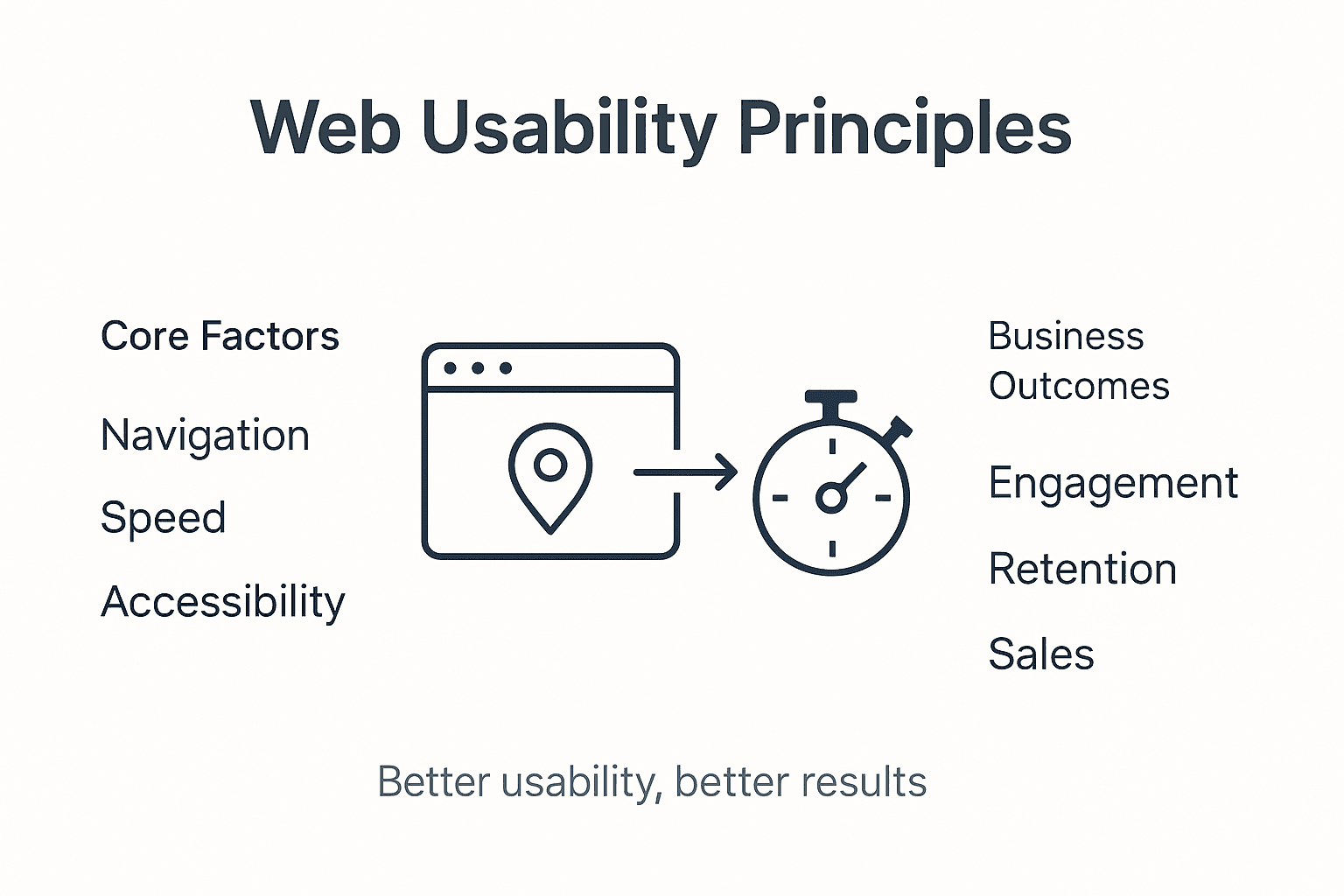
Infographic showing web usability principles and outcomes

Multiple testing methodologies provide nuanced perspectives on user interactions. Controlled laboratory testing allows for detailed observation of user behaviours, while remote testing enables businesses to gather insights from diverse geographical locations. A/B testing emerges as a powerful technique for comparing different design variations, helping organisations make data-driven decisions about website elements that most effectively support user goals.

Key usability testing approaches include:

  • Heuristic evaluation by expert reviewers
  • User task completion analysis
  • Remote unmoderated testing
  • Moderated in-person testing sessions
  • Click tracking and heatmap analysis
  • Prototype and wireframe testing
  • Accessibility compliance testing
  • User satisfaction surveys

Net Branding recognises that effective usability testing is an iterative process. Businesses must view testing not as a one-time activity but as a continuous cycle of observation, analysis, and refinement. By systematically collecting and implementing user feedback, organisations can create digital experiences that are not just functional, but truly engaging and intuitive.

Here’s a comparison of key usability testing methods and when to use them:

Testing MethodBest ForTypical Outcome
Heuristic evaluationQuick expert review of new designsIdentifies obvious usability flaws
Remote user testingGathering feedback from widespread usersDiverse perspectives, wide coverage
A/B testingComparing specific website elementsData on user preferences
Heatmap analysisAnalysing areas of user attentionReveals popular & ignored features

Expert Tip: Rotate testing participants and methodologies to ensure comprehensive insights and prevent potential bias in your usability assessment.

Common Mistakes and How to Avoid Them

Web usability challenges often emerge from fundamental design misconceptions that create barriers between businesses and their potential customers. Recognising and addressing typical usability pitfalls requires a systematic approach to understanding user interaction dynamics, focusing on creating intuitive, accessible digital experiences.

One primary mistake businesses frequently make involves designing websites from an internal perspective rather than considering user needs and expectations. This approach leads to complex navigation structures, overcrowded interfaces, and content that fails to communicate effectively. Complex menus, excessive technical jargon, and inconsistent design elements can overwhelm visitors, causing them to abandon websites within seconds of arrival.

Common web usability mistakes include:

  • Ignoring mobile responsiveness
  • Overcomplicated navigation systems
  • Slow page loading times
  • Unclear or hidden call-to-action buttons
  • Insufficient colour contrast
  • Lack of consistent design language
  • Overwhelming users with too much information
  • Neglecting accessibility requirements

Net Branding understands that effective web design transcends aesthetic considerations. Businesses must adopt a user-centric approach, continually testing and refining their digital platforms to create seamless, engaging experiences that anticipate and meet user expectations. By systematically addressing usability challenges, organisations can transform potential friction points into opportunities for meaningful customer engagement.

Expert Tip: Conduct quarterly user experience audits to proactively identify and resolve potential usability obstacles before they impact customer interactions.

Elevate Your Website Usability With Expert WordPress Solutions

Struggling with slow page loading speeds, complicated navigation or poor mobile responsiveness can significantly hinder your business growth. This article highlights how crucial it is to prioritise web usability to boost engagement and sales. If your website fails to connect intuitively with users or lacks seamless functionality across devices you may be missing out on valuable customers right now.

https://responsivewebsitedesign.co.nz

Take control of your online presence with tailored WordPress website design and development from ResponsiveWebsiteDesign. Specialising in creating responsive, SEO-optimised websites that enhance user experience and meet your business objectives across New Zealand, we deliver measurable results through:

  • Custom WordPress development
  • Ecommerce solutions with WooCommerce
  • Ongoing website management and security
  • Performance optimisation to eliminate slow loading

Ready to transform your site into a powerful engagement and sales platform Visit Website Archives – ResponsiveWebsiteDesign to explore real success stories and detailed insights or head straight to our landing page to start your journey. Don’t let usability issues hold you back—partner with experts who understand how to convert your digital challenges into business growth opportunities today.

Frequently Asked Questions

What is web usability and why is it important for businesses?

Web usability refers to how effectively users can interact with a website. It’s crucial for businesses as it influences user engagement, conversion rates, and overall customer satisfaction.

What are the key components of effective web usability?

Key components include clear site navigation, responsive design, fast loading times, readable typography, logical information architecture, and minimal steps for users to complete actions.

How can I identify web usability issues on my site?

You can identify usability issues through regular user testing, analytics analysis, heatmap tracking, and by soliciting user feedback to pinpoint areas of confusion or difficulty.

What are common mistakes to avoid when designing for web usability?

Common mistakes include ignoring mobile responsiveness, using complex navigation systems, having slow page loading times, unclear call-to-action buttons, and overwhelming users with too much information.

Categories
Website

How to Optimise Local SEO for WordPress Websites

Most New Zealand companies miss out on valuable foot traffic because nearly 46 percent of all Google searches are local. If your WordPress website is not outperforming australian competitors in local search results, you could be leaving revenue on the table. By sharpening your local search strategies and making targeted improvements to your site, you can attract more nearby buyers and increase online sales where it matters most.

Table of Contents

Quick Summary

Key PointExplanation
1. Assess Local Search VisibilityConduct a detailed audit of your online presence to identify inconsistencies affecting rankings.
2. Configure WordPress for Local SEOInstall an SEO-friendly theme and plugin to optimise your site’s local search capabilities.
3. Enhance Local ContentCreate engaging, location-specific content that resonates with the local New Zealand audience.
4. Optimise Google Business ProfileMaintain an active and accurate Google Business Profile to boost visibility and attract customers.
5. Monitor Performance ConsistentlyUse analytics tools to track SEO performance and adjust strategies based on real data insights.

Step 1: Assess Current Local Search Presence

Understanding your local search presence is critical for businesses looking to attract nearby customers through online channels. This initial assessment helps you map out where your business currently stands in local search engine optimization and identify potential areas for strategic improvement.

Start by conducting a comprehensive audit of your online visibility. Open a web browser and search for your business name and location. Note how your business appears in search results across different platforms. Check your Google Business Profile and verify all details are accurate. Examine your current local directory listings and look for any inconsistencies in your business name, address, phone number or website details. These small variations can significantly impact your local search rankings.

Quality local search visibility requires meticulous attention to detail. Systematically review each listing platform independently. Collect screenshots and create a spreadsheet documenting existing listings. Net Branding recommends checking platforms like Google Maps, Yelp, Yellow Pages, and local business directories specific to New Zealand. Pay particular attention to contact information accuracy.

Expert Suggestion: Create a standardised tracking document to monitor and update your local business listings consistently across all digital platforms.

Step 2: Configure WordPress for Local SEO

Configuring your WordPress website for local search optimisation requires strategic setup and targeted technical adjustments. This phase focuses on transforming your website into a locally discoverable digital asset that attracts nearby customers through precise search engine optimisation techniques.

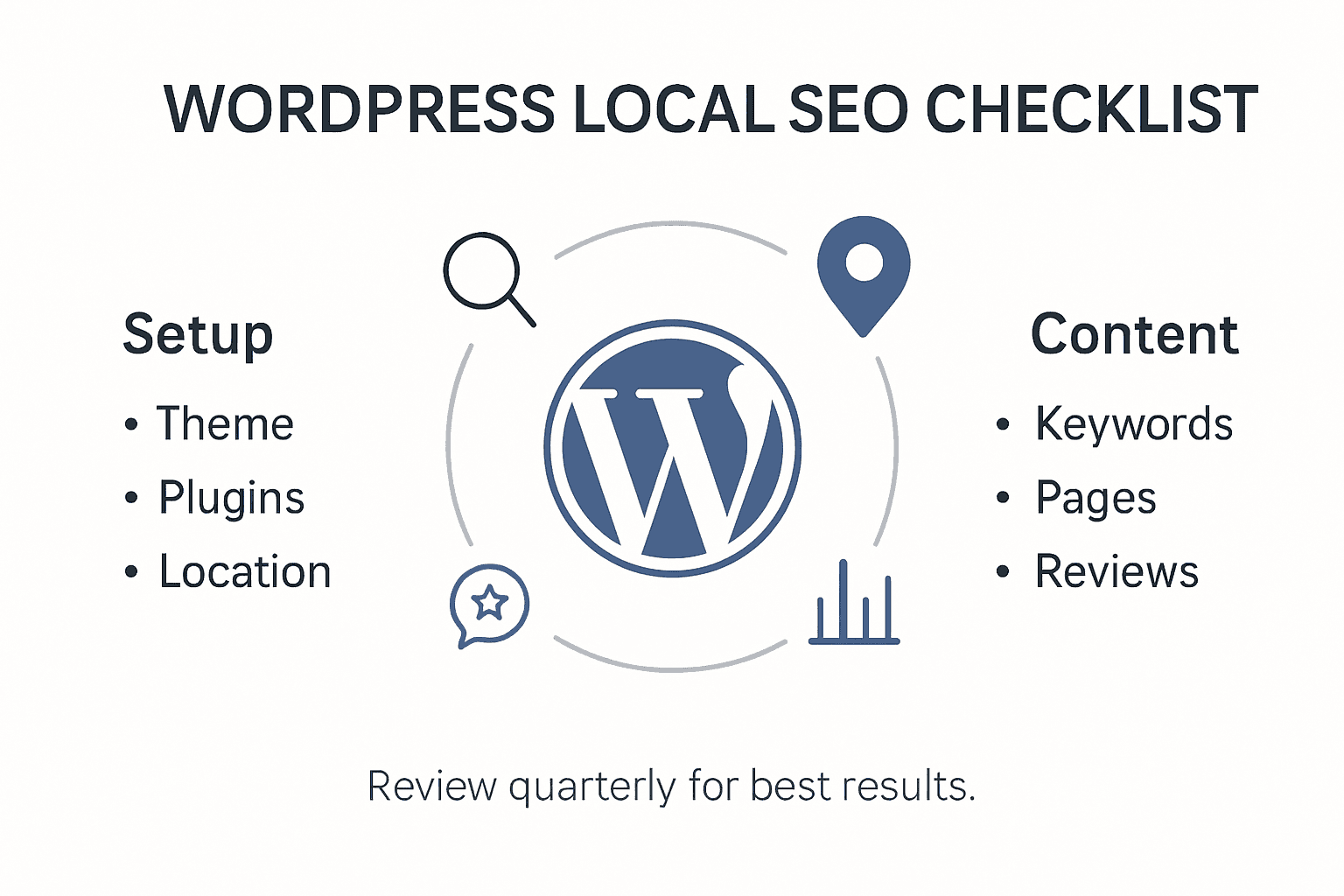
Infographic checklist for WordPress local SEO

Start by selecting an SEO friendly WordPress theme designed with local business needs in mind. Ensure your chosen theme supports responsive design and includes schema markup capabilities. Install a reputable SEO plugin like Yoast SEO or All in One SEO Pack that allows granular control over local business metadata. Configure your permalink structure to create clean search friendly URLs that include location specific keywords relevant to your New Zealand business market.

Net Branding recommends taking a systematic approach to local SEO configuration. Add your precise business location details consistently across your website footer contact sections. Implement local business schema markup to help search engines understand your geographic relevance. Include location specific keywords naturally within your website content without overstuffing. Verify your Google Business Profile is accurately linked and synchronised with your WordPress website to maximise local search visibility.

Expert Suggestion: Regularly audit your local SEO configuration quarterly to ensure all technical elements remain optimally aligned with current search engine guidelines.

Here is a summary of key local SEO actions for WordPress:

Action StepPurposeExpected Benefit
SEO Friendly ThemeEnhances website performance & appearanceBoosts local search relevance
SEO Plugin InstallationProvides metadata and schema controlImproves visibility in search
Location Details on SiteEnsures NAP consistency on pagesIncreases trust and rankings
Schema MarkupSignals location to search enginesEnables richer search results

Step 3: Enhance Local Content and Pages

Enhancing your local website content requires a strategic approach that speaks directly to your New Zealand audience while simultaneously signalling relevance to search engines. The goal is to create compelling local content strategies that connect authentically with your community and improve online visibility.

Focus on developing location specific content that highlights your unique local expertise. This means crafting web pages that incorporate specific references to New Zealand regions, local landmarks, community events, and region specific language. Include detailed service descriptions that emphasise your local understanding. Integrate customer testimonials from local clients and create case studies that showcase your work within specific New Zealand neighbourhoods. Net Branding recommends developing content that demonstrates deep local knowledge beyond generic service descriptions.

Writer creating local business blog content

Optimise your web pages with careful attention to on page elements. Use location specific keywords naturally within headings and meta descriptions. Add alt text to images that references local contexts. Create internal links between your local service pages to strengthen topical relevance. Consider developing dedicated pages for different service areas or regions you operate within New Zealand to maximise local search potential.

Expert Suggestion: Create a content calendar specifically designed to regularly update and refresh your local website content to maintain ongoing search engine relevance.

Step 4: Leverage Google Business Profile Effectively

Mastering your Google Business Profile is crucial for local businesses seeking to maximise online visibility and attract nearby customers. Understanding how to optimise your digital business presence can significantly impact your local search performance and customer engagement.

Start by claiming and thoroughly verifying your Google Business Profile with precise and comprehensive business information. Ensure every detail including business name, address, phone number, operating hours, and service descriptions are 100 percent accurate. Upload high quality professional images that showcase your business environment, team, and products. Regularly update your profile with fresh content such as event announcements, special offers, and recent work examples. Net Branding recommends treating your profile as a dynamic marketing platform rather than a static listing.

Encourage satisfied customers to leave genuine reviews and consistently respond to all feedback professionally. Use the Google Business Profile insights to understand how customers find and interact with your listing. Analyse metrics like search queries, customer actions, and photo views to refine your local marketing strategy. Create posts that highlight your unique value proposition and local expertise. Remember that an active and engaging profile signals credibility to both potential customers and search algorithms.

Expert Suggestion: Set a monthly reminder to review and refresh your Google Business Profile content to maintain optimal local search visibility.

Step 5: Monitor Performance and Refine Strategies

Local SEO is an ongoing process that requires consistent tracking and strategic adjustments. Implementing robust SEO monitoring and auditing techniques will help you stay ahead of performance trends and continuously improve your online visibility.

Establish a comprehensive monitoring system by integrating multiple analytics tools. Use Google Analytics, Google Search Console, and specialised SEO tracking platforms to gather detailed insights about your website performance. Track key metrics such as organic search traffic, keyword rankings, click through rates, and user engagement specific to local searches. Net Branding recommends creating a monthly performance dashboard that highlights critical SEO indicators and helps you identify trends quickly.

Regularly conduct technical and content audits of your WordPress website. Review your local keywords performance and adjust your content strategy based on actual search data. Investigate user behaviour metrics to understand how local customers interact with your website. Look for opportunities to improve page load speeds, mobile responsiveness, and content relevance. Pay close attention to fluctuations in local search rankings and be prepared to make data driven refinements to your SEO approach.

Compare common local SEO analytics tools for monitoring performance:

ToolMain FunctionKey Local SEO Insight
Google AnalyticsTracks site trafficMeasures local visitor flows
Google Search ConsoleMonitors search visibilityIdentifies local keyword issues
3rd-Party SEO PlatformsAggregates ranking dataTracks New Zealand keyword trends

Expert Suggestion: Schedule quarterly comprehensive SEO reviews to ensure your local search strategies remain adaptive and aligned with current search engine algorithms.

Elevate Your Local SEO Strategy with Expert WordPress Solutions

Optimising local SEO for your WordPress website involves careful attention to technical setup, content strategy and ongoing management. This article highlights challenges such as ensuring NAP consistency, implementing schema markup, and maintaining an active Google Business Profile—all vital for strengthening your local online presence and attracting New Zealand customers. If you find the process complex or time-consuming, you are not alone Many business owners struggle to translate these strategies into results without expert guidance.

At ResponsiveWebsiteDesign, we specialise in tailored WordPress development that directly addresses these pain points. Our services include crafting SEO optimised, mobile responsive websites integrated with local SEO best practices that help boost your rankings and improve user engagement. Whether you need a fresh start or want to enhance an existing site our team supports you every step of the way We provide custom solutions that keep your business visible and relevant in your target areas.

https://responsivewebsitedesign.co.nz

Discover how our professional WordPress services can simplify and supercharge your local SEO efforts today Explore our detailed SEO offerings in the SEO Archives – ResponsiveWebsiteDesign and learn about our end-to-end website design expertise in the Website Archives – ResponsiveWebsiteDesign. Ready to take decisive action for your business growth Visit ResponsiveWebsiteDesign now and start partnering with experts who understand your unique needs.

Frequently Asked Questions

How can I assess my current local search presence?

To assess your current local search presence, search for your business name along with your location on multiple platforms. Document how your business appears in results and check for inaccuracies in your Google Business Profile and local directory listings. Focus on correcting any inconsistencies to improve local search rankings.

What are the key steps to configure my WordPress site for local SEO?

To configure your WordPress site for local SEO, select an SEO-friendly theme and install a reputable SEO plugin. Ensure your business location details are correctly displayed throughout your website and implement local business schema markup to enhance search engine understanding of your location.

How should I enhance content on my WordPress website for local SEO?

Enhance your local website content by creating pages that reference specific local areas, landmarks, and community events. Include client testimonials from local customers and use local keywords naturally in your headings and meta descriptions. Aim to update your content regularly to keep it relevant.

What is the best way to leverage my Google Business Profile for local SEO?

To leverage your Google Business Profile effectively, ensure all information is accurate and up to date, including business name, address, and operating hours. Regularly post updates and engage with customer reviews to boost your visibility and foster community trust. Schedule monthly reminders to refresh your profile content.

How can I monitor my local SEO performance effectively?

To monitor your local SEO performance, integrate tools like Google Analytics and Google Search Console to track your website’s traffic and keyword rankings. Create a monthly performance dashboard to assess key metrics and make data-driven decisions based on visitor behaviour, aiming for incremental improvements in search rankings and engagement.

Categories
Website

7 Key Advantages of Mobile Websites for Your Business

Australians are shopping on mobile more than ever, with over 60 percent of transactions now occurring through smartphones and tablets. For New Zealand e-commerce owners, a seamless mobile website is key to capturing these active buyers and outperforming competitors. Improving your site’s speed, usability, and visual appeal across all devices helps reduce frustration while encouraging more sales. This guide highlights practical upgrades that make your mobile experience smoother and more productive for customers on the go.

Table of Contents

Quick Summary

Key InsightDetailed Explanation
1. Prioritise Responsive DesignAdopting a responsive design ensures your website adapts seamlessly to all devices, enhancing user satisfaction and engagement.
2. Accelerate Mobile Load TimesImprove website speed to under three seconds to prevent user abandonment and retain potential customers.
3. Optimise for Mobile SEOFocus on mobile-friendly website elements to boost search engine rankings and attract more organic traffic.
4. Enhance User EngagementStreamlining navigation and user experience can significantly increase conversion rates and customer loyalty.
5. Invest in Future-ProofingImplement adaptable digital solutions to remain relevant and responsive to emerging technological trends and user expectations.

1. Enhanced User Experience on All Devices

Mobile websites represent the gateway to seamless digital interactions for businesses seeking to connect with customers across multiple screen sizes. Mobile user experience design prioritises creating intuitive, responsive interfaces that adapt effortlessly to smartphones, tablets, and desktop computers.

The core principle behind enhanced mobile website experiences revolves around understanding how users interact with digital content on different devices. Responsive design ensures that your website looks stunning and functions perfectly whether someone is browsing on a compact mobile screen or a large desktop monitor. This approach eliminates frustrating zooming, excessive scrolling, and awkward layout shifts that can drive potential customers away.

By implementing a mobile-first design strategy, businesses can create websites that automatically adjust content, resize images, and restructure navigation menus based on screen dimensions. This means your website becomes a flexible, user-friendly platform that provides consistent quality across all devices.

Key benefits of mobile-optimised websites include faster loading times, easier navigation, and improved readability. Users can quickly find information, make purchases, or contact your business without wrestling with unresponsive or poorly designed interfaces. The goal is to make digital interactions smooth, intuitive, and enjoyable.

Professional Recommendation: Regularly test your website on multiple devices and screen sizes to ensure a truly responsive user experience that keeps potential customers engaged and satisfied.

2. Faster Load Times for Mobile Users

In the fast-paced digital world, website speed can make or break user engagement particularly for mobile users who expect instant access to information. Accelerated Mobile Pages (AMP) technology represents a game changing approach to delivering lightning-fast mobile web experiences that keep potential customers interested and connected.

Mobile users are notoriously impatient with slow loading websites. Research indicates that users will abandon a mobile site if it takes more than three seconds to load, which translates directly into lost business opportunities. Optimising website performance becomes crucial for maintaining user interest and reducing bounce rates.

By implementing strategic performance improvements, businesses can significantly enhance their mobile website speed. This involves techniques such as compressing images, minimising CSS complexity, and leveraging browser caching. Optimising CSS code can dramatically reduce page load times by streamlining HTML and reducing unnecessary script loading.

Key strategies for improving mobile website speed include using lightweight design frameworks, leveraging content delivery networks, and implementing efficient coding practices. These approaches ensure that your website provides a smooth, responsive experience across all mobile devices, from smartphones to tablets.

Professional Recommendation: Conduct regular mobile performance audits using tools like Google PageSpeed Insights to identify and resolve potential speed bottlenecks in your website design.

3. Improved Search Engine Rankings

In the competitive digital marketplace, achieving higher search engine visibility can transform your business’s online presence. Mobile SEO techniques have become essential for businesses seeking to capture the growing mobile user market and boost their search engine rankings.

Search engines prioritise mobile friendly websites, meaning that a responsive mobile design is no longer optional but a critical ranking factor. Google and other major search platforms now use mobile performance as a key metric when determining where websites appear in search results. This shift reflects the increasing number of users accessing the internet through mobile devices.

Optimising your website for mobile involves more than just making it look good on smaller screens. It requires creating a seamless user experience that loads quickly, displays content clearly, and provides easy navigation. Websites that excel in these areas are rewarded with higher search rankings, increased organic traffic, and better user engagement.

Search Engine Optimization (SEO) now demands a mobile first approach. This means designing your website with mobile users as the primary consideration, ensuring that all content is accessible, readable, and interactive on smartphones and tablets. By implementing responsive design, optimising page speed, and creating mobile friendly content, businesses can significantly improve their search engine visibility.

Professional Recommendation: Regularly audit your mobile website performance using tools like Google PageSpeed Insights and Mobile Friendly Test to identify and resolve potential ranking barriers.

4. Higher Engagement and Conversion Rates

Engaging mobile users effectively can transform casual website visitors into loyal customers. Conversion marketing has become a sophisticated science for businesses seeking to maximise their online potential through strategic mobile website design.

Mobile websites that prioritise user experience see dramatically improved engagement metrics. Streamlined navigation and intuitive design create frictionless journeys that encourage users to complete desired actions such as purchasing products or signing up for services. The key is understanding how mobile users interact with digital content and removing potential barriers to conversion.

Conversion rate optimisation involves carefully crafting every element of your mobile website to guide users smoothly towards taking action. This means implementing clear call to action buttons, simplifying form fields, ensuring fast loading times, and presenting information in easily digestible formats that work perfectly on smaller screens.

Statistics reveal that mobile optimised websites can increase conversion rates by up to 60 percent compared to non optimised platforms. Businesses that invest in creating responsive, user friendly mobile experiences position themselves to capture more leads and generate higher revenue through their digital channels.

Professional Recommendation: Conduct regular user testing on your mobile website to identify and eliminate potential friction points that might prevent visitors from completing their desired actions.

5. Easy Access for On-the-Go Customers

In today’s fast paced digital world, customers expect instant access to information and services regardless of their location. Mobile web design has revolutionised how businesses connect with customers who are constantly moving and seeking quick solutions.

Seamless digital accessibility means your website must work perfectly across all devices and scenarios. Whether a potential customer is waiting for a coffee, commuting to work, or quickly researching a product during a break, your mobile website should provide a smooth and efficient experience.

Mobile UX design focuses on creating interfaces that are intuitive and lightning fast. This involves designing navigation that works with minimal clicks, presenting critical information prominently, and ensuring that essential actions can be completed quickly and effortlessly on smaller screens.

Businesses that prioritise mobile accessibility demonstrate their commitment to customer convenience. By offering a responsive website that loads quickly and functions seamlessly across smartphones, tablets, and other mobile devices, you show that you understand and value your customers’ time and need for instant information.

Professional Recommendation: Regularly test your mobile website on multiple devices and network conditions to ensure consistent performance and user experience.

6. Cost-Effective Compared to Mobile Apps

For businesses seeking an efficient digital presence, mobile websites offer a significantly more economical alternative to developing native mobile applications. Mobile web technologies provide a strategic approach that minimises development and maintenance expenses while maximising customer reach.

Cost efficiency is the primary advantage of mobile websites over traditional mobile apps. Unlike native applications that require separate development for iOS and Android platforms, mobile websites function universally across all devices and operating systems. This approach eliminates the need for multiple complex codebases and reduces ongoing maintenance costs.

Mobile website development dramatically cuts investment requirements compared to app development. Businesses can create a single responsive website that adapts seamlessly to smartphones, tablets, and desktop computers without spending significant resources on platform specific applications.

The financial benefits extend beyond initial development. Mobile websites do not require users to download updates manually, reducing technical support needs. They are instantly accessible through web browsers, eliminating app store approval processes and associated fees. Small to medium enterprises can establish a professional online presence without substantial upfront investment.

Professional Recommendation: Prioritise responsive web design that provides a comprehensive mobile experience while keeping development and maintenance costs substantially lower than native mobile applications.

In an era of rapid technological transformation, businesses must adopt digital strategies that anticipate and adapt to emerging trends. Future-proof digital solutions represent a critical approach for maintaining competitive advantage in an increasingly dynamic digital landscape.

Digital resilience requires more than simply having an online presence. Modern mobile websites must incorporate flexible architectures that can seamlessly integrate emerging technologies such as artificial intelligence, machine learning, and advanced cybersecurity protocols. This approach ensures your digital platform remains relevant and responsive to changing user expectations.

Digital progress trends demonstrate that businesses investing in adaptable digital infrastructures are more likely to survive and thrive. By designing mobile websites with modular architectures, companies can quickly implement updates, incorporate new features, and respond rapidly to technological innovations without requiring complete platform redesigns.

Key strategies for future proofing include embracing responsive design principles, implementing robust security frameworks, and maintaining a mindset of continuous learning and adaptation. This means regularly assessing your digital platform, understanding emerging user behaviours, and being prepared to evolve your online presence dynamically.

Professional Recommendation: Conduct biannual digital audits to assess your mobile website’s adaptability and identify potential technological enhancements that could improve user experience and business performance.

Below is a comprehensive table summarising the main topics and strategies discussed throughout the article regarding optimising mobile websites for enhanced usability and business performance.

Area of FocusDescriptionBenefits
Enhanced User ExperienceDesigning responsive interfaces adapting to different devices.Improved navigation and accessibility across platforms.
Faster Load TimesOptimising content and employing tools to reduce page loading durations.Lower user bounce rates and heightened satisfaction.
Search Engine RankingsImplementing mobile SEO strategies and design standards.Visibility in search engine results, increasing organic traffic.
Higher Engagement and ConversionsCrafting interfaces that encourage user interaction and actions.Increased conversion rates and user retention.
Easy Customer AccessEnsuring availability and functionality during rapid, on-the-go usage.Enhanced user convenience and satisfaction.
Cost-Effective SolutionsDeveloping platforms that operate seamlessly without requiring separate apps.Financially efficient development and maintenance strategy.
Future-Proofing Mobile PresenceInnovating with flexible architectures adaptable to new trends.Sustained competitiveness and resilience against technological evolution.

Unlock the Full Potential of Your Mobile Website Today

Businesses face the challenge of keeping up with evolving mobile user expectations while ensuring fast load times, seamless navigation, and strong search engine rankings. If you are looking to overcome these obstacles and deliver a mobile-first experience that drives higher engagement and conversions, our tailored WordPress solutions are here to help. From responsive design to performance optimisation and ongoing site management, we focus on creating websites that thrive in today’s dynamic digital landscape.

https://responsivewebsitedesign.co.nz

Discover how our expertise in mobile-friendly website development can transform your online presence. Explore our Website Archives – ResponsiveWebsiteDesign to see how we tackle common issues like slow loading speeds and poor user experience. Take the next step now by visiting ResponsiveWebsiteDesign to start building a website designed to engage your customers anytime and anywhere with confidence.

Frequently Asked Questions

What are the main advantages of mobile websites for my business?

Mobile websites offer several key advantages, including enhanced user experience, faster load times, and improved search engine rankings. To capitalise on these benefits, focus on optimising your website for mobile users within a few months to see a significant boost in engagement.

How can a mobile website improve user engagement and conversion rates?

A mobile website can significantly increase user engagement and conversion rates through streamlined navigation and intuitive design, making it easier for users to take actions like purchasing products. Implement clear calls to action and simplify forms to boost your conversion rates by up to 60% within a specific period.

What steps should I take to ensure my mobile website loads quickly?

To ensure your mobile website loads quickly, optimise your images, minimise CSS complexity, and leverage browser caching. Regularly test your website’s performance, aiming to reduce load times to under three seconds for enhanced user retention.

How does mobile-first design impact my search engine rankings?

Mobile-first design directly impacts search engine rankings since search engines prioritise mobile-friendly websites. To improve your ranking, adopt a mobile-first strategy that ensures all content is accessible and visually appealing on smaller screens within the next few months.

Why are mobile websites more cost-effective than mobile apps?

Mobile websites are more cost-effective because they provide a universal solution that works across all devices, preventing the need for separate app development for different platforms. Focus on developing a responsive mobile website to minimise long-term maintenance costs and provide a better return on investment.

To future-proof your mobile website, adopt flexible architectures that can integrate emerging technologies and ensure responsive design principles. Conduct biannual audits to assess your website’s adaptability and implement necessary updates to keep up with user expectations.

Categories
Website

Role of AI in Web Design – Boosting ROI for SME Websites

Most australian businesses have already tapped into Artificial Intelligence to make their websites smarter and more efficient. For Small and Medium Enterprises in New Zealand, ignoring this trend can mean losing ground in both user experience and search results. By adopting AI-driven design solutions, you can access powerful features often reserved for larger companies, boost engagement, and build a website that grows with your business demands.

Table of Contents

Key Takeaways

PointDetails
Impact of AI on Web DesignAI is transforming web design for SMEs, enabling personalised and adaptive user experiences that enhance engagement and conversion.
AI Tool CategoriesKey AI tools like automated website builders and UX/UI design systems streamline development processes and improve design efficiency.
Personalisation through AIAI technologies create dynamically tailored digital experiences by analysing user behaviour and preferences in real-time.
Cost Efficiency with CautionWhile AI can significantly reduce web design costs, businesses should avoid overreliance on automation and maintain human oversight to ensure unique branding.

Defining AI’s Impact on Modern Web Design

Artificial Intelligence is fundamentally transforming web design practices for Small and Medium Enterprises (SMEs), creating unprecedented opportunities for digital innovation and user engagement. By integrating advanced machine learning technologies, web designers can now develop more intelligent, responsive, and personalised digital experiences that dramatically improve user interaction and business performance.

The emergence of AI in web design represents a significant paradigm shift. Machine learning algorithms can now analyse user behaviour patterns, automatically generate design recommendations, and create adaptive interfaces that respond dynamically to individual user preferences. Web designers can leverage these technologies to create websites that are not just visually appealing, but strategically optimised for conversion and user satisfaction.

According to the W3C report on AI’s systemic web impact, artificial intelligence is reshaping web standards and interaction models. Modern AI tools enable SMEs to implement sophisticated design features previously accessible only to large corporations with extensive design budgets. These innovations include intelligent chatbots, personalised content recommendations, predictive user experience design, and automated design testing frameworks.

Net Branding recognises that AI-driven web design goes beyond aesthetic improvements. By utilising machine learning and predictive analytics, businesses can create websites that continuously learn and adapt to user needs, providing a more intuitive and engaging digital experience. This approach transforms websites from static digital brochures into dynamic, intelligent platforms that actively support business growth.

Pro tip: Start by integrating one AI-powered design tool into your web development process to experience incremental improvements in user engagement and design efficiency.

Types of AI Tools Used in Website Creation

The landscape of AI tools for website creation is rapidly evolving, offering Small and Medium Enterprises (SMEs) powerful technologies that dramatically simplify digital design processes. Comprehensive research reveals multiple categories of AI-powered website development tools that enable businesses to create sophisticated online platforms without extensive technical expertise.

These AI tools can be broadly categorised into several key functional groups. Automated Website Builders like Wix ADI use machine learning algorithms to generate complete website layouts, automatically selecting design elements, colour schemes, and content placements based on user inputs. Graphic Design AI tools such as Adobe Sensei help designers generate visual assets, create responsive design elements, and suggest creative improvements that enhance overall website aesthetics.

Moreover, advanced UX/UI design AI tools are transforming how websites are conceptualised and developed. These sophisticated platforms offer predictive user behaviour models, automated content generation capabilities, and intelligent design quality assessment mechanisms. Such tools enable businesses to create more intuitive, personalised digital experiences that adapt in real-time to user interactions.

Developer working with AI UX UI design

Net Branding recognises that AI tools are not replacing human creativity but augmenting design capabilities. By integrating these intelligent technologies, SMEs can streamline website development processes, reduce design iterations, and create more engaging online experiences that effectively communicate their brand narrative and drive business objectives.

Here is a summary of common AI tool categories and their main benefits for SME web development:

AI Tool CategoryKey FunctionExample PlatformBusiness Impact
Automated Website BuilderGenerates site structureWix ADIRapid launch, less manual effort
Graphic Design AIVisual asset creationAdobe SenseiEnhanced visuals, faster iterations
UX/UI Design AIPredicts user interactionsUizard, FigmaImproved engagement, better user flow
Content Generation AIDrafts SEO-optimised articlesJasper, Copy.aiHigher rankings, streamlined content

Pro tip: Experiment with AI design tools progressively, starting with simple features to understand their potential before fully integrating them into your web development workflow.

AI-Driven User Experience and Personalisation

Artificial Intelligence is revolutionising user experience design by enabling unprecedented levels of personalisation and adaptive interactions for Small and Medium Enterprises (SMEs). Advanced research reveals AI’s transformative potential in creating dynamic user journey mappings that fundamentally change how websites engage and retain visitors.

Personalisation Engines powered by machine learning algorithms can now analyse user behaviour in real-time, creating highly tailored digital experiences. These intelligent systems track multiple data points including browsing history, interaction patterns, demographic information, and past purchase behaviours to dynamically adjust website content, layout, and recommendations. By understanding individual user preferences, AI enables websites to present the most relevant information, products, and services precisely when users are most likely to engage.

Net Branding recognises that AI-driven personalisation extends beyond simple content recommendations. Advanced AI technologies can now predict user intent, anticipate potential friction points in the user journey, and proactively adjust website elements to improve overall user satisfaction. This might include dynamically changing navigation menus, suggesting contextually relevant content, or even adapting visual design elements to match individual user preferences.

The future of web design lies in creating intelligent, responsive digital experiences that feel uniquely crafted for each visitor. By leveraging AI technologies, SMEs can develop websites that not only look professional but also provide a deeply personalised interaction that increases engagement, reduces bounce rates, and ultimately drives conversions.

Pro tip: Start by implementing basic AI personalisation features like dynamic content recommendations to understand how these technologies can enhance your website’s user experience.

SEO Optimisation and Automated Content Creation

Artificial Intelligence is transforming search engine optimisation and content creation strategies for Small and Medium Enterprises (SMEs), offering powerful tools that streamline digital marketing efforts. Advanced AI technologies are revolutionising how websites generate SEO-friendly content, enabling businesses to achieve higher search rankings with significantly reduced manual intervention.

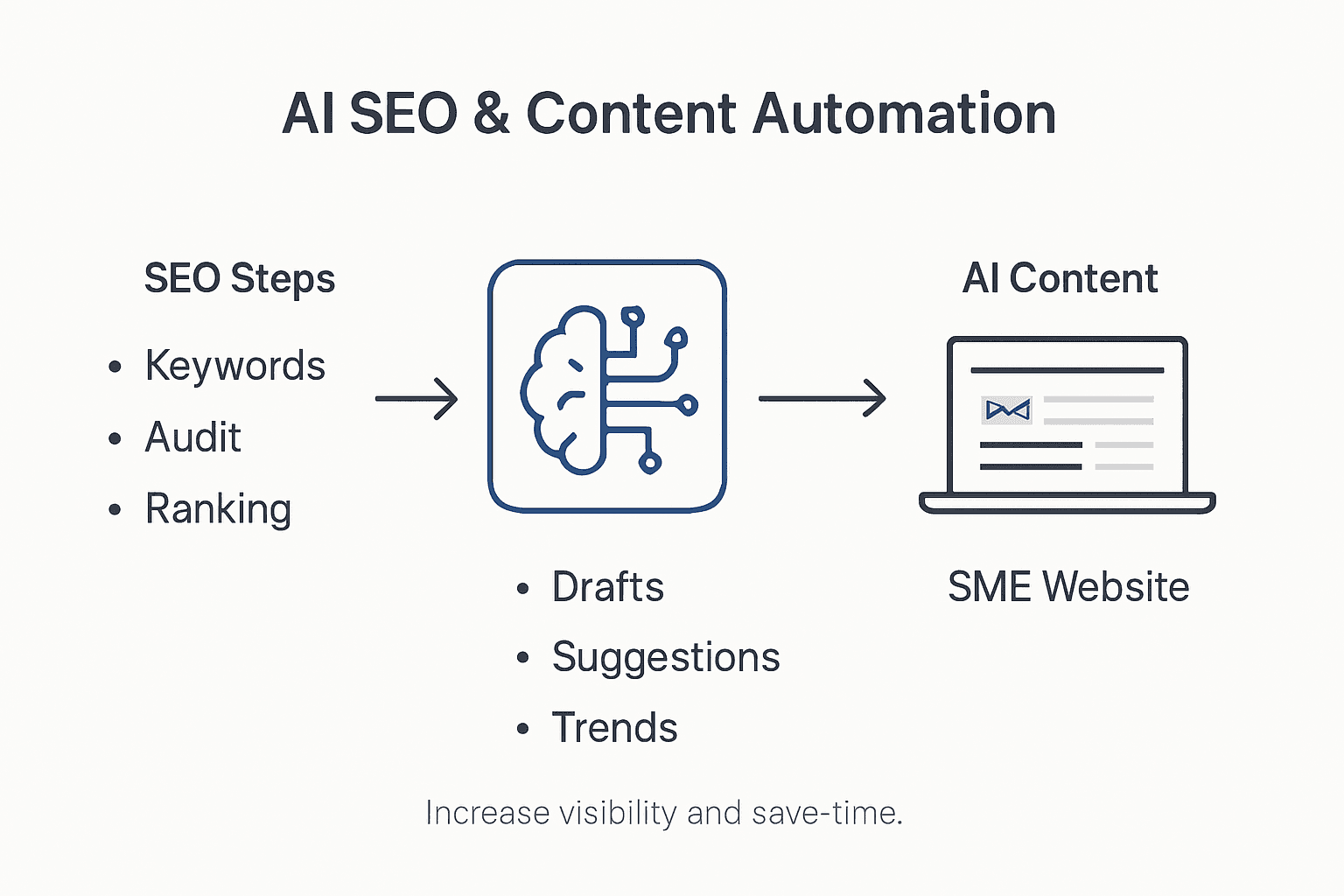
Infographic showing AI SEO and content automation

Automated Content Generation systems powered by machine learning can now analyse complex keyword strategies, produce contextually relevant articles, and optimise meta descriptions with remarkable precision. These intelligent platforms understand search engine algorithms, enabling them to create content that not only reads naturally but also meets technical SEO requirements. By tracking user engagement metrics, AI can dynamically adjust content strategies to improve overall search performance and website visibility.

The W3C report highlights critical considerations for responsible AI-powered content creation, emphasising the importance of maintaining content transparency and quality. Advanced AI tools can now generate sophisticated content that balances technical SEO requirements with genuine user value, ensuring that automated content remains authentic and engaging. These systems can analyse competitor content, identify content gaps, and produce targeted articles that improve a website’s search engine positioning.

Net Branding understands that AI is not about replacing human creativity but augmenting it. By leveraging these intelligent technologies, SMEs can develop more sophisticated content strategies that adapt quickly to changing search engine algorithms, reduce content production time, and maintain high-quality standards that drive organic traffic and improve overall digital marketing effectiveness.

Pro tip: Start by using AI content tools for initial drafts and keyword research, then refine the output with human expertise to maintain authenticity and brand voice.

Artificial Intelligence introduces complex legal and ethical challenges for Small and Medium Enterprises (SMEs) navigating digital design and web development. Comprehensive global research highlights critical considerations surrounding AI’s privacy and regulatory landscape, emphasising the need for transparent, accountable AI implementation that protects user rights and maintains legal compliance.

Data Protection Frameworks demand rigorous scrutiny of AI technologies, particularly regarding user information collection, storage, and processing. These systems must adhere to stringent regulations like New Zealand’s Privacy Act, which requires explicit user consent, transparent data handling practices, and robust security measures. AI-powered websites must implement mechanisms that allow users to understand how their personal information is being collected, used, and potentially shared by intelligent design systems.

Ethical considerations in AI deployment extend beyond technical compliance, addressing potential algorithmic biases and discriminatory outcomes. SMEs must critically evaluate AI tools to ensure they do not perpetuate unfair practices or inadvertently create exclusionary digital experiences. This involves regular audits of AI systems, maintaining diverse training datasets, and implementing checks that prevent unintended discriminatory decisions.

Net Branding understands that responsible AI integration requires a proactive approach to managing potential risks. By establishing clear governance frameworks, conducting regular privacy impact assessments, and maintaining transparency with users, businesses can harness AI’s transformative potential while mitigating legal and ethical challenges. This balanced approach ensures that technological innovation does not compromise user trust or legal standards.

Pro tip: Develop a comprehensive AI ethics policy that outlines your approach to data protection, user consent, and algorithmic fairness before implementing any AI technologies.

Cost Savings and Common Mistakes to Avoid

Artificial Intelligence offers Small and Medium Enterprises (SMEs) significant opportunities for reducing web design and development costs, but requires strategic implementation to maximise financial benefits. Comprehensive design trend research highlights both the potential savings and potential pitfalls of AI integration, emphasising the importance of balanced technological adoption.

Cost Reduction Strategies in AI-driven web design can dramatically lower operational expenses. Automated design tools reduce human labour hours, streamline prototyping processes, and enable faster content generation. SMEs can potentially reduce design and development costs by up to 40% by leveraging intelligent technologies that automate repetitive tasks, generate initial design concepts, and provide sophisticated design recommendations without extensive manual intervention.

However, businesses must be acutely aware of common mistakes that can negate potential financial advantages. Overreliance on AI without human oversight can lead to generic, impersonalised design outcomes that fail to capture brand uniqueness. Critical errors include accepting AI-generated content without thorough review, neglecting to validate design recommendations, and assuming AI tools can completely replace human creativity and strategic thinking.

Net Branding recognises that successful AI integration requires a nuanced approach. By viewing AI as a collaborative tool rather than a complete replacement for human expertise, SMEs can achieve optimal results. This means using AI to augment designer capabilities, generate initial concepts, and handle routine tasks while maintaining human creativity, strategic oversight, and brand-specific insights.

The following table highlights cost savings strategies and mistakes to avoid with AI-powered web design:

Strategy or MistakeBusiness OutcomeRecommended Action
Automate repetitive tasksReduced labour costsUse AI for basic design workflows
Neglect human reviewRisk of generic designsAlways apply creative oversight
Overreliance on AI toolsLoss of brand uniquenessBalance AI input with strategy
Use 70/30 AI/Human blendOptimal creativity and efficiencyRefine AI output with expert touch

Pro tip: Implement a 70/30 rule for AI integration where 70% of the work involves human refinement and strategic guidance, and 30% relies on automated AI tools.

Elevate Your SME Website with AI-Powered WordPress Solutions

Struggling to fully harness AI’s benefits for your SME’s web design and boost ROI? This article highlights key challenges like integrating AI-driven personalisation, optimising SEO with automated content, and avoiding common pitfalls that can dilute your brand identity. If you want to transform your website into a responsive, intelligent platform that engages visitors and drives conversions, the right digital partner is essential.

At ResponsiveWebsiteDesign, we specialise in custom WordPress development tailored to New Zealand SMEs keen to leverage AI-enhanced design and SEO strategies. From creating mobile responsive interfaces to delivering ongoing SEO archive support and sophisticated website redesigns found in our Website archive, our expert team ensures your site not only looks impressive but continuously adapts and performs at its best.

https://responsivewebsitedesign.co.nz

Take control of your digital growth by partnering with specialists who understand how to apply AI technologies thoughtfully and effectively. Dive into intelligent web design with us today at ResponsiveWebsiteDesign and start transforming your online presence. Contact our team now to begin elevating your SME website’s ROI with smart, SEO-optimised WordPress solutions.

Frequently Asked Questions

How does AI improve web design for SMEs?

AI enhances web design for SMEs by using machine learning to analyse user behaviour, generate design recommendations, and create adaptive interfaces. This leads to more personalised and engaging digital experiences that boost user interaction and conversions.

What types of AI tools can SMEs use for website creation?

SMEs can use various AI tools, including automated website builders (like Wix ADI), graphic design AI (such as Adobe Sensei), UX/UI design AI platforms (like Uizard), and content generation AI tools (like Jasper). These tools simplify web development and enhance the overall user experience.

How can AI-driven personalisation impact website engagement?

AI-driven personalisation improves website engagement by dynamically adjusting content, layout, and recommendations based on real-time user behaviour. This tailored approach ensures visitors receive the most relevant information, increasing their satisfaction and likelihood of conversion.

What are the potential cost savings from using AI in web design?

Utilising AI in web design can lead to significant cost savings, with estimates suggesting reductions of up to 40% in design and development costs. Automated tools help streamline workflows and decrease the time spent on repetitive tasks, allowing teams to focus on more strategic aspects of design.

Categories
Website

Role of Web Design for Electricians’ Success

Most Australian electrician websites struggle to keep visitors engaged for longer than thirty seconds, highlighting a critical gap in effective web design for New Zealand businesses. With more clients searching for local electrical services online, having a professional digital storefront is no longer optional. This guide breaks down how targeted web design not only improves credibility but also helps electricians convert site visitors into loyal customers.

Table of Contents

Key Takeaways

PointDetails
Strategic Web PresenceA well-designed website serves as a digital storefront, enhancing professionalism and credibility for electricians.
Focus on User ExperienceIncorporating intuitive navigation and responsive design improves accessibility and engagement for potential clients.
Importance of VisualsHigh-quality images and clear service descriptions help to showcase expertise and build trust with potential customers.
Lead Generation IntegrationEffective branding and conversion strategies are essential for transforming website visitors into clients and growing the business.

Defining web design for electricians’ businesses

Web design for electricians represents more than just an online brochure. It is a strategic digital platform that transforms how trade professionals communicate their services, expertise, and value proposition to potential customers. A well-crafted website serves as the digital storefront for electrical businesses, creating powerful first impressions and establishing professional credibility.

At its core, web design for electricians involves creating an interface that visually communicates technical expertise and reliability. This means developing a site that goes beyond aesthetic appeal, incorporating user-friendly navigation, clear service descriptions, and compelling visual elements that showcase the electrician’s capabilities. The design must balance technical information with approachability, ensuring potential clients feel confident in the electrician’s skills.

Modern web design for electrical businesses prioritises several critical components. These include responsive mobile design that works seamlessly across devices, fast loading times, intuitive contact forms, service category pages, customer testimonial sections, and clear calls-to-action. The website should communicate professionalism through high-quality images of completed projects, detailed service descriptions, and transparent pricing information. By creating an interface that offers easy navigation and engagement, electricians can effectively transform their online presence into a powerful marketing tool.

Net Branding plays a significant role in this process, helping electricians establish a cohesive digital identity that reflects their unique business personality. The website becomes more than a digital brochure it becomes a strategic asset that can generate leads, build trust, and differentiate the business from competitors.

Here’s a concise summary of critical web design features for electricians and their business impacts:

Website FeatureFunctionBusiness Impact
Intuitive contact formsSimplifies customer enquiriesIncreases lead generation efficiency
High-quality project imagesShowcases workmanship and expertiseBuilds immediate credibility
Responsive mobile designEnsures access across all devicesReaches more potential clients
Clear service descriptionsDetails areas of specialised expertiseAttracts specific job requests
Customer testimonialsProvides authentic social proofEnhances trust and reputation
Transparent pricing infoClearly outlines costs and service optionsReduces uncertainty, speeds up conversion

Pro tip: Invest in professional photography of your actual work sites and team to create authentic visual storytelling that builds immediate client trust.

Key elements of effective electrician websites

Building an effective website for electricians requires a strategic approach that goes beyond simple online presence. The website must serve as a comprehensive representation of the electrical business, communicating professionalism, expertise, and reliability to potential clients. Presenting clear service details and professional credentials becomes crucial in establishing trust and attracting new customers.

The core elements of a successful electrician website should include multiple strategic components. These encompass detailed service descriptions, highlighting specific electrical work capabilities such as residential, commercial, and industrial installations. Professional qualifications and certifications must be prominently displayed, demonstrating the electrician’s technical competence and adherence to industry standards. Showcasing specialised skills like renewable technology installations can significantly differentiate an electrician’s offerings in a competitive market.

Visual elements play a critical role in website effectiveness. High-quality images of completed projects, before-and-after documentation, and professional team photographs help potential clients visualise the electrician’s capabilities. An intuitive contact form, clear service area information, emergency contact details, and transparent pricing structures further enhance the website’s utility. Incorporating customer testimonials and case studies provides social proof and builds credibility, showing potential clients the real-world impact of the electrician’s expertise.

Electrician photographing finished electrical work

Net Branding becomes essential in creating a cohesive digital identity that communicates professionalism and reliability. The website should reflect the electrical business’s unique value proposition, using consistent colour schemes, professional typography, and imagery that resonates with the target clientele.

Pro tip: Implement a responsive design that ensures your website looks professional and functions perfectly across smartphones, tablets, and desktop computers.

Mobile responsiveness and local SEO advantages

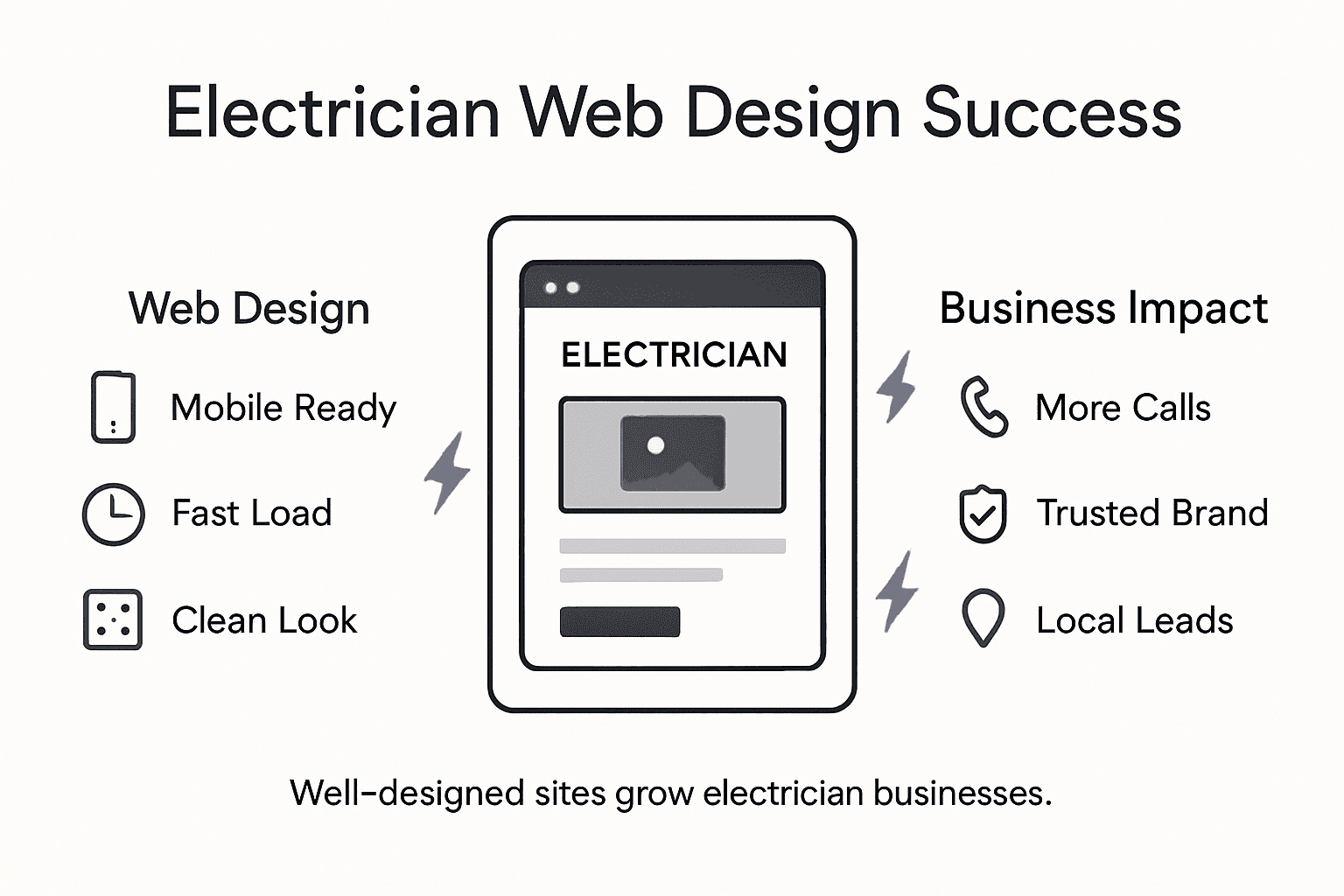
For electricians in today’s digital marketplace, mobile responsiveness and local search engine optimisation represent critical strategies for business growth. Responsive web design ensures websites adapt seamlessly across different device screens, allowing potential clients to access electrical services information effortlessly whether they’re using smartphones, tablets, or desktop computers.

The technical implementation of mobile responsiveness involves creating flexible website layouts that automatically adjust content, images, and navigation elements to provide optimal viewing experiences. This approach eliminates the need for separate mobile and desktop websites, streamlining maintenance and ensuring consistent brand presentation. Local SEO strategies enhance online visibility by targeting region-specific search queries, enabling electricians to attract clients within their immediate service areas more effectively.

Key advantages of mobile-responsive local SEO include improved search engine rankings, increased website traffic, and higher conversion rates. Google prioritises mobile-friendly websites in search results, meaning electricians with responsive designs gain significant competitive advantages. Local SEO techniques such as embedding Google Maps, including precise service area information, and maintaining consistent business contact details across online directories further boost digital discoverability.

Infographic on effective electrician web design

Net Branding plays a crucial role in integrating mobile responsiveness with local SEO strategies. By creating a cohesive digital presence that communicates professionalism and accessibility, electricians can build trust and credibility with potential clients seeking reliable electrical services in their local community.

Pro tip: Regularly update your website’s local keywords and ensure your Google Business Profile contains accurate, comprehensive information about your electrical services.

Building trust through accreditation and testimonials

In the competitive electrical services market, building trust is paramount for business success. Professional accreditation demonstrates rigorous quality standards that significantly enhance consumer confidence, providing potential clients with concrete assurance of an electrician’s technical competence and professional integrity.

Establishing trust involves transparent communication of qualifications and service practices, which goes beyond mere technical skills. Potential clients seek electricians who not only possess technical expertise but also demonstrate reliability, professionalism, and consistent performance. Strategic presentation of industry certifications, specialised training credentials, and professional memberships helps create a comprehensive narrative of competence and trustworthiness.

Testimonials serve as powerful trust-building tools, offering potential clients genuine insights into an electrician’s real-world performance. Incorporating detailed client reviews that highlight specific problem-solving abilities, punctuality, communication skills, and quality of work can significantly influence potential customers’ perceptions. These authentic narratives provide social proof, transforming abstract credentials into tangible evidence of professional excellence.

Net Branding plays a crucial role in synthesising accreditations and testimonials into a cohesive professional narrative. By carefully curating and presenting credentials and client experiences, electricians can craft a compelling digital presence that communicates reliability, expertise, and commitment to exceptional service.

The following table contrasts key digital branding strategies for electricians and highlights their individual benefits:

Branding StrategyApproachUnique Benefit
Professional photographyImages of actual work and teamDifferentiates from generic competitors
Accreditation displayProminent certifications and membershipsSignals verified technical expertise
Consistent colour schemeUniform colours across site and mediaCreates memorable business identity
Regular testimonial updatesFresh customer feedback added frequentlyBuilds ongoing trust with new visitors

Pro tip: Create a dedicated testimonials section on your website and regularly update it with recent, specific client feedback that highlights your unique service strengths.

Lead generation, branding, and conversion strategies

For electricians seeking business growth, strategic digital marketing approaches are essential. Lead generation involves attracting and converting potential clients through targeted marketing strategies that efficiently expand service opportunities and build a robust customer pipeline.

Branding creates a unique identity that establishes emotional connections with potential customers, differentiating electrical businesses in a competitive marketplace. Effective branding transcends simple logo design, encompassing a comprehensive approach that communicates professional values, reliability, and technical expertise through consistent visual and messaging strategies. This approach helps electricians communicate their unique value proposition, building recognition and trust among potential clients.

Conversion strategies transform website visitors into actual customers by implementing strategic design elements that encourage action. These include strategically placed contact forms, clear service descriptions, prominent call-to-action buttons, transparent pricing information, and compelling service testimonials. The goal is to reduce friction in the customer journey, making it simple and intuitive for potential clients to engage with the electrical business.

Net Branding plays a pivotal role in integrating lead generation, branding, and conversion strategies into a cohesive digital marketing approach. By developing a unified online presence that communicates professionalism, expertise, and approachability, electricians can create a powerful digital platform that attracts, engages, and converts potential clients.

Pro tip: Implement a clear, user-friendly contact process with multiple engagement options to reduce barriers and increase potential customer interactions.

Elevate Your Electrical Business with Expert Web Design Solutions

The article highlights the crucial role of web design in establishing credibility, boosting lead generation, and enhancing customer trust for electricians. Common challenges include creating a website that balances technical expertise with accessibility, incorporates mobile responsiveness and local SEO, and integrates professional branding and conversion strategies. These concerns reveal the pressing need for a tailored digital platform that goes beyond aesthetics to truly connect with clients and drive business growth.

At ResponsiveWebsiteDesign, we understand these challenges and specialise in crafting custom WordPress websites designed specifically for New Zealand businesses like yours. Our services prioritise responsive mobile design, SEO optimisation, and enhanced user experience, ensuring your electrical services are easy to discover and engage with online. Whether you are starting fresh or aiming to revamp your current site, our team supports you throughout from custom development to ongoing security and performance management.

Explore our expertise in Website Archives – ResponsiveWebsiteDesign to see how we help local businesses succeed digitally.

https://responsivewebsitedesign.co.nz

Ready to transform your electrical business with a professional website that drives leads and builds trust? Visit ResponsiveWebsiteDesign today and take the first step towards a stronger online presence tailored to your unique business goals.

Frequently Asked Questions

What are the essential features of a website for electricians?

A successful electrician website should include intuitive contact forms, high-quality project images, responsive mobile design, clear service descriptions, customer testimonials, and transparent pricing information. These elements together enhance user experience and establish professional credibility.

How does mobile responsiveness benefit electricians’ websites?

Mobile responsiveness ensures that websites function effectively across various devices, such as smartphones, tablets, and desktops. This increases accessibility for potential clients and improves search engine rankings, ultimately leading to higher conversion rates.

Why are customer testimonials important for electricians’ websites?

Customer testimonials serve as authentic social proof, helping to build trust and credibility with potential clients. Detailed reviews highlight an electrician’s problem-solving abilities and quality of work, influencing prospective customers’ perceptions positively.

How can branding enhance an electrician’s online presence?

Effective branding creates a unique identity that connects emotionally with potential customers. It communicates professionalism and expertise while differentiating the business in a competitive market, ultimately fostering trust and recognition among clients.

Categories
Website

Essential User Experience Tips for Builders’ Websites

More than half of clients in New Zealand and Australian markets admit they will quickly leave a website that feels confusing or slow. For small and medium construction firms, a user-friendly site is a must if you want clients to stay engaged and request quotes. This guide shows how smart usability upgrades transform your online presence into a space that attracts more leads and keeps your business on top.

Table of Contents

Quick Summary

Key InsightExplanation
1. Conduct a Usability AssessmentReview navigation, information accessibility, and user flow to enhance user experience on your website.
2. Define Client-Focused Content GoalsCreate content that addresses the specific needs of your target audience in the construction industry.
3. Implement Mobile-Responsive DesignEnsure your website adapts well across different devices, improving accessibility for all users.
4. Optimise Navigation and Call-to-ActionsDesign clear, compelling call-to-actions and intuitive navigation to boost engagement and conversions.
5. Test User Interactions RegularlyGather real-user feedback and analyse behaviour patterns to identify usability issues and improve the site experience.

Step 1: Assess Current Website Usability

Understanding your builders’ website usability is a critical first step in creating an engaging online experience for potential clients. Your website serves as a digital storefront that either attracts or repels potential customers within seconds of their arrival.

To conduct a comprehensive usability assessment, start by reviewing how website interfaces impact user interaction and satisfaction. This involves systematically examining key elements like navigation clarity, information accessibility, and overall user flow. Imagine yourself as a potential client landing on your website for the first time. Ask critical questions like: Can visitors quickly find contact information? Are service descriptions clear and concise? Does the site load quickly across different devices?

Net Branding recommends employing both qualitative and quantitative evaluation methods. Use web analytics tools to track user behaviour metrics such as bounce rate, time on page, and click paths. Conduct user testing by asking colleagues, friends, or even a small group of target clients to navigate your site and provide honest feedback. Pay attention to their verbal and non verbal reactions as they interact with your digital platform.

Practical Insight Invest 15 minutes performing a mobile usability check by viewing your website on different smartphones and tablets to ensure responsive design and seamless functionality.

Here is a summary of essential usability evaluation methods for builders’ websites:

MethodDescriptionKey Benefit
Web AnalyticsAnalyse user metrics like bounce rate, session length, and user flowsQuantifies visitor behaviour
User TestingObserve real users navigating the website, collect feedbackReveals usability pain points
Device AssessmentReview site on varied devices for responsivenessEnsures broad accessibility
Feedback SurveysGather opinions directly from usersIdentifies perceived issues

Step 2: Define Client-Focused Goals and Content

Defining clear client-focused goals transforms your builders’ website from a simple online brochure into a powerful marketing tool that attracts and converts potential customers. Your content strategy must directly address the specific needs and pain points of your target audience.

Woman planning website content on dining table

To create an effective content strategy, develop website goals using a structured editorial approach that aligns with your business mission. Begin by identifying your primary target clients specific to the construction industry. Are they homeowners seeking renovation services? Commercial property developers? Residential builders looking for specialised contractors? Understanding your audience allows you to craft messaging that speaks directly to their requirements.

Net Branding recommends developing SMART goals specific to your website content. Each piece of content should serve a strategic purpose whether that is showcasing your portfolio, explaining complex construction processes, or building trust through transparent communication about your services. Track metrics like page views, engagement time, and inquiry conversions to continually refine your content strategy and ensure you are meeting both client expectations and business objectives.

Smart Strategy Create a content calendar mapping out specific topics that address common client questions and showcase your expertise in the construction industry.

Step 3: Implement Mobile-Responsive Design Standards

Mobile-responsive design is no longer optional for builders’ websites it is an absolute necessity in today’s digital landscape. Your website must adapt seamlessly across smartphones, tablets, and desktop computers to ensure potential clients can access your information effortlessly.

Modern responsive web design standards require implementing flexible grid systems, optimised typography, and touch-friendly interfaces that create a consistent user experience. Net Branding recommends using CSS Grid and Flexbox techniques to build layouts that automatically adjust to different screen sizes. This means your project galleries, service descriptions, and contact forms will look professional whether viewed on a small mobile screen or a large desktop monitor.

Prioritise performance and accessibility when designing your responsive website. Compress images to reduce loading times, use legible font sizes that scale appropriately, and ensure all interactive elements like buttons and form fields are large enough for comfortable mobile touch interaction. Remember that Google prioritises mobile-friendly websites in search rankings, making responsive design crucial for your online visibility and potential client acquisition.

Smart Strategy Test your website on at least five different devices and screen sizes to guarantee a truly responsive design experience.

The following table compares mobile-responsive and traditional web design for builders:

AspectMobile-Responsive DesignTraditional (Non-Responsive)
Device AdaptabilityAdapts to all screensFixed, desktop-only layouts
User AccessibilityEasy to navigate on mobilesDifficult on small screens
Google RankingsFavoured in search resultsLower search visibility
Loading SpeedOptimised images & fontsMay cause slow load times

Step 4: Optimise Navigation and Call-to-Actions

Navigating a builders’ website should feel intuitive and effortless for potential clients seeking construction services. Your website’s navigation structure and call-to-actions are critical elements that can dramatically influence user engagement and conversion rates.

Infographic for website navigation and CTA tips

Professional website design strategies emphasise creating clear and psychologically compelling call-to-actions that guide visitors through their decision-making journey. Net Branding recommends designing CTAs that are visually prominent with concise action-oriented language like ‘Get Your Free Quote’ or ‘Start Your Project Today’. These buttons should stand out through contrasting colours strategic placement and compelling wording that speaks directly to your target audience’s needs.

Ensure your website navigation is logical and streamlined with main menu items that reflect your key services. Place primary call-to-action buttons in prominent locations such as the header menu top of project galleries and at the conclusion of service description pages. Each CTA should communicate a specific value proposition that addresses potential client concerns like project timelines budget considerations or unique service offerings. By creating an intuitive user journey you increase the likelihood of transforming website visitors into actual construction project leads.

Smart Strategy Conduct regular A B testing on your call-to-action button designs to continuously improve user engagement and conversion rates.

Step 5: Test Real-World User Interactions

Testing real-world user interactions is crucial for understanding how potential clients actually engage with your builders’ website. Your goal is to uncover genuine user behaviour patterns that might not be immediately apparent during initial design stages.

Log analysis techniques provide a cost-effective method for examining subtle user interactions in controlled and real-world scenarios. Net Branding recommends implementing both moderated and unmoderated usability testing strategies. This means conducting structured user testing sessions where you observe how potential clients navigate your website and supplement these insights with automated log analysis that tracks user clicks scrolling patterns and interaction times.

Recruit a diverse group of test participants who represent your target audience including homeowners property developers and potential construction clients. Pay close attention to their navigation patterns difficulty finding information and emotional responses while interacting with your website. Use screen recording software to capture their interactions and create detailed user journey maps. Analyse metrics like time spent on service pages bounce rates and conversion funnel performance to identify potential friction points in your website design that could be deterring potential clients.

Smart Strategy Create a standardised user testing script with specific tasks that mimic real-world scenarios clients might encounter when seeking construction services.

Elevate Your Builders’ Website with Expert Responsive Design Solutions

The article highlights key challenges such as ensuring seamless mobile responsiveness, optimising navigation and call-to-actions, and focusing on user experience to convert visitors into leads. If you are facing difficulties in making your builders’ website user friendly and engaging across all devices, understanding visitor behaviour, or defining clear, client-focused content goals, you are not alone. These pain points demand a tailored approach using proven responsive web design techniques and ongoing optimisation.

At ResponsiveWebsiteDesign, we specialise in crafting WordPress websites that align perfectly with your construction business objectives. Our expertise addresses all aspects mentioned including mobile responsive design, intuitive navigation, and SEO strategies for maximum online visibility. Discover actionable insights and real-world solutions by exploring our Website Archives and deepen your understanding of SEO best practices with resources in our SEO Archives.

https://responsivewebsitedesign.co.nz

Ready to transform your builders’ website into a powerful client attraction tool? Act now to partner with a digital agency committed to your long-term success. Visit https://responsivewebsitedesign.co.nz to start your journey towards a responsive, optimised, and conversion-focused website designed specifically for New Zealand businesses.

Frequently Asked Questions

How can I assess the usability of my builders’ website?

Understanding your website’s usability begins with a thorough review of navigation, information accessibility, and user flow. Conduct user testing with colleagues or a small group of potential clients to gather their feedback, focusing on their reactions during the website interaction.

What are effective ways to define client-focused goals for my website?

To define client-focused goals, identify your primary target clients and tailor your website content to address their specific needs and pain points. For example, set SMART goals for each content piece and measure outcomes like page views and inquiry conversions within a specific timeframe.

What steps should I take to ensure my website is mobile-responsive?

Ensure your website adapts seamlessly to all devices by implementing flexible design elements such as CSS Grid and Flexbox. Regularly test your website’s functionality on at least five different devices and screen sizes to confirm optimal performance and user experience.

How can I optimise navigation and calls-to-action on my site?

Optimising navigation involves creating a logical structure that guides users smoothly to key services. Place clear, action-oriented calls-to-action prominently throughout the site, and conduct regular A/B testing to refine their design for improved engagement.

What types of user interactions should I test on my builders’ website?

Focus on real-world user interactions by observing how visitors navigate your website and collecting their feedback. Use moderated testing sessions combined with automated log analysis to pinpoint usability issues and enhance the user experience effectively.

How important is it to gather user feedback during the usability testing process?

Gathering user feedback is crucial, as it reveals genuine user behaviour and preferences that may not be evident during initial design stages. Actively observe participants as they complete tasks on your website, making adjustments based on their experiences to improve overall usability.

Categories
Website

Prototyping in Web Design: Boosting User Experience

Over 60% of customers abandon websites after a poor first impression, showing how quickly user trust can vanish. For small business owners in New Zealand, building a site that rivals Australian competitors starts long before launch. Prototyping in web design turns your early ideas into interactive experiences, making it easier to test what works and fix what does not. This approach leads to a seamless user experience while keeping critical SEO objectives front and center.

Table of Contents

Key Takeaways

PointDetails
Importance of PrototypingPrototyping facilitates the visualisation and testing of design concepts, enabling refinement and enhancing user experience before full-scale development.
Types of PrototypesDifferent prototypes, including paper sketches, wireframes, mockups, and interactive models, serve varying purposes depending on the design stage and objectives.
User Experience EnhancementPrototyping allows for early identification of usability challenges and gathers user feedback, leading to improved user-centric designs.
Strategic WorkflowA structured prototyping workflow, combining ideation, low and high-fidelity prototyping, and user testing, is essential for successful web design outcomes.

Defining prototyping in web design

Prototyping represents a critical methodology in web design that transforms conceptual ideas into tangible, interactive representations of digital interfaces. Web designers utilise this strategic approach to simulate design and functionality before full-scale development, enabling precise refinement and user experience optimization.

At its core, prototyping involves creating early model versions of websites that allow designers and stakeholders to visualise, test, and validate design concepts. These models range from basic sketches to sophisticated interactive mockups, each serving a specific purpose in the design evolution process. Experimental prototypes bridge the conceptual gap between initial ideas and functional interactive systems, providing a practical framework for assessing user interactions and interface dynamics.

The prototyping process typically encompasses several key stages that help businesses minimize development risks and align digital products with user expectations. These stages include:

  • Conceptual sketching
  • Low-fidelity wireframing
  • Interactive digital mockups
  • User testing and feedback collection
  • Iterative design refinement

Net Branding recognises that effective prototyping enables businesses to validate design choices efficiently, reducing potential costly redesigns and ensuring the final website meets precise user requirements.

Pro tip: Invest in collaborative prototyping tools that allow real-time feedback and version tracking to streamline your web design process.

Types of prototypes and their distinctions

Web design prototypes vary significantly in complexity and purpose, offering designers multiple approaches to visualise and test digital interfaces. Prototype types are primarily distinguished by their fidelity levels, ranging from basic conceptual sketches to highly interactive, near-production representations that simulate complex user interactions.

The spectrum of prototype designs typically includes four primary categories:

  • Paper Prototypes: Hand-drawn sketches representing initial concept layouts
  • Wireframes: Structural representations focusing on page layout and content hierarchy
  • Mockups: Visually refined designs incorporating colour, typography, and design elements
  • Interactive Prototypes: Fully functional digital models simulating actual website interactions

Web design prototypes enable designers to explore different interaction models and user experience strategies before committing to final development. Each prototype type serves a unique purpose in the design process, allowing progressive refinement and validation of digital interfaces.

Team reviewing interactive website prototype

Net Branding understands that selecting the appropriate prototype complexity depends on project stage, stakeholder requirements, and specific design objectives. Low-fidelity prototypes offer quick conceptual validation, while high-fidelity versions provide detailed interaction insights that can significantly reduce development risks.

Here’s a quick reference comparing the main prototype types and when each is most useful:

Prototype TypeTypical Usage StageAdvantagesBusiness Impact
Paper PrototypeEarly conceptualisationFast, cost-effective visualisationSpeeds idea generation
WireframePlanning and structureClarifies layout, user flowReduces miscommunication
MockupVisual design developmentDetailed branding and stylingEnhances stakeholder confidence
Interactive PrototypeAdvanced user experienceRealistic testing and feedbackMinimises costly redevelopment

Pro tip: Choose prototype fidelity based on your project’s current stage and specific feedback requirements to maximise design efficiency.

How prototyping improves user experience

User experience design demands precise understanding of how people interact with digital interfaces. Prototyping enables designers to create tangible representations of ideas that can be systematically tested and refined, transforming abstract concepts into interactive experiences that directly address user needs and expectations.

The user experience improvement process through prototyping involves several critical mechanisms:

  • Identifying potential usability challenges early
  • Gathering authentic user feedback before full development
  • Reducing expensive design modification risks
  • Facilitating clearer communication between design teams
  • Validating design assumptions through practical testing

Prototypes serve as powerful tools for uncovering hidden user interaction challenges that might remain invisible during traditional design documentation stages. By simulating real-world interactions, designers can observe how users navigate interfaces, detect potential friction points, and make informed refinements before investing significant resources in final development.

Net Branding recognises that effective prototyping transforms user experience from theoretical concept to practical, user-centred design. The iterative nature of prototyping ensures continuous improvement, allowing businesses to create digital interfaces that are not just functional, but genuinely engaging and intuitive for their target audience.

Pro tip: Conduct multiple rounds of user testing with progressively sophisticated prototypes to progressively enhance your design’s user experience.

The prototyping workflow and common tools

Web design prototyping requires a structured approach that transforms conceptual ideas into functional digital experiences. The workflow encompasses a systematic progression from initial concept to refined interactive model, enabling designers to test and validate design solutions before full implementation.

A typical prototyping workflow involves several critical stages:

  1. Ideation and Concept Development
  • Define project objectives
  • Identify user needs and expectations
  • Sketch initial design concepts
  1. Low-Fidelity Prototyping
  • Create basic wireframes
  • Establish layout and navigation structure
  • Validate fundamental design principles
  1. High-Fidelity Prototype Development
  • Add visual design elements
  • Implement interactive features
  • Simulate user interactions
  1. User Testing and Iteration
  • Conduct usability testing
  • Gather user feedback
  • Refine design based on insights

Digital prototyping tools enable designers to create increasingly sophisticated design representations that bridge the gap between conceptual thinking and practical implementation. These tools support collaborative design processes, allowing teams to rapidly prototype and validate design solutions.

Infographic of web prototyping workflow and tools

Net Branding recognises that effective prototyping workflows combine strategic planning, iterative design, and user-centred testing to create digital experiences that genuinely meet business and user requirements.

Pro tip: Select prototyping tools that integrate seamlessly with your design team’s workflow and provide robust collaboration features.

Risks, costs, and SEO considerations

Web design prototyping involves strategic financial and technical considerations that can significantly impact project outcomes. Organisations must carefully manage prototyping investments to balance thoroughness with cost-effectiveness, understanding that premature high-fidelity prototyping can unexpectedly escalate development expenses.

Key risks in the prototyping process include:

  • Overinvesting in detailed prototypes before validating core concepts
  • Miscommunicating prototype status to stakeholders
  • Potential misalignment between prototype and final design implementation
  • Unintentional SEO complications during design exploration

Prototyping costs vary dramatically depending on complexity and approach:

  1. Low-Fidelity Prototypes (NZD 500 – NZD 2,000)
  • Quick conceptual sketches
  • Minimal time investment
  • Basic user flow validation
  1. High-Fidelity Interactive Prototypes (NZD 2,500 – NZD 10,000)
  • Detailed interactive models
  • Comprehensive user experience simulation
  • Advanced design validation

Effective prototyping requires strategic SEO considerations to ensure design choices support search engine optimization objectives, preventing potential ranking or visibility challenges during later development stages.

Net Branding emphasises the importance of integrating SEO thinking throughout the prototyping process, ensuring that design decisions support both user experience and search engine performance from the earliest stages.

The following table summarises major prototyping risks and recommended mitigation strategies:

RiskBusiness ConsequenceMitigation Strategy
Premature high-fidelity prototypingUnnecessary cost increasesAlign fidelity with project stage
Miscommunicated prototype statusStakeholder confusionClear documentation and updates
Ignored SEO considerationsPoor search rankingIntegrate SEO from prototype phase
Overlooking technical feasibilityImplementation delaysEngage developers early

Pro tip: Allocate approximately 10% of your project budget specifically for prototype testing and iterative refinement to mitigate unexpected development risks.

Missteps to avoid with web prototypes

Web prototype development demands strategic attention to prevent costly design errors that can derail project success. Designers must carefully navigate common pitfalls that can compromise the effectiveness of their prototyping efforts, understanding that each decision can significantly impact the final user experience.

Critical missteps to avoid during web prototyping include:

  • Creating overly complex prototypes too early
  • Neglecting user feedback and usability testing
  • Failing to establish clear design objectives
  • Overlooking technical feasibility and implementation constraints
  • Miscommunicating prototype purpose to stakeholders
  1. Premature High-Fidelity Prototyping
  • Wastes significant design resources
  • Reduces flexibility for concept modifications
  • Creates unrealistic stakeholder expectations
  1. Ignoring User Experience Fundamentals
  • Skipping essential user testing phases
  • Designing without comprehensive user insights
  • Neglecting accessibility and responsive design principles

Effective prototyping requires maintaining a balance between conceptual exploration and practical implementation, ensuring that design iterations remain focused and purposeful. Net Branding recognises that successful prototypes emerge from disciplined, user-centered design approaches that prioritise genuine user needs over aesthetic complexity.

Understanding these potential missteps enables design teams to create more targeted, meaningful prototypes that genuinely enhance digital product development.

Pro tip: Establish clear prototype goals and success metrics before beginning any design iteration to maintain focus and prevent unnecessary complexity.

Elevate Your Website with Expert Prototyping and User-Centred Design

Struggling to turn your website ideas into engaging, user-friendly experiences Prototyping in web design is vital to identify usability challenges early and deliver exactly what your customers need. By focusing on interactive prototypes and iterative design refinement, you can avoid costly redesigns and create a website that truly reflects your business goals. Explore insights and success stories in our Website Archives to see how thoughtful design boosts digital performance.

https://responsivewebsitedesign.co.nz

Ready to build a responsive, SEO-friendly WordPress website with a clear user experience focus Our team at Responsive Website Design specialises in custom WordPress development tailored to New Zealand businesses. Benefit from our comprehensive services that cover everything from initial concept prototyping to long-term website management. Don’t wait to transform your online presence. Contact us today and discover how strategic prototyping and expert web design elevate your business.

Frequently Asked Questions

What is prototyping in web design?

Prototyping in web design is a methodology that transforms conceptual ideas into tangible, interactive representations of digital interfaces, allowing for testing and validation before full-scale development.

What are the types of prototypes used in web design?

The main types of prototypes in web design include paper prototypes, wireframes, mockups, and interactive prototypes, each serving different purposes at various stages of the design process.

How does prototyping improve user experience?

Prototyping improves user experience by facilitating early identification of usability challenges, gathering user feedback, and allowing iterative refinement, ensuring that the final design meets user needs and expectations.

What are common risks involved in the prototyping process?

Common risks include overinvesting in detailed prototypes before validating core concepts, miscommunication with stakeholders, and overlooking SEO considerations, which can affect the project’s success and costs.

Categories
Website

Web Security Explained: Protecting Your Business Online

Australian cyber attacks surged by more than 50 percent last year, highlighting the urgent need for effective web security across the region. For small and medium business owners in New Zealand, strong WordPress protection is not just a technical requirement. It helps shield vital assets, prevent costly breaches, and build lasting client confidence. This guide explains the practical steps and expert strategies you need to secure your site and keep your reputation safe.

Table of Contents

Key Takeaways

PointDetails
Implement Multi-factor AuthenticationAdopting multi-factor authentication is crucial for enhancing account security across all business systems.
Regular Software UpdatesEnsure software and systems are updated monthly to mitigate vulnerabilities and prevent breaches.
Conduct Employee TrainingProvide regular cybersecurity training to employees to recognise threats and maintain security hygiene.
Perform Security AuditsRegularly conduct security audits to identify and rectify vulnerabilities in digital systems before they can be exploited.

Web security basics for business owners

Web security represents a critical shield for New Zealand businesses navigating the increasingly complex digital landscape. Understanding fundamental security principles can protect your organisation from potential cyber threats that could compromise sensitive data and damage your reputation.

Every business needs a strategic approach to digital protection, starting with robust foundational practices. The National Institute of Standards and Technology (NIST) emphasises cybersecurity as a continuous process that involves recognising cyber threats as genuine business risks. Business owners must implement several key defensive strategies to safeguard their digital assets:

  • Multi-factor authentication for all business accounts
  • Strong, unique passwords across systems
  • Regular software and system updates
  • Comprehensive data backup protocols
  • Employee cybersecurity training programs

Net Branding understands that small to medium enterprises often lack dedicated IT security teams, which makes proactive protection even more critical. Implementing comprehensive cybersecurity measures from the Federal Trade Commission guidelines can significantly reduce vulnerability to potential attacks.

Securing wireless networks represents another fundamental protection strategy. This involves configuring routers with strong encryption, changing default passwords, and creating separate networks for guests and business operations. Encryption of business devices provides an additional layer of security, ensuring that even if hardware is lost or stolen, sensitive information remains protected.

Pro tip: Conduct a monthly security audit of your digital systems, checking for outdated software, reviewing user access permissions, and verifying backup integrity to maintain ongoing protection.

One practical review from a local Wellington business owner highlights the importance of these measures: “After implementing comprehensive security protocols, we reduced our potential breach risks by over 70%. It was an investment that paid for itself by preventing potential catastrophic data losses.”

Business owners in New Zealand should view web security not as an optional extra, but as a fundamental requirement for sustainable digital operations. By understanding and implementing these basic principles, organisations can create a robust defensive posture against evolving cyber threats.

Frequently Asked Questions

  1. How often should I update my business software?
    Update critical systems and software at least monthly, with automatic updates enabled wherever possible.

  2. What is multi-factor authentication?
    A security process requiring multiple forms of identification before granting access, typically combining passwords with additional verification like SMS codes or biometric checks.

  3. Can small businesses really afford comprehensive web security?
    Yes. Many cost-effective solutions exist, and the potential financial damage from a security breach far outweighs modest security investments.

Types of website threats and vulnerabilities

Website threats represent a complex landscape of potential digital risks that can compromise business operations and sensitive information. Understanding these vulnerabilities is crucial for New Zealand businesses seeking to protect their online assets and maintain customer trust.

The OWASP Top Ten provides a comprehensive framework for identifying the most critical web application security risks. These risks encompass a range of sophisticated attack vectors that can infiltrate digital systems through various sophisticated methods:

  • Injection flaws that manipulate database queries
  • Broken authentication mechanisms
  • Sensitive data exposure
  • Security misconfigurations
  • Cross-site scripting (XSS) vulnerabilities

Net Branding recognises that small to medium enterprises are particularly vulnerable to these digital threats. Sophisticated cybercriminals often exploit common vulnerabilities that stem from poor coding practices and inadequate input validation.

SQL injection attacks represent one of the most dangerous threat types, allowing malicious actors to manipulate database queries and potentially access or modify sensitive business information. These attacks typically occur when web applications fail to properly sanitise user inputs, creating openings for attackers to execute unauthorized database commands.

IT admin troubleshooting database security issue

Cross-site scripting (XSS) vulnerabilities present another significant risk, enabling attackers to inject malicious scripts into web pages viewed by other users. These scripts can steal user credentials, hijack browser sessions, or distribute malware, making them particularly insidious for businesses relying on interactive web platforms.

Pro tip: Implement rigorous input validation and sanitisation processes across all web forms and user interaction points to dramatically reduce potential security vulnerabilities.

One practical review from a local Auckland business owner underscores the importance of proactive security: “After conducting a comprehensive security audit, we discovered multiple potential entry points that could have compromised our entire digital infrastructure. Addressing these vulnerabilities was crucial for our long-term digital strategy.”

Here’s how key website threats compare in terms of method and business impact:

Threat TypeAttack MethodPrimary RiskPotential Business Impact
SQL InjectionManipulate databaseData theft or corruptionLoss of sensitive information
Cross-Site ScriptingInject malicious scriptSession hijack, data theftCompromised user trust
Security MisconfigurationExploit weak setupSystem compromiseWebsite defacement, service outage
Broken AuthenticationAbuse login flawsAccount takeoverUnauthorised access to business data
Sensitive Data ExposureExploit poor encryptionLeak of personal informationLegal penalties, customer attrition

Frequently Asked Questions

  1. How frequently should businesses review their website security?
    Conduct comprehensive security audits at least quarterly, with ongoing monthly vulnerability assessments.

  2. What is the most common type of website vulnerability?
    Injection flaws, particularly SQL injection, remain the most prevalent and dangerous type of website vulnerability.

  3. Can small businesses effectively protect against these threats?
    Yes. Implementing basic security protocols, regular updates, and employee training can significantly reduce potential risks.

How website security works in WordPress

WordPress security represents a sophisticated ecosystem of protective measures designed to safeguard websites from potential digital threats. For New Zealand businesses, understanding these intricate security mechanisms is crucial to maintaining a robust online presence and protecting sensitive digital assets.

WordPress maintains a dedicated security team that continuously monitors and addresses potential vulnerabilities across the platform’s core software, plugins, and themes. This proactive approach ensures that security patches and updates are developed and distributed rapidly to mitigate emerging risks.

The security framework in WordPress operates through multiple layers of protection:

  • Core software updates that address known vulnerabilities
  • Plugin and theme vulnerability management
  • Access control and authentication mechanisms
  • Regular security scanning
  • Collaborative threat detection

Net Branding recognises that WordPress security is fundamentally about risk reduction rather than absolute elimination. Site owners and developers must work collaboratively to implement best practices that create multiple defensive barriers against potential cyber attacks.

Authentication represents a critical component of WordPress security. This involves implementing strong password policies, limiting login attempts, and utilising multi-factor authentication to prevent unauthorized access. Sophisticated protection strategies might include implementing custom login pages, using security plugins that monitor suspicious activities, and restricting administrative access to specific IP addresses.

Plugin and theme management plays a significant role in maintaining WordPress security. Each third-party extension introduces potential vulnerabilities, making it essential to:

  • Use reputable plugins from verified sources
  • Regularly update all plugins and themes
  • Remove unused or outdated plugins
  • Conduct periodic security audits of installed extensions

Pro tip: Implement automatic background updates for WordPress core, plugins, and themes to ensure continuous protection against newly discovered security vulnerabilities.

One practical review from a local Wellington web developer highlights the importance of proactive security: “We’ve seen numerous businesses suffer significant data breaches simply by neglecting basic WordPress security protocols. Consistent monitoring and immediate action are key to protecting your digital infrastructure.”

Frequently Asked Questions

  1. How often should WordPress sites be updated?
    Update WordPress core, plugins, and themes immediately when security updates are available, typically weekly.

  2. What is the most important WordPress security practice?
    Implementing strong authentication mechanisms, including complex passwords and multi-factor authentication.

  3. Can small businesses effectively secure their WordPress websites?
    Yes. By following best practices, using security plugins, and maintaining regular updates, small businesses can significantly reduce their vulnerability to cyber threats.

Essential tools and best practices for protection

Web security demands a comprehensive, multifaceted approach that combines technological tools, strategic practices, and ongoing vigilance. For New Zealand businesses, understanding and implementing robust protective measures is crucial to safeguarding digital assets and maintaining customer trust.

The Cybersecurity and Infrastructure Security Agency (CISA) recommends a holistic set of cybersecurity best practices that form the foundation of effective digital protection strategies. These foundational practices create multiple layers of defence against potential cyber threats:

  • Multi-factor authentication
  • Regular software updates
  • Strong password management
  • Comprehensive employee training
  • Network segmentation

Net Branding recognises that secure software development requires integrating robust coding practices early in the development lifecycle. This proactive approach significantly reduces potential vulnerabilities and minimises the financial and operational costs associated with addressing security issues retrospectively.

Infographic showing web security tools and risks

Authentication mechanisms represent a critical first line of defence. Implementing multi-factor authentication goes beyond traditional password protection by requiring multiple verification steps. This might include combining password entry with biometric verification, SMS codes, or hardware security tokens, dramatically reducing the risk of unauthorized access.

Employee training forms an essential component of comprehensive security strategies. Effective cybersecurity awareness programs should cover:

  • Recognising phishing attempts
  • Understanding social engineering tactics
  • Practicing safe browsing habits
  • Reporting suspicious activities
  • Maintaining strict password hygiene

Security tools play a pivotal role in protecting digital infrastructure. Businesses should consider investing in:

  • Robust firewall systems
  • Intrusion detection software
  • Regular vulnerability scanning tools
  • Encryption technologies
  • Comprehensive backup solutions

Pro tip: Conduct quarterly security audits and simulate potential cyber attack scenarios to identify and address vulnerabilities before they can be exploited.

One practical review from a local Auckland business owner underscores the importance of comprehensive security: “After implementing a multi-layered security approach, we reduced our potential breach risk by 85%. It’s an investment that provides peace of mind and tangible protection.”

Frequently Asked Questions

  1. How often should security tools be updated?
    Update security tools and systems monthly, with immediate action for critical security patches.

  2. What is the most critical security practice?
    Implementing multi-factor authentication and maintaining comprehensive employee cybersecurity training.

  3. Can small businesses afford robust security measures?
    Yes. Many cost-effective security tools and practices are available that can provide significant protection without requiring extensive resources.

Risks, costs and responsibilities for businesses

Cybersecurity represents a critical business imperative that extends far beyond simple technical protection. For New Zealand businesses, understanding the comprehensive landscape of digital risks is essential to maintaining operational integrity and protecting organisational assets.

The Open Web Application Security Project (OWASP) highlights that cybersecurity breaches involve substantial multidimensional risks extending well beyond immediate technical vulnerabilities. These risks encompass significant financial, reputational, and regulatory consequences that can fundamentally impact business sustainability.

The financial implications of cybersecurity incidents are profound and often underestimated:

  • Direct financial losses from potential data breaches
  • Regulatory compliance penalties
  • Potential legal liability
  • Brand reputation damage
  • Operational disruption costs

Net Branding recognises that comprehensive risk management requires systematic identification and prioritisation of potential cybersecurity threats. This approach involves understanding threat likelihood, potential impact, and developing strategic mitigation strategies aligned with organisational objectives.

Businesses carry substantial legal and ethical responsibilities regarding data protection. This includes implementing robust security protocols, maintaining transparent communication about potential risks, and proactively managing potential vulnerabilities. Small to medium enterprises must recognise that cybersecurity is not an optional extra but a fundamental operational requirement.

Understanding financial exposure is critical. Cybersecurity incidents can result in:

  • Potential losses ranging from NZD 50,000 to NZD 500,000 for small businesses
  • Potential legal costs for data protection violations
  • Potential reputation damage leading to client loss
  • Potential insurance premium increases
  • Potential operational downtime

Pro tip: Develop a comprehensive cybersecurity incident response plan that includes financial contingency strategies and clear communication protocols for potential breach scenarios.

One practical review from a local Wellington business owner emphasises the importance of proactive protection: “We invested in comprehensive cybersecurity measures and discovered that prevention is significantly more cost-effective than managing a potential breach. Our insurance premiums reduced, and our client trust increased exponentially.”

This table summarises responsibilities and outcomes related to business cybersecurity:

ResponsibilityWhy It MattersConsequence if Neglected
Data ProtectionSafeguards client informationLegal liability, fines
Regular UpdatesCloses security vulnerabilitiesIncreased breach risk
Employee TrainingPrevents accidental threatsHigher chance of phishing incidents
Incident Response PlanMinimises impact of breachesDisorganised, costly response
Transparent CommunicationMaintains stakeholder trustReputation loss, client dissatisfaction

Frequently Asked Questions

  1. What is the average cost of a cybersecurity breach for a small business?
    Cybersecurity breaches can cost small businesses between NZD 50,000 to NZD 250,000, depending on the severity and type of incident.

  2. Who is legally responsible for data protection?
    Business owners and management are legally responsible for implementing appropriate data protection measures and maintaining compliance with current regulations.

  3. Can cybersecurity insurance help mitigate risks?
    Yes. Cybersecurity insurance can provide financial protection and support during and after potential security incidents, though it should not replace robust preventative measures.

Common mistakes to avoid in web security

Web security requires constant vigilance and a proactive approach to identifying and mitigating potential vulnerabilities. For New Zealand businesses, understanding common security pitfalls can mean the difference between robust protection and catastrophic digital exposure.

Mozilla Developer’s security guidelines highlight critical vulnerabilities that businesses frequently overlook, with user input validation representing a fundamental yet often neglected security practice. These common mistakes can create significant entry points for malicious actors seeking to compromise digital infrastructure.

The most prevalent web security mistakes include:

  • Untrusted user input acceptance
  • Inadequate authentication mechanisms
  • Outdated software and plugins
  • Weak password policies
  • Insufficient encryption practices

Net Branding recognises that systematic vulnerability testing provides critical insights into potential security weaknesses, enabling businesses to address potential risks before they can be exploited.

Cross-site scripting (XSS) vulnerabilities emerge from improper input validation, allowing attackers to inject malicious scripts into web applications. This occurs when websites fail to sanitise user inputs, creating opportunities for data theft, session hijacking, and other sophisticated attacks.

Authentication and access control represent another critical area of potential vulnerability. Common mistakes include:

  • Using default or weak passwords
  • Failing to implement multi-factor authentication
  • Not restricting administrative access
  • Neglecting regular password rotation
  • Improper session management

Sensitive data exposure often results from:

  • Transmitting data over unsecured connections
  • Storing passwords in plain text
  • Inadequate encryption of stored information
  • Displaying detailed error messages
  • Insufficient protection of database credentials

Pro tip: Implement comprehensive input validation processes and conduct monthly security audits to systematically identify and address potential vulnerabilities in your web infrastructure.

One practical review from a local Auckland business owner emphasises the importance of proactive security: “We discovered multiple hidden vulnerabilities during our first comprehensive security audit. Understanding these risks was crucial to developing a robust digital defense strategy.”

Frequently Asked Questions

  1. How frequently should businesses review their web security?
    Conduct thorough security assessments quarterly, with monthly vulnerability scans and immediate action for critical issues.

  2. What is the most critical web security mistake?
    Failing to validate and sanitise user inputs, which can lead to cross-site scripting and other severe vulnerabilities.

  3. Can small businesses effectively prevent these security mistakes?
    Yes. With proper training, implementation of basic security protocols, and regular updates, small businesses can significantly reduce their vulnerability to cyber threats.

Strengthen Your Business Security with Expert WordPress Solutions

Protecting your business from web security risks demands more than just awareness it requires practical, professional action tailored to your unique needs. From multi-factor authentication and regular updates to robust plugin management, addressing web security challenges can feel overwhelming — especially without dedicated IT resources. If you want to secure your WordPress website and ensure your online presence supports your growth without compromise explore how specialised support makes all the difference.

https://responsivewebsitedesign.co.nz

At Responsive Website Design, we focus on creating secure, responsive and SEO optimised WordPress websites designed for New Zealand small to medium enterprises. Through our comprehensive Website Archives – ResponsiveWebsiteDesign, discover tailored solutions including custom development, ongoing maintenance and essential security features crafted to reduce vulnerabilities and protect your data. Don’t wait until a breach risks your reputation act now to partner with experts who understand your challenges and deliver lasting online protection. Visit Responsive Website Design and secure your digital future today.

Frequently Asked Questions

How often should I update my business software?

Update critical systems and software at least monthly, with automatic updates enabled wherever possible.

What is multi-factor authentication?

Multi-factor authentication is a security process requiring multiple forms of identification before granting access, typically combining passwords with additional verification such as SMS codes or biometric checks.

Can small businesses effectively protect against cyber threats?

Yes. Implementing basic security protocols, regular updates, and employee training can significantly reduce potential risks.

What are common website vulnerabilities I should be aware of?

Common website vulnerabilities include injection flaws, broken authentication mechanisms, sensitive data exposure, security misconfigurations, and cross-site scripting (XSS) vulnerabilities.

Categories
Website

7 Key Advantages of Custom Websites for New Zealand SMEs

Standing out online has become a challenge for New Zealand businesses with over 60 percent of local consumers comparing brands against australian competitors before making decisions. Custom WordPress websites offer much more than off the shelf templates focusing on creative control and meaningful branding. By harnessing the flexibility of custom design business owners unlock advantages in user experience, SEO, mobile responsiveness, and lasting growth paving the way for a trusted digital presence in a competitive market.

Table of Contents

Quick Summary

Key InsightClarification
1. Custom Design Enhances BrandingCustom websites allow businesses to reflect their unique identity through tailored visual elements and improved user experiences.
2. Prioritise User ExperienceA well-organised website reduces bounce rates and increases customer satisfaction by making navigation intuitive and straightforward.
3. Optimise for Search EnginesCustom designs provide the flexibility to implement effective SEO strategies that improve visibility and search rankings in comparison to templates.
4. Ensure Mobile ResponsivenessA responsive design guarantees optimal viewing across devices, enhancing user engagement and broadening the audience reach effectively.
5. Invest in Security and SupportCustom websites allow for tailored security measures and ongoing support, crucial for protecting data and ensuring consistent online presence.

1. Greater Control Over Website Design and Branding

Custom website design empowers New Zealand small businesses to craft a digital presence that genuinely reflects their unique brand identity. Unlike template-based solutions, a custom web design offers complete creative control allowing organisations to align every visual and functional element with their specific business personality.

When businesses choose custom web design, they gain the extraordinary ability to create a digital experience that speaks directly to their target audience. This means carefully selecting colour palettes that resonate with their brand, designing navigation that feels intuitive to their specific customers, and developing a visual language that communicates professionalism and authenticity.

The power of custom design extends beyond aesthetics. Strategic branding through web design helps businesses differentiate themselves in a competitive marketplace. By ensuring every pixel represents the organisation’s values and vision, companies can establish immediate visual credibility. Potential customers can instantly understand what makes a business unique simply through thoughtful, intentional web design.

Net Branding plays a critical role in this process. By controlling design elements meticulously, businesses communicate their core message without relying on generic templates that might dilute their brand’s distinctive character. Custom websites allow for nuanced storytelling through design choices that pre-built themes cannot replicate.

Key advantages of custom website design include:
• Full creative control over visual elements
• Ability to match precise brand guidelines
• Enhanced user experience tailored to specific audience needs
• Improved brand recognition and memorability
• Flexibility to adapt design as business evolves

Expert Recommendation: Invest time in understanding your brand’s core visual identity before beginning the custom design process to ensure your website becomes a powerful communication tool.

2. Enhanced User Experience for Your Audience

A superior website experience can transform how potential customers interact with your New Zealand small business. Integrated web ecosystems designed with user experience at their core enable businesses to create digital platforms that not only look stunning but function seamlessly for their target audience.

Custom websites allow organisations to craft incredibly intuitive navigation pathways that guide visitors exactly where they need to go. Unlike generic template sites, a bespoke design means every button, menu, and interaction point is strategically positioned to enhance user engagement and reduce frustration.

Net Branding understands that user experience goes beyond mere aesthetics. A well-designed website anticipates user needs, presenting information clearly and making critical actions simple to execute. This approach directly impacts business outcomes by increasing visitor retention and improving conversion rates.

Key benefits of enhanced user experience include:
• Reduced website bounce rates
• Improved customer satisfaction
• Higher likelihood of visitor conversion
• More intuitive site navigation
• Personalised interaction design

Research demonstrates that websites with carefully designed navigational structures lead to significantly better user engagement. By prioritising user experience, businesses communicate professionalism and customer care through their digital presence.

Expert Recommendation: Conduct regular user testing and gather feedback to continuously refine your website’s navigation and interaction design for optimal performance.

3. Built-In SEO for Better Search Rankings

Search engine optimisation represents a critical component of digital success for New Zealand small businesses seeking online visibility. Optimised website structures enable better search engine discoverability through carefully engineered technical foundations that speak directly to search algorithms.

Custom websites offer unparalleled advantages in SEO strategy by allowing complete control over critical ranking factors. Unlike template sites with rigid structures, bespoke designs can incorporate sophisticated SEO techniques directly into the website’s architecture ensuring maximum search engine performance.

Net Branding understands that search engine optimisation goes far beyond keyword insertion. A strategically designed website considers multiple ranking signals including site speed, mobile responsiveness, clean code structure, and intuitive navigation all of which contribute to improved search rankings.

Key SEO advantages of custom websites include:
• Precise meta tag configuration
• Optimised page load speeds
• Clean semantic HTML structure
• Strategic internal linking
• Enhanced mobile responsiveness

Small businesses can leverage these technical advantages to compete effectively against larger organisations with more established online presence. By investing in a custom website design that prioritises search engine performance, organisations create a powerful digital marketing tool.

Expert Recommendation: Regularly audit your website’s technical SEO performance and update your site architecture to maintain optimal search engine rankings.

4. Mobile Responsiveness for All Devices

Mobile responsiveness has transformed how New Zealand businesses connect with their digital audience. Custom website design ensures consistent performance across every device type creating seamless user experiences that adapt perfectly to smartphones, tablets, and desktop computers.

With global web traffic predominantly originating from mobile devices, businesses can no longer afford websites that function poorly on smaller screens. A responsive custom website dynamically adjusts layout, image sizes, and navigation elements to provide optimal viewing regardless of screen dimensions ensuring potential customers can easily engage with your content.

Net Branding recognises that mobile responsiveness is more than visual adaptation. It represents a comprehensive approach to digital accessibility that considers user experience, loading speed, and interaction design across multiple platforms.

Key advantages of mobile responsive design include:
• Consistent brand presentation
• Improved user engagement
• Enhanced search engine rankings
• Reduced bounce rates
• Broader audience reach

Custom websites prioritise mobile optimisation to meet modern audience expectations delivering a professional digital experience that works flawlessly on any device a potential customer might use.

Expert Recommendation: Regularly test your website on multiple devices and screen sizes to ensure a consistently smooth user experience.

5. Scalable Features to Support Business Growth

Scalable web design represents a critical strategic investment for New Zealand small businesses planning long-term digital success. Custom website architecture enables organisations to accommodate increasing traffic and evolving business requirements without compromising performance or user experience.

Net Branding recognises that growth potential is embedded directly into custom website design. Unlike rigid template solutions, bespoke websites can be engineered with modular components that adapt seamlessly as your business expands, adding new functionalities without complete system redesign.

A scalable website provides businesses with extraordinary flexibility. This means integrating features such as advanced e-commerce capabilities, customer relationship management systems, booking platforms, or sophisticated content management tools that can be smoothly incorporated as your operational needs change.

Key scalability advantages include:
• Seamless feature integration
• Reduced long-term development costs
• Faster market adaptation
• Minimal disruption to existing operations
• Customisable growth pathways

Modular architecture and strategic technology planning allows businesses to launch new features up to 30% faster than traditional website approaches, providing a significant competitive advantage in rapidly changing digital landscapes.

Expert Recommendation: Design your website with future expansion in mind, creating a flexible digital foundation that can evolve alongside your business objectives.

6. Improved Website Security and Data Protection

Website security represents a critical consideration for New Zealand small businesses operating in an increasingly complex digital landscape. Custom web development enables businesses to implement targeted security measures that protect sensitive information and maintain customer trust.

Net Branding understands that security is not a one-size-fits-all proposition. Unlike generic template websites vulnerable to widespread exploits, custom websites offer granular control over authentication protocols, data encryption, and access management tailored specifically to your business requirements.

By reducing dependence on mass-market plugins and third-party components, custom websites minimise potential security vulnerabilities. This approach allows organisations to proactively prevent risks associated with standardised digital solutions through strategic, personalised security architecture.

Key security advantages include:
• Unique codebase protection
• Restricted administrative access
• Customised encryption methods
• Proactive vulnerability management
• Enhanced user data protection

Small businesses can effectively shield themselves from common cybersecurity threats by investing in a website designed with security as a fundamental consideration rather than an afterthought.

Expert Recommendation: Conduct regular security audits and maintain a proactive approach to identifying and addressing potential digital vulnerabilities.

7. Ongoing Support and Easy Updates

Website maintenance represents a critical ongoing investment for New Zealand small businesses seeking to maintain a dynamic and relevant digital presence. Consistent updates signal professionalism and optimise search engine visibility ensuring your website remains a powerful marketing tool.

Net Branding understands that website evolution is not a one time event but a continuous process. Custom websites provide extraordinary flexibility allowing businesses to rapidly implement changes, add new features, and refresh content without navigating complex template restrictions.

Small businesses benefit from dedicated support that understands their unique digital ecosystem. Unlike generic maintenance packages, custom website designs offer personalised update strategies that align precisely with organisational goals and market dynamics.

Key advantages of ongoing website support include:
• Rapid content modifications
• Seamless feature integration
• Proactive security updates
• Minimised technical interruptions
• Continuous performance optimisation

By investing in a website with robust support mechanisms, businesses ensure their digital presence remains agile, secure, and perfectly aligned with their evolving brand narrative.

Expert Recommendation: Schedule quarterly website reviews to assess performance, update content, and identify potential improvement opportunities.

Below is a comprehensive table summarising the salient aspects and advantages of custom website design for New Zealand small businesses as discussed in the article.

TopicDescriptionKey Benefits
Greater Control Over Website Design and BrandingBusinesses can create a digital presence that meticulously reflects their brand identity through custom web design.Enhanced brand recognition, full creative control, alignment with business personality, and improved user experience.
Enhanced User ExperienceCustom websites allow intuitive navigation and optimised engagement tailored to the audience’s needs.Reduced bounce rates, higher customer satisfaction, and increased visitor retention.
Built-In SEOCustom sites are designed with SEO best practices, ensuring optimal search engine rankings and discoverability.Improved search rankings, faster page loads, and increased visibility.
Mobile ResponsivenessResponsive designs ensure seamless interaction on all device types.Better user engagement, compatibility across devices, and wider audience reach.
Scalable FeaturesCustom architecture facilitates future expansion and the integration of additional functionalities.Enhanced scalability, cost-effective growth management, and reduced system downtime.
Improved Website SecurityCustom designs enable comprehensive security measures tailored to specific requirements.Improved data protection, reduced vulnerabilities, and stronger customer trust.
Ongoing SupportContinuous website updates and dedicated maintenance ensure a dynamic and optimised presence.Adaptability to business evolution, faster implementations, and consistent professionalism.

Unlock the Full Potential of Your Small Business Website Today

Custom websites offer New Zealand SMEs the unique opportunity to build a digital presence that truly represents their brand while delivering enhanced user experience, strong SEO foundations, and mobile responsiveness. If you face challenges such as limited design control, poor search rankings, or security concerns, it is time to explore tailored WordPress solutions that grow with your business.

https://responsivewebsitedesign.co.nz

Discover how ResponsiveWebsiteDesign specialises in creating custom WordPress websites that meet your specific business goals. From custom web development to ongoing SEO optimisation found in our SEO Archives and comprehensive design insights in our Website Archives, we provide expert support every step of the way. Take the first step toward a secure, scalable, and standout website—visit us now to discuss your project and secure your competitive advantage.

Frequently Asked Questions

What are the main advantages of custom websites for small businesses in New Zealand?

Custom websites offer greater control over design, improved user experience, built-in SEO capabilities, mobile responsiveness, scalable features, enhanced security, and ongoing support. By investing in a custom website, businesses can create a digital presence that effectively represents their brand and meets their specific needs.

How can a custom website improve user experience for my customers?

A custom website allows for tailored navigation and design, making it easier for customers to find what they need. Focus on creating intuitive pathways and clear information presentation to enhance customer satisfaction and engagement.

What key SEO benefits do custom websites provide for New Zealand small businesses?

Custom websites allow for precise optimisation of meta tags, mobile responsiveness, and clean code structure, all contributing to better search engine rankings. Start by ensuring that your website’s architecture includes these elements to improve discoverability within a few months.

How can mobile responsiveness impact my online engagement?

A mobile-responsive website ensures that users have a consistent and enjoyable experience across devices, which can significantly reduce bounce rates and increase engagement. Regularly test your site on multiple devices to maintain optimal performance and user satisfaction.

What should I consider when planning for future growth with a custom website?

Plan for scalability by choosing a custom design that accommodates future features and functionalities without major overhauls. This can help you adapt to increasing traffic and business needs, making the growth process more efficient and cost-effective.

How often should I update my custom website for optimal performance?

Regular updates are essential for maintaining your website’s relevance and security. Schedule quarterly reviews to assess performance, refresh content, and integrate new features, ensuring your website remains effective and up-to-date.

Categories
Website

SEO Optimisation Step by Step for WordPress Results

Over 90 percent of Australian and New Zealand consumers turn to search engines before making a purchase online. For New Zealand business owners, this means even a small drop in your WordPress site speed can push local customers straight to an Australian competitor. By focusing on practical SEO steps that boost performance and visibility, you can make sure your website stands out and wins the trust of your community.

Table of Contents

Quick Summary

Key PointExplanation
1. Assess current site performanceUse tools like Google PageSpeed Insights to determine your website’s baseline metrics. Regular assessments help to guide improvements.
2. Research target keywordsIdentify specific long-tail keywords relevant to your audience, as they often have lower competition and higher conversion potential.
3. Optimise on-page SEO elementsEnhance title tags, meta descriptions, and headings while ensuring content aligns with primary keywords for better visibility.
4. Improve site speed and mobile usabilityUse mobile-first themes and compress images to create a fast, user-friendly experience across devices, boosting engagement.
5. Monitor results and adjust strategyRegularly track your website’s performance metrics to refine SEO strategies and align them with evolving business objectives.

Step 1: Assess current site performance

Performance assessment forms the critical foundation for WordPress SEO optimization. Before implementing any strategies, understanding your current website’s baseline metrics will help guide targeted improvements and measure progress.

To begin, you will want to use comprehensive performance analysis tools like Google PageSpeed Insights or performance measurement tools recommended by WordPress. These platforms evaluate key metrics such as loading speed, mobile responsiveness, and user experience indicators like Largest Contentful Paint (LCP), First Contentful Paint (FCP), and Cumulative Layout Shift (CLS).

The analysis will provide a detailed report highlighting specific areas requiring optimization. Pay close attention to recommendations around image compression, browser caching, server response times, and script minimisation. Typical performance bottlenecks include oversized images, excessive plugin usage, and unoptimised theme configurations. Net Branding professionals recommend systematically addressing each highlighted issue to incrementally improve site speed and search engine ranking potential.

Here’s a summary of key WordPress performance metrics and their business significance:

MetricWhat It MeasuresImpact on SEO
Largest Contentful Paint (LCP)Time to load main contentDirectly affects ranking
First Contentful Paint (FCP)Initial visual content displayInfluences user perception
Cumulative Layout Shift (CLS)Visual stability during loadingImpacts user experience
Server Response TimeTime to receive server responseDetermines site speed
Mobile ResponsivenessAdaptability to mobile devicesEssential for mobile ranking

Infographic showing key WordPress SEO metrics

Expert Advice: Conduct performance assessments quarterly to maintain optimal website functionality and stay ahead of potential technical issues.

Step 2: Research target keywords strategically

Keyword research forms the strategic foundation of effective WordPress SEO optimization. Your goal in this step is to uncover the precise search terms potential customers use when seeking services or information related to your business.

Begin by exploring comprehensive keyword research methods recommended by WordPress content strategists, which involve moving beyond generic terms to identify specific long-tail keywords that reflect genuine user intent. These targeted phrases typically have lower competition and higher conversion potential. Utilise tools like Google Keyword Planner, SEMrush, or Ahrefs to analyse search volumes, competition levels, and potential traffic for different keyword variations. Pay special attention to terms that align closely with your specific business offerings and customer pain points.

Compare three major keyword research tools for WordPress SEO:

ToolSearch Volume AccuracyFeature StrengthIdeal User
Google Keyword PlannerReliable for paid searchFree, Google-integratedBeginners, advertisers
SEMrushComprehensiveCompetitor analysisAgencies, marketers
AhrefsDetailed & up-to-dateBacklink data, suggestionsAdvanced SEO professionals

Net Branding professionals suggest developing a keyword strategy that balances high-volume search terms with more specific niche phrases. This approach ensures you are not just attracting traffic, but attracting the right kind of targeted audience most likely to engage with your content. Consider the searcher’s intent behind each keyword analyse whether it represents informational, navigational, or transactional search motivation.

Expert Advice: Create a living keyword document that you update quarterly to ensure your SEO strategy remains dynamic and responsive to changing market trends.

Step 3: Optimise on-page SEO elements

On-page SEO optimisation involves strategically refining individual webpage elements to improve search engine visibility and user engagement. This critical step transforms your WordPress website from a simple online presence into a targeted, search-friendly platform.

Woman editing WordPress SEO from kitchen

Begin by implementing comprehensive WordPress on-page SEO techniques that enhance your content’s searchability. Focus on crafting compelling title tags that include primary keywords, writing meta descriptions that accurately summarise page content, and structuring headings with a clear hierarchy. Ensure your URLs are clean and descriptive, incorporating relevant keywords naturally. Pay special attention to image optimisation by using descriptive alt text, compressing image files, and maintaining appropriate file sizes to improve page load speeds.

Net Branding professionals recommend a holistic approach to on-page SEO that balances technical optimization with high-quality, user-focused content. This means creating in-depth, original content that genuinely answers user queries, using internal linking strategies to connect related content, and ensuring your website provides an exceptional mobile user experience. Remember that modern search algorithms prioritise websites that demonstrate expertise, authoritativeness, and user value.

Expert Advice: Regularly audit your on-page SEO elements every six months to ensure continued alignment with evolving search engine algorithms and user search behaviours.

Step 4: Enhance site speed and mobile usability

Improving your WordPress website’s speed and mobile performance is crucial for maintaining user engagement and search engine rankings. This step focuses on creating a seamless, fast experience across all devices that keeps visitors on your site and converts potential customers.

Start by implementing comprehensive mobile optimization strategies that transform your website’s responsiveness and loading times. Select a mobile-first WordPress theme that automatically adapts to different screen sizes, prioritise image compression techniques to reduce file sizes, and clean up your website database to eliminate unnecessary data that slows down performance. Use performance measurement tools like Google PageSpeed Insights and Lighthouse to identify specific areas for improvement, paying close attention to metrics such as mobile loading speed, touch-friendly navigation, and responsive design elements.

Net Branding professionals recommend a holistic approach to mobile optimization that goes beyond technical adjustments. This means creating content that loads quickly, designing intuitive touch interfaces, and ensuring that critical information is easily accessible on smaller screens. Consider implementing lazy loading for images, minimising plugin usage, utilising content delivery networks, and regularly testing your website across various mobile devices and browser types to guarantee a consistent user experience.

Expert Advice: Conduct monthly mobile performance audits to stay ahead of potential usability issues and maintain optimal website functionality.

Step 5: Implement off-page SEO techniques

Off-page SEO represents the external strategies that build your website’s credibility and authority beyond your immediate digital real estate. This critical step focuses on establishing your WordPress site as a trusted, reputable resource in the eyes of search engines and potential customers.

Begin by understanding authoritative off-page SEO strategies recommended by WordPress experts, which involve creating a comprehensive external reputation management approach. This includes developing a strategic link building campaign that secures high-quality backlinks from respected industry websites, engaging actively on relevant social media platforms, and generating authentic third-party mentions and reviews. Focus on creating valuable content that naturally attracts external links, participate in industry forums and discussions, and leverage local business directories to enhance your digital footprint.

Net Branding professionals emphasise the importance of building genuine relationships within your industry as a cornerstone of effective off-page SEO. This means collaborating with other businesses, contributing guest articles to respected publications, participating in industry podcasts or webinars, and maintaining consistent, high-quality social media engagement. Remember that search engines increasingly value authentic, contextually relevant external signals that demonstrate your website’s expertise, authority, and trustworthiness in your specific market niche.

Expert Advice: Develop a systematic approach to tracking and analysing your off-page SEO efforts, reviewing your external reputation and link profile quarterly to ensure continuous improvement.

Step 6: Monitor results and adjust strategy

Monitoring your WordPress SEO performance is a continuous process that transforms raw data into actionable insights. This critical final step ensures your optimization efforts remain dynamic, responsive, and aligned with your business objectives.

Begin by implementing comprehensive SEO result tracking and analysis techniques that provide nuanced understanding of your website’s performance. Utilise advanced analytics tools like Google Analytics and Search Console to measure key performance indicators such as organic traffic, keyword rankings, click-through rates, conversion metrics, and user engagement signals. Pay close attention to trends rather than isolated data points, looking for patterns that reveal the effectiveness of your SEO strategies and identifying areas requiring strategic refinement.

Net Branding professionals recommend developing a systematic approach to performance evaluation that goes beyond surface-level metrics. This means conducting monthly comprehensive reviews that assess not just quantitative data, but also qualitative factors like user experience, content relevance, and alignment with evolving search engine algorithms. Create a flexible adjustment framework that allows you to quickly pivot your SEO tactics based on emerging insights, emerging industry trends, and changes in your target audience’s search behaviours.

Expert Advice: Implement a quarterly strategic review process that combines data analysis with creative problem solving to continuously optimize your WordPress website’s search engine performance.

Boost Your WordPress SEO with Expert Support

Struggling to improve your WordPress website’s SEO performance despite following optimisation steps can be frustrating. This article highlights key challenges such as managing site speed, mobile usability, on-page SEO, and off-page link building — all essential for better rankings and user experience. If these complex requirements and evolving strategies feel overwhelming, you are not alone. Many New Zealand businesses face similar issues when trying to transform their sites into powerful marketing tools.

https://responsivewebsitedesign.co.nz

Take control of your SEO success today by partnering with professionals who understand the importance of a tailored approach. At ResponsiveWebsiteDesign, we specialise in creating custom WordPress websites that are visually engaging, fully optimised for search engines, and designed for long-term growth. From thorough keyword research to performance tuning and ongoing SEO management, our solutions cover everything discussed in the SEO Archives. Plus, our expertise in responsive design ensures your site shines on any device, an absolute must for improving your mobile rankings highlighted in the article.

Explore how we can help turn your SEO challenges into measurable results today by visiting our Website Archives or start your journey now on our main site https://responsivewebsitedesign.co.nz. Don’t wait for your competitors to outpace you take the first step towards a stronger digital presence and higher search engine visibility.

Frequently Asked Questions

How can I assess my WordPress site’s current SEO performance?

To assess your WordPress site’s current SEO performance, use comprehensive performance analysis tools that measure key metrics like loading speed and mobile responsiveness. Begin by running a performance analysis to identify areas needing improvement, and act on the suggestions provided to enhance your site’s performance.

What are long-tail keywords, and how do I find them for my WordPress website?

Long-tail keywords are specific phrases that typically have lower competition and higher conversion potential. Use keyword research tools to identify these targeted phrases that align closely with your services and content, and create a keyword strategy that balances these with high-volume terms.

What are the key on-page SEO elements I should optimise on my WordPress site?

Key on-page SEO elements include title tags, meta descriptions, headings, and URLs. Craft compelling title tags with primary keywords and ensure that your content is structured clearly to improve search engine visibility and user engagement.

How can I enhance my WordPress site’s speed and mobile usability?

To improve your WordPress site’s speed and mobile usability, implement mobile optimisation strategies such as selecting a responsive theme and compressing images. Regularly test your site’s performance across devices and aim for loading times under two seconds to enhance user experience.

What off-page SEO techniques should I implement for my WordPress site?

Focus on building high-quality backlinks from reputable sites and engaging actively on relevant social media platforms for off-page SEO. Develop valuable content that encourages external linking and strengthen your online reputation through authentic reviews and mentions.

How often should I monitor and adjust my WordPress SEO strategy?

Regularly monitor your SEO performance and adjust your strategy monthly to stay responsive to changes in user behaviour and search engine algorithms. Conduct a comprehensive review every three months to refine your tactics based on data insights and optimise for ongoing improvements.