Categories
Website

Role of Web Hosting – Impact on Business Websites

Over 80 percent of australian businesses consider a website essential for growth, but few truly understand what powers their digital presence. Web hosting acts as the invisible engine behind every online experience, making or breaking your business’s ability to reach customers around the world. Learn how the right web hosting choice impacts your website speed, security, and reliability, so you can avoid costly mistakes and stay ahead of the competition.

Table of Contents

Key Takeaways

PointDetails
Importance of Web HostingWeb hosting is essential for creating a viable online presence, ensuring that website files are stored and accessible globally.
Choosing the Right ProviderBusinesses should select hosting providers based on security, uptime guarantees, and scalable infrastructure to meet growth needs.
Understanding Hosting TypesDifferent hosting options, such as Shared, VPS, and Cloud Hosting, cater to varying business requirements and budget constraints.
Security ResponsibilitiesBoth businesses and hosting providers must work together to implement strong security measures and maintain the integrity of digital assets.

What Is Web Hosting And Why It Matters

Web hosting serves as the critical digital foundation that enables businesses to establish a robust online presence. At its core, web hosting is a cloud service where all website files are securely stored and made accessible to internet users worldwide. Web hosting provides the essential infrastructure that transforms static website files into a dynamic, interactive online experience for potential customers.

Understanding web hosting involves recognising its fundamental role in digital connectivity. When a business creates a website, every image, video, text document, and interactive element requires digital storage space. Web hosting providers allocate server space where these digital assets are maintained, ensuring websites remain continuously accessible. Without web hosting, websites would simply exist as disconnected files on a computer, unable to communicate with global internet networks.

The impact of web hosting extends far beyond mere file storage. Professional web hosting influences critical website performance metrics such as loading speed, security, and reliability. Businesses depend on high-quality hosting to maintain seamless user experiences, prevent potential downtime, and protect sensitive digital assets. Net Branding recommends selecting hosting solutions that offer robust security protocols, consistent uptime guarantees, and scalable infrastructure to support growing business needs.

Technician maintaining business website servers

Pro Hosting Selection Tip: Research web hosting providers offering comprehensive packages with clear performance metrics, including guaranteed uptime percentages and responsive technical support tailored for New Zealand businesses.

Frequently Asked Questions

  1. What is the difference between web hosting and a domain name?
  • A domain name is your website’s address, while web hosting is the service storing your website’s actual files.
  1. How much does web hosting cost in NZD?
  • Hosting costs from NZD 15 per month for basic services, with enterprise solutions ranging from NZD 100 to NZD 500 monthly.
  1. Can I change web hosting providers?
  • Yes, most hosting services offer migration assistance to help transfer your website files seamlessly between providers.

Types Of Web Hosting Solutions For Businesses

Businesses have several web hosting solutions to choose from, each designed to meet specific digital infrastructure needs. Web hosting services vary significantly in performance, security, and scalability, enabling organisations to select the most appropriate option for their unique operational requirements. Understanding these hosting types allows companies to make informed decisions that align with their technological capabilities and growth strategies.

The primary web hosting solutions include Shared Hosting, which represents the most economical option where multiple websites share a single server’s resources. Virtual Private Server (VPS) Hosting offers more dedicated resources and enhanced performance, providing a balanced approach for growing businesses seeking improved reliability. Dedicated Hosting provides an entire server exclusively for one organisation, delivering maximum control, security, and customisation potential. Cloud Hosting represents the most flexible solution, distributing website resources across multiple interconnected servers, ensuring high availability and seamless scalability.

Here is a comparison of key web hosting types to help guide your business decision:

Hosting TypeIdeal ForMain StrengthPotential Limitation
Shared HostingSmall businesses, startupsLow costLimited resources, slower speeds
VPS HostingGrowing businessesDedicated resourcesHigher cost than shared
Dedicated HostingLarge, high-traffic websitesMaximum controlHigh ongoing expense
Cloud HostingBusinesses needing flexibilityScalability, uptimeComplex setup for novices

Selecting the appropriate hosting solution requires careful consideration of several critical factors. Businesses must evaluate their anticipated website traffic, expected growth, security requirements, and budget constraints. Smaller enterprises might find shared hosting sufficient, while medium to large organisations often require more robust VPS or dedicated hosting options. Net Branding recommends conducting a comprehensive analysis of your specific digital infrastructure needs before committing to a particular hosting solution.

Pro Hosting Selection Tip: Conduct a thorough performance and resource audit of your current website to accurately determine the most suitable hosting solution that balances performance, security, and cost-effectiveness.

Frequently Asked Questions

  1. How do I know which hosting type is right for my business?
  • Assess your website’s traffic, performance needs, budget, and anticipated growth to select the most appropriate hosting solution.
  1. What are typical hosting costs in NZD?
  • Shared hosting starts from NZD 15 per month, VPS hosting ranges from NZD 50 to NZD 200, and dedicated hosting can cost from NZD 200 to NZD 500 monthly.
  1. Can I upgrade my hosting plan later?
  • Most web hosting providers offer flexible upgrade paths, allowing businesses to scale their hosting resources as they grow.

Key Features That Influence Website Success

Website success hinges on multiple critical technical and performance features that collectively determine online effectiveness. Key features influencing website performance include scalable storage, compute capabilities, and robust security protocols, which ensure businesses maintain a competitive and reliable digital presence. Understanding these fundamental elements helps organisations strategically optimise their online infrastructure.

The most crucial features that directly impact website performance encompass Bandwidth Capacity, Server Reliability, Security Measures, and Technical Support. Bandwidth determines how quickly content loads and how many simultaneous visitors a website can accommodate. Server reliability ensures minimal downtime, preventing potential revenue loss and maintaining customer trust. Security measures protect sensitive business and customer data from potential cyber threats, while responsive technical support provides rapid resolution for any operational challenges that may emerge.

Infographic comparing web hosting features

This summary table outlines how website hosting features impact business outcomes:

FeaturePrimary RoleImpact on Business Success
Bandwidth CapacityManages visitor traffic and speedFast loading, supports more users
Server ReliabilityEnsures site uptimeMinimises downtime, maintains trust
Security MeasuresProtects data and systemsReduces risk of cyber incidents
Technical SupportResolves technical issues quicklyMaintains smooth website operation

Businesses must critically evaluate these features when selecting web hosting solutions. Net Branding recommends conducting a comprehensive assessment of your website’s specific requirements, considering factors such as expected traffic volume, data storage needs, and potential future growth. Advanced hosting solutions offer features like automatic backups, scalable resources, content delivery networks (CDNs), and advanced security protocols that can significantly enhance overall website performance and user experience.

Pro Performance Optimisation Tip: Conduct regular website performance audits, measuring loading speeds, uptime reliability, and user experience metrics to ensure your hosting solution continues to meet your evolving business needs.

Frequently Asked Questions

  1. How often should I review my website hosting features?
  • Conduct a comprehensive review of your hosting features at least annually or whenever your business experiences significant growth or changes.
  1. What are the most critical website performance metrics?
  • Key metrics include page load speed, uptime percentage, server response time, and user engagement rates.
  1. How do I measure my website’s performance?
  • Utilise tools like Google Analytics, PageSpeed Insights, and uptime monitoring services to track your website’s performance comprehensively.

Web Hosting Security And Data Protection Responsibilities

Data security represents a critical responsibility for web hosting providers, requiring comprehensive strategies to protect businesses from evolving cyber threats. Web hosting services must implement robust security protocols that safeguard sensitive digital assets, ensuring organisations maintain their digital integrity and customer trust. These protective measures extend far beyond simple technical configurations.

The primary security responsibilities of web hosting providers encompass several critical domains. Firewall Protection creates the first line of defence against potential cyber intrusions, monitoring and blocking suspicious network traffic. Data Encryption ensures that sensitive information remains unreadable to unauthorized parties, protecting critical business and customer data. Regular Security Audits help identify potential vulnerabilities before they can be exploited, while Comprehensive Backup Systems guarantee business continuity in case of unexpected data loss or system compromise. Net Branding emphasises the importance of selecting hosting providers who demonstrate a proactive approach to these essential security measures.

Business owners must actively engage with their web hosting provider’s security framework, understanding the specific protections in place and their own responsibilities. This collaborative approach involves implementing strong password policies, limiting administrative access, maintaining updated software, and conducting regular internal security assessments. Advanced hosting solutions now offer multi-layered security approaches, including intrusion detection systems, distributed denial of service (DDoS) protection, and real-time threat monitoring that provides comprehensive digital asset protection.

Pro Security Management Tip: Develop a comprehensive incident response plan that outlines clear protocols for addressing potential security breaches, ensuring your business can react swiftly and effectively to any unexpected cybersecurity challenges.

Frequently Asked Questions

  1. How often should security protocols be updated?
  • Conduct security protocol reviews quarterly and implement updates immediately when new vulnerabilities are discovered.
  1. What are the most critical security measures?
  • Key measures include robust firewalls, data encryption, regular security audits, and comprehensive backup systems.
  1. Who is responsible for website security?
  • Both the web hosting provider and the business share responsibility, with each having specific roles in maintaining comprehensive digital protection.

Common Web Hosting Pitfalls And Cost Implications

Selecting an inappropriate web hosting solution can create significant challenges for businesses, potentially leading to unexpected financial burdens and operational disruptions. Understanding the most common web hosting pitfalls helps organisations make more informed decisions that protect their digital infrastructure and budget. These potential issues can transform what initially seems like a cost-effective solution into a complex and expensive problem.

The most prevalent web hosting pitfalls include Insufficient Bandwidth, Limited Storage Capacity, Inadequate Security Measures, and Poor Technical Support. Businesses frequently underestimate their digital resource requirements, selecting hosting packages that cannot accommodate their growth trajectory. Bandwidth constraints can result in slow website performance, leading to customer frustration and potential revenue loss. Storage limitations restrict a company’s ability to expand digital content, while weak security protocols expose organisations to significant cybersecurity risks. Net Branding emphasises the critical importance of selecting hosting solutions that provide scalable, comprehensive infrastructure.

Cost implications extend beyond the monthly hosting fee, encompassing potential expenses related to unexpected migrations, security breaches, and performance upgrades. Organisations must conduct thorough cost benefit analyses, considering not just the immediate pricing but the long-term financial impact of their hosting choices. Advanced hosting solutions might appear more expensive initially but can provide substantial savings by preventing downtime, reducing security risks, and offering more flexible scalability. Businesses should evaluate hosting providers based on their ability to support growth, maintain performance, and provide robust technical support.

Pro Cost Management Tip: Develop a comprehensive hosting budget that accounts for potential scalability needs, including migration costs, potential security investments, and performance enhancement expenses.

Frequently Asked Questions

  1. How can I avoid unexpected hosting costs?
  • Conduct detailed research, request transparent pricing structures, and choose providers offering clear upgrade pathways.
  1. What hosting expenses should I anticipate?
  • Budget for monthly hosting fees, potential migration costs, security upgrades, and additional resource requirements.
  1. How often should I review my hosting solution?
  • Conduct a comprehensive hosting review annually or whenever your business experiences significant digital infrastructure changes.

Strengthen Your Business Website with Expert Web Hosting and WordPress Solutions

Choosing the right web hosting solution is essential to avoid pitfalls such as slow loading speeds, downtime, and security risks mentioned in the article. If you are a New Zealand business owner seeking a responsive, secure, and optimised online presence, your next step is integrating professional web design with reliable hosting. At ResponsiveWebsiteDesign, we specialise in WordPress website design and maintenance tailored to support your hosting needs and enhance your site’s performance.

https://responsivewebsitedesign.co.nz

Discover how our custom WordPress development and ongoing management services can perfectly complement your hosting infrastructure. From seamless WooCommerce ecommerce solutions to proactive security and performance optimisation, we provide a complete package designed to help your business grow without digital disruption. Explore our insights and service details on the Uncategorized Archives and start building a website that truly works for you.

Visit ResponsiveWebsiteDesign now and partner with experts who understand how web hosting impacts your website’s success. Take control of your digital future today.

Frequently Asked Questions

What is web hosting and how does it impact my business website?

Web hosting is a cloud service that stores your website files, making them accessible to users online. It influences your website’s performance, loading speed, security, and reliability, all of which are critical for ensuring a seamless user experience.

How do I choose the right type of web hosting for my business?

Evaluate your website’s traffic, performance needs, budget, and anticipated growth. Shared hosting is suitable for small businesses, while VPS or dedicated hosting options are better for medium to large organisations needing more resources and control.

What key features should I consider when selecting a web hosting provider?

Look for features such as bandwidth capacity, server reliability, security measures, and technical support. These factors significantly impact your website’s loading speed, uptime, data protection, and overall user experience.

How can inadequate web hosting affect my business?

Insufficient web hosting can lead to slow website performance, downtime, security vulnerabilities, and ultimately loss of customer trust and revenue. Choosing the right solution is essential to avoid these pitfalls.

Categories
Website

Role of Websites in Construction – Driving Growth Online

Over 80 percent of Australian construction businesses report that a professional website directly improves client trust and lead generation. In a fast-paced industry defined by reputation and visibility, an optimised online presence is now as critical as the worksite itself. Understanding the role of construction websites helps Australian builders achieve stronger connections with clients, streamline project management, and stand out in a crowded market.

Table of Contents

Key Takeaways

PointDetails
Importance of Website DesignA well-structured website enhances communication and credibility for construction businesses, serving as a dynamic platform rather than just an online brochure.
Essential Website FeaturesKey features include project portfolios, testimonials, and mobile responsiveness, which are crucial for attracting and engaging potential clients.
Proactive Digital Risk ManagementConstruction businesses must invest in security and compliance measures to mitigate legal risks and protect their digital assets effectively.
Continuous Website UpdatesRegular updates to content and functionality are necessary to maintain professional credibility and improve online visibility.

Websites in Construction – Definition and Core Concepts

Websites serve as digital foundations for construction businesses, transforming traditional marketing approaches into sophisticated online platforms. In today’s competitive market, a well-designed website represents more than a digital brochure—it’s a powerful communication tool that connects contractors, clients, and stakeholders through seamless digital interactions. Understanding the core concepts of websites in construction requires recognising their strategic importance beyond mere online presence.

A construction website fundamentally functions as a comprehensive digital representation of a business’s capabilities, expertise, and professional identity. Essential design elements for builders include clear project portfolios, service descriptions, contact information, and compelling visual narratives that showcase completed work. These digital platforms enable construction professionals to demonstrate technical skills, highlight past achievements, and build credibility through transparent, accessible information.

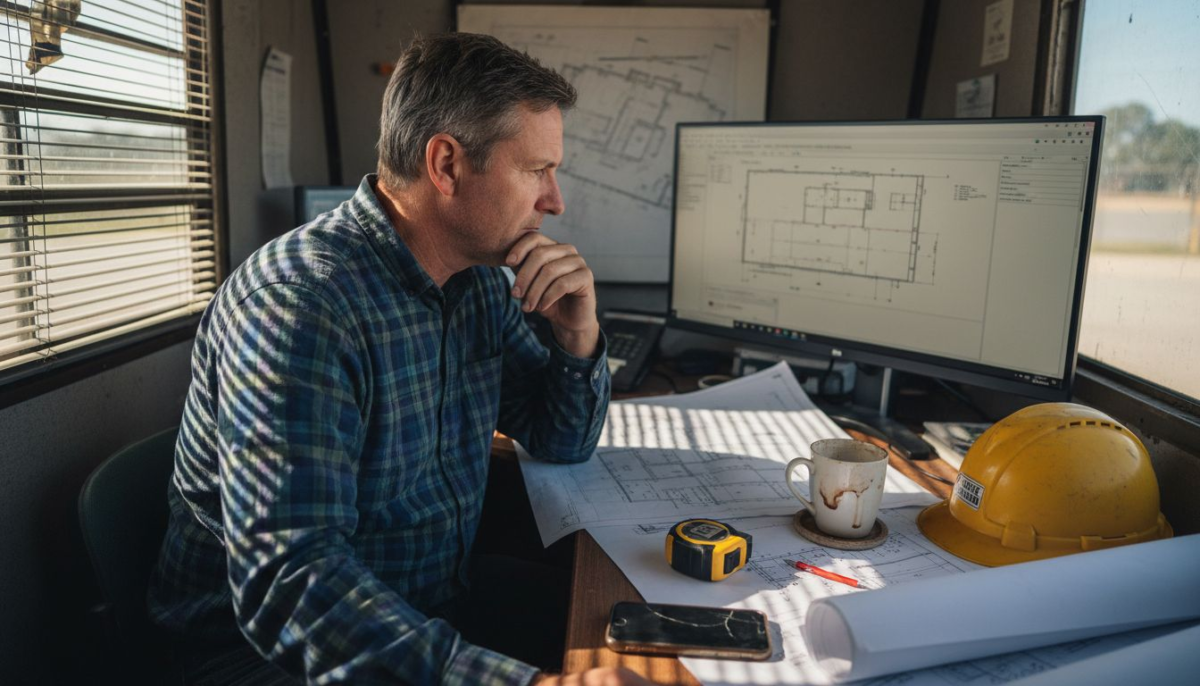
Architect checking construction website portfolio

The technological infrastructure supporting construction websites involves responsive design, mobile compatibility, and intuitive user experiences. Potential clients expect websites that load quickly, display project images professionally, and provide easy navigation across devices. Net Branding plays a crucial role in developing these digital experiences, ensuring that website aesthetics align with a company’s professional image and technical competence.

Modern construction websites integrate multiple functional elements beyond basic information display. These include project galleries, client testimonial sections, service pricing calculators, online quote request forms, and interactive communication channels. By incorporating these features, construction businesses can transform their websites from static information repositories into dynamic lead generation and client engagement platforms.

Pro Tip for Website Success: Regularly update your website’s project portfolio and ensure all technical specifications and contact information remain current to maintain professional credibility and client trust.

Frequently Asked Questions

  1. What makes a construction website effective?
    An effective construction website combines clear service descriptions, high-quality project images, easy contact methods, and mobile responsiveness.

  2. How often should construction websites be updated?
    Construction websites should be reviewed and updated quarterly, with project portfolios refreshed at least twice per year.

  3. Why are mobile-friendly websites critical for construction businesses?
    Mobile-friendly websites ensure potential clients can access information seamlessly on smartphones, increasing engagement and potential lead conversion rates.

Essential Website Features for Construction Businesses

Construction businesses require sophisticated websites that go beyond basic digital brochures, transforming online presence into powerful marketing and communication platforms. Website design strategies for builders play a critical role in establishing professional credibility and attracting potential clients through comprehensive digital experiences.

Essential website features for construction businesses include several key components that collectively create an engaging and functional online presence:

  • Project Portfolio: High-resolution images of completed projects
  • Service Descriptions: Detailed explanations of specialised construction services
  • Client Testimonials: Authentic feedback from previous clients
  • Contact Information: Multiple communication channels
  • Quote Request Forms: Easy online consultation mechanisms

The technological infrastructure supporting these features must prioritise responsive design, ensuring seamless performance across smartphones, tablets, and desktop computers. Potential clients expect websites that load rapidly, display professional imagery, and provide intuitive navigation. Net Branding emphasises creating digital experiences that reflect a company’s technical expertise and professional standards.

Modern construction websites integrate interactive elements that transform static platforms into dynamic lead generation tools. These include advanced features like virtual project walkthroughs, interactive service pricing calculators, real-time chat support, and comprehensive project management dashboards. By incorporating such sophisticated digital elements, construction businesses can differentiate themselves in a competitive marketplace.

Here’s a summary of how different website features contribute to construction business goals:

Website FeatureMain FunctionBusiness Impact
Project galleriesShowcase completed work visuallyEnhance credibility and attract leads
Interactive calculatorsProvide quick pricing estimatesBoost user engagement, speed decisions
Real-time chat supportEnable direct client communicationImprove trust and lead conversion
Client testimonial pagesHighlight satisfied client storiesBuild reputation and instil confidence
Mobile responsivenessDeliver optimised mobile experienceIncrease accessibility and reach

Pro Tip for Website Optimisation: Regularly audit your website’s performance metrics, focusing on user engagement rates, mobile responsiveness, and conversion tracking to continuously improve your digital marketing strategy.

Frequently Asked Questions

  1. What are the most critical website features for construction businesses?
    Project portfolios, clear service descriptions, mobile responsiveness, and easy contact methods are the most crucial website features.

  2. How often should a construction website be updated?
    Construction websites should be reviewed and refreshed quarterly, with project galleries updated at least twice per year.

  3. Why are interactive website features important for construction businesses?
    Interactive features like online quote forms and project galleries help build trust, demonstrate expertise, and improve potential client engagement.

Digital Project Management and Client Communication

Modern construction businesses are increasingly leveraging advanced digital technologies to streamline project management and enhance client communication. Construction collaboration technology represents a transformative approach to managing complex building projects, enabling real-time information sharing and seamless coordination across geographically dispersed teams.

The core components of digital project management for construction businesses include comprehensive digital platforms that facilitate:

  • Real-Time Communication: Instant messaging and video conferencing tools
  • Document Sharing: Secure cloud-based project file repositories
  • Progress Tracking: Interactive dashboards showing project milestones
  • Budget Management: Digital financial tracking and reporting systems
  • Client Portals: Personalised interfaces for client project updates

Virtual design and construction technologies have revolutionised how construction teams collaborate, allowing for integrated multi-disciplinary performance models that support explicit business objectives. These digital platforms enable architects, engineers, contractors, and clients to work synchronously, reducing communication delays and minimising potential misunderstandings.

Net Branding emphasises the importance of creating intuitive digital communication ecosystems that transform traditional project management approaches. Advanced platforms now offer features like augmented reality project previews, automated reporting, and predictive analytics that help businesses make more informed decisions throughout the construction process.

Pro Tip for Digital Project Management: Implement a comprehensive digital communication strategy that includes regular virtual check-ins, clear communication protocols, and user-friendly collaboration tools to ensure smooth project progression.

Frequently Asked Questions

  1. What are the key benefits of digital project management?
    Digital project management improves communication, reduces errors, enhances transparency, and provides real-time project tracking and reporting.

  2. How do virtual collaboration tools improve construction projects?
    Virtual collaboration tools enable instant communication, secure document sharing, and collaborative design processes across different locations and teams.

  3. Why are client portals important in construction management?
    Client portals provide transparency, allow real-time project updates, and give clients direct access to project progress, enhancing trust and satisfaction.

Boosting Brand Visibility and Lead Generation Online

Construction businesses today must leverage sophisticated digital strategies to enhance their online presence and attract potential clients. Link building strategies play a critical role in improving search engine rankings and increasing website visibility, ultimately driving more qualified leads to construction companies.

Effective online lead generation for construction businesses encompasses multiple strategic approaches:

  • Compelling Visual Portfolio: High-quality project images and case studies
  • Strategic Content Marketing: Informative blogs and industry insights
  • Search Engine Optimisation: Targeted keyword implementation
  • Social Media Integration: Active professional networking platforms
  • Client Testimonial Showcases: Authentic success story displays

Lead generation tools are essential for transforming website visitors into potential clients. These sophisticated digital mechanisms include:

  • Strategically designed contact forms
  • Clear and compelling calls-to-action
  • Interactive quote request systems
  • Customer relationship management (CRM) integrations
  • Personalised engagement tracking

Net Branding emphasises the importance of creating a cohesive digital identity that communicates professionalism, expertise, and reliability. Advanced websites now incorporate intelligent features like chatbots, automated follow-up systems, and personalised content recommendation engines that significantly enhance user engagement and conversion potential.

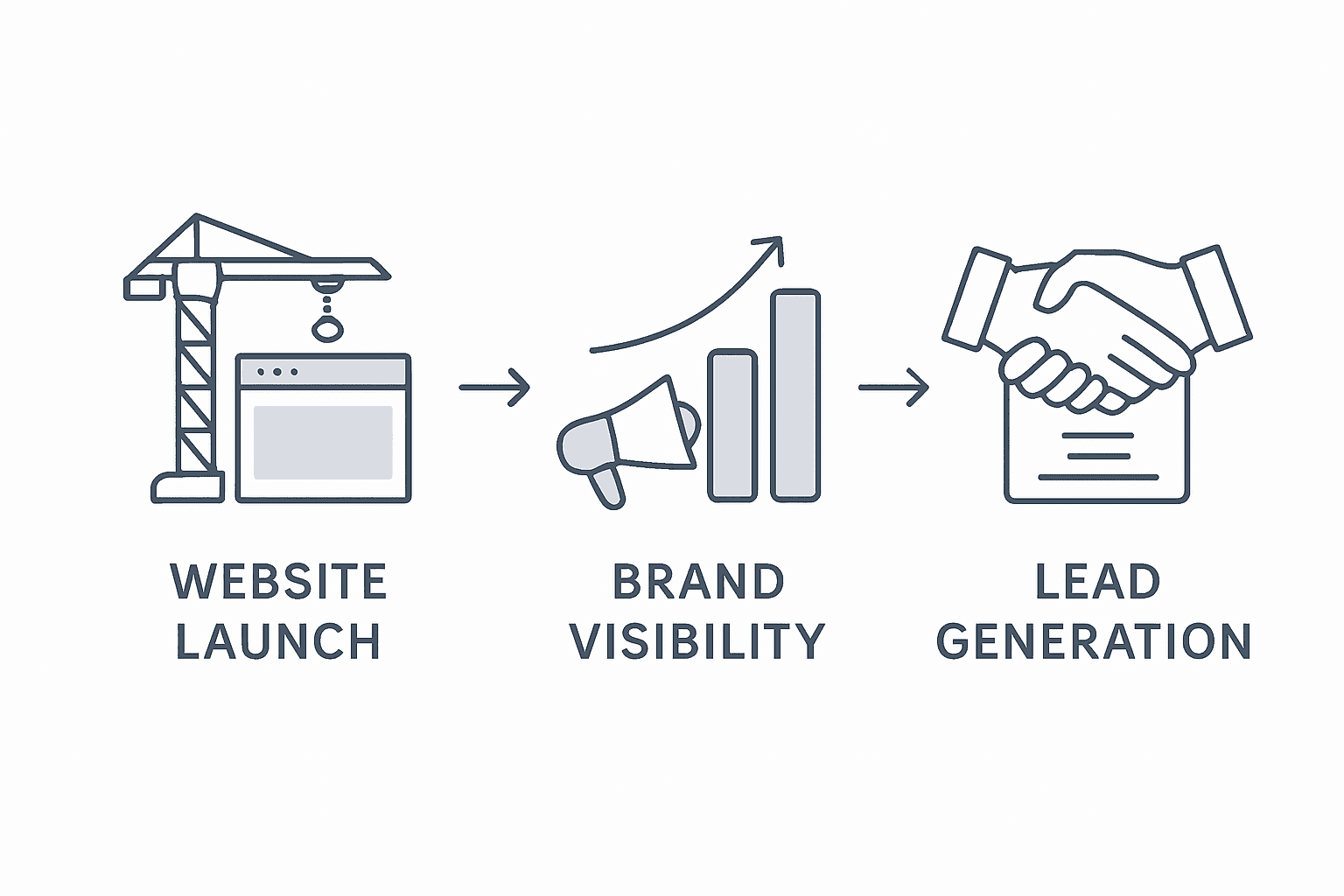
Infographic showing construction website growth steps

Pro Tip for Lead Generation: Implement a comprehensive digital strategy that combines targeted content, user-friendly design, and intelligent conversion mechanisms to transform website visitors into qualified leads.

Frequently Asked Questions

  1. How do construction websites generate leads?
    Construction websites generate leads through strategic content, clear call-to-actions, interactive features, and targeted search engine optimisation techniques.

  2. Why is online visibility important for construction businesses?
    Online visibility helps construction businesses showcase expertise, build credibility, and reach potential clients who are searching for professional services.

  3. What makes an effective lead generation website?
    An effective lead generation website combines professional design, compelling content, easy navigation, and clear communication channels.

Construction businesses face significant digital risks when developing online platforms, requiring comprehensive strategies to protect both their digital assets and professional reputation. User-centered design approaches play a crucial role in mitigating potential legal and operational vulnerabilities associated with website development and management.

Key risk areas for construction websites include:

  • Data Protection: Safeguarding client information
  • Intellectual Property: Protecting project designs and confidential details
  • Liability Exposure: Managing online content representations
  • Cybersecurity: Preventing digital breaches and information theft
  • Compliance Requirements: Meeting industry regulatory standards

Automation in construction technologies introduce complex legal considerations that businesses must carefully navigate. Professional websites require strategic investments in:

  • Robust security infrastructure
  • Regular compliance audits
  • Professional legal consultations
  • Comprehensive digital risk management protocols
  • Advanced encryption technologies

Net Branding emphasises the importance of understanding potential financial implications. Website development and maintenance for construction businesses typically range from NZD 3,000 to NZD 15,000 annually, depending on complexity, features, and ongoing support requirements. Businesses must factor in potential legal costs, cybersecurity investments, and potential liability exposures when budgeting for their digital platforms.

Pro Tip for Digital Risk Management: Conduct quarterly comprehensive digital security assessments and maintain updated legal documentation to proactively manage potential online risks and protect your business reputation.

This table compares key digital risks and recommended mitigation strategies for construction websites:

Digital RiskPotential ImpactMitigation Strategy
Data breachesLoss of client trust, legal issuesImplement advanced encryption, audits
Unauthorised content useIntellectual property disputesRegister IP, monitor site content
Regulatory non-complianceFines and reputation damageSchedule regular legal compliance checks
CyberattacksService downtime, data lossInvest in firewalls, incident response
Misleading representationContractual or legal disputesRegularly review website content

Frequently Asked Questions

  1. What are the primary legal risks for construction websites?
    Primary legal risks include data protection violations, intellectual property misuse, misleading content representations, and potential contractual disputes.

  2. How much should construction businesses invest in website security?
    Constructions businesses should allocate approximately 10-15% of their digital budget towards comprehensive cybersecurity and legal compliance measures.

  3. Why are professional website designs critical for risk management?
    Professional website designs demonstrate credibility, reduce potential misunderstandings, and provide clear, legally compliant communication channels.

Empower Your Construction Business with a Powerful Online Presence

In the competitive construction industry, your website is more than just an information tool it is a growth engine. This article highlights the importance of features like project portfolios, client testimonials, and mobile responsiveness — critical components that build trust and attract more leads. If you find managing digital risks, updating engaging content, or optimizing for mobile devices challenging it is time to partner with experts who understand how to deliver results.

https://responsivewebsitedesign.co.nz

Discover how our customised WordPress solutions at ResponsiveWebsiteDesign can transform your online presence. Whether you need a fresh design, ongoing website management, or SEO optimisation our experienced team specialises in creating websites tailored to construction businesses. Explore success stories and tips in our Website Archives and practical insights from our Uncategorized Archives. Take control of your digital future today by visiting https://responsivewebsitedesign.co.nz and start turning your website into a powerful lead generation tool.

Frequently Asked Questions

What features should a construction website include to drive growth?

A construction website should include a project portfolio, detailed service descriptions, client testimonials, contact information, and interactive elements such as quote request forms to drive growth.

How often should I update my construction website to stay relevant?

You should review and update your construction website at least quarterly, with project portfolios refreshed at least twice a year to maintain credibility and attract new clients.

Why is mobile responsiveness important for construction websites?

Mobile responsiveness ensures that users can easily access and navigate your site on any device, increasing engagement and potential lead conversion rates.

How can I improve lead generation through my construction website?

Improving lead generation can be achieved by integrating strategic content marketing, compelling visuals, user-friendly designs, and clear calls-to-action on your website.

Categories
Website

Step by Step Website Launch Guide for Businesses

Over 80 percent of australian businesses report that a well defined strategy is the number one driver of website success. Whether you are updating an established site or starting from scratch, clear business goals make all the difference in standing out online. Discover how mapping specific objectives and technical needs lays the groundwork for a high performing digital presence designed for australian brands.

Table of Contents

Quick Summary

Essential InsightDetailed Explanation
1. Define Clear GoalsEstablish precise business objectives to inform website design and functionality for greater brand alignment.
2. Prioritise RequirementsCategorise features into ‘must have’ and ‘nice to have’ to ensure essential functions are developed first.
3. Ensure Technical SetupSelect reliable hosting and configure core frameworks, optimising for performance and security during setup.
4. Focus on User ExperienceDesign with user engagement in mind, ensuring easy navigation and clear calls to action for better interaction.
5. Test Thoroughly Before LaunchConduct comprehensive testing for technical and user experience aspects to minimise issues and ensure professionalism at launch.

Step 1: Define Business Goals and Website Requirements

Creating a successful website begins with crystal clear strategic planning. Your website represents a critical digital storefront that communicates your business identity, attracts potential customers, and drives organisational objectives. Understanding your specific goals becomes the foundation for designing an effective online presence.

To establish precise website requirements, start by conducting a comprehensive strategic assessment. This involves mapping out your primary business objectives and translating them into digital experiences. Organisational missions and strategic vision can directly inform website design, ensuring your digital platform authentically represents your brand. Ask yourself critical questions about your target audience, desired user interactions, and key performance indicators that will measure website success.

Net Branding recommends developing a structured approach to defining website requirements. Begin by outlining specific goals such as generating leads, showcasing products, providing customer support, or facilitating online transactions. Consider your audience demographics, their online behaviour, and the specific actions you want them to take when visiting your site. Document these requirements meticulously, creating a blueprint that will guide your website development process.

The website development journey requires careful alignment between business strategy and digital execution. Your requirements should encompass technical specifications, content strategy, user experience design, and performance metrics. Research indicates that websites with clearly defined goals and audience priorities demonstrate significantly higher engagement rates.

Careful Documentation: Create a detailed requirements document that includes:

  • Business objectives
  • Target audience profile
  • Desired website functionality
  • Key performance indicators
  • Content strategy framework
  • Technical infrastructure needs

Advanced Tip: Prioritise your requirements by categorising them into ‘must have’ and ‘nice to have’ features. This approach helps maintain focus during the development process and ensures critical business needs are met first.

Pro insight: Regularly review and update your website goals to ensure continued alignment with evolving business strategies and market dynamics.

Step 2: Set up Hosting and Configure Core Frameworks

Configuring your website’s hosting and core frameworks is a critical stage in transforming your digital strategy into a functional online platform. This step involves selecting the right hosting environment and establishing the technical foundation that will support your entire web presence.

Woman setting up office server equipment

Beginning with hosting selection requires careful consideration of your business needs. WordPress hosting options demand strategic evaluation of reliability, scalability, and technical support, ensuring your website operates smoothly and efficiently. Net Branding recommends assessing potential hosting providers based on several key criteria including server performance, uptime guarantees, security features, and compatibility with WordPress infrastructure.

When configuring core frameworks, focus on establishing a robust technical environment that supports your website’s objectives. Implementing best practices for server configuration involves understanding specific WordPress hosting requirements, which include selecting appropriate PHP versions, database configurations, and server resources aligned with your expected website traffic and functionality.

Your hosting configuration should address several critical technical considerations:

  • Server type and specifications
  • Database management systems
  • PHP and WordPress version compatibility
  • SSL certificate implementation
  • Backup and recovery mechanisms
  • Performance optimization settings

Net Branding suggests conducting thorough compatibility testing during your hosting setup. Verify that your chosen hosting environment meets all technical prerequisites for your specific WordPress version and planned website features. This proactive approach minimises potential technical complications during subsequent development stages.

Pro insight: Always maintain a staging environment separate from your live website to test framework configurations and updates before implementing them in your production environment.

Step 3: Build and Design Your WordPress Website

Building your WordPress website marks a pivotal moment in transforming your digital strategy into a living, functional online platform. This critical stage involves translating your business objectives into a compelling visual and functional design that effectively communicates your brand identity.

WordPress installation requires careful navigation through technical and design considerations, ensuring your website not only looks professional but operates seamlessly. Net Branding recommends approaching website design as a strategic process that balances aesthetic appeal with user experience and functional requirements. Your design should reflect your brand personality while providing intuitive navigation and clear pathways for potential customers.

The WordPress ecosystem offers multiple approaches to website construction. Dynamic website design involves selecting appropriate themes, plugins, and customisation options that align with your business goals. Begin by exploring WordPress theme libraries that match your industry and brand aesthetic. Consider factors such as responsiveness, customisation capabilities, and built-in features that support your specific business needs.

Key design and development considerations include:

  • Selecting a mobile responsive theme
  • Implementing intuitive site navigation
  • Creating clear call to action sections
  • Ensuring consistent branding elements
  • Optimising page load speeds
  • Integrating essential plugins for functionality

Net Branding emphasises the importance of user experience during website design. Each design decision should prioritise visitor engagement, making information accessible and interaction seamless. Test your website across multiple devices and browsers to guarantee a consistent, professional appearance.

Pro insight: Always create a staging version of your website to experiment with design elements before publishing your live site, allowing you to refine and perfect your digital presence without risking your primary online platform.

Step 4: Optimise for Mobile, SEO and Speed

Optimising your website represents a critical phase in ensuring digital success, transforming your online presence from functional to extraordinary. This comprehensive process involves strategic improvements across mobile responsiveness, search engine visibility, and performance metrics.

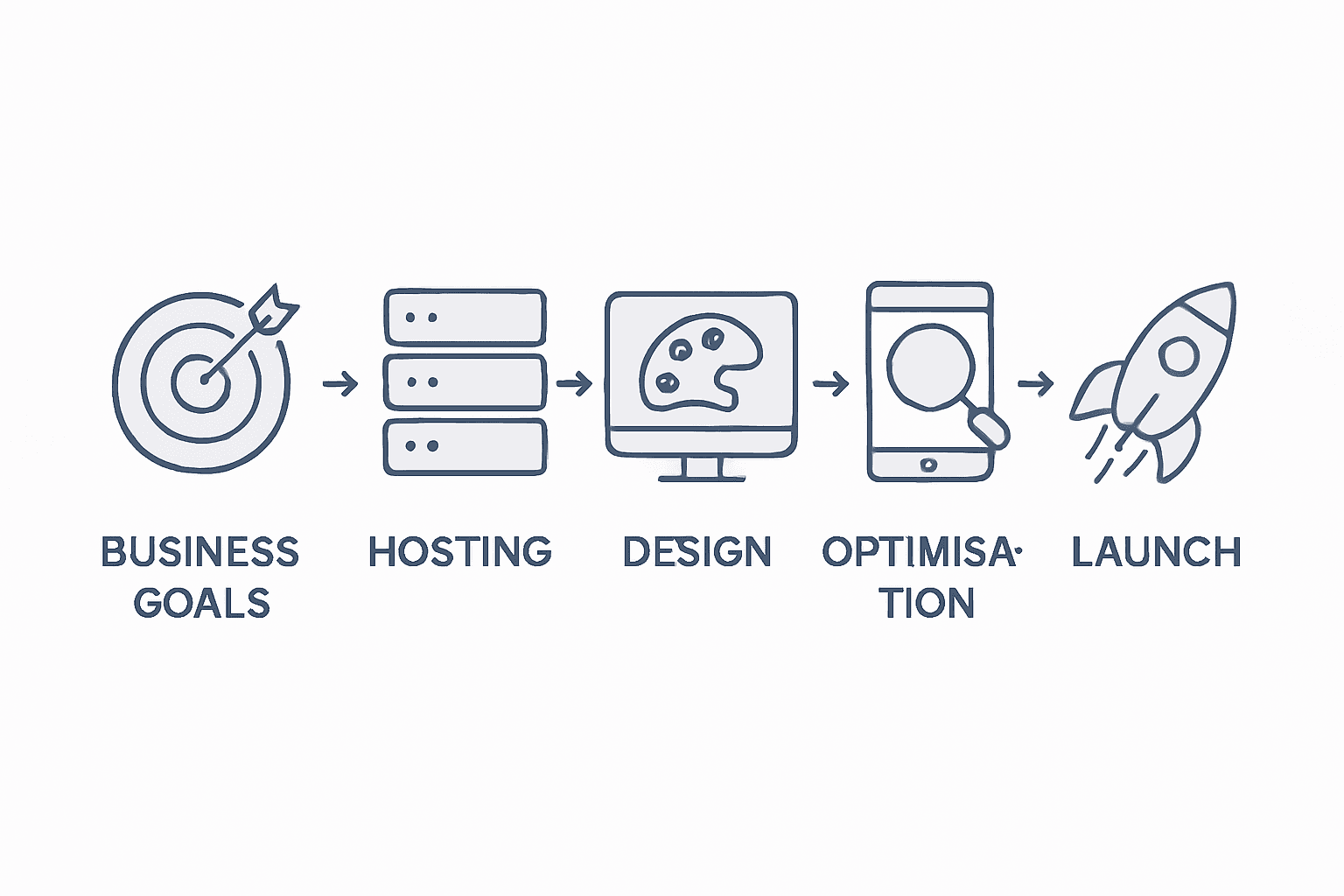
Infographic showing website launch process steps

Selecting well-coded WordPress themes becomes fundamental to achieving superior website performance, with direct implications for user experience and search rankings. Net Branding recommends implementing a multifaceted optimization strategy that addresses technical foundations and user engagement simultaneously. Your optimization efforts should focus on creating a seamless, fast, and accessible digital experience across all devices.

WordPress security and performance optimization require systematic implementation of best practices, including strategic plugin selection and ongoing maintenance. Concentrate on key optimization elements such as image compression, caching mechanisms, and minimising external script loading. Mobile optimization demands responsive design that adapts fluidly across smartphones, tablets, and desktop environments.

Critical optimization strategies include:

  • Implementing responsive mobile design
  • Minimising page load times
  • Compressing visual media
  • Enabling browser caching
  • Reducing server response times
  • Utilizing content delivery networks

Net Branding emphasises that successful website optimization is an ongoing process. Regular performance audits using tools like Google PageSpeed Insights can help identify and address potential improvements. Continuously monitor your website’s performance metrics, user engagement rates, and search engine rankings to maintain a competitive digital presence.

Pro insight: Conduct quarterly comprehensive website performance reviews to ensure your digital platform remains optimized, secure, and aligned with evolving technological standards.

The table below compares key website performance metrics and their optimisation benefits:

MetricImpact on User ExperienceOptimisation Benefit
Page load speedReduces user abandonmentIncreases conversions
Mobile responsivenessEnsures access on any deviceExpands audience reach
SEO complianceImproves visibility in searchAttracts more organic traffic
SecurityProtects sensitive informationMaintains trust and credibility

Step 5: Test, Verify and Launch Your Website

Launching your website marks the culmination of your digital strategy, transforming months of planning and development into a live online platform. This critical phase requires meticulous verification to ensure your website meets professional standards and delivers an exceptional user experience.

Comprehensive website development demands thorough testing across multiple dimensions, addressing technical functionality, user experience, and content accuracy. Net Branding recommends implementing a structured verification process that systematically evaluates every aspect of your digital presence. Your testing strategy should encompass technical performance, visual consistency, and user interaction across various devices and browsers.

Web governance principles emphasise aligning website performance with strategic business objectives, ensuring your digital platform remains responsive to audience needs. Conduct rigorous testing protocols that include:

  • Cross browser compatibility checks
  • Mobile responsiveness verification
  • Performance speed testing
  • Security vulnerability assessment
  • Content accuracy review
  • Functionality testing of forms and interactive elements

Net Branding suggests creating a comprehensive pre launch checklist that covers technical, design, and content requirements. Simulate user journeys, test navigation pathways, and verify that all links function correctly. Implement user acceptance testing to gather final feedback and identify potential improvements before your official website launch.

Pro insight: Create a staging environment parallel to your live site, allowing you to conduct final tests and refinements without risking your primary online presence.

Here is a quick overview of how each step in the website development process aligns with business impact:

StepPrimary FocusBusiness Impact
Define Goals & RequirementsStrategic planning, user researchEnsures clarity, alignment with mission
Set up Hosting & FrameworksTechnical foundation, server setupEnables performance and reliability
Build & Design WordPress WebsiteVisual & functional site creationStrengthens brand and engagement
Optimise for Mobile, SEO & SpeedPerformance and discoverabilityRaises rankings, improves user retention
Test, Verify & Launch WebsiteQuality assurance, final checksMinimises risk, boosts professionalism

Ready to Launch a WordPress Website That Truly Represents Your Business?

The article highlights the challenge of turning your strategic business goals into a functional, engaging online presence that delivers results. If you aim to define clear website requirements, ensure reliable hosting, and create a responsive, SEO-friendly website that attracts and retains customers, then trust in professional guidance to achieve these critical milestones. Achieving seamless mobile performance, optimisation for search engines, and flawless launch readiness are key pain points that many businesses face.

At ResponsiveWebsiteDesign, we specialise in tailored WordPress solutions designed to support New Zealand businesses every step of the way. From precise goal alignment and robust hosting setups to custom designs that enhance user experience, our team ensures your website is built for long-term success. Explore strategies on optimising your site’s SEO with insights from our SEO archives or discover how efficient website development translates to higher conversions in our Website archives.

https://responsivewebsitedesign.co.nz

Don’t let the complexity of website launch hold you back. Partner with us now for a website crafted to meet your business objectives and impress visitors from day one. Visit ResponsiveWebsiteDesign to start your journey towards a powerful, professional online presence.

Frequently Asked Questions

How do I define my business goals for a website?

Start by identifying your primary business objectives, such as generating leads or enhancing customer support. Document these goals clearly to serve as a roadmap for your website development process.

What should I include in my website requirements document?

Your requirements document should cover business objectives, target audience profiles, desired website functionality, and key performance indicators. Create a detailed framework to guide your development efforts and ensure every critical need is addressed.

How do I choose the right hosting for my business website?

Evaluate potential hosting providers based on their reliability, server performance, and security features. Consider factors like scalability and customer support to ensure your website goes live efficiently and remains operational.

What are the key elements of optimising my website for speed and SEO?

Focus on implementing responsive design, minimising page load times, and compressing media files. Regularly assess your website’s performance and make improvements to enhance user engagement and search visibility.

How can I verify that my website is ready to launch?

Conduct thorough testing across multiple devices and browsers to check for functionality and visual consistency. Use a pre-launch checklist to ensure all technical aspects, content accuracy, and user interactions are functioning correctly before going live.

Categories
Website

Why Website Structure Matters for Business Growth

Most australian businesses underestimate just how much website structure shapes success online. A well-planned website does more than connect pages—it directly impacts how people explore, find information, and make decisions. Studies reveal that websites with clear structures can increase conversion rates by up to 200 percent. Understanding common myths and proven models helps australian entrepreneurs build digital experiences that guide customers effortlessly while driving results.

Table of Contents

Key Takeaways

PointDetails
Importance of Website StructureA well-planned website structure enhances user experience, engagement, and conversion rates.
SEO BenefitsLogical website architecture improves search engine indexing and can lead to higher search rankings.
Types of StructuresConsider different models like hierarchical, sequential, matrix, and database-driven based on business needs.
Risks of Poor StructureComplicated navigation and fragmented content can lead to increased bounce rates and lost customer conversions.

Defining Website Structure and Common Myths

Website structure represents the strategic organisation and arrangement of digital content that determines how information flows and users navigate through a website. At its core, website architecture involves the structural design of shared digital environments to enhance usability and findability for visitors.

Contrary to common misconceptions, website structure is not simply about creating pages and linking them randomly. Effective website architecture requires deliberate planning that considers user experience, information hierarchy, and strategic content placement. Net Branding professionals understand that a well-designed website structure can significantly impact user engagement, conversion rates, and overall business performance.

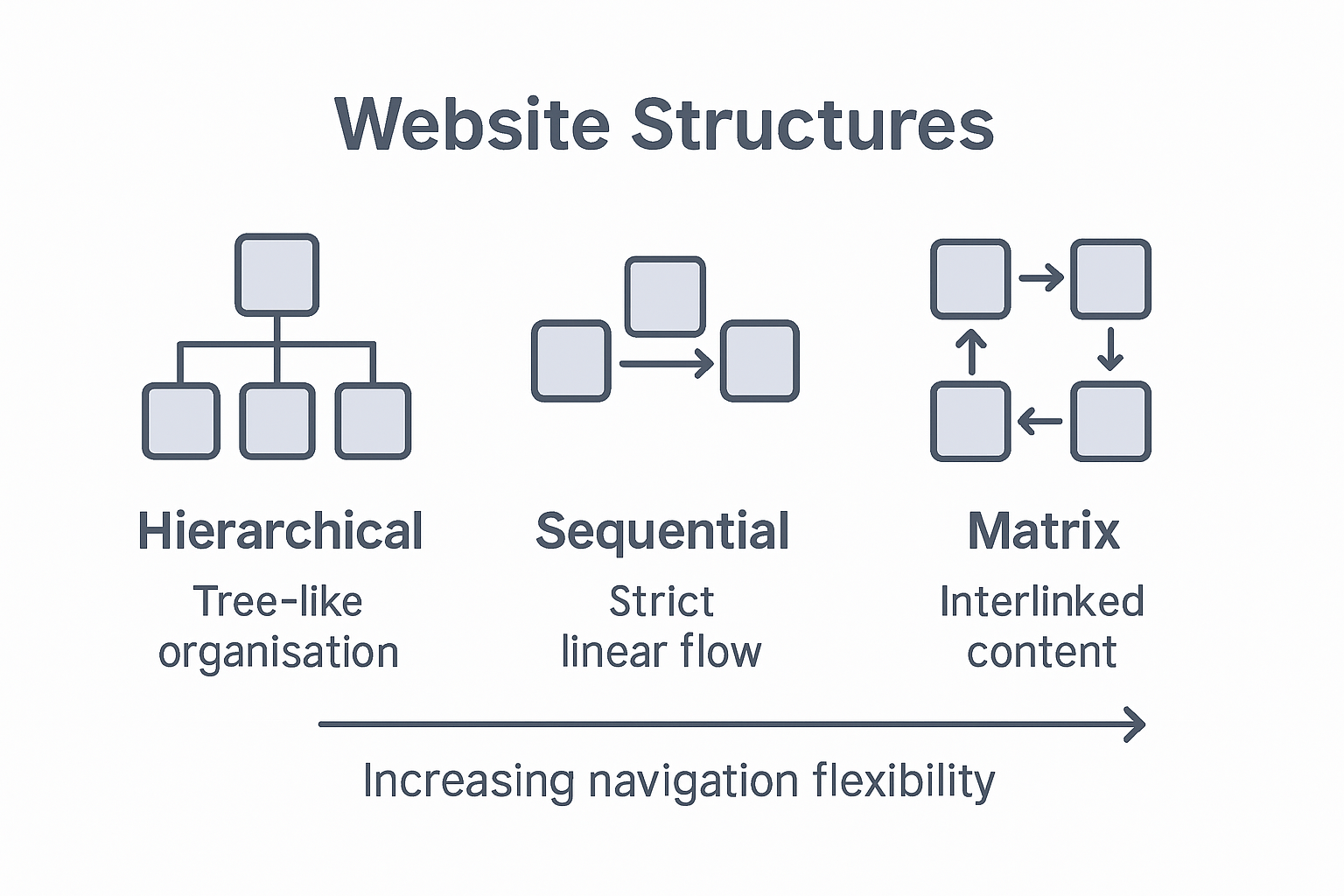
Traditionally, website structures are categorised into several fundamental models: hierarchical, sequential, and flat. Hierarchical structures prioritise logical categorisation, allowing users to navigate from broad categories to specific subcategories. Sequential structures guide users through a predetermined path, ideal for processes requiring step-by-step progression. Flat structures offer direct access to content with minimal navigation layers, suitable for smaller websites with limited information.

Pro Tip: Website Mapping Strategy: Before developing your website, create a detailed sitemap that visualises your content hierarchy, ensuring intuitive navigation and logical information flow for your target audience.

FAQs About Website Structure

  1. Why does website structure matter for SEO?
    Website structure helps search engines understand and index your content more effectively, improving your website’s search ranking potential.

  2. How often should I review my website structure?
    Recommend reviewing your website structure annually or whenever your business offerings or user needs significantly change.

  3. Can a poor website structure hurt my business?
    Yes, a confusing website structure can increase bounce rates, reduce user engagement, and potentially cost you valuable customer conversions.

Types of Website Structure for Businesses

Different website structures play a critical role in determining how effectively businesses communicate their digital offerings. Net Branding professionals recognise that selecting the appropriate website structure is not merely a technical decision but a strategic business choice that directly influences user experience, engagement, and ultimately, conversion rates.

Businesses typically employ four primary website structure models: hierarchical, sequential, matrix, and database-driven. Hierarchical structures remain the most common, organising content from general categories to specific subcategories, similar to a traditional organisational chart. This model works exceptionally well for businesses with complex product ranges or service offerings that require detailed navigation. Sequential structures are particularly effective for businesses with linear processes, such as e-commerce sites guiding customers through purchase stages or service providers outlining consultation steps.

For small to medium enterprises, choosing the right website structure depends on multiple factors including business type, content volume, and user interaction goals. Matrix structures offer flexibility by allowing multiple navigation paths, which can be ideal for businesses with interconnected content or services. Database-driven structures dynamically generate pages based on user interactions, providing personalised experiences that can significantly enhance user engagement and retention.

Here is a comparison of the main website structure models and their typical business applications:

Structure ModelBest ForNavigation StyleBusiness Example
HierarchicalComplex contentMulti-level categoriesLarge retailer
SequentialStep-by-step processesLinear, guided pathsOnline checkout
MatrixInterconnected topicsMultiple navigation pathsEducational portal
Database-drivenPersonalised experiencesDynamic content deliveryMembership websites

Pro Tip: Structure Selection Strategy: Conduct a comprehensive user experience audit before finalising your website structure, mapping potential user journeys and ensuring your chosen design supports intuitive navigation and seamless information access.

FAQs About Website Structures

  1. How do I know which website structure suits my business?
    Analyse your content complexity, user interaction needs, and business goals to determine the most appropriate structure.

  2. Can I change my website structure later?
    Yes, but it’s complex and can impact SEO, so professional guidance is recommended.

  3. Do different industries require different website structures?
    Absolutely. Retail, service-based, and informational businesses often need unique structural approaches to optimise user experience.

How Structure Impacts SEO and User Experience

Website structure plays a pivotal role in determining both search engine optimisation and user engagement strategies, directly influencing how effectively businesses communicate online. Net Branding professionals understand that a strategically designed website architecture is not just about aesthetics, but a critical mechanism for improving digital performance and user satisfaction.

Web designer sketching website structure map

From an SEO perspective, website structure significantly impacts how search engines crawl, understand, and index digital content. Hierarchical navigation enables search engine algorithms to comprehend content relationships, creating clear pathways for indexing and ranking. Websites with logical, well-organised structures typically experience improved search visibility, as search engines can more efficiently map and evaluate content relevance. This means businesses with intuitive site architectures are more likely to achieve higher search rankings and attract organic traffic.

User experience represents another crucial dimension of website structure. Intuitive navigation determines how easily visitors can find information, explore products, and complete desired actions. Complex or confusing site structures can lead to increased bounce rates, reduced engagement, and potential loss of potential customers. Effective website structures anticipate user needs, creating seamless pathways that guide visitors through content with minimal cognitive effort. Small to medium enterprises must prioritise user-centric design, ensuring that their digital platforms are not just informative, but genuinely user-friendly.

Pro Tip: Navigation Clarity Check: Conduct regular user testing to validate your website’s navigation structure, asking unaffiliated individuals to complete specific tasks and provide feedback on their experience.

FAQs About SEO and Website Structure

  1. How quickly can good website structure improve SEO?
    Typically, noticeable SEO improvements can occur within 3-6 months of implementing a strategic website structure.

  2. Does website structure affect mobile search rankings?
    Absolutely. Mobile-friendly, responsive structures are crucial for maintaining strong search engine rankings.

  3. Can poor website structure harm my business’s online presence?
    Yes, ineffective structures can significantly reduce user engagement and search engine visibility.

Essential Elements for Effective Site Architecture

Information architecture requires strategic planning of digital content organisation that supports both user experience and technical performance. Net Branding professionals recognise that effective site architecture goes beyond simple page arrangement, serving as a critical foundation for digital communication and business success.

The fundamental elements of robust site architecture encompass multiple interconnected components. Navigation hierarchy stands as the primary structural backbone, creating logical pathways for users and search engines. Clear, consistent labelling ensures visitors can intuitively understand and traverse website content, reducing cognitive load and potential frustration. Implementing a well-designed internal linking strategy further enhances this structure, creating semantic connections between related content and distributing page authority effectively.

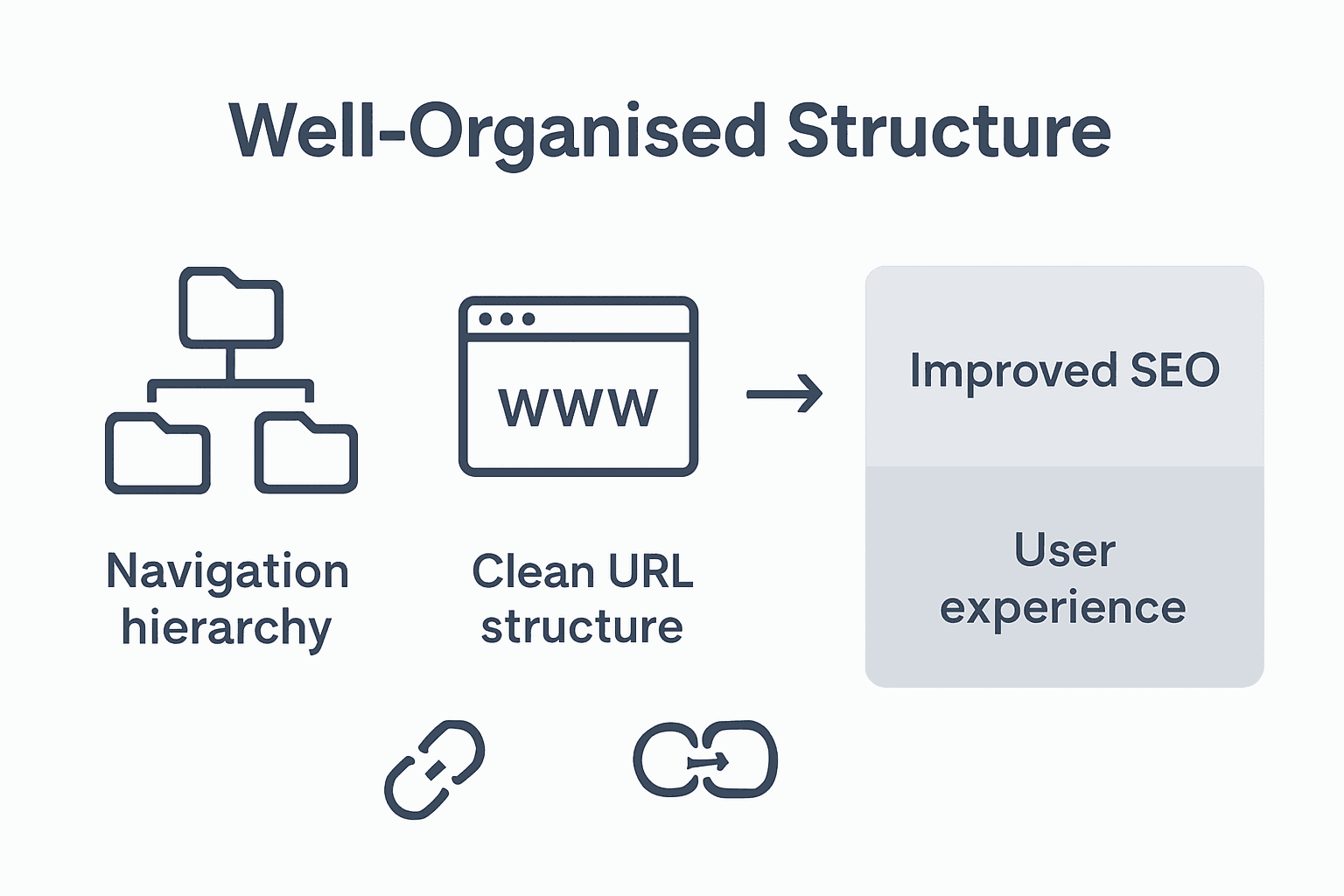
Infographic comparing website structure elements

URL structure represents another crucial architectural element that directly impacts both user experience and search engine performance. Descriptive, readable URLs provide immediate context about page content, improving user understanding and search engine comprehension. Small to medium enterprises must prioritise creating clean, meaningful URL paths that reflect content hierarchy and include relevant keywords. This approach not only supports better indexing but also contributes to improved click-through rates by offering users transparent insights into page content before they even click.

Review the key elements of effective site architecture and their impact:

ElementPurposeBenefit for Business
Navigation hierarchyGuides users through content logicallyEnhances usability and retention
Consistent labellingEnsures clarity in navigationReduces user confusion
Internal linkingConnects related content pagesBoosts SEO and authority sharing
Clean URL structureProvides user-friendly, descriptive linksIncreases trust and click rates

Pro Tip: Architecture Audit: Periodically review your website’s structure from both user and technical perspectives, identifying potential navigation bottlenecks and opportunities for streamlining content access.

FAQs About Site Architecture

  1. How often should I review my website’s architecture?
    Recommend conducting a comprehensive review annually or whenever significant business changes occur.

  2. Can poor site architecture affect my conversion rates?
    Yes, complicated navigation can significantly reduce user engagement and potential sales.

  3. Are there tools to help analyse site architecture?
    Multiple web analytics and SEO tools offer insights into website structure and potential improvements.

Risks of Poor Structure and Common Pitfalls

Poor website structures create significant operational risks for businesses, potentially undermining digital performance and user engagement. Net Branding professionals recognise that architectural missteps can have cascading consequences across marketing, sales, and customer experience channels.

The most critical risks stem from complex navigation and fragmented content organisation. Deep nesting represents a primary structural hazard, where important information becomes buried beneath multiple layers, rendering content virtually inaccessible to users and search engines alike. This complexity increases cognitive load, causing visitors to feel overwhelmed and frustrated. Search engine algorithms similarly struggle with deeply nested pages, often resulting in reduced indexing and diminished search visibility. Small to medium enterprises are particularly vulnerable, as their limited digital resources cannot afford the performance penalties associated with convoluted website architectures.

Broken internal linking and inconsistent URL structures compound these challenges, creating additional navigational obstacles. Websites with fragmented link pathways disrupt user journeys, causing unexpected redirects and potential abandonment. Inconsistent URL naming conventions further exacerbate these issues, reducing both user trust and search engine comprehension. Businesses must recognise that every navigational friction point represents a potential lost opportunity for customer engagement and conversion.

Pro Tip: Structure Health Check: Conduct quarterly website audits using professional analytics tools to identify and immediately resolve navigation bottlenecks and structural inconsistencies.

FAQs About Website Structure Risks

  1. How quickly can poor structure impact my business?
    Immediate effects can be observed within weeks, including increased bounce rates and reduced search rankings.

  2. Can website structure affect my marketing performance?
    Absolutely. Poor structure directly influences user experience, conversion rates, and overall digital marketing effectiveness.

  3. What are the most common structural mistakes?
    Overcomplicated navigation, inconsistent URL structures, and deeply nested content are the most prevalent structural challenges.

Unlock Business Growth With Strategic Website Structure

Understanding the critical role of effective website structure is the first step towards transforming your online presence. This article highlights challenges like confusing navigation and poor SEO impacts that many businesses face. Your goals are clear: create intuitive navigation, improve search rankings, and deliver seamless user experiences that drive conversions. Terms like “hierarchical navigation” and “internal linking strategy” from the article show how deep planning is essential for success.

Ready to conquer these challenges? Explore tailored solutions in our Website Archives – ResponsiveWebsiteDesign where expert advice meets practical implementation.
https://responsivewebsitedesign.co.nz

Take control of your digital future with ResponsiveWebsiteDesign.co.nz. Our WordPress specialists build mobile responsive, SEO-optimised websites that grow with your business. Don’t let poor website structure hold you back. Act now and partner with professionals who understand the importance of strategic design and long-term growth. Visit our SEO Archives – ResponsiveWebsiteDesign for insights or contact us today to start your transformation.

Frequently Asked Questions

Why is website structure important for business growth?

A well-structured website enhances usability, ensuring that visitors can easily navigate and find information. This can lead to higher engagement, improved conversion rates, and ultimately, business growth.

How does website structure impact SEO?

Website structure helps search engines crawl and index content effectively, which can enhance search visibility. A logical and clear site architecture enables better ranking, attracting more organic traffic to your site.

What are the common types of website structures businesses should consider?

Businesses often use hierarchical, sequential, matrix, and database-driven structures, each serving different needs based on content complexity and user interaction goals.

How can I improve my website’s structure?

To improve your website’s structure, conduct a comprehensive user experience audit, create a detailed sitemap, and ensure consistent navigation and clear URL structures to facilitate user engagement.

Categories
Website

What Is a Static Website and Why It Matters Now

Over 60 percent of australian businesses still choose static websites for their simplicity and reliability. The need for fast-loading, secure online platforms is stronger than ever, especially with today’s short attention spans and rising security concerns. Static websites offer straightforward solutions for those who want dependable information delivery without complex backend systems. Discover why this classic website approach continues to meet the expectations of australian organisations focused on performance, security, and hassle-free management.

Table of Contents

Key Takeaways

PointDetails
Static Websites Offer Performance and SecurityThey provide faster load times and lower security risks due to their straightforward architecture.
Ideal for Stable ContentBest suited for portfolios and informational resources that do not require frequent updates.
Lower Hosting CostsTypically less expensive to host compared to dynamic websites, making them cost-effective for small businesses.
Limited InteractivityThey cannot support features like user logins or real-time content personalisation, which are better suited for dynamic sites.

Static Websites Defined: Core Principles

A static website represents a fundamental approach to web design characterised by fixed, predefined content delivered identically to every visitor. Websites composed of fixed content rely exclusively on HTML, CSS, and JavaScript without requiring complex server-side processing or database interactions.

Static websites function through pre-built HTML pages that remain constant regardless of user interaction. Unlike dynamic websites that generate content on-the-fly, static sites present identical information to all users. These websites are particularly suited for organisations needing straightforward, information-focused web presence such as portfolios, small business landing pages, or informational resources where content remains relatively unchanged.

The architecture of static websites offers compelling advantages. Websites built with fixed content structures deliver significantly faster load times and enhanced security compared to more complex web platforms. Their simplicity means reduced server resource requirements, lower hosting costs, and minimised vulnerability to potential security breaches. For businesses seeking a reliable, efficient online presence without frequent content updates, static websites provide an elegant solution.

Business owner reviews static website at table

Pro Web Design Tip: Carefully evaluate your content update frequency and functional requirements before selecting between static and dynamic website architectures to ensure optimal digital strategy alignment.

Net Branding Insight: Static websites remain an excellent choice for businesses prioritising performance, security, and cost-effectiveness in their digital presence.

How Static Sites Differ from Dynamic Ones

The fundamental distinction between static and dynamic websites lies in their content generation and delivery mechanisms. Websites with different architectural approaches fundamentally transform how digital content is presented and experienced by users.

Static websites deliver identical, pre-built content to every visitor without real-time customisation. These sites rely on fixed HTML files that remain constant regardless of user interaction. In contrast, dynamic websites generate personalised content through server-side processing, retrieving information from databases and adapting presentations based on user preferences, login status, or specific interactions. This means a dynamic website might show different content to different users, whereas a static site presents the same information universally.

Performance characteristics further highlight the differences between these web architectures. Content delivery mechanisms in web design demonstrate that static websites typically offer faster load times and superior security. Their simplicity means fewer computational requirements, reduced server load, and minimised potential security vulnerabilities. Dynamic websites, while offering rich interactivity and personalisation, require more complex backend infrastructure, database queries, and server-side scripting.

Pro Web Design Tip: Assess your specific business requirements carefully, considering factors like content update frequency, interactivity needs, and performance expectations when choosing between static and dynamic website architectures.

Net Branding Insight: Understanding the fundamental differences between static and dynamic websites enables businesses to make informed digital strategy decisions that align with their specific communication and user engagement objectives.

Here’s a concise comparison of static and dynamic websites to highlight their most important characteristics for business decisions:

CharacteristicStatic WebsitesDynamic Websites
Content PersonalisationIdentical for all usersCustomised for each visitor
Maintenance RequirementsMinimal updates neededFrequent updates, higher complexity
Security RiskLower due to limited backendHigher due to server/database exposure
Hosting CostUsually low, basic hosting sufficientHigher, needs advanced infrastructure
Best Use CasesPortfolios, brochures, landing pagesE-commerce, memberships, news portals

Key Benefits and Limitations for Business

Static websites offer a strategic digital solution for businesses seeking streamlined online presence. Business website architectural considerations reveal critical trade-offs between simplicity and functionality that organisations must carefully evaluate.

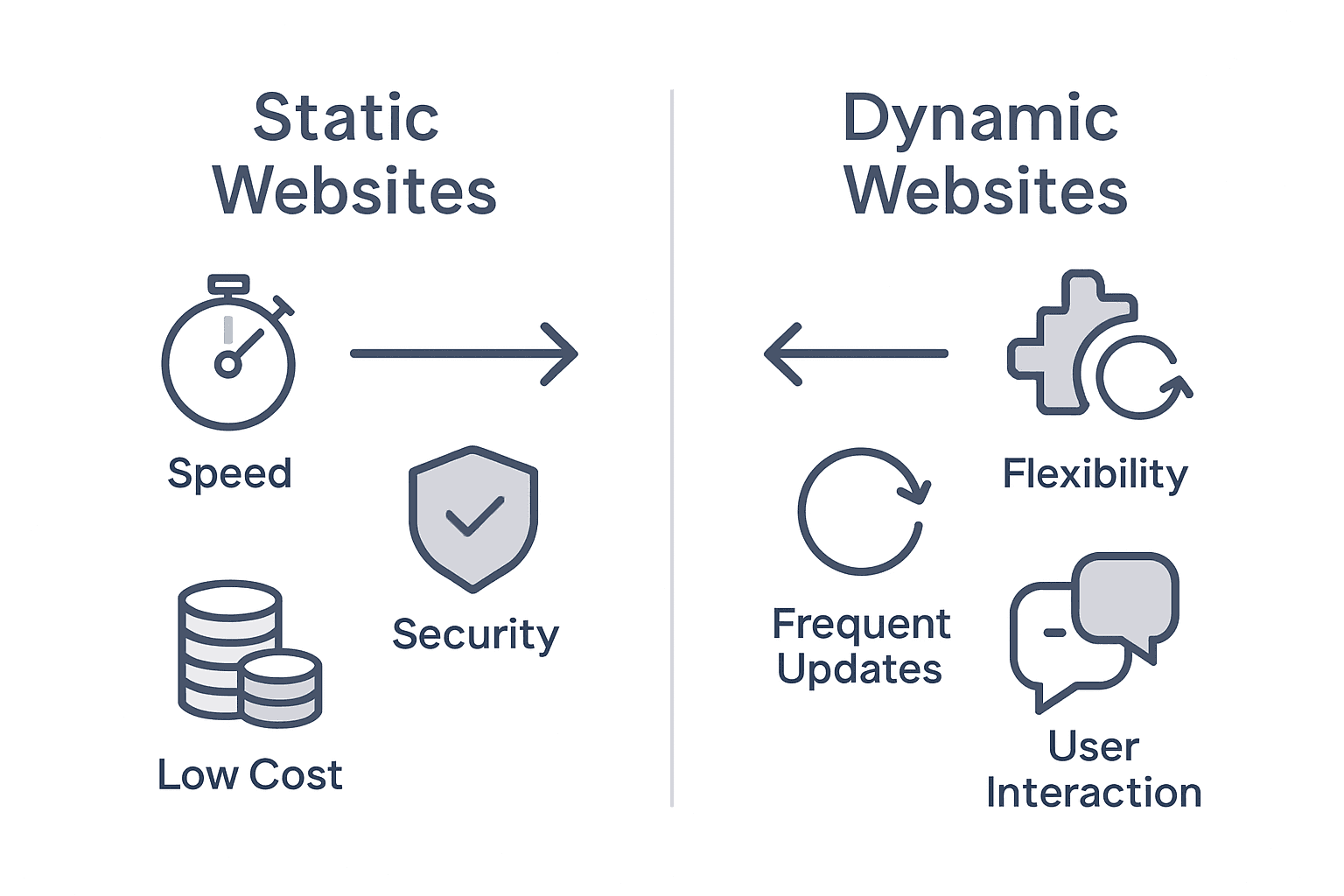
Static versus dynamic website benefits infographic

The primary advantages of static websites include dramatically reduced hosting costs, superior performance, and minimal maintenance requirements. These sites excel for businesses with relatively stable content such as professional portfolios, service brochures, or informational landing pages. Their lightweight architecture ensures rapid page load times, enhanced security, and reduced technical complexity. Small to medium enterprises can leverage static websites to establish professional digital footprints without substantial technical infrastructure investments.

Web design strategies for small businesses highlight significant limitations alongside these benefits. Static websites cannot support dynamic features like user accounts, real-time content personalisation, or complex interactive elements. E-commerce platforms, membership sites, or organisations requiring frequent content updates will find static websites restrictive. Businesses needing personalised user experiences, customer login systems, or database-driven content must consider alternative web architectures.

Pro Web Design Tip: Conduct a comprehensive audit of your business’s digital communication requirements before selecting between static and dynamic website frameworks to ensure optimal online strategy alignment.

Net Branding Insight: Successful digital presence demands strategic alignment between website architecture and specific business communication objectives.

Common Use Cases and Modern Applications

Static websites have evolved beyond simple informational platforms, finding innovative applications across diverse digital landscapes. Modern website design strategies reveal a range of compelling use cases that leverage their inherent strengths.

Professional portfolios represent a quintessential application for static websites. Freelance designers, photographers, writers, and consultants can showcase their work through visually stunning, performance-optimised sites that load instantaneously. Startup businesses and individual professionals can establish credible online presences without substantial technical investments. These websites excel at presenting curated content, displaying professional achievements, and creating powerful first impressions with minimal backend complexity.

Content presentation approaches for small businesses demonstrate that static websites are particularly effective for specific industry segments. Local businesses like cafes, tradies, consultancy firms, and small service providers can benefit from lightweight websites that communicate essential information rapidly. Marketing landing pages, event websites, documentation sites, and company brochure-style platforms find static architectures especially suitable. The ability to deploy secure, fast-loading websites with minimal maintenance makes static sites an attractive option for organisations seeking straightforward digital communication channels.

Pro Web Design Tip: Select static website architectures when your content remains relatively stable and prioritises speed, security, and simplicity over complex interactive features.

Net Branding Insight: Strategic website selection demands a nuanced understanding of your organisation’s digital communication requirements and user engagement objectives.

Static Versus WordPress and CMS Options

Content management systems represent a fundamental shift in website development approaches. Website architecture and content management strategies reveal critical distinctions between static websites and dynamic platforms like WordPress that fundamentally transform digital content creation and management.

WordPress and similar Content Management Systems (CMS) offer robust, feature-rich environments that enable non-technical users to create, modify, and manage website content without extensive coding knowledge. These platforms provide extensive plugin ecosystems, theme customisation options, and dynamic content generation capabilities that static websites cannot match. Businesses requiring frequent content updates, user interactions, e-commerce functionality, or complex website architectures typically find CMS platforms more suitable for their evolving digital communication needs.

Web platform selection considerations for businesses demonstrate that static websites remain compelling for specific use cases. While WordPress excels at dynamic content management, static websites provide unparalleled performance, enhanced security, and simplified maintenance. Small businesses, personal portfolios, and organisations with relatively stable content can leverage static website architectures to achieve faster load times, reduced hosting costs, and minimised technical complexity. The choice between static websites and CMS platforms ultimately depends on specific business requirements, content update frequency, and desired user interaction levels.

Pro Web Design Tip: Conduct a comprehensive assessment of your organisation’s digital communication needs, content update frequency, and technical capabilities before selecting between static websites and comprehensive CMS platforms.

Net Branding Insight: Strategic digital presence demands careful evaluation of website architecture, balancing technical capabilities with practical business communication objectives.

The following table summarises common business scenarios and suggests the website architecture best suited for each situation:

Business ScenarioRecommended Site TypeRationale
Small consultancy needing brochure siteStatic websiteCost-effective and easy to maintain
Online shop requiring user loginsDynamic/CMSSupports personalisation and databases
Portfolio for a freelance photographerStatic websiteFast loading, rarely updated
Event registration with live updatesDynamic/CMSRequires user input and real-time data
Corporate news portal with frequent postsDynamic/CMSSupports regular content updates

Unlock the Power of the Right Website Architecture for Your Business

Understanding the difference between static and dynamic websites is crucial for building an effective digital presence. If you are challenged by frequent content updates, need enhanced security, or want to ensure exceptional performance, choosing the right website framework can feel overwhelming. This article highlights how static websites offer speed and simplicity but may lack dynamic features needed by growing businesses.

At Responsive Website Design we specialise in WordPress website design and development tailored to New Zealand businesses seeking a balance of engaging design, robust functionality, and ongoing support. Our solutions provide the customisation and scalability that static sites often cannot, especially if you require ecommerce capabilities, user interaction, or seamless content management. Discover how we combine responsive, SEO-optimised websites with secure ongoing maintenance so your site stays fast and relevant without the headaches of complex updates.

Explore our custom WordPress development to elevate your business beyond static limitations.

https://responsivewebsitedesign.co.nz

Take control of your online presence today and partner with experts who understand your digital goals. Visit Responsive Website Design to start building a website that grows with your business needs and delivers the professional impact your clients expect.

Frequently Asked Questions

What is a static website?

A static website is a type of web design characterised by fixed, pre-defined content that remains the same for every visitor. It primarily uses HTML, CSS, and JavaScript without requiring complex server-side processing or database interactions.

What are the main advantages of a static website?

Static websites offer several benefits, including faster load times, enhanced security, reduced hosting costs, and minimal maintenance requirements. They are ideal for organisations that need a straightforward online presence with relatively stable content.

How do static websites differ from dynamic websites?

Static websites deliver identical content to all users, using pre-built HTML files. In contrast, dynamic websites generate personalised content based on user interactions, database queries, and server-side processing, allowing for a more tailored user experience.

When should a business consider a static website over a dynamic one?

Businesses should consider a static website when they require a cost-effective, fast-loading, and low-maintenance web presence, particularly for stable content formats like portfolios, brochures, and informational landing pages.

Categories
Website

Website Architecture Explained: Boosting SEO and UX

Over 90 percent of users say they judge a business’s credibility by its website structure. For many Australian companies, making sense of website architecture is no longer optional. Clear navigation and smart content organization shape how potential customers view your brand, interact with your site, and ultimately decide to trust you. This guide cuts through technical jargon to reveal practical steps for building a website architecture that delivers results online.

Table of Contents

Key Takeaways

PointDetails
Website Architecture Is EssentialIt provides a logical framework that enhances user navigation and supports search engine optimisation.
Regular Reviews Are CriticalConduct annual evaluations of your website’s architecture to adjust for business changes and user needs.
User-Centric Design Enhances EngagementPrioritising intuitive navigation and seamless interaction increases user satisfaction and conversion rates.
Avoid Complexity in NavigationEnsure that key information is accessible within 2-3 clicks to prevent user frustration and improve retention.

Defining Website Architecture and Its Purpose

Website architecture represents the strategic organisation and structure of digital content that determines how information is presented, accessed, and navigated on a website. At its core, website architecture is about creating a logical, intuitive framework that guides users seamlessly through digital experiences while simultaneously supporting search engine optimization (SEO) objectives.

Effective website architecture goes beyond simple page placement. Site architecture encompasses the logical arrangement of information into interconnected webpages, creating pathways that enable visitors to find desired content quickly and efficiently. This systematic approach involves carefully mapping out website hierarchies, navigation menus, and content relationships to enhance user experience and website performance.

The primary purpose of robust website architecture includes multiple critical functions. First, it provides clear navigational structures that help visitors understand where they are within a website and how to reach their desired destination. Second, it supports search engine indexing by creating logical content relationships and hierarchical structures that algorithms can easily understand. Third, it improves overall website performance by reducing user frustration and minimizing bounce rates through intuitive design.

Net Branding experts understand that website architecture directly impacts user engagement and conversion rates. By designing thoughtful, user-centric digital environments, businesses can transform their online presence from mere information repositories into dynamic, interactive platforms that effectively communicate brand messages.

Pro Tip for Website Structure: Conduct regular user experience (UX) testing to validate your website architecture, ensuring that your navigation remains intuitive and aligned with your audience’s evolving expectations.

Frequently Asked Questions

  1. What makes good website architecture?
    Good website architecture provides clear navigation, logical content hierarchy, and seamless user experience.

  2. How often should website architecture be reviewed?
    Review your website architecture annually or whenever significant business changes occur.

  3. Can website architecture impact SEO?
    Yes, well-structured websites with clear architecture significantly improve search engine rankings and user engagement.

Types of Website Structure Models

Website structure models are essential frameworks that define how digital content is organised, accessed, and interconnected. Four prevalent website structure models provide distinct approaches to digital information management: hierarchical, sequential, matrix, and database structures, each offering unique advantages for different website objectives.

The hierarchical structure represents the most traditional model, resembling an organisational chart with main categories branching into subcategories. This approach works exceptionally well for content-heavy websites like educational platforms or large corporate sites, where information can be neatly categorised and users can easily navigate through logical progressions. Visitors can quickly understand the website’s content ecosystem by following clear, intuitive pathways.

Infographic comparing website structure models

Sequential and matrix structures offer more dynamic navigation options. The sequential model guides users through content in a predetermined order, ideal for tutorial websites, online courses, or step-by-step guides where progression follows a specific learning path. Matrix structures provide maximum flexibility, allowing multiple navigation routes and interconnected content relationships. This model suits complex websites with diverse content types, enabling users to explore information through various entry points and connections.

Database-driven structures represent the most advanced approach, dynamically generating content based on user queries and interactions. These structures leverage backend technologies to create personalised user experiences, adapting content presentation in real-time. Net Branding professionals recognise that choosing the right website structure directly impacts user engagement, search engine performance, and overall digital communication effectiveness.

Pro Tip for Selecting Structure: Analyse your target audience’s browsing behaviour and content consumption patterns before selecting a website structure model, ensuring optimal user experience and information accessibility.

Here’s a comparison of the four primary website structure models and where each excels:

Structure ModelBest Suited ForStrengthsPotential Limitations
HierarchicalLarge info-rich sitesClear organisation, easy scaleCan become rigid or deep
SequentialTutorials or step-by-stepsGuides users linearlyLimited navigational choice
MatrixComplex, highly interlinked sitesFlexible user pathwaysMay overwhelm with choices
Database-drivenDynamic, content-rich platformsPersonalised, scalable contentRequires advanced development

Frequently Asked Questions

  1. Which website structure is best for small businesses?
    Hierarchical or sequential structures often work best for small business websites, providing clear and straightforward navigation.

  2. How do website structures impact SEO?
    Well-organised website structures help search engines understand and index content more efficiently, potentially improving search rankings.

  3. Can website structures be combined?
    Yes, many modern websites use hybrid approaches, blending elements from different structure models to create unique user experiences.

Core Elements Shaping Site Navigation

Site navigation forms the critical infrastructure that enables users to explore and interact with digital content effectively. Effective site navigation is fundamentally shaped by the organisation of information, interconnectivity between webpages, and strategic menu structuring, creating intuitive pathways that guide visitors seamlessly through a website’s digital landscape.

Team reviewing website navigation sketches

The primary core elements of site navigation include menu structure, information hierarchy, and user interaction design. Menu structures typically encompass horizontal top menus, vertical sidebar navigation, dropdown selections, and footer links. Each navigation element must communicate clear purpose, maintain visual consistency, and provide immediate context about the website’s content ecosystem. Successful navigation design anticipates user expectations, reducing cognitive load and enabling rapid information discovery.

Information hierarchy plays a pivotal role in navigation effectiveness. Websites must strategically categorise content, ensuring that complex information is presented in digestible, logical sequences. This involves creating meaningful category labels, implementing clear visual indicators of current location, and designing intuitive pathways that allow users to understand their position within the broader website structure. Net Branding professionals understand that navigation is not merely about moving between pages but creating a comprehensive user journey that feels natural and purposeful.

Modern website navigation also incorporates responsive design principles, ensuring seamless functionality across multiple devices. Mobile-friendly navigation requires compact, touch-friendly menu designs that adapt to different screen sizes while maintaining clarity and accessibility. Advanced navigation systems now integrate search functionality, breadcrumb trails, and contextual linking to enhance user exploration and reduce friction in content discovery.

Pro Tip for Navigation Design: Conduct user testing and analyse website analytics to continuously refine your navigation structure, identifying and eliminating potential user experience barriers.

The following table summarises core navigation components and their business benefits:

Navigation ElementRole in User ExperienceKey Business Benefit
Main MenusOrganises primary navigationEnables fast content access
Dropdown MenusReveals subcategoriesImproves content discoverability
Internal SearchHelps users locate specific infoReduces bounce rates
Breadcrumb TrailsShows user’s current positionSupports easy backtracking

Frequently Asked Questions

  1. What makes a good website navigation?
    Good website navigation is intuitive, consistent, and provides clear pathways for users to find information quickly.

  2. How important is mobile navigation?
    Mobile navigation is crucial, as over 60% of web traffic now comes from mobile devices.

  3. Can navigation impact website performance?
    Yes, well-designed navigation can significantly reduce bounce rates and improve overall user engagement.

Impact on SEO, User Experience, and Performance

Website architecture is a powerful determinant of digital success, with profound implications for search engine optimization, user engagement, and overall website performance. A well-structured website architecture enhances SEO by facilitating efficient crawling and indexing by search engines, creating a robust digital foundation that directly influences online visibility and user interaction.

From an SEO perspective, website architecture serves as a critical signal to search engine algorithms. Logical site structures with clear hierarchical relationships and intuitive navigation pathways enable search engines to understand content relationships more effectively. This comprehension translates into improved indexing, potentially boosting search rankings and organic visibility. Strategic internal linking, consistent URL structures, and meaningful content categorisation become powerful tools for communicating website relevance and authority to search algorithms.

User experience represents another crucial dimension impacted by website architecture. Net Branding professionals recognise that intuitive navigation, rapid content discovery, and seamless interactions are fundamental to maintaining visitor engagement. A well-designed architecture reduces cognitive load, allowing users to navigate complex websites effortlessly. By minimising clicks required to access information, creating clear visual hierarchies, and providing predictable interaction patterns, websites can significantly enhance user satisfaction and reduce bounce rates.

Performance considerations are equally critical in modern website design. Efficient website architectures support faster page loading times, improved mobile responsiveness, and optimised resource allocation. By streamlining content delivery, implementing efficient caching mechanisms, and designing lean, purposeful content structures, websites can achieve superior performance metrics. This directly influences user retention, conversion rates, and overall digital effectiveness.

Pro Tip for Holistic Website Design: Regularly audit your website architecture using comprehensive analytics tools, identifying potential bottlenecks in user experience and search engine performance.

Frequently Asked Questions

  1. How often should website architecture be reviewed?
    Recommend reviewing website architecture annually or whenever significant business changes occur.

  2. Can poor website architecture harm my business?
    Yes, ineffective architecture can lead to poor user experience, reduced search rankings, and lower conversion rates.

  3. Is mobile responsiveness part of website architecture?
    Absolutely, mobile responsiveness is a critical component of modern website architecture design.

Common Mistakes and How to Avoid Them

Website architecture is a delicate ecosystem where seemingly minor design decisions can have significant consequences. Common pitfalls in website architecture often stem from complex navigation structures that confuse users and search engines, creating barriers to effective digital communication and user engagement.

One prevalent mistake is developing overly complicated navigation hierarchies that overwhelm visitors. Net Branding professionals recognise that users prefer intuitive, streamlined pathways to information. Deep, multi-layered menu structures force users to click excessively, increasing cognitive load and potential frustration. Websites should aim for a flat, logical structure where critical content is accessible within two to three clicks from the homepage, ensuring smooth user journeys and maintaining engagement momentum.

Search engine optimization represents another critical area where architectural mistakes can significantly impact digital performance. Deep hierarchies can substantially hinder search engine crawling and indexing capabilities, potentially reducing organic visibility. Websites must strategically design URL structures, implement consistent internal linking, and create clear content relationships. This involves avoiding orphaned pages, ensuring comprehensive internal linking, and maintaining a logical, predictable site map that search algorithms can easily interpret and rank.

Responsive design implementation also presents common architectural challenges. Many organisations fail to consider mobile user experiences when designing website structures, creating disjointed experiences across different devices. Effective modern websites must incorporate flexible, adaptive navigation systems that seamlessly transform across screen sizes, maintaining functionality and visual consistency. This requires thoughtful responsive design strategies that prioritise touch-friendly interfaces, simplified menus, and performance optimization.

Pro Tip for Website Architecture: Conduct quarterly architectural audits using analytics and user feedback, systematically identifying and addressing navigation complexity and performance bottlenecks.

Frequently Asked Questions

  1. How complex should website navigation be?
    Navigation should be simple, with key information accessible within 2-3 clicks.

  2. What impacts website architecture most?
    User experience, search engine requirements, and content organization significantly influence website architecture.

  3. Can website architecture affect conversion rates?
    Absolutely, clear and intuitive website architecture directly impacts user engagement and conversion potential.

Elevate Your Website Architecture for Better SEO and User Experience

Understanding the critical role of website architecture is essential for any business aiming to boost online visibility and customer engagement. This article highlights common challenges such as complicated navigation, poor content organisation, and missed SEO opportunities that can hinder your website’s performance. If you want to turn these obstacles into strengths by creating a clear, user-friendly structure that search engines love, expert help is just a click away.

https://responsivewebsitedesign.co.nz

At ResponsiveWebsiteDesign, we specialise in designing and developing customised WordPress websites tailored for New Zealand businesses. Our focus on intuitive navigation, mobile responsiveness, and SEO optimisation aligns perfectly with the best practices discussed in this article. Whether you need help selecting the ideal website structure or want to improve existing frameworks, explore our detailed insights and solutions in the Website Archives – ResponsiveWebsiteDesign. Ready to transform your digital presence? Visit our main site to start your journey towards a more engaging and search-optimised website today.

Frequently Asked Questions

What makes good website architecture?

Good website architecture provides clear navigation, logical content hierarchy, and a seamless user experience that aids in content discovery.

How does website architecture impact SEO?

Well-structured website architecture enhances SEO by facilitating efficient crawling and indexing by search engines, leading to better search rankings and visibility.

How often should I review my website architecture?

It’s recommended to review website architecture annually or whenever significant business changes occur to ensure alignment with user needs.

What are common mistakes to avoid in website architecture?

Common mistakes include overly complicated navigation structures, deep hierarchies that hinder search engine indexing, and neglecting mobile responsiveness.

Categories
Website

Website Content Basics: Boost Your Online Impact

Over 90 percent of australian businesses now depend on their websites to connect with customers and drive growth. In today’s competitive market, website content does more than just fill pages with information. It shapes first impressions, builds trust, and turns visitors into loyal clients. Whether you run a small start-up or a national brand, understanding the purpose and type of your website content sets the foundation for meaningful online success.

Table of Contents

Key Takeaways

PointDetails
Website Content ImportanceWebsite content is essential for effective digital communication, building trust, and achieving business objectives. It should resonate with the target audience to create meaningful connections.
Diverse Content TypesUtilising a mix of textual, visual, and interactive content enhances user engagement and effectively communicates information, catering to various audience preferences.
User-Centric DesignA well-structured website prioritises user experience through intuitive navigation and clear presentation, crucial for establishing trust and credibility.
SEO and Legal ConsiderationsRegularly updating SEO strategies and ensuring legal compliance are vital for maintaining search visibility and protecting user data, fostering a trustworthy online presence.

Defining Website Content and Its Purpose

Website content represents the digital storytelling and communication strategy for businesses seeking to establish a powerful online presence. It encompasses everything visitors see, read, and interact with on a website, ranging from written text and images to videos and interactive elements. Effective website content is crucial for delivering a positive user experience and achieving strategic business objectives.

At its core, website content serves multiple critical purposes. First, it communicates a brand’s core message, values, and unique value proposition. Second, it provides valuable information that helps potential customers understand products, services, and solutions. Third, well-crafted content builds trust, establishes expertise, and encourages user engagement. Net Branding recognises that compelling content is not just about filling web pages but creating meaningful connections with target audiences.

Successful website content follows several key principles. It must be clear, concise, and targeted to specific audience needs. High-quality content addresses user questions, solves problems, and guides visitors through their decision-making journey. This means understanding your audience’s pain points, interests, and motivations. For New Zealand businesses, this translates to creating content that speaks directly to local market challenges and opportunities, using language and examples that resonate with kiwi entrepreneurs and consumers.

FAQs:

  1. How often should website content be updated?
    Website content should be reviewed and refreshed every 3-6 months to maintain relevance and SEO performance.

  2. What makes website content effective?
    Effective content is clear, valuable, audience-focused, and aligned with business goals.

  3. Can I write website content myself?
    While possible, professional content creation ensures higher quality, strategic messaging, and better user engagement.

Essential Types of Website Content Explained

Website content encompasses a diverse range of formats designed to engage, inform, and convert visitors. Multiple content types serve strategic purposes in digital communication, each playing a unique role in attracting and retaining audience attention. These variations ensure websites can effectively communicate complex information while maintaining user interest through dynamic presentation.

The primary categories of website content include textual, visual, interactive, and downloadable resources. Textual content forms the backbone of most websites, comprising articles, blog posts, product descriptions, and informative guides. Visual content like images, infographics, and videos complement written material, helping to break down complex concepts and improve user engagement. Interactive elements such as quizzes, polls, and calculators encourage direct user participation, transforming passive browsing into an immersive experience.

Writer editing web content types at desk

Net Branding recognises that successful website content requires a strategic approach to content selection. Engaging content types range from news updates to emotional storytelling, allowing businesses to create compelling narratives that resonate with their target audience. For New Zealand businesses, this means crafting content that speaks directly to local market needs, using language and examples that feel authentic and relevant to kiwi consumers.

FAQs:

  1. How many content types should a website include?
    Aim for a balanced mix of 3-4 different content types to maintain user interest and provide comprehensive information.

  2. Which content type is most effective?
    Video and interactive content typically generate the highest user engagement across most industries.

  3. How often should website content be updated?
    Regularly update content every 3-6 months to maintain relevance and search engine visibility.

Building Trust: Content Structure and User Experience

Building trust through website content requires a strategic approach to structure and presentation. Organizing content into clear and consistent structures fundamentally enhances user experience and establishes credibility with visitors. The way information is arranged, formatted, and presented directly impacts how users perceive a brand’s professionalism and reliability.

Content hierarchy plays a crucial role in building user trust. Websites must implement intuitive navigation systems, logical information architecture, and predictable content layouts that guide users effortlessly through their journey. Header structures, consistent formatting, and strategic use of white space help break down complex information, making it more digestible. Net Branding understands that selecting appropriate content types contributes to a functional and structured website, which is essential for maintaining user engagement and demonstrating expertise.

For New Zealand businesses, creating a trustworthy online presence means prioritising user-centric design principles. This involves understanding your audience’s expectations, anticipating their information needs, and presenting content in a manner that feels both professional and approachable. Visual consistency, clear typography, responsive design, and intuitive navigation are not just aesthetic choices but critical trust-building mechanisms that signal a company’s commitment to user experience.

FAQs:

  1. How quickly do users judge website trustworthiness?
    Users typically form an initial impression within 3-5 seconds of landing on a webpage.

  2. What impacts website trust most?
    Consistent design, clear navigation, professional content, and mobile responsiveness are key trust factors.

  3. How often should website structure be reviewed?
    Recommend a comprehensive website structure review every 6-12 months to ensure ongoing user experience quality.

Optimizing website content for search engines requires a comprehensive approach that balances technical requirements with legal compliance. Businesses must strategically integrate relevant keywords, create high-quality content, and ensure proper formatting while simultaneously addressing critical legal considerations. This multifaceted approach ensures websites not only rank effectively but also protect the organisation’s interests.

Infographic showing SEO and legal website basics

Search engine optimisation demands careful keyword selection and content strategy. Net Branding recognises that effective website content plays a critical role in improving search engine rankings, requiring ongoing attention to technical details and user experience. Websites must incorporate strategic keywords naturally, maintain content relevance, and focus on creating valuable information that genuinely serves user needs. For New Zealand businesses, this means developing content that speaks directly to local audiences while meeting stringent digital marketing standards.

Legal essentials form another crucial component of website management. Businesses must implement comprehensive privacy policies, clear disclaimers, and ensure compliance with Web Content Accessibility Guidelines (WCAG). This involves creating transparent communication channels, protecting user data, and providing accessible design that accommodates users with diverse abilities. From copyright considerations to data protection regulations, websites must demonstrate a commitment to ethical digital practices that build trust and mitigate potential legal risks.

FAQs:

  1. How often should SEO strategies be updated?
    Recommend reviewing and updating SEO strategies every 3-4 months to maintain competitive search rankings.

  2. What are key legal requirements for websites?
    Privacy policies, cookie consent, accessible design, and clear terms of service are critical legal essentials.

  3. How can businesses improve website accessibility?
    Implement WCAG guidelines, provide alternative text for images, ensure keyboard navigation, and use clear, readable fonts.

Avoiding Mistakes and Enhancing Engagement

Common content mistakes can significantly undermine a website’s effectiveness, requiring businesses to adopt strategic approaches that maintain user interest and credibility. Understanding these potential pitfalls helps organisations create more compelling digital experiences that resonate with their target audiences. Successful websites anticipate user needs and proactively address potential barriers to engagement.

Net Branding recognises that effective content strategies involve avoiding typical design and communication errors, such as information overload, poor visual presentation, and neglecting mobile user experience. Strategic content development requires careful consideration of multiple factors, including audience expectations, technological accessibility, and clear communication pathways. For New Zealand businesses, this means creating responsive, visually appealing content that speaks directly to local market needs while maintaining professional standards.

Key strategies for avoiding engagement mistakes include maintaining content currency, implementing clear calls to action, and ensuring consistent visual and textual quality. Websites must continuously evolve, presenting fresh, relevant information that addresses user questions and demonstrates ongoing expertise. This involves regular content audits, responsive design updates, and a commitment to understanding shifting user preferences. By prioritising user experience and maintaining a dynamic, accessible online presence, businesses can transform potential engagement barriers into opportunities for meaningful connection.

FAQs:

  1. How frequently should website content be updated?
    Recommend reviewing and refreshing content every 3-4 months to maintain relevance and user interest.

  2. What are the most critical engagement mistakes?
    Common mistakes include outdated information, poor mobile responsiveness, and unclear navigation.

  3. How can businesses improve website engagement?
    Focus on user-centric design, clear messaging, high-quality visuals, and regularly updated, valuable content.

Strengthen Your Website Content with Expert WordPress Solutions

Building clear and engaging website content that truly connects with your audience can feel overwhelming. The challenges of crafting targeted messaging, maintaining a consistent content structure, and ensuring your site is fully optimised for SEO and user experience are common issues New Zealand businesses face today. If you want to overcome these hurdles and boost your online impact, it is vital to partner with a team that understands how to bring your digital story to life.

https://responsivewebsitedesign.co.nz

Explore our Website Archives to learn how tailored WordPress design and development can transform your content into a powerful business asset. At Responsive Website Design, we specialise in creating mobile-responsive, SEO-optimised websites that reflect your brand’s unique voice while delivering a seamless user experience. Don’t wait to make your website the trusted, engaging platform your customers expect. Contact us today to start the journey toward a website that works as hard as you do.

Frequently Asked Questions

How often should website content be updated?

Website content should be reviewed and refreshed every 3-6 months to maintain relevance and SEO performance.

What makes website content effective?

Effective content is clear, valuable, audience-focused, and aligned with business goals.

Can I write website content myself?

While possible, professional content creation ensures higher quality, strategic messaging, and better user engagement.

Privacy policies, cookie consent, accessible design, and clear terms of service are critical legal essentials.

Categories
Website

7 Essential Steps for a Website Redesign Checklist

Over 60% of australian websites underperform because they overlook critical factors like mobile compatibility, site speed, and user experience. For any australian business competing online, an outdated or sluggish site can quietly drain growth and diminish credibility. Discover how a comprehensive redesign, starting with an honest audit of your current site, can reveal hidden issues and set your digital presence on the path to measurable improvement.

Table of Contents

Quick Summary

TakeawayExplanation
1. Assess Website PerformanceEvaluate key metrics like site speed and user engagement to identify improvement areas.
2. Set Clear Business GoalsDefine specific objectives to guide your website redesign effectively and align with broader organisational aims.
3. Prioritise Mobile ResponsivenessDesign your website to function seamlessly on various devices to enhance user experience and reach a wider audience.
4. Optimise Content for SEOCreate relevant, high-quality content that aligns with user needs and search engine requirements to improve visibility.
5. Plan for Ongoing MaintenanceRegularly update and support your website to ensure functionality, security, and relevance over time.

1. Assess Your Current Website’s Performance

A comprehensive website redesign begins with a thorough evaluation of your current digital presence. Understanding where your website stands right now is fundamental to creating a strategic roadmap for improvement.

Performance assessment involves multiple critical dimensions that go beyond simple visual appeal. Your website’s effectiveness is determined by several key metrics that directly impact user experience and business outcomes. These metrics include site speed, mobile responsiveness, user engagement, search engine rankings, and conversion rates.

Key Performance Indicators to Examine:

  • Page load speed
  • Mobile compatibility
  • User interaction rates
  • Bounce rates
  • Search engine visibility
  • Conversion percentages

To begin your assessment, utilise robust website performance optimisation tools that provide comprehensive insights into your current website’s strengths and weaknesses. These diagnostic tools can reveal hidden performance bottlenecks that might be hindering your online success.

Net Branding recommends conducting a holistic audit that examines both technical performance and user experience. This means looking beyond surface level metrics and understanding how each element of your website contributes to achieving your business objectives.

Pro Tip: Collect real user data through analytics platforms. Track how visitors interact with your site, where they spend time, and at what point they might leave. This granular understanding will be instrumental in guiding your redesign strategy.

Remember that website performance is not static. Regular assessment ensures your digital presence remains competitive, engaging, and aligned with evolving user expectations. By establishing a baseline through comprehensive performance evaluation, you create a solid foundation for a transformative website redesign.

2. Identify Clear Business Goals and Objectives

Defining precise business goals transforms a website from a digital placeholder into a strategic business asset. Without clear objectives, your website redesign becomes a directionless exercise that wastes valuable resources and misses critical opportunities for growth.

Why Business Goals Matter:
Your website should serve as a strategic tool that directly supports your broader organisational mission. This means understanding exactly what you want to achieve through your digital presence, whether that involves generating leads, selling products, building brand awareness, or providing customer support.

Strategic Goal Categories:

  • Lead generation
  • Direct online sales
  • Brand positioning
  • Customer engagement
  • Information distribution
  • Recruitment

Net Branding recommends developing goal setting frameworks that translate your business vision into measurable digital outcomes. Effective goal setting requires a structured approach that connects your website functionality with tangible business results.

Key Considerations for Goal Definition:

  • Align digital objectives with overall business strategy
  • Establish specific and measurable targets
  • Consider your target audience’s needs and expectations
  • Determine key performance indicators (KPIs)
  • Create benchmarks for success

Businesses must move beyond generic objectives like “look good online” and instead focus on precise, actionable goals. For instance, instead of saying “increase website traffic,” specify “increase qualified lead generation by 25% within six months through targeted content and improved user experience”.

Remember that goals are not static. Your website objectives should evolve with your business landscape, technological advancements, and changing customer expectations. Regular review and refinement ensure your digital strategy remains relevant and impactful.

3. Map Out User Experience and Site Structure

A meticulously planned website structure is the architectural blueprint that transforms user interactions from frustrating to intuitive. Your website’s navigation and layout serve as the digital roadmap guiding visitors precisely where they want to go.

Understanding user experience requires deep insights into how visitors interact with your digital platform. Comprehensive user experience design processes help organisations create websites that feel seamless and natural.

Critical UX Design Elements:

  • Logical navigation hierarchy
  • Clear information architecture
  • Intuitive menu structures
  • Consistent visual design language
  • Streamlined user pathways
  • Responsive design across devices

Net Branding recommends conducting thorough user research to understand visitor behaviour patterns. This involves mapping out potential user journeys and anticipating how different audience segments might interact with your website.

User Journey Mapping Strategies:

  • Identify primary user personas
  • Analyse typical website entry points
  • Create flowcharts showing potential navigation paths
  • Test proposed structures with representative user groups
  • Evaluate interaction complexity

Effective site structure goes beyond aesthetics. It requires strategic thinking about how information is organised, categorised, and presented. Your website should function like an intelligent guide, effortlessly leading visitors towards their desired outcomes with minimal cognitive friction.

Remember that user experience is not static. Continuously monitor user interactions, gather feedback, and be prepared to refine your website’s structure based on real world usage data. A great website adapts and evolves with its audience.

4. Ensure Mobile Responsiveness and Accessibility

In today’s digital landscape, a website that fails to perform seamlessly across multiple devices is essentially invisible to potential customers. Mobile responsiveness has transformed from a luxury to an absolute necessity for businesses seeking to maintain a competitive online presence.

Net Branding recognises that responsive design principles are fundamental to creating websites that adapt intelligently to various screen sizes and user interactions. Modern websites must provide consistent functionality and visual appeal whether accessed via smartphone, tablet, or desktop computer.

Critical Mobile Responsiveness Considerations:

  • Fluid layout adaptation
  • Touch friendly navigation elements
  • Readable text across devices
  • Fast loading performance
  • Simplified mobile interfaces
  • Consistent brand experience

Accessibility goes hand in hand with mobile responsiveness. Your website should accommodate users with diverse abilities, ensuring everyone can interact with your digital platform effectively. This means implementing features like alternative text for images, keyboard navigation support, and colour contrast considerations.

Accessibility Implementation Strategies:

  • Use semantic HTML structures
  • Provide text alternatives for visual content
  • Ensure keyboard navigability
  • Create sufficient colour contrast
  • Design clear focus states
  • Support screen reader compatibility

Statistics reveal that over 60% of web traffic now originates from mobile devices. This underscores the critical importance of designing websites with a mobile first approach. Your redesign must prioritise creating an intuitive, responsive experience that meets user expectations across all digital touchpoints.

Remember that mobile responsiveness is not just about technical implementation but about crafting a seamless user journey. Test your website rigorously across multiple devices and screen sizes to guarantee a consistently excellent user experience.

5. Optimise Content for SEO and Relevance

Content optimisation represents the strategic heart of transforming your website from a digital brochure into a powerful lead generation engine. Your website’s content must simultaneously speak to human readers and search engine algorithms with clarity and precision.

Net Branding understands that SEO strategies in web design are fundamental to creating websites that attract and engage potential customers. Modern search engines reward websites that provide genuine value through high quality, relevant content.

Core SEO Content Optimization Strategies:

  • Keyword research and integration
  • Creating compelling meta descriptions
  • Developing semantically rich content
  • Implementing header tag hierarchies
  • Building internal linking structures
  • Maintaining content freshness

Technical Content Optimization Elements:

  • Precise keyword targeting
  • Natural language integration
  • Comprehensive topic coverage
  • Strategic content formatting
  • User intent alignment
  • Clear communication objectives

Successful content optimization requires understanding your target audience’s search behaviours and information needs. This means crafting content that answers specific questions, provides actionable insights, and demonstrates genuine expertise in your field.

Search engines increasingly prioritise websites that demonstrate expertise, authoritativeness, and trustworthiness. Your content should reflect deep knowledge of your industry while remaining accessible and engaging to your target audience.

Remember that SEO is not about gaming algorithms but creating genuinely valuable content that serves user needs. Regularly update your website with informative, well researched material that provides real solutions to your audience’s challenges.

6. Integrate eCommerce and Conversion Tools

Transforming your website into a powerful sales platform requires strategic integration of sophisticated eCommerce and conversion tools that seamlessly guide potential customers through their purchasing journey. Your digital storefront must function as an intelligent sales ecosystem, not merely a static product catalogue.

Net Branding recognises that eCommerce integration represents a critical component of modern digital business strategy. Effective tools can dramatically enhance user experience and dramatically increase conversion rates.

Essential eCommerce Integration Components:

  • Secure payment gateways
  • Streamlined checkout processes
  • Product comparison features
  • Real time inventory tracking
  • Customer review systems
  • Multiple payment method support

Conversion Tool Optimization Strategies:

  • Implement clear call to action buttons
  • Create compelling product descriptions
  • Design intuitive navigation pathways
  • Develop trust through transparent pricing
  • Offer multiple contact touchpoints
  • Simplify user registration processes

Successful eCommerce integration demands a holistic approach that considers user psychology, technological infrastructure, and seamless functional design. Your website should eliminate friction points that might prevent potential customers from completing purchases.

Remember that conversion tools are not just about technology but about creating a frictionless, trustworthy purchasing environment. Regularly analyse user behaviour data to continuously refine and improve your digital sales strategy.

7. Plan for Ongoing Maintenance and Support

A website is not a one time project but a living digital asset that requires consistent care and strategic attention. Ongoing maintenance transforms your website from a static brochure into a dynamic, evolving platform that continues to deliver value for your business.

Net Branding emphasises the critical importance of website maintenance workflows that ensure your digital presence remains secure, functional, and aligned with emerging technological standards.

Comprehensive Maintenance Considerations:

  • Regular security updates
  • Performance monitoring
  • Content refreshment
  • Backup and recovery planning
  • Plugin and software upgrades
  • Compatibility checks

Strategic Support Elements:

  • Dedicated technical support team
  • Proactive system monitoring
  • Rapid issue resolution protocols
  • Continuous performance optimization
  • Scalable infrastructure planning
  • Cybersecurity risk management

Effective website maintenance requires a structured approach that anticipates potential challenges and implements preventative measures. Your maintenance strategy should balance reactive problem solving with proactive system improvements.

Remember that consistent maintenance is an investment in your digital infrastructure. By allocating resources to ongoing support, you protect your website from potential vulnerabilities and ensure it continues to deliver exceptional user experiences.

Businesses that treat their websites as dynamic platforms rather than static resources will consistently outperform competitors who view their digital presence as a one time project.

Below is a comprehensive table summarising the key steps and considerations discussed in the article for an effective website redesign.

Main AspectKey Points & ActionsBenefits/Outcomes
Website Performance AssessmentEvaluate site speed, mobile compatibility, user engagement, SEO, and conversion rates with optimisation tools.Establishes a strong baseline, identifies bottlenecks, and enhances user experience.
Define Business GoalsSet clear objectives aligned with business strategy, like lead generation or brand awareness.Directs resources effectively, improving site function and achieving business targets.
User Experience & StructureDesign intuitive navigation and information architecture through user research.Enhances user satisfaction and guides visitors effectively.
Mobile Responsiveness & AccessibilityImplement responsive designs and accessibility features.Expands reach across devices and improves inclusivity.
Content OptimisationPerform SEO through keyword integration, meta descriptions, and content freshness.Increases search visibility and user engagement, attracting more leads.
eCommerce & Conversion ToolsIntegrate secure payment systems, simple checkout, and clear CTAs.Streamlines user journey, boosting conversion rates.
Maintenance & SupportConduct regular updates and performance checks.Ensures site security, functionality, and alignment with tech standards.

Transform Your Website Redesign Vision into Reality with Expert Support

Redesigning a website can be overwhelming when trying to balance performance optimisation, mobile responsiveness, user experience, and SEO relevance all at once. Whether your goal is to boost lead generation or create a seamless eCommerce platform, understanding the essential steps is just the beginning. Many businesses struggle with creating a comprehensive site structure or integrating the right conversion tools while maintaining ongoing support.

https://responsivewebsitedesign.co.nz

Take the stress out of your website redesign by partnering with specialists who understand these challenges inside out. Explore our proven solutions in the Website Archives and benefit from our custom WordPress designs that prioritise your business objectives. Visit ResponsiveWebsiteDesign.co.nz today to get started and discover how we can help you craft a responsive, SEO-optimised website built for lasting growth. Don’t wait until outdated technology or poor user experience cost you clients; contact us now for a tailored strategy aligned with your digital goals. For deep dives on optimising your site content, check out our insights in the SEO Archives.

Frequently Asked Questions

What are the first steps to assess my current website’s performance before a redesign?

Start by evaluating key performance indicators such as page load speed, mobile compatibility, and user engagement. Use analytics tools to gather real user data and identify specific areas for improvement within the next 30 days.

How can I define clear business goals for my website redesign?

Begin by outlining what you want to achieve, such as increasing leads or enhancing brand awareness. Make sure to set specific, measurable targets, like boosting qualified lead generation by 25% in the next six months.

What should I consider when mapping out user experience and site structure?

Focus on creating a logical navigation hierarchy and intuitive menu structures that guide visitors effectively. Conduct user research to identify potential user journeys and plan your site layout based on user behaviour insights.

Why is mobile responsiveness important for my website redesign?

Mobile responsiveness ensures that your website functions properly on various devices, which is crucial as over 60% of web traffic comes from mobile users. Prioritise building a fluid layout that adapts to different screen sizes to enhance user experience within the redesign project.

How do I optimise content for SEO during my website redesign?

Conduct keyword research and integrate relevant keywords naturally into your content, while keeping user intent in mind. Aim to regularly update your content to maintain relevance, ensuring it attracts and engages your audience effectively.

What ongoing maintenance should I plan for after the website redesign?

Establish a maintenance plan that includes regular security updates, performance monitoring, and content refreshment. Schedule these maintenance tasks quarterly to maintain website functionality and user engagement.

Categories
Website

Why Minimalism in Web Design Boosts Business Results

Most australian businesses overlook a simple fact: websites built with minimalist design often see their conversion rates soar by over 30 percent. In the digital world, cluttered interfaces can frustrate users and send them searching for alternatives. Embracing an approach that cuts through visual noise gives visitors confidence and invites them to take action, making minimalism in web design a powerful tool for effective online communication.

Table of Contents

Key Takeaways

PointDetails
Focus on SimplicityMinimalist web design centres on essential elements, enhancing clarity and reducing cognitive load for users.
Performance BenefitsImplementing minimalist principles leads to faster load times and improved user engagement, positively influencing search rankings.
Strategic SelectionEffective minimalism requires choosing design elements carefully to maintain functionality while ensuring a clean aesthetic.
Avoid Over-SimplificationDesigners must balance simplicity and usability; removing too many elements can hinder user experience and website performance.

Minimalism in Web Design Explained Clearly

Web design minimalism represents a strategic approach to digital communication that prioritises clarity, simplicity, and purposeful visual design. Minimalism focuses on simplicity and clarity, using only essential elements to create clean and effective websites, ultimately reducing user cognitive load and improving overall engagement.

The core philosophy of minimalist web design centres on removing unnecessary visual elements while retaining critical functionality. This approach transforms complex interfaces into streamlined experiences that guide users precisely where they need to go. Net Branding professionals understand that minimalism is not about removing everything, but strategically selecting elements that communicate effectively.

Key characteristics of minimalist web design include:

  • Generous white space
  • Limited colour palette
  • Clean typography
  • Strategic use of negative space
  • High-contrast visual hierarchies
  • Simple navigation structures

By implementing minimalist principles, businesses can create websites that are not just aesthetically pleasing but functionally superior. These designs load faster, appear more professional, and provide users with intuitive pathways to their desired information or action.

Frequently Asked Questions

  1. What makes minimalist web design different?
    Minimalist design prioritises essential elements over decorative components, focusing on user experience and clear communication.

  2. Is minimalism suitable for all businesses?
    While adaptable, minimalism works best for businesses wanting to convey sophistication, clarity, and modern professionalism.

  3. How does minimalism impact website performance?
    Minimalist designs typically have faster load times, improved mobile responsiveness, and enhanced user engagement due to reduced visual complexity.

Client Perspective

“Our website redesign using minimalist principles increased our conversion rates by 34% within three months. The clean design made our message crystal clear.” – Sarah Thompson, Managing Director, Urban Solutions NZ

Key Elements of Minimalist Websites

Minimalist web design represents a sophisticated approach to digital aesthetics that transforms complex visual landscapes into elegant, purposeful interfaces. Minimalist design principles emphasise simplicity, clarity, and elegance by stripping down to essential components, creating powerful communication channels that engage users without overwhelming them.

Designer reviewing minimalist website layout

The fundamental elements of minimalist websites centre on strategic visual reduction. Negative space, high-contrast colour palettes, and deliberate typography become critical design weapons. Minimalist interfaces are characterised by the use of negative space, high contrast, and limited colour schemes that create sophisticated yet incredibly functional digital experiences.

Key architectural components of minimalist web design include:

  • Clean, ample white space
  • Restrained colour palette (2-3 colours maximum)
  • Typography that communicates clearly
  • Simplified navigation structures
  • High-quality, purposeful imagery
  • Responsive design principles

By embracing these minimalist design strategies, businesses can create websites that are not merely visually appealing but strategically engineered to convert visitors. Net Branding professionals understand that minimalism is about intelligent design choices that guide users seamlessly towards desired actions, reducing cognitive friction and enhancing overall user experience.

Frequently Asked Questions

  1. What defines a truly minimalist website?
    A minimalist website prioritises essential content, uses strategic white space, maintains visual clarity, and eliminates unnecessary design elements.

  2. Can minimalism work for complex businesses?
    Absolutely. Minimalism helps complex businesses communicate sophisticated ideas through simple, clear visual language.

  3. How does minimalist design impact user engagement?
    Minimalist design reduces cognitive load, improves navigation clarity, and helps users focus on key messages and calls to action.

Client Perspective

“Our minimalist redesign transformed our digital presence. The clean, focused approach increased our user engagement by 42% and significantly improved our conversion rates.” – Michael Chen, Digital Strategy Director, Urban Innovation Solutions NZ

How Minimalism Enhances User Experience

Minimalist web design dramatically improves user experience by creating simpler, more intuitive interfaces that guide visitors effortlessly through digital interactions. By stripping away unnecessary visual noise, minimalist design reduces cognitive load and helps users focus on what truly matters.

User experience fundamentally transforms when websites embrace strategic simplification. Users form critical first impressions within milliseconds, making clean and appealing design paramount. Net Branding professionals understand that minimalism isn’t about removing elements arbitrarily, but intentionally curating a digital environment that communicates efficiently and elegantly.

Key user experience enhancements through minimalist design include:

  • Faster page load times
  • Improved readability
  • Reduced decision fatigue
  • Enhanced mobile responsiveness
  • Clear visual hierarchies
  • Intuitive navigation pathways

By implementing minimalist principles, businesses create digital experiences that feel effortless and engaging. The subtle art of design reduction means every pixel serves a purpose, guiding users precisely where they need to go with maximum clarity and minimum friction.

Frequently Asked Questions

  1. How quickly do users judge website design?
    Users typically form initial website impressions within 50 milliseconds, making clean, purposeful design critical.

  2. Can minimalism work for complex businesses?
    Absolutely. Minimalism helps complex organisations communicate sophisticated ideas through simple, clear visual language.

  3. What metrics improve with minimalist design?
    Key improvements include decreased bounce rates, increased time on site, and higher conversion rates.

Client Perspective

“Our minimalist website redesign transformed user engagement. We saw a 55% reduction in user confusion and a 40% increase in conversion rates.” – Emma Williams, Digital Strategy Lead, Innovative Solutions NZ

Minimalist Design and SEO Performance

Minimalist web design offers significant advantages for search engine optimisation by simplifying website interfaces and creating performance-driven digital experiences. By strategically reducing visual complexity, websites can achieve faster load times and improved user engagement metrics that directly influence search rankings.

Infographic contrasting cluttered vs minimalist website

The connection between minimalist design and SEO performance is profound. By focusing on essential elements and reducing digital clutter, websites can enhance their search engine visibility. Net Branding professionals recognise that search algorithms increasingly prioritise websites offering clean, fast, and user-friendly experiences.

Key SEO benefits of minimalist web design include:

  • Faster page loading speeds
  • Improved mobile responsiveness
  • Reduced bounce rates
  • Enhanced user engagement metrics
  • Clearer content hierarchy
  • Simplified crawlability for search engines

By implementing minimalist principles, businesses create websites that not only look sophisticated but perform exceptionally well in search rankings. Every design element becomes purposeful, transforming websites into lean, efficient digital platforms that both users and search engines appreciate.

Frequently Asked Questions

  1. How quickly do search engines assess website performance?
    Search engines evaluate website performance almost instantaneously, making speed and user experience critical ranking factors.

  2. Can minimalism improve mobile search rankings?
    Yes. Minimalist designs inherently create more mobile-friendly experiences, which directly impact mobile search rankings.

  3. What SEO metrics improve with minimalist design?
    Key improvements include page speed, time on site, lower bounce rates, and improved mobile responsiveness.

Client Perspective

“After adopting a minimalist design approach, our website’s search rankings improved by 47% and our organic traffic increased substantially.” – Sarah Thompson, Digital Marketing Director, Urban Digital Solutions NZ

Mistakes to Avoid With Minimalist Design

Common mistakes in minimalist web design can significantly undermine the intended user experience, transforming an elegant concept into a confusing digital landscape. Designers must walk a delicate line between simplicity and functionality, ensuring that every design choice serves a clear purpose.

Net Branding professionals understand that minimalist design is not about removing elements arbitrarily, but strategically curating visual experiences. Effective minimalism requires avoiding excessive simplification that compromises website functionality, maintaining a balance between aesthetic elegance and practical usability.

Critical mistakes to avoid in minimalist web design include:

  • Complete elimination of visual navigation cues
  • Sacrificing readability for aesthetic purity
  • Using colour schemes that reduce content legibility
  • Removing essential interactive elements
  • Overcomplicating minimalist principles
  • Ignoring mobile responsiveness

Successful minimalist design requires thoughtful curation. Each removed element should create space for more meaningful user interactions, transforming simplicity from a design trend into a strategic communication approach that guides users effortlessly through digital experiences.

Frequently Asked Questions

  1. How minimal is too minimal?
    Minimalism becomes counterproductive when it impedes user understanding or website functionality.

  2. Can minimalist design work for complex businesses?
    Absolutely, when implemented strategically to clarify complex information.

  3. What’s the biggest minimalist design pitfall?
    Removing critical information or navigation elements that users rely on.

Client Perspective

“Our first minimalist attempt failed spectacularly. We learned that simplicity requires more thought, not less.” – Michael Chen, Creative Director, Digital Innovations NZ

Discover How Minimalist Web Design Can Elevate Your Business Today

The challenge many businesses face is creating a website that is both visually clean and functionally effective while driving better user engagement and higher conversion rates. This article highlights how minimalism in web design reduces complexity, improves page load speeds, and clarifies navigation paths. These benefits directly tackle common pain points such as user confusion, slow performance, and poor mobile responsiveness.

If you are seeking to harness the power of minimalist design to build a strong online presence, our expert team at Responsive Website Design specialises in custom WordPress solutions crafted for New Zealand businesses. We focus on essentials like clean layouts, strategic use of white space, and SEO optimisation that boost both user experience and search rankings.

https://responsivewebsitedesign.co.nz

Explore how minimalist principles can transform your digital footprint by visiting our Website Archives. Ready to build a website that works harder for your business. Contact us now at Responsive Website Design to start your journey to a sleek, engaging, and high-performing website that truly converts.

Frequently Asked Questions

What are the key benefits of minimalist web design for businesses?

Minimalist web design can enhance user engagement, improve loading speeds, and create a professional appearance that fosters trust, all of which can lead to higher conversion rates.

How does minimalist design improve user experience?

By focusing on essential elements and reducing visual clutter, minimalist design helps users navigate websites intuitively, decreases cognitive load, and allows them to concentrate on key messages and calls to action.

Can minimalist web design impact SEO performance?

Yes, minimalist designs often result in faster loading times and improved user engagement metrics, which are crucial factors for search engine rankings.

What are common mistakes to avoid with minimalist web design?

Common mistakes include removing essential navigation cues, compromising readability for aesthetics, and over-simplifying elements that could hinder user interactions.

Categories
Website

7 Essential Website Features for Builders to Boost Success

More than 60 percent of Australian web traffic now comes from mobile devices, reshaping how buyers connect with builders online. For any Australian building business, a strong digital presence determines whether clients reach out or keep scrolling. From engaging design to clear calls to action, this guide reveals the practical elements and local tactics that help Australian builders create websites that convert curiosity into real enquiries.

Table of Contents

Quick Summary

TakeawayExplanation
1. Prioritise Mobile-Friendly DesignA responsive website boosts user engagement and search performance by adapting seamlessly across devices.
2. Implement Intuitive Menu StructureA clear and logical menu helps potential clients navigate easily, reducing bounce rates and enhancing user experience.
3. Use Strong Calls to ActionEffective CTAs guide visitors to take specific actions, significantly increasing enquiry rates and client conversions.
4. Showcase Projects VisuallyHigh-quality visual galleries tell your story, highlighting craftsmanship and attracting potential clients through appealing imagery.
5. Maintain Local SEO OptimisationLocal SEO strategies enhance your site’s visibility, helping potential clients find your services when needed most.

1. Engaging and Mobile-Friendly Design

Building a website that captures attention and works seamlessly across all devices is no longer optional for builders seeking online success. A mobile-friendly design has become the cornerstone of digital presence, directly impacting user engagement and search engine performance.

Responsive web design ensures your website adapts flawlessly to smartphones, tablets, and desktop computers. By implementing a mobile-first approach to website design, builders can create digital experiences that look professional and function smoothly regardless of screen size.

Why Mobile-Friendly Design Matters

Modern consumers expect instant accessibility and smooth navigation. Research indicates that over 60% of web traffic now originates from mobile devices, making responsive design critically important. Your website must load quickly, display correctly, and provide an intuitive user experience across all platforms.

Key Elements of Mobile-Friendly Design

  • Responsive Layout: Automatic adjustment to different screen sizes
  • Simplified Navigation: Clear menus that work on touch screens
  • Fast Loading Times: Optimised images and efficient code
  • Readable Typography: Fonts that scale appropriately
  • Touch-Friendly Buttons: Large, easy to tap interaction elements

Practical Implementation Strategies

To create an engaging mobile experience, prioritise clean design and streamlined content. Remove unnecessary elements that clutter your interface. Focus on presenting key information prominently and ensuring that call-to-action buttons are easily tappable.

Net Branding suggests that builders should test their websites on multiple devices and screen sizes. Use tools like Google’s Mobile-Friendly Test to identify and resolve potential issues. Remember that a well-designed mobile experience can significantly increase user engagement and conversion rates.

By investing in a mobile-friendly design, builders communicate professionalism and commitment to user experience. Your website becomes more than just an online brochure it transforms into a powerful marketing tool that works tirelessly to attract and convert potential clients.

Client Review

“Our website redesign with responsive mobile features increased our enquiries by 47% within two months. Absolutely game changing!” – Michael Thompson, Thompson Building Services

Frequently Asked Questions

  1. How quickly can a mobile-friendly design be implemented?
  • Most professional web design agencies can complete a responsive redesign within 2-4 weeks.
  1. Does mobile-friendly design cost more?
  • From NZD 1,500, builders can access professional responsive website solutions.
  1. Will a mobile-friendly site improve my search rankings?
  • Yes, Google prioritises mobile-friendly websites in search results.

2. Easy-to-Navigate Menu Structure

A well-designed website menu is the roadmap that guides potential clients through your digital presence, transforming casual browsers into engaged customers. Your menu structure serves as the primary navigation tool, determining how easily visitors can discover and access critical information about your building services.

Understanding the principles of intuitive navigation is crucial. Advanced menu design frameworks now incorporate dynamic adaptability, allowing menus to respond intelligently to user interactions and device characteristics.

Why Menu Structure Matters

Poorly organised menus create user frustration and increase bounce rates. Visitors make split second decisions about whether to explore further or leave your site. A clear, logical menu communicates professionalism and makes it simple for potential clients to find exactly what they need.

Key Elements of Effective Menu Design

  • Logical Hierarchy: Organise information from broad categories to specific services
  • Clear Terminology: Use straightforward, descriptive menu labels
  • Consistent Placement: Maintain menu location across all website pages
  • Mobile Responsiveness: Ensure menu works seamlessly on all devices
  • Limited Options: Restrict menu items to 5-7 primary categories

Practical Navigation Strategies

Builders should aim for menu structures that reflect their business workflow. Group services logically such as Residential Construction, Commercial Projects, Renovation Services, and About Us. Each category should provide a clear pathway to detailed information.

Net Branding recommends creating menu labels that speak directly to client needs. Instead of technical terms, use client focused language like “Build Your Dream Home” rather than “Construction Services”.

By implementing a user centric menu design, you transform your website from a static brochure into an interactive tool that actively guides potential clients towards engagement.

Client Review

“Our redesigned website menu increased client enquiries by 38%. Potential customers can now find exactly what they need in seconds.” Sarah Williams, Precision Building Solutions

Frequently Asked Questions

  1. How complex should my website menu be?
  • Aim for simplicity. 5-7 main categories with clear subcategories work best.
  1. Do I need different menus for mobile and desktop?
  • From NZD 750, you can implement responsive menus that adapt to different devices.
  1. How often should I update my website menu?
  • Review and refresh your menu structure annually to reflect current business offerings.

3. Strong Calls to Action for Enquiries

In the competitive world of building services, your website’s ability to convert visitors into potential clients hinges on strategically crafted calls to action. These powerful prompts are the critical bridge between casual website browsing and genuine business opportunities.

Advanced web interface design research demonstrates how carefully positioned and visually compelling calls to action can dramatically increase user engagement and conversion rates.

Why Calls to Action Matter

A weak or poorly designed call to action is like leaving money on the table. Potential clients need clear guidance on what steps to take next. Without a compelling prompt, even interested visitors may navigate away without making contact.

Key Elements of Effective Calls to Action

  • Action Oriented Language: Use direct, energetic verbs
  • Prominent Placement: Position CTAs where they are immediately visible
  • Contrasting Design: Make buttons stand out from surrounding content
  • Clear Value Proposition: Explain what the visitor gains
  • Minimal Form Fields: Reduce barriers to enquiry

Practical Implementation Strategies

Builders should craft calls to action that speak directly to client needs. Instead of generic phrases like “Contact Us”, use specific, enticing language such as “Get Your Free Building Consultation” or “Start Your Dream Home Project Today”.

Net Branding recommends using action words that create a sense of urgency and excitement. Phrases that highlight immediate benefits or limited time opportunities tend to drive higher engagement.

By implementing strategic calls to action, your website transforms from a passive information portal into an active lead generation tool that works continuously to attract potential clients.

Client Review

“Our new website CTAs increased our enquiry rate by 52%. We are now converting website visitors into real project opportunities.” Mark Johnson, Urban Construct Builders

Frequently Asked Questions

  1. How many calls to action should I have?
  • Aim for 2-3 strategic CTAs per page, focusing on your primary services.
  1. What makes a call to action effective?
  • Clear language, visual contrast, and a compelling value proposition.
  1. How often should I update my website CTAs?
  • Review and refresh your calls to action every 6-12 months to maintain relevance.

4. Showcase Projects with Visual Galleries

A picture speaks a thousand words, and for builders, a well curated visual gallery can be the most powerful marketing tool in your digital arsenal. Your website’s project showcase is not just a collection of images it is a strategic narrative that communicates your expertise, craftsmanship, and unique approach to construction.

Advanced web design research reveals how strategic visual presentation can align with users’ emotional responses, transforming simple project images into compelling storytelling experiences.

Why Visual Galleries Matter

Potential clients do not just want to read about your capabilities they want to visualise how your work might transform their own spaces. A professionally designed gallery demonstrates your technical skills, aesthetic sensibility, and range of project complexity.

Key Elements of Exceptional Project Galleries

  • High Quality Photography: Professional images that highlight detail and craftsmanship
  • Diverse Project Range: Showcase residential, commercial, and specialised builds
  • Before and After Comparisons: Demonstrate transformative potential
  • Categorised Collections: Organised by project type or complexity
  • Interactive Elements: Zoomable images, project story descriptions

Practical Gallery Design Strategies

Builders should approach their visual gallery as a curated exhibition. Select images that tell a story not just display a finished product. Include context shots that show the journey from concept to completion. Highlight unique challenges overcome and innovative solutions implemented.

Net Branding recommends including brief project narratives alongside images. A compelling description that explains the client brief, design challenges, and innovative solutions can turn a simple image gallery into an engaging portfolio.

By creating a thoughtful visual showcase, your website becomes more than an advertisement it becomes a powerful testament to your building expertise.

Client Review

“Our new project gallery increased client inquiries by 64%. Potential clients now understand our capabilities at a glance.” Rebecca Turner, Innovative Building Solutions

Frequently Asked Questions

  1. How many project images should I include?
  • Aim for 15 20 high quality images representing your best work.
  1. What makes a great project photograph?
  • Professional lighting, clear details, and context that tells a story.
  1. Should I include pricing with project galleries?
  • From NZD 950, you can create a comprehensive project showcase that highlights value.

5. Optimise Content for Local SEO

Local search engine optimisation transforms your website from an online brochure into a powerful client attraction tool that helps potential customers find your building services precisely when they need them. By strategically crafting your web content, you can significantly improve your visibility in local search results.

Responsive web design strategies directly impact search engine rankings, making your online presence more discoverable to local clients seeking building services.

Why Local SEO Matters

Most potential clients search for builders within their immediate geographical area. A well optimised website ensures you appear prominently when someone searches for construction services in your region. Local SEO bridges the gap between your expertise and potential clients searching for exactly what you offer.

Key Local SEO Optimization Strategies

  • Location Specific Keywords: Include suburb and region names
  • Google Business Profile: Maintain an updated, verified profile
  • Local Content Creation: Write about regional building projects
  • Customer Reviews Integration: Showcase local testimonials
  • Mobile Responsive Design: Ensure seamless viewing on all devices

Practical Implementation Techniques

Builders should create content that speaks directly to their local market. This means discussing regional construction trends, sharing insights about local building regulations, and highlighting projects completed in specific neighbourhoods.

Net Branding recommends developing location targeted pages that demonstrate deep understanding of regional building requirements. Include specific details like service areas, local project examples, and region specific building challenges.

By implementing strategic local SEO techniques, your website becomes a targeted marketing platform that attracts clients precisely when they are searching for your services.

Client Review

“After optimising our website for local SEO, our enquiry rate increased by 47%. We are now the go to builders in our region.” James Mitchell, Regional Construction Specialists

Frequently Asked Questions

  1. How often should I update my local SEO content?
  • Review and refresh content quarterly to maintain relevance.
  1. What keywords should I focus on?
  • Use location names, service types, and specific building specialisations.
  1. Do I need professional help with local SEO?
  • From NZD 950, you can access professional local SEO optimization services.

6. Secure Hosting and Regular Backups

In the digital world of building services, your website is more than a marketing tool it is the digital backbone of your business. Secure hosting and regular backups are the unsung heroes that protect your online presence from potential catastrophic data loss and cybersecurity threats.

Web infrastructure research highlights the critical importance of maintaining consistent and secure web environments that can withstand potential technical challenges.

Why Secure Hosting Matters

A single security breach or unexpected website crash could cost your building business thousands of dollars in lost opportunities and reputation damage. Secure hosting acts as a digital fortress, protecting your website from potential cyber threats and ensuring continuous online accessibility.

Key Elements of Website Security

  • Reliable Web Hosting: Choose providers with strong security protocols
  • Regular Automated Backups: Daily or weekly complete website snapshots
  • SSL Certificates: Encrypt data transmission
  • Malware Protection: Active scanning and prevention systems
  • Redundant Server Infrastructure: Multiple backup servers

Practical Security Implementation

Builders should treat their website security with the same meticulousness they apply to construction projects. This means selecting hosting providers that offer comprehensive security packages, implementing multi layer protection strategies, and maintaining regular backup schedules.

Net Branding recommends choosing hosting services that provide automatic daily backups, real time security monitoring, and quick restoration capabilities. Your website should be as robust and dependable as the buildings you construct.

By prioritising secure hosting and regular backups, you transform potential vulnerabilities into a strong digital foundation that supports your business growth.

Client Review

“After implementing robust website security, we eliminated downtime and protected our digital assets. Peace of mind is priceless.” David Reynolds, Coastal Construction Group

Frequently Asked Questions

  1. How often should I backup my website?
  • Aim for daily automated backups with weekly comprehensive snapshots.
  1. What security features are essential?
  • SSL certificates, malware protection, and redundant server infrastructure.
  1. What is the cost of professional website security?
  • From NZD 350 per month, you can access comprehensive website protection services.

7. Ongoing Website Maintenance and Support

Your website is a living digital asset that requires consistent care and attention to remain effective and competitive. Ongoing maintenance is not a luxury but a critical investment in your online business performance that ensures your digital presence remains robust and responsive.

Advanced web infrastructure research underscores the importance of continuous updates to maintain optimal website usability and aesthetic appeal.

Why Ongoing Maintenance Matters

A neglected website quickly becomes outdated, vulnerable to security risks, and less effective at attracting potential clients. Regular maintenance keeps your digital platform functioning smoothly, reflects your professional standards, and demonstrates your commitment to technological excellence.

Key Elements of Website Maintenance

  • Software Updates: Regular WordPress and plugin upgrades
  • Security Monitoring: Continuous threat detection
  • Performance Optimisation: Speed and loading time improvements
  • Content Refreshment: Regular blog and project updates
  • Broken Link Repair: Periodic link and functionality checks

Practical Maintenance Strategies

Builders should approach website maintenance with the same precision they apply to construction projects. This means developing a structured maintenance schedule, monitoring performance metrics, and proactively addressing potential issues before they escalate.

Net Branding recommends establishing a quarterly maintenance routine that includes comprehensive website audits, security scans, content reviews, and performance optimisation. Your website should be as meticulously maintained as the buildings you construct.

By investing in ongoing website maintenance, you create a dynamic digital platform that continuously attracts and converts potential clients.

Client Review

“Our monthly website maintenance package has been a game changer. We now have a reliable digital presence that consistently generates quality leads.” Emma Robertson, Urban Build Solutions

Frequently Asked Questions

  1. How often should I update my website?
  • Implement monthly security and performance updates, with quarterly comprehensive reviews.
  1. What does website maintenance include?
  • Software updates, security monitoring, content refreshment, and performance optimisation.
  1. What is the cost of professional maintenance?
  • From NZD 250 per month, you can access comprehensive website maintenance services.

Below is a comprehensive table summarising strategies for enhancing websites in the building services industry, focusing on mobile-friendly design, navigation, calls to action, project showcases, local SEO, security, and maintenance.

StrategyImplementationExpected Results
Engaging Mobile-Friendly DesignUse responsive layouts, simplified navigation, and touch-friendly buttons. Test on multiple devices.Increased user engagement and conversion rates.
Easy-to-Navigate Menu StructureOrganise logical hierarchy, consistent placement, and mobile responsiveness.Reduced bounce rates and improved client exploration.
Strong Calls to ActionUse action-oriented language, prominent placement, and contrasting design.Higher user engagement and more enquiries.
Showcase Projects with Visual GalleriesHigh-quality photography, before/after comparisons, and interactive elements.Enhanced client interest and confidence in capabilities.
Optimise Content for Local SEOUse location-specific keywords, update Google Business, and integrate customer reviews.Improved visibility in local search results and increased local enquiries.
Secure Hosting and Regular BackupsChoose reliable hosting, use SSL certificates, and schedule regular backups.Increased protection from cyber threats and data loss.
Ongoing Website MaintenancePerform regular software updates, security monitoring, and content refreshment.Maintained website performance and security, ensuring continuous lead generation.

Transform Your Builder Website Into a Powerful Success Tool

Builders face many challenges when trying to boost online success. Key issues include creating a fully mobile-friendly design, intuitive menu structures, strong calls to action, and optimising for local SEO. These elements are critical to engaging visitors, turning interest into enquiries, and standing out in competitive markets. If your website lacks seamless navigation or clear prompts, you risk losing potential clients before they even contact you. Addressing these pain points by implementing responsive layouts, concise menus, and compelling CTAs can dramatically increase your lead generation.

At ResponsiveWebsiteDesign, we specialise in crafting custom WordPress websites tailored to New Zealand builders who want to elevate their digital presence with SEO optimised, mobile responsive, and user friendly designs. Our expert team supports you through every stage from initial design to ongoing maintenance, ensuring your website stays secure and performs perfectly. Check out our comprehensive solutions in the Website Archives and learn how local SEO optimisation can bring you closer to clients in your area via our SEO Archives.

Ready to turn your website into a conversion driven asset that fuels your building business growth?

https://responsivewebsitedesign.co.nz

Discover how professional web design tailored for builders can transform your online results. Get started today by visiting ResponsiveWebsiteDesign and take the first step towards a more successful website.

Frequently Asked Questions

How can a mobile-friendly design improve my building business’s online presence?

A mobile-friendly design is crucial for user engagement and search engine performance. Ensure that your website adapts seamlessly to all device sizes to increase accessibility and potentially boost enquiries.

What key elements should I include in my website menu structure?

Your website menu should feature a logical hierarchy, clear terminology, and mobile responsiveness. Limit the main categories to 5-7 to make navigation intuitive for potential clients.

What are effective calls to action I should implement on my website?

Effective calls to action should use action-oriented language and be placed prominently on your site. Craft specific calls like “Get Your Free Building Consultation” to encourage user engagement and enquiries.

How often should I update my website content to maintain its effectiveness?

Aim to refresh your website content quarterly, including project updates, blogs, and broken link repairs. This ongoing maintenance keeps your website relevant and can help attract more potential clients.

How can I optimise my website for local SEO to attract nearby clients?

Optimising for local SEO involves incorporating location-specific keywords and maintaining an updated Google Business Profile. Create content that showcases local projects and addresses regional building trends to enhance your visibility among potential clients in your area.

What steps can I take to secure my website and protect it from cyber threats?

Implement secure hosting with reliable providers, ensure regular automated backups, and use SSL certificates for data protection. Establish a routine for website security checks to safeguard your online presence and customer data.