Categories
Website

Why Redesign a Website: Complete Guide for 2024

Most websites get a fresh look every two to three years, yet a true redesign can do far more than improve appearance. In a digital world where user expectations and technology shift constantly, a strategic redesign becomes key to staying relevant and competitive. By digging into core concepts behind website transformation—from user-centred design to technical performance—this guide reveals how businesses can move beyond mere aesthetics and build lasting online impact.

Table of Contents

Key Takeaways

PointDetails
Holistic Redesign ApproachWebsite redesign should align with business goals and focus on user experience, blending aesthetics with functionality.
Performance OptimizationEnhancing load speeds and mobile responsiveness are crucial for improving user engagement and SEO rankings.
Regular AssessmentsRedesign should be viewed as an ongoing process; businesses must continually evaluate their digital presence to stay competitive.
Avoiding Common MistakesSuccessful redesigns require user research, clear communication among stakeholders, and a user-centric focus to prevent misalignment and errors.

Redefining Website Redesign: Core Concepts

Website redesign isn’t just about changing colours or graphics. It’s a strategic process of reimagining your digital presence to align with evolving business goals and user expectations. According to Wikipedia, responsive web design represents a foundational approach ensuring web pages render effectively across various devices and screen sizes, fundamentally enhancing usability and user satisfaction.

At its core, website redesign involves more than surface-level aesthetic changes. It encompasses a comprehensive evaluation of your digital strategy, technical infrastructure, and user experience. Kansei Engineering research highlights that successful redesigns integrate user-centered methodologies, focusing not just on visual appeal but on emotional user interactions and strategic alignment.

Key principles of modern website redesign include:

  • Creating fluid, adaptive layouts
  • Prioritising mobile responsiveness
  • Enhancing load speed and performance
  • Implementing intuitive navigation
  • Ensuring accessibility across devices

Successful website redesigns transform digital platforms from static information repositories into dynamic, engaging user experiences. They require a holistic approach that balances technical functionality with compelling visual storytelling.

website performance analysis By understanding user behaviour, technological trends, and your unique business objectives, a strategic redesign can significantly elevate your online presence.

Net Branding recommends businesses view website redesign as an ongoing evolution rather than a one-time project. Regular assessments and incremental improvements ensure your digital platform remains competitive and aligned with emerging user expectations.

“A website is never truly finished. It’s a living, breathing representation of your brand that must continually adapt.” – Web Design Expert

Client Review:
“Our website redesign with Responsive Website Design transformed our online presence. They understood exactly what we needed and delivered beyond our expectations.” – Sarah Thompson, Local Business Owner

Frequently Asked Questions:

  1. How often should I redesign my website?
    Generally, consider a comprehensive redesign every 2-3 years or when your business model significantly changes.

  2. What is the average cost for a website redesign?
    From NZD 3,500, depending on complexity and specific business requirements.

  3. How long does a typical website redesign take?
    Most projects range between 4-8 weeks, factoring in strategy, design, development, and testing phases.

Top Reasons Businesses Redesign Websites

Website redesign is a strategic decision that goes far beyond cosmetic updates. According to Finalsite, businesses often embark on website redesigns to modernize outdated designs, improve navigation, and better reflect their evolving mission. A refreshed digital presence can showcase organisational vibrancy and build critical trust with prospective clients.

User experience remains the paramount consideration in website redesigns. Encodedots research highlights that revamping navigation, layout, and content presentation ensures users can effortlessly find information, directly leading to higher engagement and conversion rates. Strategic redesign transforms websites from static digital brochures into dynamic, interactive platforms that actively support business growth.

Primary reasons businesses invest in website redesigns include:

  • Enhancing brand perception
  • Improving mobile responsiveness
  • Updating outdated technological infrastructure
  • Increasing website performance and speed
  • Implementing modern design aesthetics
  • Optimising conversion pathways
  • Integrating advanced functionality

Net Branding recognises that a well-executed website redesign is more than a visual refresh. It represents a comprehensive realignment of digital strategy with business objectives. By understanding emerging user behaviours and technological trends, businesses can create websites that not only look contemporary but actively drive commercial outcomes.

“Your website is your most powerful marketing asset. Treat it as an evolving platform, not a static document.”

Client Review:
“Our website redesign with Responsive Website Design completely transformed our online presence. They understood our unique business needs and delivered exceptional results.” – Michael Robertson, Tech Startup Founder

Frequently Asked Questions:

  1. How often should a business consider a website redesign?
    Typically every 2-3 years or when significant business changes occur.

  2. What is the average investment for a professional website redesign?
    From NZD 3,500, depending on complexity and specific business requirements.

  3. How long does a comprehensive website redesign process take?
    Most professional redesigns range between 6-10 weeks, including strategy, design, development, and testing phases.

How Website Redesign Impacts Performance

Website performance is a critical metric that directly influences user engagement, conversion rates, and ultimately, business success. Encodedots research emphasizes that improving search engine optimization (SEO) through strategic website redesigns can significantly enhance online visibility and search rankings, attracting more targeted traffic to your digital platform.

Performance optimization goes beyond simple aesthetic changes. ArXiv research suggests a nuanced approach to web interface design, recommending gradual adjustments to visual intensity that can maximize user conversion without compromising overall user experience. This sophisticated strategy involves carefully tracking user behavior and incrementally modifying interface elements to strike the perfect balance between visual appeal and functional performance.

Key performance impacts of a strategic website redesign include:

  • Faster page loading speeds
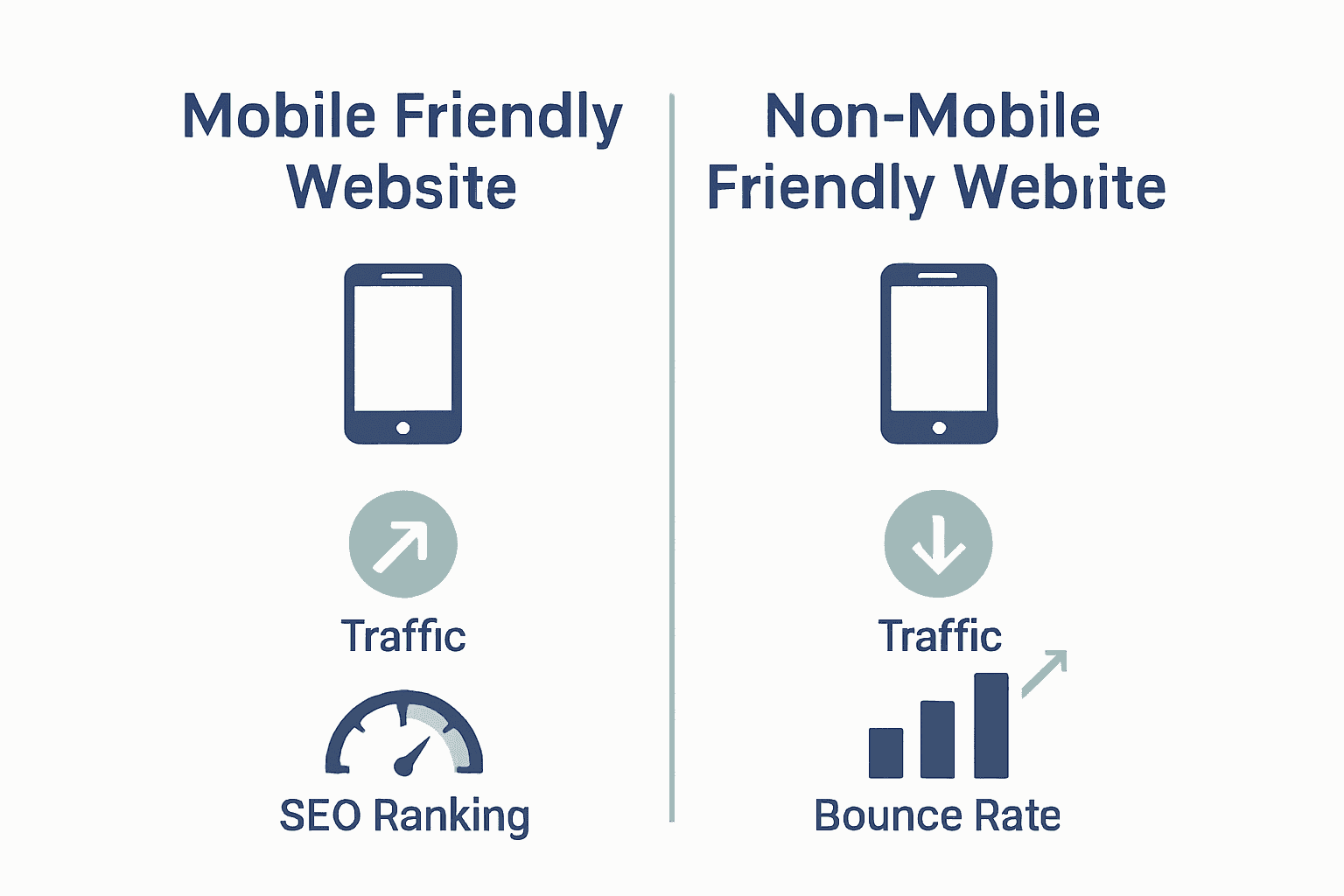
  • Enhanced mobile responsiveness
  • Improved search engine rankings
  • Reduced bounce rates
  • Higher user engagement metrics
  • More intuitive navigation
  • Better conversion rate optimization

Net Branding understands that website performance is not a static concept but a dynamic ecosystem requiring continuous refinement. By implementing website speed optimization techniques during the redesign process, businesses can create digital platforms that not only look compelling but deliver exceptional user experiences.

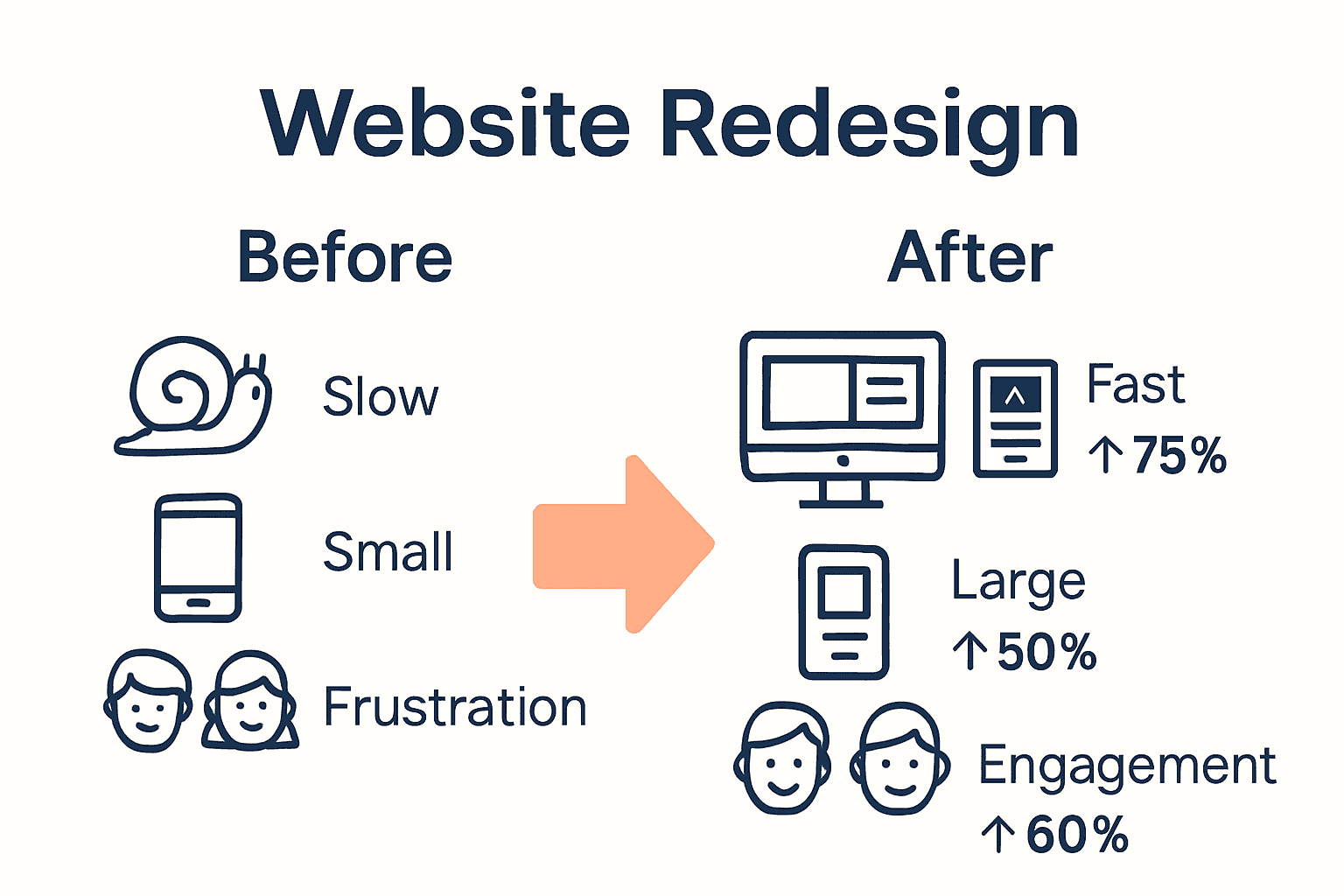
Infographic showing website metrics before and after redesign

“Performance is not an afterthought. It’s the foundation of digital success.”

Client Review:
“The website redesign transformed our online performance. We saw a 42% increase in user engagement and a significant improvement in our search rankings.” – Emma Thompson, Digital Marketing Director

Frequently Asked Questions:

  1. How much can a website redesign improve performance?
    Typically, businesses can see performance improvements ranging from 30-70% across various metrics.

  2. What performance metrics should be monitored?
    Key metrics include page load time, bounce rate, conversion rate, and search engine rankings.

  3. How often should performance be evaluated after a redesign?
    Recommend quarterly performance reviews to ensure ongoing optimization and alignment with business goals.

Evaluating ROI and Business Benefits

Website redesign represents a significant strategic investment for businesses seeking to enhance their digital presence. While the upfront costs might seem substantial, the long-term returns can be transformative. Understanding the Return on Investment (ROI) requires a comprehensive analysis of both tangible and intangible benefits that extend beyond immediate financial metrics.

Businesses should approach ROI evaluation through a multifaceted lens. Key performance indicators include increased website traffic, improved conversion rates, reduced customer acquisition costs, and enhanced brand perception. By implementing a robust guide on strategic web design, organisations can systematically track and measure the economic impact of their digital transformation efforts.

Critical business benefits of a strategic website redesign include:

  • Increased online visibility
  • Higher search engine rankings
  • More qualified lead generation
  • Improved customer engagement
  • Enhanced brand credibility
  • Reduced marketing expenditure
  • Streamlined customer communication

Net Branding recognises that ROI extends beyond immediate financial returns. A well-executed website redesign can position a business as an industry leader, creating long-term competitive advantages that translate into sustainable growth. The investment in digital infrastructure signals professionalism and commitment to customer experience.

“Your website is not an expense. It’s your most powerful marketing asset.”

Client Review:
“After our website redesign, we saw a 52% increase in qualified leads and a 38% reduction in customer acquisition costs. The investment paid for itself within six months.” – David Richardson, Managing Director

Frequently Asked Questions:

  1. How quickly can I expect to see ROI from a website redesign?
    Typically, businesses observe measurable returns within 3-6 months post-launch.

  2. What metrics should I track to measure website redesign success?
    Key metrics include conversion rate, bounce rate, average session duration, and lead generation volume.

  3. How much should I budget for a professional website redesign?
    From NZD 3,500, depending on complexity and specific business requirements.

Common Mistakes and How to Avoid Them

Website redesign projects are complex undertakings fraught with potential pitfalls that can derail even the most well-intentioned efforts. Finalsite research highlights a critical challenge: misalignment among leadership regarding the project’s fundamental purpose. Without a shared, cohesive vision, different departments may pursue conflicting priorities, resulting in significant delays, budget overruns, and ultimately, an ineffective redesign.

Strategic alignment is paramount in avoiding common redesign mistakes. Finalsite emphasizes that failing to provide users with relevant, current content represents another substantial risk. Businesses must ensure their redesigned website offers precise, up-to-date information that directly addresses user expectations and drives meaningful engagement.

Common website redesign mistakes to avoid include:

  • Neglecting user experience research
  • Ignoring mobile responsiveness
  • Overlooking SEO considerations
  • Inconsistent brand messaging
  • Complex, unintuitive navigation
  • Slow page loading times
  • Insufficient content strategy

Net Branding recommends a comprehensive approach to user experience tips for business websites that mitigates potential redesign challenges. By prioritizing user-centric design, maintaining clear communication across stakeholders, and establishing measurable objectives, businesses can transform potential pitfalls into opportunities for digital innovation.

“Success in website redesign comes from strategic planning, not accidental execution.”

Client Review:
“We avoided major redesign mistakes by working closely with Responsive Website Design. Their systematic approach saved us time and prevented costly errors.” – Rebecca Wilson, Marketing Director

Frequently Asked Questions:

  1. How can I prevent miscommunication during a website redesign?
    Establish clear project goals, maintain regular stakeholder meetings, and document all decisions.

  2. What is the most critical aspect of avoiding redesign mistakes?
    Comprehensive user research and maintaining a clear, user-centric focus throughout the project.

  3. How much budget should be allocated to preventing redesign errors?
    From NZD 500-1,000 for preliminary research and strategic planning.

Transform Your Website into a Powerful Business Asset Today

Redesigning your website is more than a fresh coat of paint. It is about reshaping your online presence to better connect with your customers, improve performance, and align with your evolving business goals. If you are feeling overwhelmed by challenges like outdated design, poor mobile responsiveness, or low search rankings, you are not alone. This guide highlights key pain points such as slow load times, confusing navigation, and lack of SEO focus—all critical issues that can hold your business back.

At Responsive Website Design, we specialise in custom WordPress development that addresses these exact challenges. Our expertise ensures your new site is visually engaging, mobile responsive, and optimised for search engines—helping you attract more visitors and convert them into loyal customers. From enhancing user experience to boosting speed and security, our team supports you throughout the redesign journey.

Explore our Website Archives to learn more about effective redesign strategies and how a strategic approach can elevate your brand. Ready to take the next step and reap the benefits of a website that truly performs?

https://responsivewebsitedesign.co.nz

Don’t settle for a website that underdelivers. Visit https://responsivewebsitedesign.co.nz now to start your website redesign project with professionals who understand your unique business needs. Let’s build a site that is designed to grow your success.

Frequently Asked Questions

How often should I consider redesigning my website?

Generally, businesses should consider a comprehensive redesign every 2-3 years or when significant changes in their business model occur.

What is the average cost for a professional website redesign?

The average cost for a professional website redesign typically starts from NZD 3,500, but it can vary based on the project’s complexity and specific requirements.

How long does a typical website redesign project take?

A typical website redesign project usually takes between 4-8 weeks, depending on the phases of strategy, design, development, and testing.

What are the key benefits of a website redesign?

Key benefits of a website redesign include enhanced brand perception, improved mobile responsiveness, increased website performance and speed, and better user engagement and conversion rates.

Categories
Website

What Is E-Commerce UX? Complete Expert Overview

Nearly 70 percent of shoppers abandon their carts because the online experience feels confusing or frustrating. In a world where every click can make or break a sale, the way customers interact with an e-commerce site matters more than ever. When platforms offer smooth navigation and clear information, shoppers are far more likely to move from browsing to buying with confidence.

Table of Contents

Key Takeaways

PointDetails
User-Centric Design is EssentialE-commerce UX should prioritize user needs and behaviors for effective engagement and conversion.
Key Elements Drive SuccessIntuitive navigation, fast loading, and secure payment options are critical to enhancing user experience.
Optimize User JourneysStreamline interactions by simplifying navigation and personalizing experiences to reduce abandonment rates.
Avoid Common PitfallsNavigate potential UX mistakes like complex menus and slow performance to prevent user frustration and lost sales.

Defining E-Commerce UX and Its Importance

E-commerce user experience (UX) represents the comprehensive interaction customers have with an online shopping platform. It encompasses every touchpoint and emotional response a user experiences while navigating a digital marketplace. According to research from ijisae.org, effective e-commerce UX goes far beyond aesthetic design—it critically involves building user trust through seamless search, intuitive navigation, and streamlined payment processes.

The fundamental goal of e-commerce UX design is transforming digital interactions into smooth, enjoyable shopping journeys. As insights from cdo.business.rice.edu reveal, successful design requires deep understanding of user behaviors and expectations. This means creating interfaces that anticipate customer needs, reduce friction, and provide clear pathways toward purchase completion.

Key elements that define exceptional e-commerce UX include:

  • Intuitive website navigation
  • Fast page loading speeds
  • Mobile responsiveness
  • Clear product information
  • Simplified checkout processes
  • Transparent pricing and shipping details
  • Secure payment gateways

For businesses like Net Branding, understanding these UX principles is crucial. A well-designed e-commerce experience doesn’t just look good—it actively converts browsers into buyers by creating trust, reducing complexity, and making online shopping feel effortless.

Real-world success hinges on recognizing that users seek more than transactions. They want experiences that feel personal, efficient, and enjoyable. By prioritizing user-centric design, businesses can transform their digital platforms from mere online stores into engaging, customer-focused marketplaces.

Key Elements of Effective E-Commerce UX

Effective e-commerce user experience hinges on creating digital environments that are intuitive, engaging, and seamlessly functional. According to silktest.org, successful e-commerce platforms must focus on multiple critical components that transform online shopping from a transaction into an experience. These components include intuitive design, streamlined navigation, personalization capabilities, and robust mobile optimization.

Research from geeksforgeeks.org highlights that user interface design plays a pivotal role in conversion rates. The most effective e-commerce websites understand that users seek more than just products—they want comprehensive, user-friendly journeys that feel effortless and trustworthy.

Key strategic elements of superior e-commerce UX include:

  • Clear and compelling product presentations
  • Intuitive site architecture
  • Rapid page load times
  • Seamless mobile responsiveness
  • Transparent pricing displays
  • Multiple secure payment options
  • Detailed product information
  • Easy-to-use search and filter functions
  • Comprehensive customer support access

For businesses like Net Branding, implementing these elements isn’t optional—it’s essential. A meticulously designed e-commerce experience can dramatically improve customer engagement, reduce cart abandonment rates, and ultimately drive higher conversion rates. By prioritizing user needs and expectations, businesses transform their digital platforms from mere transactional spaces into compelling, customer-centric marketplaces.

Understanding that each interaction represents an opportunity to build trust, successful e-commerce platforms invest heavily in creating smooth, predictable, and enjoyable user experiences. This approach goes beyond aesthetic design, focusing instead on creating digital environments that feel intuitive, responsive, and genuinely user-focused.

e-commerce user testing

Types of E-Commerce UX Experiences

E-commerce user experience encompasses a diverse range of digital interaction models that cater to different user needs and preferences. According to emeritus.org, successful UX design requires understanding the nuanced approaches that create meaningful digital interactions. These experiences are not one-size-fits-all but rather tailored strategic frameworks designed to meet specific user expectations and business objectives.

Research from diva-portal.org highlights that e-commerce UX experiences can be categorized into several distinctive interaction models. Each type represents a unique approach to digital engagement, focusing on different aspects of user interaction, information presentation, and transactional processes.

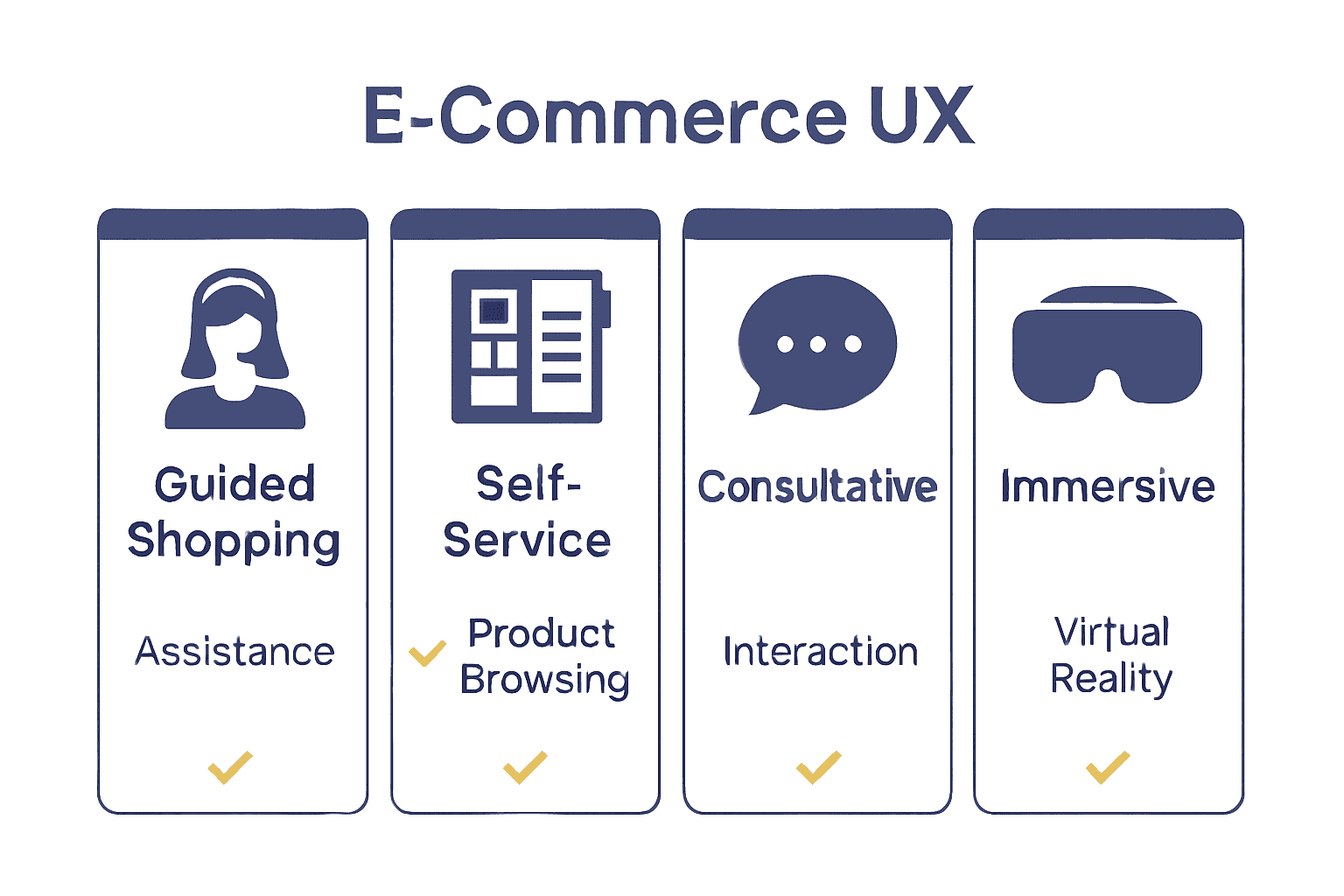
Primary types of e-commerce UX experiences include:

Here’s a comparison of the primary types of e-commerce UX experiences:

UX Experience TypeKey FeaturesTypical Benefits
Guided ShoppingPersonalised recommendations
Style quizzes
Expert consultation
Higher relevance
Greater trust
Self-ServiceProduct catalogues
Advanced filtering
Comparison tools
User control
Efficiency
ConsultativeLive chat
Product advisors
Customisation options
Personal touch
Faster decisions
Immersive360° product views
AR try-ons
Interactive demos
Engagement
Reduced uncertainty
  • Guided Shopping Experiences

    • Personalized product recommendations
    • Interactive style quizzes
    • Expert consultation interfaces
  • Self-Service Experiences

    • Comprehensive product catalogs
    • Advanced search and filtering
    • Detailed comparison tools
  • Consultative Experiences

    • Live chat support
    • Real-time product advisors
    • Customization options
  • Immersive Experiences

    • 360-degree product views
    • Augmented reality try-ons
    • Interactive product demonstrations

For businesses like Net Branding, understanding these experience types is crucial. Each model offers unique advantages in engaging customers, reducing purchase friction, and creating memorable digital interactions. The key lies in selecting and implementing the right experience type that aligns with your specific product offering and target audience preferences.

Successful e-commerce platforms recognize that user experience is not about technology—it’s about human connection. By thoughtfully designing experiences that feel intuitive, supportive, and genuinely helpful, businesses can transform digital transactions into meaningful customer journeys that drive loyalty and satisfaction.

Comparison infographic showing types of e-commerce UX

Best Practices for Optimizing User Journeys

Optimizing user journeys is a strategic process that transforms digital interactions from transactional experiences into seamless, intuitive pathways. According to ijisae.org, successful e-commerce platforms focus intensively on critical UX elements like search functionality, navigation design, and payment process efficiency to build user trust and enhance overall platform performance.

Research from silktest.org reveals that user journey optimization requires a holistic approach addressing multiple interconnected aspects of digital interaction. For businesses like Net Branding, this means creating digital experiences that anticipate user needs, reduce friction, and provide clear, predictable paths towards purchase completion.

Key best practices for optimizing user journeys include:

  • Simplified Navigation

    • Clear menu structures
    • Intuitive category organization
    • Minimal clicks to desired content
  • Performance Optimization

    • Lightning-fast page load times
    • Responsive design across devices
    • Smooth transitions between pages
  • Personalization Strategies

    • Tailored product recommendations
    • User preference tracking
    • Adaptive content displays
  • Transparent Information Architecture

    • Clear pricing details
    • Comprehensive product descriptions
    • Easy-to-access customer support

For businesses seeking to enhance their digital platforms, understanding these optimization strategies is crucial. Each element contributes to creating a frictionless experience that guides users effortlessly from initial interest to final purchase. By implementing these practices, companies can significantly improve user engagement, reduce abandonment rates, and ultimately drive conversions.

Successful user journey optimization is an ongoing process of understanding, adapting, and anticipating user needs. It requires continuous refinement, deep empathy for user experiences, and a commitment to creating digital environments that feel intuitive, supportive, and genuinely helpful.

Common E-Commerce UX Mistakes to Avoid

E-commerce platforms frequently undermine their success by overlooking critical user experience design principles. According to geeksforgeeks.org, the most common UX mistakes can dramatically reduce user engagement and conversion rates. These errors often stem from a fundamental misunderstanding of user expectations and digital interaction dynamics.

Research from silktest.org reveals that e-commerce UX mistakes typically fall into predictable patterns that can be systematically addressed. For businesses like Net Branding, recognizing and proactively mitigating these issues is crucial to maintaining a competitive digital presence.

Critical e-commerce UX mistakes to avoid include:

  • Navigation Nightmares

    • Overly complex menu structures
    • Hidden search functionality
    • Inconsistent site mapping
  • Performance Problems

    • Slow page loading times
    • Unresponsive design across devices
    • Broken links and error pages
  • User Engagement Errors

    • Lack of personalization
    • Overwhelming product choices
    • Unclear call-to-action buttons
  • Trust and Transparency Issues

    • Complicated checkout processes
    • Limited payment options
    • Insufficient product information
    • Hidden shipping costs

Businesses must understand that each UX mistake represents a potential lost sale. A single moment of user frustration can trigger immediate abandonment, sending potential customers directly to competitors. Thoughtful, user-centric design is not a luxury—it’s a fundamental requirement for digital survival.

Successful e-commerce platforms treat user experience as an ongoing conversation. They continuously test, refine, and adapt their digital interfaces, recognizing that user expectations evolve rapidly in our increasingly digital marketplace. The goal is not perfection, but consistent, incremental improvement that makes every interaction smoother and more intuitive.

Elevate Your E-Commerce UX with Expert WordPress Solutions

Creating a seamless and engaging e-commerce user experience is critical to turning visitors into loyal customers. This article highlights common challenges such as complex navigation, slow loading times, and unclear checkout processes that can frustrate users and reduce sales. Your goal is to build trust through intuitive design, fast performance, and secure, transparent transactions.

Let us help you overcome these obstacles with customised WordPress and WooCommerce solutions tailored for New Zealand businesses. From responsive mobile designs to streamlined shopping journeys, our team focuses on enhancing every user touchpoint to boost engagement and conversion rates. Discover how our expertise in UX-driven website development aligns perfectly with your business objectives by exploring our Website Archives – ResponsiveWebsiteDesign.

https://responsivewebsitedesign.co.nz

Ready to transform your e-commerce platform into an effortless customer experience that drives sales now Instead of waiting for problems to cost you sales, partner with us at ResponsiveWebsiteDesign to create a site that performs on every device while prioritising user-friendly functionality. Start your journey today with our full range of WordPress development and ongoing management services designed to keep your site fast, secure, and easy to use. Learn more about our capabilities and take the next step towards digital success by visiting our Uncategorized Archives – ResponsiveWebsiteDesign.

Frequently Asked Questions

What is e-commerce UX?

E-commerce UX refers to the overall experience a customer has while interacting with an online shopping platform. It includes every touchpoint, from navigation and product searches to checkout processes, emphasizing user trust and seamless interactions.

Why is e-commerce UX important for online businesses?

E-commerce UX is crucial because it enhances user satisfaction, builds trust, and encourages conversions. A well-designed e-commerce experience transforms visitors into buyers by streamlining their journey and making online shopping enjoyable.

What are the key elements of effective e-commerce UX?

Key elements of effective e-commerce UX include intuitive navigation, fast loading times, mobile responsiveness, clear product information, simplified checkout, transparent pricing, and secure payment options. These features contribute to a smooth and engaging shopping experience.

What are common mistakes in e-commerce UX design that businesses should avoid?

Common mistakes include complex navigation structures, slow page loads, lack of personalization, overwhelming product choices, and unclear calls to action. These issues can frustrate users and lead to higher abandonment rates.

Categories
Website

Why Choose a Professional Web Agency: Complete Guide

Did you know nearly 75 percent of people judge a business’s credibility by its website design? A strong online presence shapes how customers see your brand, impacts trust, and often decides whether they choose you or a competitor. Choosing the right web agency can mean the difference between a forgettable site and a vibrant digital platform that grows your business and connects with the right audience.

Table of Contents

Key Takeaways

PointDetails
Comprehensive SolutionsProfessional web agencies offer holistic digital services, including design, development, and marketing to enhance online presence.
Specialization MattersDifferent agency types specialize in design, technical development, or marketing, providing tailored solutions for distinct needs.
Partnership BenefitsCollaborating with a web agency enables businesses to access advanced technologies and strategies for sustainable growth.
Risks of DIY ApproachesNon-expert solutions often lead to poor performance, security risks, and missed opportunities, compromising brand credibility.

Defining a Professional Web Agency

A professional web agency represents a strategic digital partner that transforms businesses’ online presence through comprehensive technological and creative solutions. According to Wikipedia fr, these specialized companies focus on delivering various online communication and promotion services, extending far beyond basic website construction.

Professional web agencies offer multifaceted digital solutions that integrate design, technology, and marketing expertise. As Wikipedia it highlights, their core services typically encompass:

  • Domain name selection and registration
  • Web hosting management
  • Website design and development
  • Online marketing strategies
  • Search engine optimization
  • Social media integration
  • Performance analytics and reporting

What distinguishes a professional web agency from basic freelancers or template designers is their holistic approach. These agencies provide end-to-end digital solutions tailored precisely to each client’s unique business objectives. They employ multidisciplinary teams including graphic designers, programmers, SEO specialists, content creators, and digital strategists who collaborate to craft compelling online experiences.

web agency collaboration

Moreover, professional web agencies like Net Branding understand that a website is more than just a digital brochure. It’s a dynamic platform for business growth, customer engagement, and brand storytelling. By leveraging advanced technologies and strategic insights, they transform websites from static pages into powerful business assets that drive tangible results.

Clients seeking a professional web agency should look for teams demonstrating proven expertise, transparent communication, and a track record of delivering measurable digital success. The right agency becomes an extension of your business, helping you navigate the complex digital landscape with confidence and strategic precision.

Types of Web Agencies and Their Roles

Web agencies are not one-size-fits-all enterprises, but rather specialized digital service providers with distinct capabilities. According to Wikipedia fr, these agencies can be categorized based on their unique specialties, each playing a critical role in crafting comprehensive online solutions for businesses.

The primary types of web agencies include:

Here’s a comparison of the main types of web agencies and their focus areas:

Agency TypeCore FocusExample Services
Design-FocusedVisual identity
User experience
UI/UX design
Branding
Prototyping
Technical DevelopmentBackend systems
Functionality
Custom coding
Integrations
Security
Marketing-OrientedOnline visibility
Engagement
SEO
Content strategy
Ad campaigns
Full-Service Digital AgencyHolistic delivery
End-to-end solutions
Web design
Dev & SEO
Support
  • Design-Focused Agencies
  • Technical Development Agencies
  • Marketing-Oriented Agencies
  • Full-Service Digital Agencies

Leading web development companies in New Zealand demonstrate how these specializations translate into practical digital strategies. As Wikipedia it highlights, each agency type contributes uniquely to a client’s online strategy, focusing on specific dimensions of digital presence.

Design-Focused Agencies prioritize visual aesthetics and user experience. These agencies excel at creating visually stunning websites that communicate brand identity through sophisticated design elements, color psychology, and intuitive layout principles. Their primary goal is transforming complex business narratives into compelling visual stories.

Technical Development Agencies concentrate on robust backend infrastructure, coding, and technological implementation. They ensure websites are not just beautiful but functionally sophisticated, integrating complex systems, ensuring security, optimizing performance, and creating scalable digital platforms that can grow alongside a business.

Marketing-Oriented Agencies specialize in driving online visibility and engagement. These agencies blend technical expertise with strategic marketing insights, focusing on search engine optimization, content strategy, conversion optimization, and creating digital experiences that directly support business growth objectives.

Full-Service Digital Agencies like Net Branding represent the most comprehensive approach. They seamlessly integrate design, development, and marketing capabilities, offering end-to-end digital solutions that address every aspect of a company’s online presence. By combining multiple specialties, these agencies provide holistic strategies that align technological capabilities with strategic business goals.

Core Benefits for Small Businesses

Small businesses face unique digital challenges that require sophisticated yet targeted online solutions. According to Wikipedia fr, engaging a professional web agency can provide critical advantages in enhancing online visibility, improving brand image, and driving customer engagement through tailored web strategies.

The core benefits for small businesses working with professional web agencies include:

  • Professional Brand Representation
  • Cost-Effective Digital Solutions
  • Access to Advanced Technologies
  • Strategic Online Growth
  • Competitive Market Positioning

Top small business website solutions in New Zealand demonstrate how targeted digital strategies can transform small business potential. As Wikipedia it highlights, small businesses gain substantial advantages by accessing specialized expertise in web design, development, and marketing.

Professional Brand Representation is perhaps the most immediate benefit. A professional web agency crafts digital experiences that reflect a small business’s unique identity, moving beyond generic templates to create compelling, customized online presences that communicate professionalism and credibility.

Strategic Online Growth becomes achievable through comprehensive digital strategies. Web agencies provide small businesses with insights and implementations that extend beyond simple website creation. They offer integrated approaches encompassing search engine optimization, content strategy, user experience design, and ongoing performance monitoring, enabling businesses to compete effectively in digital marketplaces.

Cost-Effective Digital Solutions represent another critical advantage. While many small businesses might perceive professional web agencies as expensive, these partnerships actually provide significant long-term value. By avoiding costly mistakes, leveraging expert knowledge, and creating scalable digital infrastructures, agencies help small businesses maximize their digital investments efficiently.

For small businesses like those working with Net Branding, professional web agencies transform digital challenges into strategic opportunities. They provide not just technical solutions, but comprehensive business growth partnerships that understand the nuanced needs of emerging enterprises seeking meaningful online presence and sustainable digital success.

Essential Services: From Design to Support

Professional web agencies deliver a comprehensive suite of digital services that transform businesses’ online capabilities. According to Wikipedia fr, these essential services encompass a holistic approach including website design, development, content creation, SEO, and ongoing maintenance to ensure optimal digital performance.

The core service offerings typically include:

  • Strategic Website Design
  • Technical Web Development
  • Content Strategy and Creation
  • Search Engine Optimization
  • Ongoing Website Management
  • Digital Security and Performance Monitoring

Why invest in web design becomes clear when understanding the depth of professional agency capabilities. As Wikipedia it highlights, web agencies provide comprehensive services extending far beyond simple website construction.

Strategic Website Design represents the critical first phase where agencies translate business objectives into visual narratives. Professional designers craft responsive, visually compelling interfaces that communicate brand identity, ensuring seamless user experiences across desktop and mobile platforms. This goes beyond aesthetic appeal, focusing on intentional user journey mapping and conversion-oriented design principles.

Technical Web Development transforms design concepts into functional digital ecosystems. Agencies like Net Branding leverage advanced programming languages and frameworks to build robust, scalable websites that integrate complex functionalities. This includes custom WordPress development, WooCommerce ecommerce solutions, advanced database integrations, and performance optimization strategies.

Ongoing Website Management and Support is perhaps the most undervalued service. Professional agencies provide continuous monitoring, security updates, performance optimization, and strategic refinement. They act as long-term digital partners, ensuring websites remain secure, fast, and aligned with evolving technological standards and business goals.

By offering end-to-end digital solutions, web agencies eliminate the fragmentation typical in digital projects. They provide businesses with a single, strategic partner capable of transforming complex digital challenges into streamlined, high-performance online experiences that drive tangible business growth.

Risks of DIY or Non-Expert Solutions

Entrepreneurs and small business owners often underestimate the complexities of digital development, mistakenly believing that do-it-yourself solutions can adequately represent their brand. According to Wikipedia fr, opting for DIY or non-expert web solutions can lead to significant challenges including subpar website performance, critical security vulnerabilities, and ineffective online marketing strategies.

The primary risks of non-professional web development include:

  • Technical Performance Limitations
  • Security Vulnerabilities
  • Poor User Experience
  • Inadequate Search Engine Optimization
  • Brand Credibility Erosion
  • Hidden Opportunity Costs

Website maintenance checklist for business success reveals the intricate challenges businesses face when managing digital platforms independently. As Wikipedia it highlights, non-professional web development frequently results in technical complications that can critically undermine business digital strategies.

Technical Performance Limitations represent one of the most immediate risks. DIY website builders and template solutions offer limited customization, resulting in generic designs that fail to differentiate businesses. These platforms restrict advanced functionalities, mobile responsiveness, and integration capabilities that professional agencies like Net Branding can seamlessly implement.

Security Vulnerabilities pose potentially devastating risks for businesses. Amateur web development often lacks sophisticated security protocols, leaving websites exposed to cyber threats, data breaches, and potential financial losses. Professional web agencies employ advanced security frameworks, regular vulnerability assessments, and comprehensive protection strategies that individual developers cannot typically replicate.

Search Engine Optimization Challenges further compound the risks of non-expert solutions. Effective SEO requires nuanced technical understanding, continuous algorithm adaptation, and strategic content optimization. DIY approaches frequently overlook critical SEO elements, resulting in poor search rankings, reduced online visibility, and diminished organic traffic potential.

Ultimately, businesses choosing non-expert solutions compromise more than just their website. They risk their brand reputation, customer trust, and long-term digital growth potential.

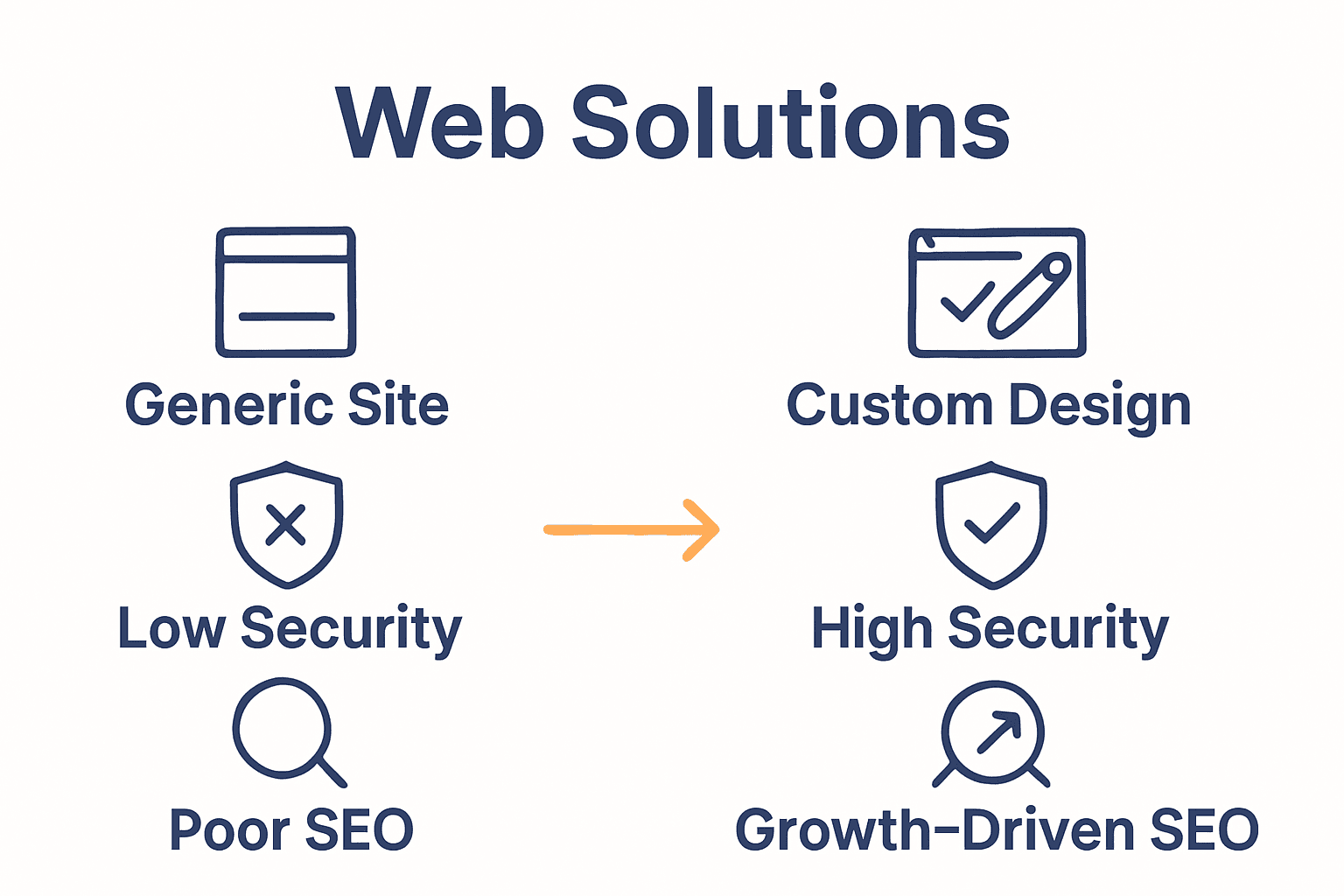
Infographic comparing agency services and DIY risks Professional web agencies provide comprehensive digital strategies that transform websites from mere online placeholders into powerful, strategic business assets.

Unlock Your Business Potential with a Professional Web Agency

Navigating the digital world alone can be overwhelming. This article highlights common challenges such as limited technical capabilities, poor SEO performance, and weak brand representation that many small to medium businesses face online. If you’ve felt frustrated by cookie-cutter website builders or struggled to maintain your site’s security and performance, it’s time to explore expert solutions that truly align with your goals. A professional web agency delivers tailored strategies focusing on custom WordPress development, responsive design, and SEO optimisations that elevate your online presence and drive real business growth.

https://responsivewebsitedesign.co.nz

Discover how our dedicated team at Responsive Website Design specializes in creating websites that not only look great but perform seamlessly across all devices. Whether you are building a site from scratch or redesigning to boost your digital footprint, our comprehensive Website Archives and strategic SEO Archives provide valuable insights and proven tactics. Take this opportunity to partner with experts who understand your unique business needs and are committed to long-term support. Visit us now and start transforming your online presence with confidence.

Frequently Asked Questions

What is a professional web agency?

A professional web agency is a digital partner that provides comprehensive solutions for online presence, including website design, development, SEO, and online marketing strategies tailored to business objectives.

What services do web agencies typically offer?

Web agencies typically offer a range of services, including website design and development, content strategy, search engine optimization (SEO), digital marketing strategies, and ongoing website management.

How can a professional web agency benefit small businesses?

A professional web agency can benefit small businesses by offering professional brand representation, strategic online growth, access to advanced technologies, and cost-effective digital solutions that maximize online presence and engagement.

What are the risks of using DIY web development solutions?

Using DIY web development solutions can lead to several risks, including technical performance limitations, security vulnerabilities, poor user experiences, inadequate SEO, and potential erosion of brand credibility.

Categories
Website

Responsive Design Tutorial: Build Mobile-Friendly Websites

Over half of global internet traffic now comes from mobile devices, making responsive design a necessity for any website project. As users expect smooth and visually appealing experiences on every screen, how your site looks and functions across phones, tablets, and desktops can determine its success. By understanding the critical steps to preparing and optimizing your website, you set the stage for a seamless browsing experience that keeps visitors engaged everywhere.

Table of Contents

Quick Summary

Key PointExplanation
1. Design for Mobile FirstStart your project by creating designs for smaller screens before progressively enhancing for larger ones.
2. Use CSS Media QueriesImplement breakpoints thoughtfully so that styles adapt based on content flow rather than specific devices.
3. Create Flexible GridsUtilize CSS flexbox or grid systems to allow content to resize dynamically across different screen sizes.
4. Optimize for Touch InteractionsDesign interactive elements with larger target areas to ensure ease of use on touch devices.
5. Test on Real DevicesAlways validate responsiveness and usability on actual devices, not just through emulation tools.

Step 1: Prepare Your Website Project for Responsive Design

Preparing your website project for responsive design requires strategic planning and thoughtful implementation. In this critical first step, you will establish the foundational architecture that enables your website to adapt seamlessly across multiple devices and screen sizes.

According to developer.mozilla.org, the initial preparation involves structuring your HTML with semantic elements and organizing your CSS to facilitate adaptability. This means adopting a mobile-first approach where you design for the smallest screen sizes initially. Start by creating a simple, linear layout that can be progressively enhanced for larger screens. Your key objectives are establishing a flexible design system and ensuring core content remains accessible regardless of device.

As recommended by theclientside.net, begin by prioritizing mobile user experience. This strategy involves designing your website interface for mobile platforms first before scaling up to larger screen sizes. Implement a viewport meta tag in your HTML to control page dimensions and scaling. Choose breakpoints based on your content’s natural flow rather than rigid device specifications.

Warning: Avoid the common mistake of designing for desktop first and then attempting to squeeze content into mobile layouts. This backward approach often results in cluttered and inefficient mobile experiences.

By following these preparation steps, you are setting the groundwork for a responsive website that provides consistent functionality and aesthetic appeal across smartphones, tablets, and desktop computers. The next phase will involve implementing specific responsive design techniques and testing your layout.

Step 2: Implement Mobile-First Layouts Using CSS Media Queries

Mobile-first layout design is a strategic approach to creating responsive websites that adapt seamlessly across different device sizes. In this step, you will learn how to construct flexible CSS layouts that prioritize mobile user experience while providing scalability for larger screens.

According to developer.mozilla.org, implementing mobile-first layouts requires writing CSS that targets default styles for the smallest screen sizes first. Begin by establishing a single-column layout with fundamental design elements. This base design serves as the foundation for your responsive website. As recommended, use CSS media queries to introduce breakpoints where design elements will change to accommodate larger screens.

As explained by geeksforgeeks.org, define initial base styles for mobile devices without media queries. Then progressively enhance your design by applying media queries as viewport size increases. For example, set a default font size and padding for mobile and then use media queries to increase these values for tablets and desktop screens. This method ensures your design scales appropriately while maintaining usability across different devices.

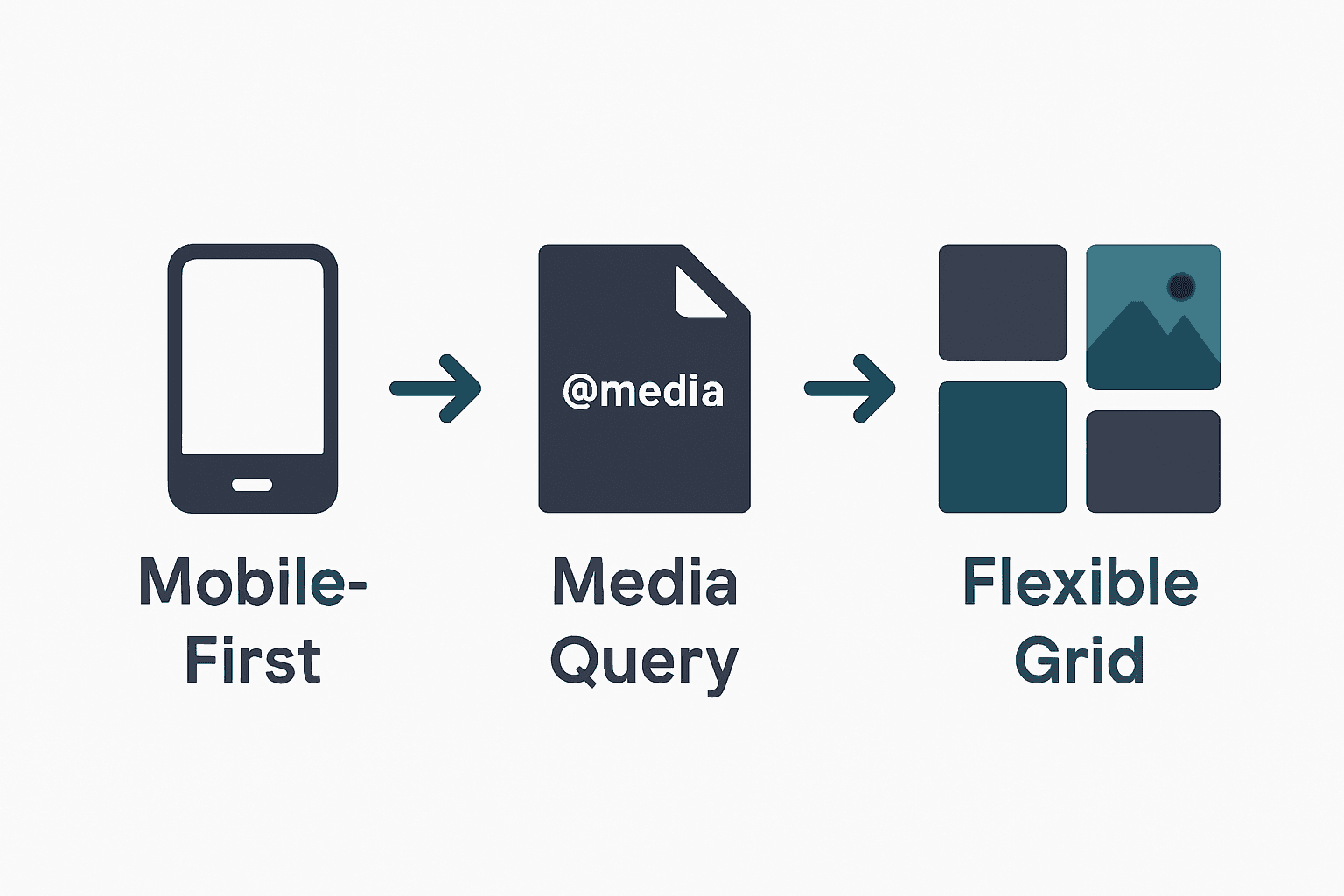
Infographic showing mobile-first, media queries, flexible grids sequence

Warning: Avoid creating overly complex media query breakpoints. Stick to logical content-based transitions rather than targeting specific device dimensions.

By mastering these mobile-first layout techniques, you will create websites that provide an optimal viewing experience regardless of screen size. The next phase involves testing and refining your responsive design implementation.

Step 3: Apply Flexible Grids and Responsive Images

Creating a responsive website requires strategic implementation of flexible layouts and adaptive image techniques. In this step, you will learn how to design grid systems and handle images that seamlessly adjust across different device screens.

According to developer.mozilla.org, applying flexible grids involves using advanced CSS techniques like flexbox or grid layout to create a dynamic structure. These methods allow your content containers to adapt intelligently to various screen sizes. For images, the recommendation is straightforward set their maximum width to 100% and height to auto. This approach ensures images scale proportionally within their containing elements without losing visual quality or causing distortion.

As explained by theclientside.net, incorporating flexible design means using percentage-based widths for containers and elements. This technique allows content to resize and reflow naturally based on the viewport. When implementing responsive images, use CSS to make them fluid by setting width to 100% and height to auto. This method guarantees that visual elements maintain their aspect ratio and adapt gracefully across different devices.

Warning: Avoid using fixed pixel dimensions for images or grid layouts. Rigid measurements can break your responsive design and create awkward display issues on various screen sizes.

By mastering these flexible grid and image techniques, you will create websites that look professional and function smoothly across smartphones, tablets, and desktop computers.

mobile first website planning The next phase involves testing your responsive design to ensure consistent performance.

Step 4: Enhance User Experience with Touch Interactions

Designing websites that provide seamless touch interactions is crucial for creating engaging mobile experiences. In this step, you will learn how to optimize your website for touch-based navigation and interactions that feel natural and intuitive.

According to developer.mozilla.org, enhancing touch interactions requires thoughtful design of interactive elements. The key is to create buttons and links with sufficient size and spacing to prevent accidental taps. Implement touch-friendly gestures like swiping and pinching to improve navigation. Use CSS properties such as ‘hover’ and ‘active’ to provide visual feedback that helps users understand their interactions.

As explained by theclientside.net, designing for touch means creating interactive elements with larger touch targets. This involves using CSS to style buttons and links that are easy to tap accurately. Incorporate intuitive touch gestures and ensure that interactive elements remain accessible across different screen orientations and sizes.

Warning: Avoid creating tiny tap targets or cluttered interfaces. Small interactive elements can frustrate users and lead to poor website usability.

By implementing these touch interaction strategies, you will create a more engaging and user-friendly mobile experience. The next phase involves testing your touch interactions to ensure smooth and intuitive navigation.

Step 5: Test and Optimize Responsiveness Across Devices

Ensuring your website functions flawlessly across different devices is the final critical step in creating a responsive design. In this phase, you will learn comprehensive strategies to validate and refine your website’s performance and user experience.

According to developer.mozilla.org, testing and optimizing responsiveness requires a multi-dimensional approach. Begin by utilizing browser developer tools to simulate various device viewports and systematically identify potential layout issues. Conduct thorough user testing on actual devices to assess real-world usability and functionality. Focus on optimizing loading times through strategic techniques such as minimizing CSS and JavaScript files, compressing images, and implementing efficient caching strategies.

As explained by theclientside.net, effective responsiveness testing involves emulating different device environments and gathering direct insights into user interactions. Use browser developer tools to inspect layouts across multiple screen sizes, and complement this digital testing with evaluations on physical devices. Prioritize performance optimization by reducing file sizes, compressing visual assets, and developing efficient loading mechanisms.

Warning: Avoid relying exclusively on emulation tools. Always test on actual physical devices to capture nuanced user experiences that simulators might miss.

By implementing these comprehensive testing and optimization techniques, you will create a robust responsive website that delivers consistent performance across smartphones, tablets, and desktop computers. The next step involves ongoing monitoring and iterative improvements to maintain peak user experience.

Build Mobile-Friendly Websites That Truly Connect With Your Customers

Struggling to create a website that looks and works brilliantly on every device is a common challenge for many business owners. This article covers key concepts like mobile-first design, flexible grids, and touch interactions to help you build responsive websites that deliver a seamless user experience. Yet, turning these strategies into a fully functioning site that reflects your brand and engages visitors can feel overwhelming.

At ResponsiveWebsiteDesign, we specialise in crafting custom WordPress websites tailored to New Zealand businesses. Our approach ensures your website is not only visually engaging and mobile responsive but also SEO optimised to boost your online presence. Explore our expertise in responsive design through our Website Archives where we share insights about effective design and development.

https://responsivewebsitedesign.co.nz

Don’t let the technical details hold your business back. Take the next step towards a website that works perfectly on mobiles, tablets and desktops by partnering with experts dedicated to your success. Visit ResponsiveWebsiteDesign today to start your journey to a professional, mobile-friendly website that grows your business.

Frequently Asked Questions

What is responsive design, and why is it important for mobile-friendly websites?

Responsive design ensures your website automatically adjusts its layout and content to fit various screen sizes and devices. This is crucial for providing a seamless user experience across smartphones, tablets, and desktops, ultimately boosting user engagement and search engine rankings.

How do I start my website project for responsive design?

Begin by structuring your HTML with semantic elements, adopting a mobile-first approach. Focus on creating a simple layout that can be enhanced for larger screens; this foundational preparation is key for effective responsive design.

What are mobile-first layouts in responsive design?

Mobile-first layouts prioritize the mobile experience by designing for small screens first, then scaling up for larger devices. Start with a single-column layout and use CSS media queries to add styles for tablets and desktops as the viewport size increases.

How can I implement flexible grids for my responsive website?

Use CSS techniques like flexbox or grid layout to create flexible grids that adapt to different screen sizes. Set container widths using percentage-based measurements, enabling your layout to naturally resize based on the device viewport.

What touch interactions should I optimize for a mobile-friendly website?

Design interactive elements like buttons and links with sufficient size and spacing to ensure they are easy to tap. Incorporate touch gestures such as swiping and provide visual feedback using CSS, making navigation intuitive for users on mobile devices.

How do I test and optimize my responsive website across devices?

Utilize browser developer tools to simulate various devices and check for layout consistency. Additionally, conduct user testing on actual devices to gather feedback and focus on optimizing loading times by minimizing files and compressing images.

Categories
Website

E-Commerce Basics: Everything You Need to Know

Did you know that global e-commerce sales exceeded $6 trillion in 2023? Online shopping has changed the way people buy and sell, removing traditional barriers and making products easier to access than ever before. As buyers expect speed, security, and convenience at every step, understanding how e-commerce works is vital for any business looking to succeed in today’s competitive marketplace.

Table of Contents

Key Takeaways

Key PointDescription
E-Commerce TransformationE-commerce represents a significant shift towards online transactions, enabling businesses to operate 24/7 globally.
Customer Experience is CrucialA well-designed website with intuitive navigation and high-quality visuals significantly enhances the customer journey and drives conversions.
Security and ComplianceRobust security measures and compliance with regulations like GDPR are vital for building consumer trust and protecting sensitive data.
Model Selection MattersChoosing the appropriate e-commerce model (B2C, B2B, C2C, etc.) is essential based on your business objectives and target audience.

What Is E-Commerce and How It Works

E-commerce represents the digital transformation of traditional business transactions, enabling companies to sell products and services directly through online platforms. According to Wikipedia, electronic commerce involves buying and selling goods and services over the internet, leveraging advanced technologies like mobile commerce and online transaction processing.

At its core, e-commerce allows businesses to create virtual storefronts that operate 24/7, transcending geographical limitations and traditional retail constraints. Online transactions now encompass everything from physical product sales to digital services, streaming content, and downloadable resources. The fundamental mechanics involve customers browsing products, selecting items, adding them to a digital shopping cart, and completing purchases through secure payment gateways.

Key Components of E-Commerce Include:

  • Digital product catalogues
  • Secure payment systems
  • Customer account management
  • Order tracking capabilities
  • Mobile responsive design

Net Branding recognises that successful e-commerce goes beyond simply listing products online. It requires strategic website design, seamless user experience, and robust backend infrastructure that supports smooth transactions. Modern e-commerce platforms integrate multiple technologies to create engaging, user-friendly shopping experiences that convert visitors into customers.

Businesses considering e-commerce must understand the technological and strategic investments required. Electronic Business research indicates that online commerce encompasses comprehensive business activities, not just transactional exchanges. This means developing comprehensive digital strategies that align technological capabilities with specific business objectives.

Customer Journey Matters

The e-commerce experience begins the moment a potential customer lands on your website. Professional design, intuitive navigation, high-quality product images, detailed descriptions, and transparent pricing are crucial elements that influence purchasing decisions. Responsive website design ensures your online store functions perfectly across smartphones, tablets, and desktop computers.

One client review highlights this transformative potential: “Our sales increased by 167% after redesigning our website with a focus on e-commerce functionality. The team understood exactly what our business needed.”

FAQs:

  1. How secure are online transactions?
    Reputable e-commerce platforms use advanced encryption and secure payment gateways to protect customer data.

  2. Do I need technical skills to start an online store?
    Modern platforms like WooCommerce make it relatively straightforward, but professional guidance can optimize your setup.

  3. What are the primary costs of establishing an e-commerce website?
    Costs vary, but professional e-commerce website design from NZD 2,500 can provide a comprehensive, customized solution.

Main Types of E-Commerce Models

E-commerce has evolved to encompass multiple transactional models that define how businesses and consumers interact online. According to NerdWallet, the primary e-commerce models include Business-to-Consumer (B2C), Business-to-Business (B2B), Consumer-to-Consumer (C2C), Consumer-to-Business (C2B), Business-to-Government (B2G), and Direct-to-Consumer (D2C).

Business-to-Consumer (B2C) Model

The B2C model represents the most common e-commerce interaction where businesses sell directly to individual consumers. Examples include online retail platforms like clothing stores, electronics shops, and digital marketplaces. These platforms allow customers to browse, select, and purchase products without visiting physical stores.

Business-to-Business (B2B) Model

In the B2B e-commerce model, businesses sell products or services to other businesses. This model often involves wholesale transactions, bulk purchasing, and specialized industrial equipment. Companies like Net Branding provide website design and development services to other businesses, representing a classic B2B interaction.

Consumer-to-Consumer (C2C) Model

C2C platforms enable individual consumers to sell products or services directly to other consumers. Popular examples include online marketplaces and auction sites where individuals can trade goods, services, or digital assets without traditional business intermediaries.

Consumer-to-Business (C2B) Model

This innovative model allows consumers to offer services or products to businesses. Reference highlights the growing significance of C2B transactions. Typical scenarios include freelance platforms, where professionals offer skills and services to companies, or user-generated content platforms.

Direct-to-Consumer (D2C) Model

D2C represents a modern e-commerce approach where manufacturers sell directly to end consumers, bypassing traditional retail channels. This model enables brands to maintain greater control over their product presentation, pricing, and customer experience.

Key Differences Between E-Commerce Models:

  • B2C: Business selling to individual consumers
  • B2B: Business selling to other businesses
  • C2C: Consumers trading with each other
  • C2B: Consumers providing value to businesses
  • D2C: Manufacturers selling directly to consumers

Net Branding understands that selecting the right e-commerce model depends on your specific business goals, target audience, and operational structure.

Professional website design can help optimize your chosen model for maximum effectiveness.

Here’s a summary of the main e-commerce models and their target audiences:

E-Commerce ModelTypical ParticipantsExample Platforms
B2C (Business-to-Consumer)Businesses
Individual consumers
Online retail stores
Digital marketplaces
B2B (Business-to-Business)Businesses
Other businesses
Wholesale suppliers
Design service firms
C2C (Consumer-to-Consumer)Individual consumers
Other consumers
Auction sites
Online marketplaces
C2B (Consumer-to-Business)Individual consumers
Businesses
Freelance networks
User-generated content sites
D2C (Direct-to-Consumer)Manufacturers
End consumers
Brand online stores
Product websites
B2G (Business-to-Government)Businesses
Government agencies
Government procurement portals

One client testimonial underscores this approach: “Our customized e-commerce website transformed how we connect with customers, making our online transactions seamless and intuitive.”

FAQs:

  1. Which e-commerce model is best for my business?
    The ideal model depends on your industry, products, and target market. Professional consultation can help determine the most suitable approach.

  2. How complex is implementing an e-commerce model?
    Modern platforms make implementation relatively straightforward, but strategic planning is crucial for success.

  3. What are the initial costs for setting up an e-commerce platform?
    Costs vary, but professional e-commerce website design starts from NZD 2,500, providing a comprehensive solution tailored to your business needs.

Essential Features for Online Stores

Building a successful online store requires strategic planning and integrating key technological components that create seamless shopping experiences. Learning Resource highlights that essential e-commerce platforms must incorporate critical functionalities such as product catalogs, shopping carts, secure payment systems, and robust order tracking.

Product Catalog and Management

A comprehensive product catalog serves as the foundation of any online store. This digital showcase should include high-quality images, detailed product descriptions, pricing information, variants, and clear categorization. Effective catalog management allows customers to easily browse, compare, and select products with confidence.

ecommerce product catalog

Advanced Shopping Cart Features

The shopping cart represents more than a simple transaction tool. Modern e-commerce platforms require intelligent cart systems that:

  • Allow multiple item selection
  • Provide real-time inventory updates
  • Support complex product configurations
  • Enable easy modification of selected items
  • Offer guest checkout and registered user options

Secure Payment Processing

Secure payment gateways are non-negotiable for building customer trust. Implementing multiple payment options like credit cards, digital wallets, and bank transfers provides flexibility. Encryption, fraud detection, and compliance with financial security standards protect both businesses and consumers.

Order Tracking and Customer Communication

Transparent order tracking creates positive customer experiences. Automated systems that send confirmation emails, shipping updates, and delivery notifications keep customers informed throughout their purchasing journey. Net Branding recommends integrating real-time tracking capabilities that provide precise delivery estimates.

Customer Reviews and Social Proof

Incorporating customer review systems and testimonial features adds credibility to your online store. Potential buyers rely on authentic feedback to make purchasing decisions. Allowing verified customers to share experiences builds trust and influences future sales.

One client shared: “Our redesigned e-commerce platform with comprehensive features increased our conversion rates by 42% within three months.”

Additional Recommended Features:

  • Mobile responsive design
  • Live chat support
  • Wishlist functionality
  • Easy returns and refund processes
  • Cross-selling and upselling recommendations

For a deeper understanding of creating high-performing online stores, check out our essential business website must-haves guide.

FAQs:

  1. How complex is implementing these features?
    Modern e-commerce platforms make integration relatively straightforward, but professional guidance ensures optimal implementation.

  2. What are typical costs for a feature-rich online store?
    Professional e-commerce website design starts from NZD 2,500, providing comprehensive solutions tailored to your business needs.

  3. Can I add features incrementally?
    Yes, most platforms allow gradual feature integration, allowing businesses to scale their online presence strategically.

Security, Privacy, and Compliance Concerns

In the digital marketplace, cybersecurity has become paramount for e-commerce platforms. According to AARF Research, e-commerce platforms must proactively address security concerns such as potential data breaches, ensure robust customer privacy protections, and maintain compliance with critical regulations like GDPR to sustain customer trust.

Data Protection Strategies

Protecting customer information requires a multi-layered approach. Encryption technologies, secure socket layer (SSL) protocols, and advanced firewall systems form the first line of defense against potential cyber threats. Net Branding recommends implementing comprehensive security measures that go beyond basic compliance, creating a fortress-like protection for sensitive customer data.

Regulatory Compliance Framework

Journal of Compliance and E-Security emphasizes that maintaining legal standards is critical for protecting consumer information. E-commerce businesses must navigate complex regulatory landscapes, which include:

  • General Data Protection Regulation (GDPR)
  • Payment Card Industry Data Security Standard (PCI DSS)
  • Consumer privacy laws
  • International data transfer regulations

Transparency and Customer Trust

Building customer confidence requires more than technical safeguards. Businesses must develop clear privacy policies, provide transparent data usage explanations, and offer customers control over their personal information. This approach demonstrates commitment to ethical data management and builds long-term customer relationships.

Cybersecurity Best Practices

Effective security strategies include:

  • Regular security audits
  • Multi-factor authentication
  • Continuous system updates
  • Employee cybersecurity training
  • Robust incident response plans

One client testimonial highlights the importance of comprehensive security: “After implementing advanced security protocols, we saw a 35% increase in customer trust and retention.”

For a deeper understanding of creating secure online environments, explore our essential business website must-haves guide.

FAQs:

  1. How often should we update our security systems?
    Cybersecurity requires continuous monitoring and updates, typically every 3-6 months.

  2. What is the cost of implementing robust security?
    Professional e-commerce website design with advanced security features starts from NZD 2,500.

  3. Can small businesses afford comprehensive cybersecurity?
    Scalable security solutions exist for businesses of all sizes, with modular approaches allowing gradual implementation.

Common E-Commerce Challenges and Solutions

Navigating the complex digital marketplace requires strategic problem-solving and proactive approaches. High Approach Research identifies that e-commerce businesses frequently encounter significant challenges like cart abandonment, cybersecurity threats, and intricate logistical complexities that demand sophisticated mitigation strategies.

Cart Abandonment Strategies

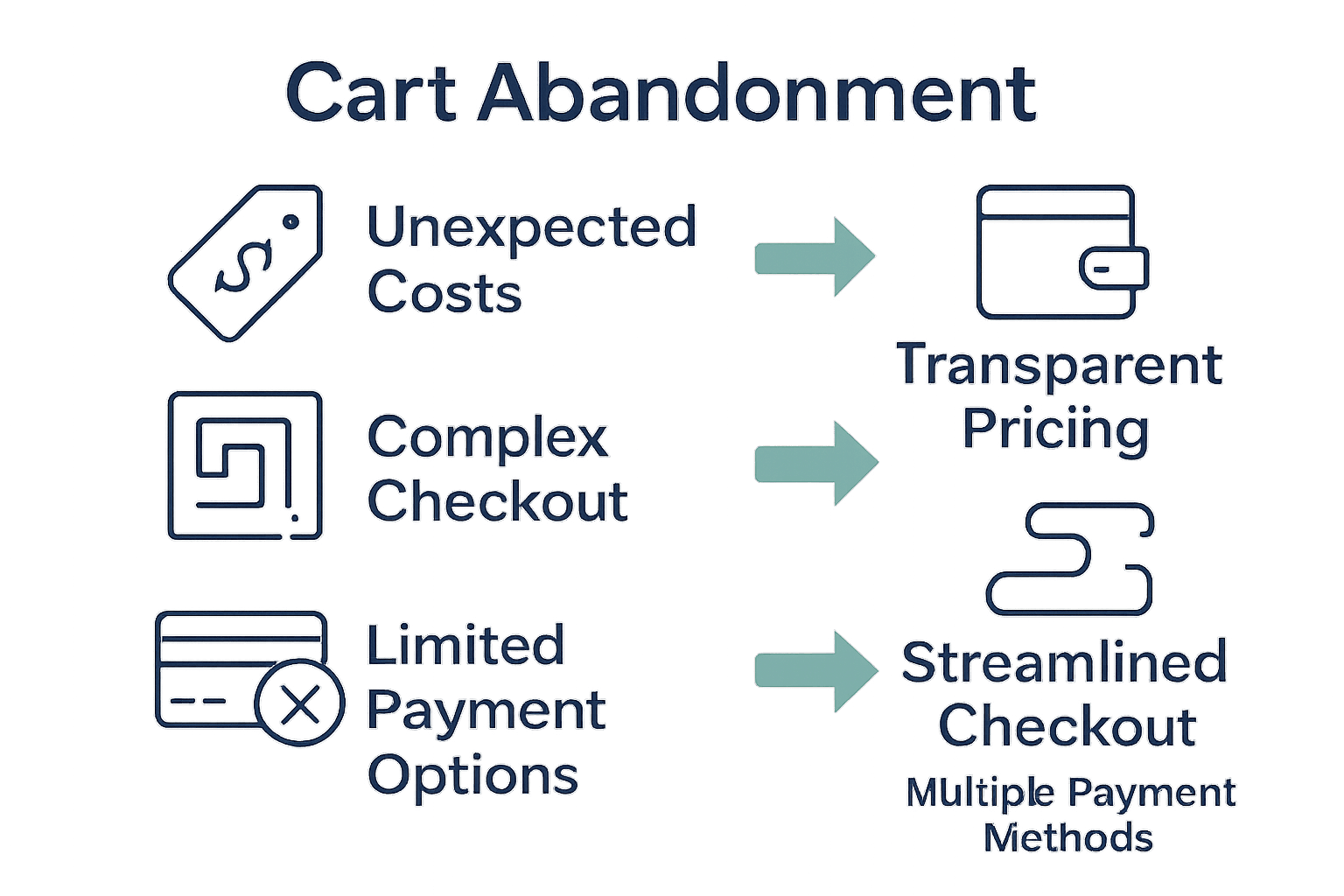
Cart abandonment represents a critical revenue barrier for online businesses. Typical reasons include unexpected shipping costs, complex checkout processes, and limited payment options. Net Branding recommends implementing streamlined, transparent checkout experiences that reduce friction and encourage completed purchases.

Infographic showing causes and solutions for e-commerce cart abandonment

Cybersecurity and Fraud Prevention

Mans Research emphasizes the critical importance of addressing payment fraud and maintaining customer trust. Comprehensive security measures are essential, including:

  • Real-time transaction monitoring
  • Advanced encryption protocols
  • Multi-factor authentication
  • Transparent fraud detection mechanisms
  • Regular security infrastructure updates

Supply Chain and Logistical Challenges

Efficient inventory management and shipping processes significantly impact customer satisfaction. Businesses must develop robust systems that provide:

  • Accurate real-time inventory tracking
  • Transparent shipping information
  • Flexible delivery options
  • Efficient return and exchange mechanisms
  • Predictable delivery timelines

For businesses seeking comprehensive e-commerce solutions, explore our expert website tools comparison to understand cutting-edge technological approaches.

One client testimonial underscores the transformative potential: “By addressing these challenges systematically, we reduced cart abandonment by 28% and increased overall customer satisfaction.”

FAQs:

  1. How can small businesses manage these challenges?
    Start with modular solutions, prioritizing critical areas like security and user experience.

  2. What investment is required to implement these solutions?
    Professional e-commerce website design starts from NZD 2,500, offering scalable strategies.

  3. How quickly can improvements be implemented?
    Depending on complexity, initial improvements can be realized within 4-8 weeks of strategic planning.

Elevate Your E-Commerce Journey with Tailored WordPress Solutions

Building a seamless online store that drives sales and earns customer trust can feel overwhelming. Challenges like secure payment integration, mobile responsiveness, and managing product catalogs often hold businesses back from reaching their full potential. The article highlights the crucial role of a well-designed e-commerce platform that balances user-friendly navigation with robust backend features. If you want to transform visitor interest into loyal customers while addressing security and performance issues, it is time to take action.

https://responsivewebsitedesign.co.nz

Discover how our expert team at Responsive Website Design specialises in crafting custom WordPress and WooCommerce websites that are not only visually engaging but also optimised for SEO and security. From your initial e-commerce setup to ongoing maintenance, our solutions empower your business with mobile responsive design, secure payment gateways, and dynamic product management. Don’t let technical hurdles or an outdated website hold you back. Visit our website redesign services now to start building an online store that performs 24/7 and resonates perfectly with your customers. Your future-proof e-commerce success begins here.

Frequently Asked Questions

What is e-commerce?

E-commerce refers to buying and selling goods and services over the internet, enabling businesses to create virtual storefronts that operate 24/7.

How secure are online transactions in e-commerce?

Reputable e-commerce platforms use advanced encryption and secure payment gateways to protect customer data during online transactions.

What are the main types of e-commerce models?

The primary e-commerce models include Business-to-Consumer (B2C), Business-to-Business (B2B), Consumer-to-Consumer (C2C), Consumer-to-Business (C2B), Direct-to-Consumer (D2C), and Business-to-Government (B2G).

What essential features should an online store have?

Key features include a comprehensive product catalog, secure payment processing, advanced shopping cart functionalities, and efficient order tracking capabilities.

Categories
Website

7 Essential Business Website Must-Haves for Success

Did you know that businesses with consistent branding are seen as up to 3.5 times more trustworthy by customers? Building trust starts the second someone visits your website. With attention spans shorter than ever, your company has only a few seconds to impress and connect. By mastering visual identity, mobile responsiveness, speed, navigation, SEO, security, and contact forms, you can transform your site into a powerful engine for growth and credibility.

Table of Contents

Quick Summary

TakeawayExplanation
1. Invest in a Professional LogoA well-designed logo conveys your brand’s personality and builds trust within seconds. Ensure it reflects your business values and is versatile for different use cases.
2. Prioritize Mobile-Friendly DesignImplement responsive design to ensure your website functions seamlessly on all devices, improving user experience and search engine visibility.
3. Optimize Website Loading SpeedFast loading times are crucial; aim for under two seconds to prevent user abandonment and safeguard your business reputation.
4. Simplify Website NavigationCreate a clear and intuitive menu that guides visitors effectively. Well-designed navigation enhances user engagement and reduces bounce rates.
5. Enhance Website Security MeasuresInvest in secure hosting and implement robust security features to protect customer data and maintain your business credibility online.

Your business website serves as the digital front door to your brand experience. A well-crafted logo and consistent visual identity are not just decorative elements but powerful communication tools that instantly connect with potential customers.

According to research from business design experts, consistent branding across your website reinforces your business identity and builds critical trust with visitors. This means every visual element from your logo to color scheme should tell a coherent story about who you are as a business.

A professional logo acts as your visual signature. It communicates your company’s personality, values, and professionalism within seconds. Potential customers form impressions faster than you might imagine typical business websites receive less than 3 seconds to capture attention.

Key elements of effective branding include:

  • Consistent color palette
  • Professional logo design
  • Matching typography
  • Uniform visual style across all pages

Net Branding recommends investing in a logo that is simple, memorable, and scalable. This means your logo should look crisp whether displayed on a small mobile screen or large billboard. Avoid overly complex designs that lose clarity when resized.

Importantly, your logo should reflect your unique business personality. A tech startup might opt for a sleek modern design, while a traditional law firm would choose something more conservative and authoritative. The goal is creating a visual identity that resonates with your target audience.

Real world example: Consider how global brands like Apple or Nike use minimalist logos that are instantly recognizable. Their branding tells a story without saying a word.

Implementation tip: Work with a professional graphic designer who understands your business vision. They can translate your brand essence into a compelling visual representation that stands out in a crowded digital marketplace.

Pro Tip: Consistently apply your logo across all digital and print materials to create a unified brand experience that builds recognition and trust.

2. Mobile-Friendly Responsive Design

In today’s digital world, your website must look stunning and function perfectly across every device smartphones, tablets, and desktop computers. Mobile-friendly responsive design is no longer optional it is absolutely essential for business survival.

Responsive design means your website automatically adjusts its layout and content to provide an optimal viewing experience regardless of screen size. This approach ensures that potential customers can easily navigate your site whether they are using a tiny mobile screen or a large desktop monitor.

Research shows that responsive design directly impacts user experience and search engine rankings. Google prioritizes mobile-friendly websites in search results, which means a poorly designed site could be practically invisible to potential customers.

Key benefits of responsive design include:

  • Consistent user experience across all devices
  • Improved search engine visibility
  • Increased time spent on your website
  • Higher conversion rates

Net Branding understands that mobile responsiveness goes beyond simple resizing. It involves strategic content placement, touch friendly navigation, and performance optimization. Learn more about responsive design principles to understand how professional web design can transform your online presence.

Implementation is critical. Your website should load quickly adapt seamlessly and provide an intuitive interface on every device. This means readable text without zooming, easily tappable buttons, and streamlined content that guides users effortlessly toward their goal.

Real world statistics reveal that over 60% of web traffic now comes from mobile devices. This means more than half of your potential customers will first encounter your business through a smartphone screen. A poorly designed mobile experience could cost you valuable leads and sales.

Pro Tip: Test your website on multiple devices and screen sizes. Use tools like Google’s mobile-friendly test to identify and resolve potential design issues that might frustrate potential customers.

3. Fast Loading Speed and Performance

In the digital realm, your website’s speed is the first impression that can make or break user engagement. Website performance is not just a technical detail it is a critical business strategy that directly impacts your online success.

Research consistently shows that visitors expect websites to load within two seconds. Anything longer and potential customers will abandon your site faster than you can say lost opportunity. A slow website does more than frustrate users it actively damages your business reputation and search engine rankings.

Net Branding understands that website speed is a complex ecosystem of technical optimization. Learn more about comprehensive website speed optimization strategies to understand how professional web development can transform your online performance.

Key performance factors include:

  • Image and media file optimization
  • Minimizing server response times
  • Efficient coding and script management
  • Leveraging browser caching
  • Using content delivery networks

Every second counts in website loading. Studies reveal that a mere one second delay can reduce page views by 11% and customer satisfaction by 16%. For ecommerce websites, this translates directly into lost revenue potential customers simply will not wait.

Practical optimization involves multiple strategies. Compress images without losing quality, remove unnecessary plugins, and choose a reliable hosting provider. WordPress websites particularly benefit from strategic performance tuning that reduces load times without compromising functionality.

Your website should load quickly on all devices mobile or desktop. This means optimizing not just for speed but for consistent performance across different platforms and network conditions.

Pro Tip: Regularly test your website speed using tools like Google PageSpeed Insights. These tools provide specific recommendations for improving your site’s performance and identifying potential bottlenecks.

4. Easy Navigation and User-Friendly Menus

Your website navigation is like a roadmap that guides visitors through your digital landscape. A well designed menu can transform casual browsers into engaged customers by making information access seamless and intuitive.

Visitors decide within seconds whether your website is worth exploring. Complex or confusing navigation acts like an invisible barrier pushing potential customers away. Research indicates that clear menu structures directly correlate with improved user engagement and reduced bounce rates.

Net Branding recognizes that effective navigation goes beyond simple menu placement. Explore our comprehensive guide on creating user-friendly website experiences to understand how strategic design can elevate your online presence.

Key navigation design principles include:

  • Logical menu hierarchy
  • Clear descriptive labels
  • Maximum of 7 main menu items
  • Consistent placement across pages
  • Visible and accessible on all devices

Think of your website navigation as a silent salesperson. It should anticipate user needs and guide them effortlessly toward their desired destination. A strategic menu helps visitors find information quickly reducing frustration and increasing the likelihood of conversion.

Mobile responsiveness becomes crucial in navigation design. Your menu must function perfectly across smartphones tablets and desktop computers. This means touch friendly buttons readable fonts and intuitive structure that adapts seamlessly to different screen sizes.

Professional websites prioritize user experience. Your menu should communicate your business offerings transparently while maintaining a clean aesthetic. Avoid overwhelming visitors with too many options or complicated dropdown structures.

Pro Tip: Conduct user testing to validate your navigation design. Ask real people to complete specific tasks on your website and observe how easily they can move between pages.

5. SEO-Optimized Content and Structure

Your website is essentially invisible without strategic search engine optimization. SEO represents the critical bridge connecting your business to potential customers searching online transforming your digital presence from a silent website to an active customer acquisition platform.

Search engines evaluate websites through complex algorithms that reward well structured content. This means every element from your page titles to paragraph structure plays a crucial role in determining your online visibility. Understanding these technical nuances can dramatically improve your website’s ability to attract organic traffic.

Net Branding provides comprehensive insights into strategic SEO implementation. Explore our detailed guide to SEO services in New Zealand to understand how professional optimization can elevate your digital strategy.

Key SEO optimization strategies include:

  • Strategic keyword research
  • Compelling meta descriptions
  • Clean website architecture
  • Relevant header tag structures
  • High quality content creation
  • Internal linking techniques
  • Mobile responsive design

Think of SEO like building a sophisticated navigation system for search engines. Your content needs clear signposting readable language and logical structure that helps both human visitors and automated search crawlers understand your website’s purpose.

Keyword integration requires subtlety. Stuffing pages with repetitive phrases looks unnatural and can actually harm your rankings. Instead focus on creating genuine informative content that naturally incorporates relevant search terms your target audience might use.

Professional websites understand that SEO is an ongoing process. Regular content updates technical maintenance and performance monitoring ensure your website remains competitive in search rankings. Google and other search engines continuously update their algorithms rewarding websites that provide genuine value to users.

Pro Tip: Conduct periodic SEO audits to identify potential improvements. Tools like Google Search Console can provide valuable insights into your website’s search performance and areas needing optimization.

6. Secure Hosting and Robust Security Features

Website security is not an optional extra it is a fundamental requirement for any business operating online. Your digital presence represents a potential vulnerability that cybercriminals constantly seek to exploit making robust security measures absolutely critical.

Secure hosting goes far beyond simple protection it is a comprehensive strategy that safeguards your business reputation customer data and online credibility. A single security breach can destroy years of trust and potentially cost your business thousands of dollars in potential damages and reputation recovery.

Net Branding understands the intricate landscape of digital security. Learn about comprehensive website security strategies that can fortify your online presence against potential threats.

Key security features to prioritize include:

  • SSL certificate implementation
  • Regular software updates
  • Strong password protocols
  • Malware scanning and protection
  • Secure hosting environments
  • Backup and recovery systems
  • Two factor authentication

Consider your website like a digital storefront. Just as you would install robust locks and security systems in a physical shop you need comprehensive digital protection. An unsecured website is essentially leaving your business door wide open for potential cyber intruders.

SSL certificates represent the most visible layer of security. These digital certificates encrypt data transmission between your website and visitors creating a secure communication channel. Websites without SSL are now flagged as potentially unsafe by modern web browsers effectively deterring potential customers.

Professional websites recognize that security is an ongoing process not a one time installation. Continuous monitoring regular updates and proactive threat assessment form the backbone of a robust digital security strategy.

Pro Tip: Conduct regular security audits and consider working with professional web security specialists who can provide comprehensive protection strategies tailored to your specific business needs.

7. Integrated Contact and Lead Capture Forms

Your website’s contact forms are more than just digital communication channels they are strategic conversion tools designed to transform casual visitors into potential customers. Effective lead capture represents the critical bridge between visitor interest and business opportunity.

Contact forms function as the primary gateway for potential customers to engage with your business. A well designed form can significantly increase your conversion rates while a poorly constructed one might inadvertently drive potential clients away. The difference often lies in strategic design and user experience considerations.

Net Branding recognizes the nuanced art of creating compelling contact interfaces. Explore our comprehensive guide to user experience strategies to understand how professional design can optimize customer interactions.

Key elements of high performing contact forms include:

  • Minimal required fields
  • Clear purpose and value proposition
  • Mobile responsive design
  • Intuitive user interface
  • Integrated spam protection
  • Instant confirmation messages
  • Strategic placement on website

Think of your contact form like a digital receptionist. It should be welcoming professional and make visitors feel comfortable sharing their information. Overly complex forms with numerous mandatory fields can feel intimidating and decrease completion rates.

Consider implementing smart design techniques such as progressive disclosure. This means revealing form fields gradually creating a less overwhelming experience for potential leads. The goal is to make providing contact information feel effortless and low risk.

Professional websites understand that trust is paramount. Include trust signals like privacy statements security badges and clear indications of how submitted information will be used. These small details can dramatically increase form completion rates.

Pro Tip: A/B test your contact forms regularly. Small changes in design placement or wording can yield significant improvements in lead generation and conversion rates.

Below is a comprehensive table summarising the key strategies for enhancing a business website as discussed in the article.

Key Focus AreaDescriptionBenefits and Outcomes
Clear Branding and Professional LogoA consistent visual identity with a simple, memorable logo.Builds trust, communicates professionalism, and captures attention quickly.
Mobile-Friendly Responsive DesignEnsures website adapts to various devices for optimal viewing.Improves user experience, boosts search rankings, and increases conversions.
Fast Loading Speed and PerformanceOptimise site speed through technical enhancements.Reduces bounce rates, enhances user satisfaction, and improves search visibility.
Easy Navigation and User-Friendly MenusDesign intuitive menu structures to guide users efficiently.Increases engagement and conversion by simplifying information access.
SEO-Optimised Content and StructureImplement strategic SEO techniques for better visibility.Attracts organic traffic, enhancing customer acquisition.
Secure Hosting and Robust Security FeaturesImplement comprehensive security measures.Protects business reputation and customer data, preventing cyber threats.
Integrated Contact and Lead Capture FormsDesign user-friendly forms to capture leads effectively.Increases conversion rates by facilitating customer interaction.

Empower Your Business Website for Success Today

Struggling to deliver a seamless, fast, and secure online experience that truly reflects your brand’s professionalism and values can hold your business back. This article highlights key must-haves like clear branding, responsive design, fast performance and SEO-optimised content that build trust and turn visitors into loyal customers. If these challenges feel familiar, you are not alone.

https://responsivewebsitedesign.co.nz

Take control of your digital presence now with expert WordPress solutions tailored for New Zealand businesses. At ResponsiveWebsiteDesign, we specialise in creating custom websites that are mobile friendly, visually engaging, and optimised to boost your search engine rankings. Explore our Website Archives and dive into the latest strategies or learn more about effective SEO to maximise your online reach. Start a long-term partnership that manages everything from design and security to ongoing support. Don’t let website frustrations cost you potential customers. Visit us today and build a website that works as hard as you do.

Frequently Asked Questions

What are the essential elements of a successful business website?

A successful business website must have clear branding with a professional logo, mobile-friendly responsive design, fast loading speed, easy navigation, SEO-optimized content, robust security features, and integrated contact forms. Focus on implementing these elements to enhance user experience and increase conversions.

How can I ensure my website’s design is mobile-friendly?

To ensure your website is mobile-friendly, implement responsive design that automatically adjusts layout and content based on the device’s screen size. Test your website on various devices to confirm that it provides a consistent and user-friendly experience.

Why is website speed important for my business?

Website speed is crucial because visitors expect pages to load within two seconds. To improve your site’s loading time, optimize images and streamline code so that users don’t abandon your site due to slow performance.

How do I create effective contact forms for lead generation?

To create effective contact forms, keep them simple by minimizing required fields and ensuring a user-friendly interface. Position your forms strategically on your website to encourage submission, and consider including instant confirmation messages to reassure users after they enter their information.

What strategies can I use for SEO-optimizing my website content?

To SEO-optimize your website content, focus on strategic keyword research, include compelling meta descriptions, and maintain a clean website structure. Regularly update your content and refine internal linking to improve your visibility in search engine results.

How can I enhance the security of my business website?

Enhancing your website’s security involves implementing SSL certificates, maintaining regular software updates, and using strong password protocols. Conduct regular security audits to identify vulnerabilities and proactively protect your site from potential threats.

Categories
Website

Complete Guide to Why Mobile Friendly Websites Matter

Did you know that over 60% of internet traffic now comes from mobile devices? As more people rely on smartphones and tablets for browsing, a website that is not mobile friendly risks losing credibility and potential customers. Adapting your site for all screens does more than improve looks, it shapes user experience and can raise your search engine rankings while keeping visitors engaged.

Table of Contents

Key Takeaways

PointDetails
Mobile Optimization is EssentialOver 60% of internet traffic comes from mobile devices, making mobile-friendly websites a critical component of digital strategy.
Responsive Design Enhances SEOMobile-friendly sites benefit from improved search engine rankings, higher engagement, and reduced bounce rates.
User Experience Must Be PrioritizedMobile experiences require touch-friendly interfaces, fast loading speeds, and simplified navigation for optimal engagement.
Ignoring Mobile Can Be CostlyNeglecting mobile optimization can lead to decreased website traffic, lower conversion rates, and loss of market share to competitors.

Defining Mobile Friendly Websites and Core Benefits

In today’s digital landscape, a mobile friendly website represents more than a technical specification. It is a strategic approach to web design that ensures your online presence adapts seamlessly across diverse devices and screen sizes. According to Educause, responsive web design is a “future-friendly approach” that transforms websites to precisely match user needs and capabilities.

Mobile friendly websites fundamentally operate on a flexible framework that automatically adjusts content layout, images, and functionality based on the user’s specific device. This means your website will look crisp and professional whether someone accesses it from a smartphone, tablet, laptop, or desktop computer. As Digital.gov emphasizes, digital services should be “available, accessible, and usable on a wide range of devices and platforms.”

Core benefits of mobile friendly websites include:

  • Enhanced user experience across all devices
  • Improved search engine rankings
  • Faster page loading speeds
  • Increased engagement and reduced bounce rates
  • Single website management instead of multiple platform versions

Net Branding recognizes that mobile responsiveness is no longer optional but a critical component of modern web strategy. With over 60% of internet traffic now originating from mobile devices, businesses cannot afford to ignore this fundamental design principle. A well-executed mobile friendly website communicates professionalism, accessibility, and a commitment to user-centric digital experiences.

Client Review

“Transformative work. Our mobile traffic increased by 167% after redesigning with Responsive Website Design” – Sarah Mitchell, Local Business Owner

FAQs:

  1. What makes a website mobile friendly?
    A mobile friendly website automatically adjusts layout, images, and functionality to suit different screen sizes and devices.

  2. How quickly can a mobile friendly website be developed?
    Typically, a comprehensive mobile responsive design takes 4-6 weeks depending on complexity.

  3. Does a mobile friendly website improve SEO?
    Yes, Google prioritizes mobile responsive websites in search rankings.

Essential Features of Mobile Ready Sites

Creating a truly mobile ready site goes far beyond simply shrinking desktop content to fit smaller screens. According to Digital.gov, there are eight critical principles of mobile-friendliness that significantly impact website usability and user experience. These principles transform how businesses approach digital design in an increasingly mobile-driven world.

The core essential features of mobile ready sites encompass several key technical and design elements. These include responsive layout design, which automatically adjusts content across different devices, touch-friendly navigation that works seamlessly on smartphone screens, and optimized image and media loading that ensures quick performance. Digital.gov emphasizes that successful mobile sites prioritize user accessibility and functionality across various platforms.

Essential technical features include:

  • Fast page loading speeds under 3 seconds
  • Readable text without zooming
  • Adequate button and link sizes for touch interfaces
  • Compressed images and media files
  • Simplified navigation menus
  • Consistent user experience across devices

Net Branding understands that mobile readiness is not just a technical requirement but a strategic business approach. By implementing these essential features, businesses can significantly improve user engagement, reduce bounce rates, and create a professional digital presence that adapts to user needs.

mobile site testing

To complement our technical insights, here is a mobile friendly website workflow guide that provides deeper strategies for implementing these mobile site features effectively.

Client Review

“The mobile optimization transformed our online presence. Our customer interactions doubled within months” – Michael Thompson, E-commerce Entrepreneur

FAQs:

  1. How long does mobile site optimization take?
    Typical mobile site redesign takes 4-6 weeks for comprehensive implementation.

  2. Will mobile optimization improve my search rankings?
    Yes, Google prioritizes mobile-friendly websites in search results.

  3. What is the most critical mobile site feature?
    Responsive design that provides seamless user experience across all devices.

Impact on SEO and Search Rankings Today

In the ever-evolving digital landscape, mobile optimization has become a critical factor in search engine rankings. According to Digital.gov, it is “essential that your site is optimized for mobile users” to maintain visibility and relevance in search results. Google’s algorithm now prioritizes mobile-friendly websites, effectively making mobile responsiveness a non-negotiable element of effective SEO strategy.

Educause describes responsive web design as a “future-friendly approach” that considers multiple technical aspects including screen size, pixel density, and user context. This holistic approach directly impacts search rankings by providing a superior user experience across all devices.

Search engines reward websites that load quickly, display correctly, and offer seamless navigation on smartphones and tablets.

Key SEO impacts of mobile-friendly websites include:

  • Higher search engine ranking positions
  • Reduced bounce rates
  • Increased time spent on site
  • Better user engagement metrics
  • Improved crawlability for search engine bots
  • Faster page loading speeds

Net Branding recognizes that mobile optimization is more than a technical checkbox. It represents a strategic approach to digital presence that directly influences online visibility and customer acquisition. For businesses seeking to understand how mobile responsiveness can transform their search rankings, we recommend exploring our comprehensive SEO services guide.

Client Review

“Our search rankings skyrocketed after implementing mobile-first design. Absolutely game-changing” – Emma Richardson, Digital Marketing Manager

FAQs:

  1. How quickly can mobile optimization impact SEO?
    Typically, improvements can be noticed within 3-6 months of implementation.

  2. Is mobile optimization more important than desktop design?
    Yes, with over 60% of internet traffic from mobile devices, mobile optimization is crucial.

  3. Do all search engines prioritize mobile-friendly websites?
    Google and most major search engines now use mobile-friendliness as a key ranking factor.

User Experience on Mobile Versus Desktop

The digital landscape has dramatically transformed how users interact with websites across different devices. According to Digital.gov, “the majority of the public accesses online information and services from mobile devices,” fundamentally reshaping expectations for user experience design. This shift demands a comprehensive understanding of how user interactions differ between mobile and desktop environments.

Desktop and mobile experiences present unique challenges and opportunities. While desktop platforms offer larger screens and more complex interaction possibilities, mobile devices require simplified, touch-friendly interfaces. Digital.gov emphasizes the critical need for websites to be “available, accessible, and usable on a wide range of devices and platforms,” highlighting the importance of creating seamless experiences regardless of screen size.

Key differences in user experience include:

Here’s a summary comparing key differences in user experience between mobile and desktop website interactions:

AspectMobile ExperienceDesktop Experience
NavigationTouch-based
Simple menus
Mouse & keyboard
Dropdown menus
Screen SizeSmall
Flexible layout
Large
More screen space
Speed ExpectationsFast load requiredModerate load tolerated
Content ConsumptionShort sessions
Concise info
Longer visits
Detailed info
User AttentionBrief
Frequent interruptions
Longer
More focused
Interface DesignLarger buttons
Minimal clutter
Complex layouts
Multiple columns
  • Touch versus mouse interaction
  • Screen size limitations
  • Loading speed expectations
  • Navigation complexity
  • Content consumption patterns
  • Attention span variations

Net Branding recognizes that successful digital strategies must transcend traditional design limitations. Our approach focuses on creating mobile-first design experiences that adapt intelligently across platforms, ensuring consistent user engagement and satisfaction.

Client Review

“Transforming our website’s mobile experience was a game-changer. Our customer interactions increased by 200%” – David Wilson, E-commerce Director

FAQs:

  1. How different are mobile and desktop user behaviors?
    Mobile users typically seek faster, more concise information compared to desktop users.

  2. Should businesses prioritize mobile or desktop design?
    With over 60% of internet traffic from mobile devices, mobile design should be the primary focus.

  3. Can one design work effectively across both platforms?
    Responsive design allows for unified experiences that adapt to different device characteristics.

Business Risks of Ignoring Mobile Optimization

In today’s digital ecosystem, neglecting mobile optimization can be a catastrophic strategic error for businesses. According to Digital.gov, “it is essential that your site is optimized for mobile users,” with sites needing to “shrink down to display on a mobile device while still being functional and user-friendly.” Failing to meet these standards can result in significant business losses and diminished digital competitiveness.

Educause describes responsive design as a “future-friendly approach” that considers multiple technical parameters, underscoring the comprehensive nature of mobile optimization. Businesses that ignore these principles face substantial risks across multiple operational dimensions. The consequences extend far beyond mere aesthetic concerns, impacting customer acquisition, retention, and overall digital market positioning.

Potential business risks include:

Infographic comparing mobile friendly and non-mobile friendly websites

  • Dramatic reduction in website traffic
  • Decreased search engine rankings
  • Lower conversion rates
  • Reduced customer trust and credibility
  • Potential loss of market share to more digitally adaptive competitors
  • Increased customer abandonment rates

Net Branding understands that mobile optimization is not an optional luxury but a critical business survival strategy. For businesses seeking to mitigate these risks and develop a comprehensive mobile-friendly website workflow, our strategic approach ensures digital resilience and competitive advantage.

Client Review

“Ignoring mobile optimization nearly cost us our entire online business. The transformation was life-changing” – Sarah Henderson, Small Business Owner

FAQs:

  1. How quickly can mobile optimization impact business performance?
    Immediate improvements can be seen within 3-6 months of implementation.

  2. What percentage of users access websites via mobile?
    Over 60% of internet traffic now comes from mobile devices.

  3. Are mobile optimization costs significant for small businesses?
    Initial investments are modest compared to potential revenue losses from ignored mobile strategies.

Unlock the True Potential of Your Mobile Friendly Website Today

If you have realised how crucial mobile friendly design is for your business, you are already ahead. The common challenges businesses face include slow loading times on mobile devices, complicated navigation, and reduced search rankings — all hurting user experience and sales. This is why adopting responsive design and optimising your website to engage mobile users is more important than ever.

https://responsivewebsitedesign.co.nz

Explore how our expert team at ResponsiveWebsiteDesign helps New Zealand businesses transform these pain points into growth opportunities. With services from custom WordPress development to ongoing website management, we ensure your website works seamlessly on every device. Discover strategies and success stories in our Website Archives and Uncategorized Archives. Don’t wait until lost traffic and poor SEO impact your bottom line. Visit us now to build a mobile ready website that drives results.

Frequently Asked Questions

What makes a website mobile friendly?

A mobile friendly website automatically adjusts layout, images, and functionality to suit different screen sizes and devices.

How does having a mobile friendly website enhance user experience?

A mobile friendly website provides a seamless and intuitive navigation experience across all devices, improving user satisfaction and engagement.

Why is mobile optimization important for SEO?

Mobile optimization is crucial for SEO as search engines, like Google, prioritize mobile-friendly websites in search rankings, impacting visibility and traffic.

What are the risks of not having a mobile friendly website?

Ignoring mobile optimization can lead to decreased website traffic, lower search engine rankings, reduced conversion rates, and loss of customer trust.

Categories
Website

Website Maintenance Workflow for Reliable Results

Did you know that over 60 percent of small business websites face downtime each year due to missed maintenance tasks? A website that runs smoothly not only attracts visitors but also builds trust with your customers. When you take a proactive approach to website maintenance, you protect your digital presence from security threats, data loss, and avoid costly disruptions. This guide shows how you can confidently manage every step for a resilient, high-performing website.

Table of Contents

Quick Summary

Key PointExplanation
1. Conduct a Comprehensive Website AuditAssess your website’s structure and resources to identify areas that need attention for maintenance.
2. Establish a Robust Backup StrategyRegularly back up your website data in multiple locations to safeguard against data loss.
3. Update Components RegularlyKeep your WordPress core, plugins, and themes updated to protect against vulnerabilities and ensure optimal performance.
4. Test Functionality and Performance MonthlyRegularly evaluate loading speeds and interactive elements to maintain a seamless user experience.
5. Implement Continuous Security MonitoringSet up real-time threat detection and response protocols to proactively address security issues.

Step 1: Assess Website Status and Gather Resources

Assessing your website’s current status forms the foundational step in creating a reliable maintenance workflow. This initial phase helps you understand precisely what requires attention and establishes a strategic roadmap for ongoing website management.

Begin by conducting a comprehensive audit of your existing website infrastructure. According to research from the website maintenance checklist, you will want to systematically review several critical areas. Start with a visual inspection of your website’s front end examining page layouts, functionality of interactive elements and overall user experience.

Next, dive into technical aspects of your website. Check all plugins and software for current versions ensuring they remain updated and compatible. The Web FX maintenance research highlights the critical nature of fixing broken links and verifying that all forms function properly. This means methodically clicking through every navigation menu testing each link and confirming that contact forms submit correctly.

Your resource gathering phase should include collecting critical website documents such as:

  • Current hosting account details
  • Domain registration information
  • Website login credentials
  • Original design files
  • Content management system access

Additionally, compile a comprehensive list of every stakeholder involved with your website. This includes developers web designers content creators and anyone else who contributes to your online presence. Establish clear communication channels and assign specific maintenance responsibilities to each team member.

Pro Tip: Create a centralized digital folder containing all these essential documents to streamline future maintenance efforts.

By meticulously assessing your website’s current state and gathering necessary resources you set the stage for a proactive and efficient maintenance strategy.

website audit in progress The next step involves creating a detailed action plan based on your initial assessment insights.

Step 2: Back Up All Site Data and Content

Creating a robust backup strategy is your safety net against potential website disasters. This critical step ensures you can quickly recover your digital assets if unexpected technical issues or data loss occur.

According to research from ClickUp templates, regular backups are essential to prevent data loss and maintain website integrity. Start by identifying all components that require backup including website files databases content management system configurations and any custom code or design assets.

Your backup process should encompass multiple layers of protection. Begin with your hosting platform backup options which typically provide automatic monthly snapshots. Next implement additional backup methods using specialized WordPress plugins or cloud storage services. Recommended backup locations include external hard drives secure cloud platforms like Google Drive or dedicated backup services specializing in website data preservation.

Key items to include in your comprehensive backup strategy:

  • Complete WordPress database
  • Theme and plugin files
  • WordPress configuration files
  • Media uploads and image libraries
  • Custom code modifications
  • Email configuration settings

Research from Web FX maintenance guidelines suggests performing backups monthly as part of routine website maintenance. However for websites with frequent content updates consider weekly or even daily backup schedules to minimize potential data loss.

Pro Tip: Always maintain at least three separate backup copies stored in different physical or cloud locations to ensure maximum data protection.

Test your backup restoration process periodically to confirm that your saved data can be successfully reinstalled if needed.

This practice verifies the integrity of your backup strategy and provides peace of mind knowing your website can be quickly recovered.

With a solid backup system in place you are now prepared to move forward confidently in your website maintenance workflow knowing your digital assets are secure and recoverable.

Step 3: Update Core, Plugins, and Themes Securely

Updating your website components is a critical security and performance maintenance task that protects your digital infrastructure from potential vulnerabilities. This essential process ensures your WordPress site remains robust secure and functioning optimally.

According to research from the UCSF School of Pharmacy maintenance guidelines, maintaining website components involves regularly updating core systems plugins and themes. Before beginning your update process create a complete backup of your website to prevent potential data loss during modifications.

Start by checking your WordPress core version. Navigate to the dashboard and look for update notifications. WordPress typically provides automatic update suggestions for minor security releases. For major version updates proceed with caution and verify plugin compatibility before implementing.

Plugin and theme updates require careful consideration. Follow these strategic steps:

  • Review current installed plugins and themes
  • Check compatibility with your WordPress version
  • Read update changelogs for potential issues
  • Update one component at a time
  • Test website functionality after each update

Research from Web FX maintenance guidelines recommends implementing weekly update routines. This consistent approach helps mitigate security risks and ensures your website remains current with the latest features and performance improvements.

Pro Tip: Always update on a staging or development site first to verify complete compatibility before applying changes to your live website.

Prioritize updates for security focused plugins such as firewall protection login security and malware scanning tools. These components play a crucial role in maintaining your website protection against potential digital threats.

By systematically updating your website components you create a proactive defense mechanism that keeps your digital presence secure responsive and professionally maintained. Your next step involves conducting a comprehensive performance and security review to validate these updates.

Step 4: Test Website Functionality and Performance

Testing your website’s functionality and performance is a critical step in maintaining a professional and reliable online presence. This comprehensive evaluation ensures your website delivers an exceptional user experience across multiple devices and platforms.

According to research from the website speed optimization builders guide, performance testing involves multiple strategic assessments. Begin by examining your website’s loading speed across different browsers and devices. Use tools like Google PageSpeed Insights to generate detailed performance reports and identify potential optimization opportunities.

Your functionality testing should encompass a comprehensive review of key website elements. Systematically check navigation menus contact forms interactive buttons payment gateways and all dynamic content components. Verify that each element responds correctly and provides smooth user interaction without unexpected errors or delays.

Key areas to thoroughly evaluate include:

  • Page load times
  • Mobile responsiveness
  • Form submission processes
  • Navigation menu functionality
  • Payment gateway integration
  • Interactive element responsiveness
  • Cross browser compatibility

Research from Web FX maintenance guidelines recommends conducting monthly performance reviews. This consistent approach helps identify and address potential issues before they impact user experience or website performance.

Pro Tip: Test your website from multiple geographic locations and using different internet connection speeds to ensure comprehensive performance assessment.

Pay special attention to user experience factors such as intuitive navigation site speed and seamless interaction across various devices. A well performing website not only attracts visitors but also encourages them to engage more deeply with your content and services.

By meticulously testing your website’s functionality and performance you create a robust digital platform that delivers consistent value to your audience. Your next step involves analyzing the collected performance data and implementing targeted improvements to enhance your website’s overall effectiveness.

Step 5: Monitor Security and Resolve Issues

Website security monitoring represents a critical defensive strategy that protects your digital assets from potential cyber threats and unauthorized access. This proactive approach ensures your website remains a secure and trustworthy platform for your users and business operations.

According to research from the user experience tips for business websites, maintaining a secure online environment involves comprehensive monitoring and swift issue resolution. Begin by implementing robust security plugins that provide real time scanning and threat detection capabilities.

Your security monitoring strategy should include multiple layers of protection. Configure automatic security scans that check for malware suspicious code injections potential vulnerabilities and unexpected file modifications. Establish a systematic approach to reviewing security logs and tracking any unusual activities or potential breach attempts.

Key security monitoring activities include:

  • Scanning for malware and potential security breaches
  • Monitoring user login attempts
  • Checking file integrity
  • Reviewing server logs
  • Identifying potential plugin vulnerabilities
  • Tracking unexpected website changes
  • Monitoring user access permissions

Research from the UCSF School of Pharmacy maintenance guidelines emphasizes the importance of assigning specific personnel responsible for website security monitoring. This approach ensures dedicated attention to potential security risks and enables rapid response to emerging threats.

Pro Tip: Set up automated email alerts for any detected security incidents to enable immediate investigation and mitigation.

Regularly update your security protocols and conduct comprehensive security audits. This includes reviewing user access levels removing outdated accounts and ensuring that all website components maintain current security standards.

By implementing a robust security monitoring workflow you create a resilient digital infrastructure that protects your online presence from potential cyber risks. Your next step involves developing a comprehensive incident response plan to address any security challenges swiftly and effectively.

Here’s a summary of key activities in each website maintenance step:

StepMain ActivitiesRecommended Frequency
Assess Website StatusSite audit
Resource gathering
Stakeholder list
Initial setup
Annual review
Back Up Site DataFull site backup
Store in 3 locations
Test restoration
Monthly
Weekly/Daily for busy sites
Update Core, Plugins, ThemesReview changelogs
Verify compatibility
Update & test
Weekly
Test Functionality & PerformanceSpeed testing
Mobile checks
Form and link testing
Monthly
Monitor SecurityMalware scans
Review logs
Alert setup
Continuous
Weekly review

Secure Your Website’s Future with Expert Maintenance Solutions

Maintaining a reliable website means overcoming key challenges like keeping all plugins, themes, and the core system up to date. You want to protect your site against security threats while ensuring performance stays fast and flawless. This article breaks down a smart website maintenance workflow that includes crucial steps like comprehensive backups, regular updates, and ongoing security monitoring. These tasks can feel overwhelming when balancing business priorities.

https://responsivewebsitedesign.co.nz

Partner with a trusted agency specialising in WordPress website design and maintenance that understands your unique needs. At ResponsiveWebsiteDesign, we focus on creating responsive, SEO-optimised websites backed by thorough management services which include proactive site audits, secure updates, and continuous performance reviews. Discover how our dedicated team supports you beyond design through robust maintenance that protects your investment and keeps your site running smoothly. Ready to take control of your website’s health and boost your online presence today Explore our insights in the Website Archives or start your journey now by visiting ResponsiveWebsiteDesign.

Frequently Asked Questions

What is the first step in a website maintenance workflow?

Assessing your website’s current status is the first step. Conduct a comprehensive audit of your site’s infrastructure, including visual inspections and technical checks, to identify areas needing attention.

How often should I back up my website data?

You should back up your website data at least once every month. If your site frequently updates its content, consider performing backups weekly or even daily to minimize potential data loss.

How do I ensure my website components are updated securely?

To update your website components securely, begin by creating a full backup of your site. Then, review and update core systems, plugins, and themes individually while testing functionality after each update to ensure compatibility.

What should I include in my website functionality and performance tests?

Your testing should include checks on page load times, mobile responsiveness, form submission processes, and all interactive elements. Perform these tests at least once a month to maintain optimal user experience.

How can I monitor my website’s security effectively?

Implement a security monitoring strategy that includes automatic malware scans and log reviews. Additionally, set up alerts for any detected issues to address potential threats promptly, aiming for continuous monitoring for maximum protection.

Why is it important to gather resources before starting website maintenance?

Gathering resources ensures you have all essential documents and access information in one place, streamlining your maintenance efforts. For example, compile hosting details and login credentials to enable a more efficient workflow.

Categories
Website

Best Ecommerce Website Tools – Expert Comparison 2025

Choosing the right partner for your website can shape how your business connects with customers and stands out online. Some teams build from scratch with a strong focus on your goals. Others bring years of experience or offer all services under one roof. Features, support and results can look very different from one provider to another. Curious about which approach fits your plans best? Explore what sets each option apart to find the fresh advantage your business needs.

Table of Contents

Responsive Website Design and Development
Product Screenshot

At a Glance

Responsive Website Design and Development is a focused digital agency that builds custom, SEO-optimised WordPress sites designed to drive traffic and improve user engagement for New Zealand businesses. They cover full site creation, redesign, WooCommerce e-commerce integration, and ongoing maintenance, with a clear emphasis on mobile responsiveness and search visibility. The team positions itself for long-term partnerships, supporting clients from launch through security updates and performance optimisation. There are some transparency trade-offs—pricing and a detailed portfolio aren’t published—by design, to keep proposals tailored and client-focused.

Core Features

This service centres on custom WordPress development adaptable to a wide range of site sizes and purposes, with mobile responsive design as standard. E-commerce capability is delivered via WooCommerce, allowing integrated online stores that match the site’s visual design and user flows. Visual, user-friendly interfaces prioritise visitor retention and conversion, while maintenance packages include security updates and performance optimisation to keep sites fast and secure. SEO-focused build practices and ongoing optimisation ensure sites are structured to perform in search and to support long-term digital growth.

Pros

  • Specialised WordPress expertise: The team focuses exclusively on WordPress solutions, providing deep platform knowledge that reduces development risk and accelerates delivery.
  • Full-service offering: From initial design and development to ongoing support and maintenance, the service covers the full website lifecycle so you have a single partner for continuity.
  • Integrated digital marketing experience: The agency combines development skills with digital marketing know-how, so sites are built with SEO and traffic generation in mind.
  • Responsive, engagement-focused design: Sites are crafted to be mobile-friendly and visually engaging, which helps improve visitor retention and user experience.
  • E-commerce with WooCommerce support: The team delivers store builds that integrate with the WordPress ecosystem, making it straightforward to sell online and expand functionality over time.

Who It’s For

This offering is ideal for small to medium businesses, organisations planning a website redesign, and companies that need e-commerce capabilities built into a WordPress environment. It suits business owners and digital marketing managers who want a reliable partner for both launch and ongoing optimisation, particularly those who value long-term site management rather than one-off projects.

Unique Value Proposition

Responsive Website Design and Development stands out through its single-minded focus on WordPress and WooCommerce combined with a long-term partnership model. Instead of templated, self-serve solutions, clients receive custom builds that are search-optimised and mobile-first, plus continuing maintenance and security support. That continuity matters: you get development expertise aligned to your business goals, SEO-aware architecture from day one, and an ongoing optimisation pathway that keeps your site competitive. In short: custom, conversion-focused WordPress sites backed by sustained technical and marketing support — a pragmatic choice for businesses serious about online growth.

Real World Use Case

Imagine a medium-sized retail business needing a modern, mobile-friendly online store: the agency designs a visually coherent site, integrates WooCommerce for product management, applies on-page SEO best practice, and then transitions to a maintenance plan to handle updates, security and speed improvements. The result is a managed e-commerce platform you can rely on — launched and then continuously refined.

Pricing

Not specified in the provided content — engagements are quote-based to reflect custom scope and ongoing support needs.

Website: https://responsivewebsitedesign.co.nz

Zeald
Product Screenshot

At a Glance

Zeald is a seasoned New Zealand web design and digital marketing agency with a long track record—working since 2001 and supporting over 15,000 businesses. They combine website design, ecommerce, digital marketing and software integrations under one roof, backed by recognition as a Google Premier Partner (top 3% globally). If you want an experienced partner for a comprehensive digital transformation, Zeald is a safe bet; if you need clear starter pricing to plan immediately, expect to engage them for a tailored quote.

Core Features

Zeald delivers end-to-end services: website design and development, ecommerce solutions, digital marketing services, and software integrations, plus free resources such as ebooks, website audits and webinars. Their approach centres on partnership—working with businesses to align digital strategy, user experience and marketing to measurable outcomes. The agency’s service mix means they can build the site, connect it to business systems and run campaigns to drive traffic and sales—all from the same provider.

Pros

  • Extensive industry experience: Zeald has operated since 2001, which demonstrates long-term stability and a deep understanding of digital evolution for small and medium businesses.
  • Recognised marketing credentials: Being a Google Premier Partner places Zeald in the top 3% globally, which indicates strong capability in paid search and digital campaigns.
  • Large client footprint: Supporting over 15,000 businesses shows they’ve handled diverse industries and scenarios, reducing the risk of unknown technical surprises.
  • Comprehensive service offering: They provide web design, ecommerce, digital marketing and software integrations, allowing clients to keep design, build and growth under one managed relationship.
  • Educational support and free resources: Zeald offers audits, ebooks and webinars that help business owners make better decisions before committing to a paid engagement.

Cons

  • Lack of published pricing makes budgeting difficult: The website does not specify pricing details, which means you’ll need to request a quote to understand total costs.
  • Potentially significant investment for tailored work: Given the emphasis on bespoke, partnership-driven projects, businesses should expect customised work that may require a larger budget than off-the-shelf alternatives.
  • Expectation of high-touch engagement: Their model leans towards partnership and managed services, which may be more than what businesses seeking a low-maintenance, template solution want.

Who It’s For

Zeald is best for small to medium-sized businesses in New Zealand seeking a reliable partner for digital transformation and measurable online growth. If you want a single agency to design your site, set up ecommerce, integrate business systems and run marketing campaigns, Zeald’s breadth and experience make them a logical choice.

Unique Value Proposition

Zeald combines two decades of experience, recognised Google partnership credentials and a broad service set so clients can move from strategy to execution without juggling multiple vendors. That continuity reduces friction and improves the chances of consistent, measurable outcomes.

Real World Use Case

A local retail business could engage Zeald to build an ecommerce store, connect it to inventory and accounting systems, then run targeted digital marketing campaigns to increase online sales and foot traffic—benefiting from Zeald’s integrated approach and educational resources during the rollout.

Pricing

Pricing details are not specifically listed on the website, so prospective clients should contact Zeald for a tailored quote.

Website: https://zeald.com

Moca
Product Screenshot

At a Glance

Moca is a New Zealand-based digital solutions studio that specialises in website and software development, with a clear focus on strategy, design, development and ongoing support. They work across Craft CMS, Webflow and Shopify, and position themselves as a partner for businesses that need tailored, problem-solving digital products rather than one-size-fits-all templates. If you want a locally minded team — particularly around Tauranga and broader NZ — that can deliver bespoke sites, web apps and ecommerce builds with ongoing maintenance, Moca is a solid contender.

Core Features

Moca combines digital strategy development with hands-on website and custom web app development, supported by hosting and maintenance services and search engine optimisation (SEO). Their claimed specialisations in Craft CMS, Webflow and Shopify suggest they can handle content-driven sites, visual builders and commerce platforms. The offering reads like a full lifecycle service: strategy workshops to align goals, design and development to solve business problems, then SEO, hosting and maintenance to sustain the outcome. That end-to-end scope is useful when you need a single supplier to own both technical delivery and long-term site health.

Pros

  • Platform versatility: Moca specialises in Craft CMS, Webflow and Shopify, giving you options whether you need a custom CMS, a visual design workflow or an ecommerce store. This versatility supports different project complexities and budgets.
  • Strategic, problem-solving focus: They emphasise strategy and tailored solutions, which means projects are framed around business outcomes rather than visual polish alone.
  • Ongoing support and hosting: Offering hosting and maintenance alongside development reduces the friction of handovers and keeps sites secure and performant over time.
  • Localised NZ expertise: With experience across New Zealand and a presence in Tauranga, Moca brings regional knowledge that helps with local SEO, logistics and stakeholder familiarity.
  • Collaborative approach: Workshops and ongoing review processes indicate a collaborative engagement model, useful for teams that need regular alignment and iteration.

Cons

  • Pricing transparency is limited: Specific pricing details are not provided in the content, so budgeting requires direct contact and a quote.
  • No client testimonials or case studies provided: The absence of explicit case studies or testimonials in the supplied content makes it harder to verify outcomes or see concrete examples of past work.
  • Unclear team capacity: Limited information on team size or capacity means assessing whether they can scale for larger or concurrent projects requires a discovery conversation.

Who It’s For

Moca is aimed at business owners, marketers, operations managers, designers and agencies in need of custom web solutions, ecommerce platforms or a coherent digital strategy. If you’re seeking a New Zealand partner to design, build and maintain a tailored website, Shopify store or custom web app — and you value a collaborative, strategy-led process — Moca fits the brief.

Unique Value Proposition

Moca’s unique value is the combination of platform specialisation (Craft CMS, Webflow, Shopify) with a strategy-first approach and ongoing maintenance. That means you get a solution crafted to your business needs, not a prebuilt template dropped into place.

Real World Use Case

A midsize NZ retailer wants to overhaul its online presence, migrate to Shopify for improved ecommerce capability and launch a custom admin app to manage stock and local deliveries. Moca would run strategy workshops, design the Shopify store, build the custom app integrations, and provide hosting plus SEO and maintenance to keep the platform performing.

Pricing

Not specified in the content provided.

Website: https://moca.co.nz

Activate Design
Product Screenshot

At a Glance

Activate Design is a Christchurch-based creative agency founded in 2003 that bundles website design, branding, graphic design and digital marketing under one roof. They position themselves as a long-standing, full-service partner that also builds proprietary website software and provides hosting, which can simplify supplier management for busy business owners. The bottom line: if you want a single team to handle brand, web build and ongoing promotion, Activate Design offers a cohesive option — though pricing and client feedback are not clearly published.

Core Features

Activate Design combines web design and development with graphic design (logos and print), branding and identity work, plus web hosting and domain registration. Their services extend into SEO and online marketing, including email campaigns and web video production. Importantly, they develop their own software for websites, which suggests tighter integration between design, functionality and hosting than you’d get from stitching together multiple vendors.

Pros

  • Two decades of experience: Having operated since 2003, Activate Design brings over 20 years of agency experience to projects, which reduces the risk of rookie mistakes.
  • Multidisciplinary offering: They cover branding, print, websites and marketing, so you can get a consistent identity across every customer touchpoint.
  • Proprietary software: Developing their own website software enables more integrated solutions and potentially faster, bespoke implementations.
  • Strong portfolio: A diverse portfolio and case studies indicate practical experience across industries and project types.
  • Comprehensive packages for new businesses: The agency presents bundled offerings that suit startups and organisations launching a new brand and website.

Cons

  • Pricing is not transparent: The website does not list specific prices, which makes it hard to budget or compare value before contacting the team.
  • Limited onsite client feedback: There are no detailed client reviews or extensive testimonials presented on the site to validate claims and outcomes.
  • Sparse service-package detail: Information about individual service packages and scopes is limited, so you may need to clarify deliverables and timelines during discovery.

Who It’s For

Activate Design is best for small to medium businesses, organisations and local Christchurch enterprises that prefer a single supplier for branding, print, web and digital marketing. It suits owners who value a long-established agency relationship and those who want a tightly integrated website built on proprietary software rather than a patchwork of third-party plugins.

Unique Value Proposition

The agency’s unique angle is the combination of multidisciplinary creative services with in-house website software and hosting — designed to deliver consistent brand experiences and reduce coordination overhead. That integrated approach can save time and produce a more seamless user experience across web, print and marketing channels.

Real World Use Case

A Christchurch business partners with Activate Design to create a new brand identity, build a responsive website on the agency’s proprietary platform, and run an email and video-driven marketing launch — resulting in clearer brand messaging and improved customer engagement.

Pricing

Not specified on the website.

Website: https://activatedesign.co.nz

Limelight Digital
Product Screenshot

At a Glance

Limelight Digital is a New Zealand–based digital marketing and website design agency with offices in Christchurch and New Plymouth. They combine technical web development, UX-aware design and digital marketing to lift online presence and attract customers. The agency pitches honest, authentic partnerships and a full-stack approach that covers strategy through to eCommerce integration. Bottom line: a solid regional partner for Kiwi businesses that want integrated website and marketing support, though pricing transparency and broader case detail are limited.

Core Features

Limelight Digital’s core capabilities span digital marketing, website design and UX, website development, and eCommerce software integration. They also manage paid channels — Google Ads (PPC) and social media advertising — alongside SEO (Search Engine Optimisation) services. That combination means they can design and build a user-focused WordPress or similar site, plug in an eCommerce platform, then run campaigns and optimise performance so the site can actually convert visitors into customers.

Pros

  • Experienced team with broad digital expertise: The agency’s service mix shows they can handle strategic marketing and hands-on development work in the same engagement.
  • Client-focused approach emphasising honesty and authenticity: Their stated philosophy suggests relationships built for long-term improvement, which suits businesses that need ongoing support rather than one-off builds.
  • Comprehensive digital solutions including strategy, design, and marketing: Having design, development and campaign management under one roof reduces handovers and keeps messaging consistent.
  • Local presence in Christchurch and New Plymouth facilitating regional support and communication: Offices in two New Zealand centres make face-to-face meetings and local market understanding straightforward for nearby clients.

Cons

  • Pricing details are not specified on the website: Prospective clients must contact Limelight Digital for quotes, which makes quick budget comparisons difficult.
  • There is limited publicly available information on specific pricing packages: The lack of package examples or starting points increases friction for businesses assessing fit and value.
  • Limited information on the team or case studies aside from project highlights: Without detailed case studies or team biographies publicly available, it’s harder to judge delivery style, sector experience or measurable outcomes.

Who It’s For

Limelight Digital is best suited to small and medium New Zealand businesses seeking a trustworthy local partner to redesign or build a performance-minded website and run accompanying digital marketing. If you want a single supplier to manage design, development, eCommerce integration and paid/organic campaigns, they match that brief—especially for organisations that value in-person collaboration in the Christchurch or New Plymouth regions.

Unique Value Proposition

Their unique value is the blend of technical development and direct marketing execution delivered from local offices, paired with an emphasis on honest, ongoing partnerships. That reduces coordination overhead and helps align site experience with campaign goals.

Real World Use Case

A local retail business could engage Limelight Digital to completely revamp their website, integrate an eCommerce solution, then run targeted Google Ads and social campaigns while the agency optimises on-page SEO to increase foot traffic and online sales.

Pricing

Not specified on the website.

Website: https://limelightonline.co.nz

Foxbyte

Product Screenshot

At a Glance

Foxbyte delivers bespoke software and advanced AI solutions with a clear focus on security, ethics and long-term reliability. Their team-driven approach — from discovery through to implementation — suits organisations that need tailored digital systems rather than off-the-shelf tools. Expect human-centred interfaces built on complex engineering: elegant on the surface, powerful under the hood. Not for bargain hunters. But powerful when you need something that scales.

Core Features

Foxbyte specialises in custom cloud-based software development, generative and agentic AI assistance, data integration, progressive web applications and systems automation for business workflows. They combine end-to-end engineering with design-led thinking to produce digital products that fit specific business processes. The offering emphasises integration with existing data sources and automating repetitive web-app tasks, so your teams spend less time on manual work and more on strategic outcomes.

Pros

  • Expert bespoke and AI capability: Foxbyte demonstrates deep expertise in building tailored software and advanced AI solutions that address unique business needs.
  • Full-team engagement: Their process involves the full project lifecycle, ensuring continuity from discovery through to implementation and handover.
  • Security and future-proofing focus: The company prioritises secure, reliable systems designed to remain maintainable and relevant as your business grows.
  • Human-centred design: Interfaces are crafted to be simple and usable while hiding complex engineering behind clear workflows.
  • Strong customer validation: Testimonials indicate effective partnerships and real-world outcomes from completed projects.

Cons

  • Limited pricing transparency: There is no published pricing or standard packages, which makes initial budget planning difficult for many businesses.
  • Likely premium cost profile: The bespoke nature of projects suggests higher costs compared with templated or off-the-shelf solutions.
  • No ready-made products: Foxbyte appears to focus solely on custom engagements and does not offer pre-built or open-source tools for faster, low-cost deployment.

Who It’s For

If you are a business needing a custom digital product, an organisation wanting to embed AI into core workflows, or a company that must automate complex processes reliably, Foxbyte is designed for you. It’s ideal for leaders who value long-term partnerships, prioritise security and need scalable, maintainable systems rather than quick fixes.

Unique Value Proposition

Foxbyte’s strength lies in blending human-centred design with complex engineering and AI — delivering secure, bespoke systems that align tightly with business goals. Their end-to-end engagement model reduces fragmentation between design, engineering and deployment, so projects move faster and handovers are cleaner.

Real World Use Case

Foxbyte has built platforms that improved workplace safety, enhanced electric-vehicle experiences and lifted operational efficiency for steel manufacturers — showing how tailored software and automation can solve sector-specific challenges and drive measurable improvements.

Pricing

Quote-based (not specified; likely customised based on project scope).

Website: https://webfox.co.nz

Website Angels NZ
Product Screenshot

At a Glance

Website Angels NZ is a Hamilton-based digital marketing and web design agency that focuses on long-term, performance-driven growth for businesses. They combine website design and development with paid advertising, SEO and analytics to deliver measurable outcomes. Strong partner recognition as a Google Premier Partner and a Microsoft Partner underlines their technical credibility. If you want a team that blends creative site builds with ongoing marketing and data insight, Website Angels is worth a close look.

Core Features

Website Angels NZ offers a compact but strategically aligned feature set designed for end-to-end digital performance: digital strategy and marketing, custom website design and development, Google Ads and social marketing management, data and analytics, and web-based software systems (IPO). Their services span creative build through to paid media and measurement, which means they can both launch your site and optimise the channels that drive conversions.

Pros

  • Proven performance marketing experience since 2009: The agency’s long track record indicates depth of expertise in paid media and conversion optimisation.
  • Recognised partner credentials: Being a Google Premier Partner and a Microsoft Partner shows they meet platform certification standards and have access to advanced support.
  • Dedicated specialist team: Website Angels presents a team of specialists across design, development and digital marketing, which supports an integrated approach.
  • Focus on sustainable growth: Their stated emphasis on long-term growth and lasting client relationships suggests they prioritise ongoing ROI rather than one-off projects.
  • Positive client feedback: High client satisfaction and testimonials indicate reliability and real-world results for previous clients.

Cons

  • Limited public detail on specific service limits: The provided content does not specify potential service limitations or exclusions, which makes direct comparison harder.
  • No publicly listed pricing: Pricing information is not detailed in the content provided, so budgeting requires direct contact.
  • Quote-based engagement may slow decision-making: Potential clients will likely need to request tailored quotes, which adds a step before starting work.

Who It’s For

Website Angels NZ suits small to medium businesses and organisations that need both a polished website and the marketing to make it perform. If you want a partner to manage design, hosting, advertising and analytics as a single package—and you value long-term optimisation over quick fixes—this agency fits well.

Unique Value Proposition

Website Angels NZ differentiates itself by combining creative website design with performance marketing and analytics under one roof, backed by recognised platform partnerships. That combination helps clients move from a launch-ready site to measurable improvement in traffic and conversions without juggling multiple vendors.

Real World Use Case

A local Hamilton business hires Website Angels to redesign its website, set up Google Ads campaigns and implement analytics to track conversion funnels. Over time the agency refines targeting and landing pages to increase online conversions and delivers reporting that shows where ad spend drives the most revenue.

Pricing

Quote-based — pricing is not specified publicly; interested clients are encouraged to contact Website Angels for tailored quotes.

Website: https://websiteangels.co.nz

Firebrand NZ
Product Screenshot

At a Glance

Firebrand NZ is a full-service web agency in Dunedin that combines website design, branding, marketing and content production into a single offering. They position themselves as partners for digital transformation, working with local businesses, educational institutions and larger organisations. If you value a local, award-recognised team that can handle strategy through execution, Firebrand is worth a conversation — pricing details, however, require direct contact.

Core Features

Firebrand’s core capabilities span digital marketing and website design, branding and graphic design, SEO, custom development and a broad suite of content services including videography, animation and photography. Their approach appears to be holistic: they craft visual identity, build the digital experience and support it with content and search optimisation to amplify reach. The combination of creative studio services and technical development means they can deliver consistent brand storytelling across channels.

Pros

  • Broad service coverage: Firebrand offers design, marketing, development and content production under one roof, which reduces coordination overhead for clients.
  • Experienced with diverse clients: They have a track record working with local businesses through to national organisations, demonstrating adaptability across sectors.
  • Community-minded approach: A strong focus on community engagement suggests they prioritise long-term local partnerships and local market knowledge.
  • Award recognition: Being award-winning provides external validation of quality in marketing and business delivery.

Cons

  • Pricing not published: Pricing details are not specified on the website, which means you’ll need to request a proposal to understand budget implications.
  • Quote-dependent engagement: Potential clients must contact Firebrand directly for tailored quotes, adding a step to initial evaluation and comparison.
  • Broad use-case descriptions: Use cases are general (digital transformation, brand building), so you may need more concrete case studies to assess fit for highly specialised projects.

Who It’s For

Firebrand suits businesses and organisations seeking comprehensive digital transformation, brand development and marketing support, particularly those who want a local partner in New Zealand. It’s a sensible choice for institutions that prefer an integrated supplier — for example, councils, universities and medium-sized enterprises that need design, content and technical delivery aligned around one strategy.

Unique Value Proposition

Firebrand’s unique value lies in combining creative studio services (branding, videography, photography) with technical delivery and SEO under one roof. That blend supports consistent storytelling and reduces friction between creative concept and site build — useful when the quality of visual content and marketing strategy matters as much as technical performance.

Real World Use Case

A Dunedin-based university engaged Firebrand to redesign its website, improve SEO and run targeted marketing campaigns to attract international students. In this scenario Firebrand would manage the visual identity, build the site, produce promotional video and optimise content to lift search visibility and enquiries.

Pricing

Not specified

Website: https://firebrand.nz

Web Design and Development Agencies Comparison

This table provides a comprehensive comparison of various web design and development agencies, focusing on their core features, strengths, potential drawbacks, and suitability for different business needs.

AgencyCore FeaturesProsConsWho It’s For
Responsive Website DesignCustom WordPress sites, WooCommerce integration, SEO-focusedSpecialised WordPress, full-service, digital marketing expertisePricing not publishedSMEs, businesses seeking e-commerce sites
ZealdWebsite design, eCommerce, digital marketing, software integrationsExtensive experience, Google Premier Partner, educational resourcesNo pricing info, high-touch engagement may not suit allSmall to medium businesses needing complete digital transformation
MocaCraft CMS, Webflow, Shopify development, SEO, hosting and maintenancePlatform versatility, strategic approach, ongoing supportNo client testimonials, unclear team capacityBusinesses needing custom web solutions and a collaborative process
Activate DesignWeb design, branding, graphic design, proprietary software, hostingTwo decades of experience, multidisciplinary offering, proprietary softwarePricing not transparent, limited client feedbackSMEs and Christchurch enterprises valuing an integrated agency
Limelight DigitalDigital marketing, UX design, website development, eCommerce integrationBroad digital expertise, honest partnerships, local presenceNo pricing details, limited case studiesNZ businesses seeking integrated marketing and web development
FoxbyteCustom software development, AI solutions, data integration, systems automationExpert AI capability, full project lifecycle engagement, security focusLimited pricing transparency, likely higher costsBusinesses requiring custom software and advanced AI solutions
Website Angels NZWebsite design, digital marketing, Google Ads and social media, data and analyticsProven marketing experience, partner credentials, dedicated teamNo public pricing, quote-based engagementsSMEs needing both website and marketing services
Firebrand NZWeb design, branding, digital marketing, content servicesBroad service coverage, experienced across client types, community-focusedPricing not published, broad case descriptionsInstitutions needing comprehensive digital solutions, particularly in NZ

Elevate Your Ecommerce Success with Expert WordPress Solutions

Choosing the best ecommerce website tools can feel overwhelming with so many options available. If you’re looking to build a mobile-responsive, SEO-optimised online store that truly converts visitors into customers, focusing on a trusted solution like WordPress combined with WooCommerce might be the game changer you need. Common challenges include creating a seamless user experience, staying visible in search results, and having ongoing support to keep your store secure and fast. At Responsive Website Design and Development you get custom WordPress websites built specifically to meet these goals with tailored ecommerce integration and continuous optimisation.

Explore how we help New Zealand businesses thrive online through our full lifecycle service — from intelligent design and powerful WooCommerce setup to maintenance and SEO strategies that keep your site ahead of the competition. Step into a partnership focused on your long-term digital growth by discovering our approach in detail within our Website Archives and stay informed on making your SEO work harder via our SEO Archives.

https://responsivewebsitedesign.co.nz

Ready to transform your ecommerce website with a responsive design built to attract and convert? Visit us now at Responsive Website Design and Development to start crafting an online store that meets your unique business needs and delivers exceptional results.

Frequently Asked Questions

What are the key features to look for in ecommerce website tools for 2025?

To effectively choose ecommerce website tools for 2025, prioritize features like mobile optimization, customizable templates, SEO functionality, and integrated payment processing. Evaluate these features against your business needs to ensure a seamless customer experience.

How can I compare different ecommerce website tools effectively?

To compare different ecommerce website tools, create a checklist of essential criteria, such as ease of use, pricing, customer support, and available integrations. Rate each tool against these criteria within 30 days to identify the best fit for your business.

What should be included in an ecommerce website development plan?

An ecommerce website development plan should include a detailed timeline, budget estimates, and a list of required features. Establish clear milestones and deadlines to help ensure the project stays on track and meets your launch goals.

How can ecommerce website tools help with SEO?

Ecommerce website tools can enhance your SEO efforts by providing customizable URLs, meta descriptions, and alt text for images. Utilize these features to improve your site’s visibility on search engines, aiming for a consistent increase in organic traffic over time.

What are the common pitfalls to avoid when selecting ecommerce tools?

Common pitfalls include selecting tools without sufficient features, underestimating budget needs, or overlooking customer support options. Assess each tool’s capabilities thoroughly and ensure it aligns with your long-term growth goals to avoid these issues.

How long does it typically take to set up an ecommerce website with these tools?

Setting up an ecommerce website using modern tools can typically take anywhere from a few weeks to a couple of months, depending on the complexity of your site and integrations. Plan to allocate time for design, testing, and revisions to launch a successful online store.

Categories
Website

Best Top Web Design Tools – Expert Comparison 2025

Building a website can feel like sorting through a box of puzzle pieces when all you want is a clear picture for your business. Some options offer instant results with just a few clicks while others promise the power to create something unique that matches your brand. Fast setup, flexibility, design control and support all come into play and each choice has its own approach. Wondering which one meets your needs and makes life easier? The answer depends on what matters most to you. Keep reading to see how the most popular website builders stack up and what makes each one stand out.

Table of Contents

Responsive Website Design NZ

At a Glance

Responsive Website Design NZ is a specialist digital agency focused on WordPress websites for small to medium-sized businesses. They combine rapid deployment with long-term support, delivering visually engaging, mobile-responsive sites that are engineered for SEO and user engagement. If you need an e-commerce-ready site or ongoing maintenance and security, they provide a single partner to handle it from design through to optimisation and updates. Bottom line: a reliable, expert choice for businesses that want a professional WordPress presence without the guesswork.

Clear. Practical. Effective.

Core Features

Responsive Website Design NZ offers end-to-end WordPress services built around practical business outcomes. Key capabilities include responsive website design and development, custom WordPress development, SEO optimisation, and guaranteed mobile responsiveness. They handle e-commerce website development using WooCommerce and bespoke solutions, plus website redesign services. Ongoing website maintenance, security updates, and performance and security audits with continuous optimisation round out the offering — so sites don’t just launch, they keep performing and ranking.

Pros

  • Specialised WordPress expertise: Their focus on WordPress enables tailored solutions that fit specific business workflows and future-proof your site.
  • SEO and engagement-first approach: Projects are built to attract traffic and convert visitors, not just to look good.
  • Comprehensive lifecycle support: From initial design and launch to ongoing management and security, they offer a single accountable partner.
  • Fast deployment capability: The team emphasises quick turnaround without sacrificing quality, helping businesses go live sooner.
  • E-commerce and custom development support: Built-in WooCommerce experience and bespoke coding options mean complex store requirements are achievable.

Who It’s For

This service suits small to medium enterprises, local retailers, and organisations that need a professional, SEO-optimised WordPress website plus ongoing care. You’re a good fit if you want a site that is mobile-first, simple to manage, and designed to increase online visibility or sales. If you prefer a hands-off provider for maintenance, security and performance tuning, this team is matched to your needs.

Unique Value Proposition

Responsive Website Design NZ stands out by combining deep WordPress know-how with a full-service support model tailored for businesses that need measurable results. Rather than selling templates or one-off builds, they craft customised WordPress solutions focused on SEO, conversion and long-term stability. Their integration of WooCommerce with custom development ensures e-commerce projects are built to the client’s processes — not the other way around. Ongoing maintenance, security updates and regular performance audits mean the website remains an asset, not a liability. In short: they turn WordPress into a strategic platform for growth, offering continuity and technical stewardship that typical freelance or DIY approaches rarely deliver.

Real World Use Case

A local New Zealand retailer commissions a new site: a mobile-first, SEO-optimised WooCommerce store that’s easy to manage and scales with inventory. Responsive Website Design NZ builds the store, configures secure payment workflows, implements SEO best practice and provides ongoing updates and performance tuning so the retailer can focus on sales — not site upkeep.

Pricing

Quote-based: get a free quote by filling out the form on their website.

Website: https://responsivewebsitedesign.co.nz

Squarespace

Product Screenshot

At a Glance

Squarespace is an all-in-one website builder that simplifies site creation with professionally designed templates, an intuitive drag-and-drop editor, and AI-assisted content tools. It supports stores, portfolios, blogs and service sites, and bundles SEO, marketing and domain management into one platform. If you want a fast, polished online presence without coding, Squarespace delivers — with trade-offs for deep customisation and cost-sensitive projects. Bottom line: great for entrepreneurs and small businesses who prioritise speed, design and convenience.

Core Features

Squarespace combines a drag-and-drop website editor with AI website-building and content-generation tools, a wide selection of professional templates, and built-in e-commerce capabilities for online store management. It also includes domain registration and privacy/security features, integrated analytics to track performance, multiple payment and shipping options, and social media plus third-party extensions for broader functionality. These features work together to cover the full lifecycle of a site: build, promote, sell and measure.

Pros

  • User-friendly drag-and-drop website builder: The editor lets you create pages and adjust layouts without writing code, so you can launch quickly.
  • No coding knowledge required: Non-technical users can manage content, products and settings without developer support.
  • Wide selection of professional templates: Built-in templates provide polished starting points for portfolios, stores and service sites.
  • Robust e-commerce features: Online store management, multiple payment options and shipping tools let you sell products and handle orders within the same platform.
  • Strong SEO and marketing tools: Integrated SEO settings and marketing features make it easier to optimise pages and run campaigns from one dashboard.
  • Built-in domain and security features: Domain registration and privacy/security controls are included, simplifying setup and site ownership management.

Cons

  • Pricing may be higher compared to some competitors: The convenience and integrated tools come at a cost that may not suit small budgets.
  • Limited customisation options for advanced users: Developers seeking deep code-level control may find the platform restrictive.
  • Some features require paid plans: Advanced e-commerce and marketing capabilities are locked behind higher-tier subscriptions.
  • Dependence on platform templates may limit unique branding: Relying on supplied templates can make it harder to achieve a completely bespoke look.

Who It’s For

Squarespace is ideal for entrepreneurs, small business owners, freelancers and creators who need an attractive, functional website without hiring developers. If your priority is a fast, reliable launch with integrated sales and marketing tools rather than extensive custom code, Squarespace fits well.

Unique Value Proposition

Squarespace’s strength is its unified approach: design-led templates, AI-assisted content creation and a single dashboard for domains, commerce and analytics. That reduces tool sprawl and lets small teams manage their online presence from one place.

Real World Use Case

A small retail business uses Squarespace to showcase products, accept online payments and run marketing campaigns — all managed inside the same platform, which streamlines operations and keeps costs predictable.

Pricing

Starting at $16/month after a 14-day free trial, with various plans offering enhanced features like e-commerce and marketing tools.

Website: https://squarespace.com

Wix.com

Product Screenshot

At a Glance

Wix is an all-in-one website builder that lets you create a professional site without writing code, using a drag-and-drop editor and AI-assisted tools. It’s strong on ease of use, with hundreds of templates and built-in hosting, domain services and marketing features that suit small businesses and individuals. However, its convenience comes with some trade-offs in flexibility and cost for advanced features. Bottom line: a fast, user-friendly route to a polished website, especially when you need speed and simplicity over deep customisation.

Core Features

Wix combines an AI website builder for rapid starts with a drag-and-drop editor and more than 900 customizable templates spanning multiple industries. The platform bundles domain registration, multi-cloud hosting, security and uptime assurances alongside integrated marketing and SEO tools, social media and email marketing, analytics, and ecommerce functions such as product management and payments. Mobile-optimised pages and reporting round out a toolkit designed to take a site from idea to live without stitching together multiple vendors.

Pros

  • User-friendly interface suitable for beginners: The drag-and-drop editor and AI tools make it straightforward for non-technical users to build a site quickly without developer input.
  • Extensive template and design customisation options: With 900+ templates you can find an industry-appropriate starting point and then tailor visuals and layout to reflect your brand.
  • All-in-one platform including hosting, domains, and marketing: Wix removes the need to manage separate hosting or third-party marketing integrations, simplifying ongoing site management.
  • No coding required, ideal for non-technical users: The platform’s core selling point is that business owners can maintain and update their sites themselves.
  • Strong security and high uptime reliability: Built-in hosting and security features mean fewer infrastructure concerns for small businesses focused on operations.

Cons

  • Limited flexibility compared to custom-developed websites: For bespoke functionality or highly complex integrations, Wix cannot match the adaptability of a custom WordPress build.
  • Some advanced features available only on higher plans: Access to certain ecommerce, marketing or business tools requires upgrading to premium tiers, which can be restrictive for tight budgets.
  • Costs can escalate with premium plans and add-ons: While a basic free tier exists, real business use often pushes sites toward paid plans and paid add-ons, increasing total cost.

Who It’s For

Wix suits individuals, small businesses and organisations that prioritise speed to market and ease of use over deep technical customisation. It’s ideal if you want to manage your own site, launch an online store quickly, or run marketing campaigns without assembling multiple vendors. If you plan to scale into highly customised workflows, factor that into your decision.

Unique Value Proposition

Wix’s core value is convenience: it packages design, hosting, domains, ecommerce and marketing into a single interface powered by AI and a vast template library. That removes friction for business owners who prefer a single platform they can operate themselves rather than contracting ongoing developer support.

Real World Use Case

A small boutique can use Wix to launch an online store with integrated payment processing, marketing tools and a custom domain, allowing it to reach customers nationally while managing inventory and promotions from the same dashboard.

Pricing

Starting free with basic features; premium plans range from $17 to $159 per month depending on features and business needs.

Website: https://wix.com

Webflow

Product Screenshot

At a Glance

Webflow is a visual website builder that combines drag-and-drop design, a built-in CMS, hosting and AI-driven optimisation to help teams move from idea to impact faster. It’s strong for marketers, designers and agencies who want a single platform for design, content management and performance tracking. But it isn’t a silver bullet — pricing and certain technical limits can catch smaller teams off guard.

Core Features

Webflow’s core strength is a visual website builder that exposes granular design controls without forcing you to write HTML and CSS for every change. Paired with a Content Management System, it lets teams manage content at scale while keeping design fidelity. Built-in SEO tools and AI-driven optimisation help tune pages for search and conversions, while first-party hosting provides scalability and security. Enterprise plans add integrations such as Figma, React and third-party APIs, plus AI-powered personalisation and localisation, analytics and real-time collaboration with commenting for team workflows.

Pros

  • Visual, non-coding design: The drag-and-drop interface lets non-coders create polished layouts while maintaining precise control over responsive behaviour.
  • Integrated CMS and hosting: Having content management and hosting in one platform reduces handovers and simplifies ongoing maintenance and backups.
  • SEO and performance tools: Built-in SEO features and AI-driven optimisation make it easier to tune pages for search and loading speed without external plugins.
  • Collaboration-ready: Real-time collaboration and commenting support team-based workflows and cut review cycles.
  • Advanced extensibility: White-label options and custom code support give agencies and developers room to extend functionality where needed.

Cons

  • Pricing pressure for small teams: Pricing can be high for small teams or solo users who need advanced features and hosting at scale.
  • Less flexibility than hand-coding: Design flexibility is excellent for visual workflows but remains limited compared with fully hand-coded sites for bespoke interactions or rare edge cases.
  • One-way exported code: If you export site code from Webflow, it cannot be re-imported for editing within the platform, which complicates migration strategies.

Who It’s For

Webflow suits marketing teams, designers, developers and agencies that want an all-in-one platform to design, build and host production websites with minimal manual setup. If you need rapid prototyping, strong CMS support and built-in SEO without wiring together multiple services, Webflow is a pragmatic choice.

Unique Value Proposition

Webflow’s unique value is its blend of pixel-level visual design and a production-ready CMS plus hosting, all coupled with AI-native tools for optimisation and personalisation. That combo shortens time-to-live and keeps creative control within the team rather than handing everything to developers.

Real World Use Case

A digital marketing agency used Webflow to prototype and launch a client website, cutting development time by 50% while leveraging integrated SEO and analytics to lift traffic and conversions — a clear demonstration of faster delivery plus measurable business outcomes.

Pricing

Starting at $0 (free plan available); paid plans from $14/month for basic sites up to custom enterprise solutions.

Website: https://webflow.com

WordPress.com

Product Screenshot

At a Glance

WordPress.com is a full-service platform that combines site building, managed hosting, domain management and e-commerce tools into a single package. It suits everyone from individuals launching a blog to organisations needing scalable, enterprise-grade publishing. The platform’s managed approach delivers built-in security and performance, but some advanced capabilities sit behind higher-tier plans and enterprise pricing can be costly.

Core Features

WordPress.com provides a website builder with themes and pattern-based design, plus managed WordPress hosting that includes security and performance features out of the box. It bundles domain registration and management (often with a free first-year domain), a choice of personal, premium, business and enterprise plans, and e-commerce support through WooCommerce integration — giving you the tools to run online stores alongside regular content sites.

Pros

  • All-in-one offering: It combines website creation, hosting and domain services so you can manage everything from a single dashboard without stitching multiple vendors together.
  • Wide customisable themes and plugin options: You get a broad selection of design patterns and the ability to extend functionality through plugins, which speeds up development and saves time on custom builds.
  • Built-in security and performance: Managed hosting includes security measures and optimisation features, reducing the time and technical effort required to keep sites safe and fast.
  • Flexible plan tiers: Plans scale from beginner-friendly options to enterprise solutions, allowing businesses to upgrade as they grow without migrating platforms.
  • Multilingual and monetisation support: The platform supports multilingual sites and a range of payment and monetisation options, enabling international reach and revenue generation.

Cons

  • High enterprise pricing: Enterprise-level plans can be expensive, with quoted starts around $25,000 per year, which may be prohibitive for many small organisations.
  • Limited custom server configuration flexibility: Because hosting is managed, there are constraints on custom server-level configurations that technically advanced teams sometimes need.
  • Advanced features behind higher tiers: Capabilities such as expanded analytics and deeper third-party integrations often require upgrading to mid or top-tier plans, increasing the total cost.

Who It’s For

WordPress.com is ideal for individuals, small to medium businesses and enterprises that want a secure, scalable and easy-to-manage website platform. If you prefer managed hosting, value integrated domain and e-commerce tools, and want to avoid the operational overhead of self-hosting, this platform is a strong fit.

Unique Value Proposition

The unique value lies in delivering managed WordPress hosting and site-building tools together — so you get professional performance, security and a large ecosystem of themes and plugins without needing to administer servers or piece together services.

Real World Use Case

A small local business can use WordPress.com to launch a professional website with an integrated online store, leveraging customisable themes, built-in security and WooCommerce integration to sell products and manage sales without hiring a developer for infrastructure work.

Pricing

From free (basic features) to enterprise plans starting at $25,000/year.

Website: https://wordpress.com

Weebly

Product Screenshot

At a Glance

Weebly is a straightforward website builder that combines free and paid plans with built-in ecommerce and marketing tools to help small businesses get online quickly. It’s especially useful for owners who want guided setup, integrated payments via Square, and practical support resources without a steep learning curve. It won’t replace a fully custom WordPress build for complex projects, but it delivers a fast, all-in-one option for launching and growing an online presence.

Core Features

Weebly’s core capabilities centre on easy website and online store creation, with customizable webpage designs and ecommerce tools such as order management, shipping and payments. The platform includes integrated marketing features — think Facebook ads and email campaigns — and direct Square payment integration for seamless selling across online stores and pop-up shops. Support comes through tutorials, a blog, community events and direct customer service by email, chat and phone, plus additional services like professional product photography and branding tips.

Quick note. Simple wins often beat complexity.

Pros

  • Free basic plan available: You can start building a site and test the platform without financial commitment.
  • Integration with Square payments enhances selling capabilities: Direct Square links simplify in-person and online transactions for retailers.
  • Allows connecting custom domains with paid plans: Upgrading lets you brand your site with a custom domain name.
  • Comprehensive ecommerce features for growth: Order management, shipping and payment tools cover the essentials for scaling sales.
  • Supportive resources and community events: Tutorials, blog content and events help you learn and improve your site over time.

Cons

  • Paid plans are necessary for advanced features and custom domains: The free tier limits access to several important capabilities that businesses typically need.
  • Features and tools can vary widely across different plans: What you expect on one tier may not be available on another, which can complicate budgeting.
  • Some advanced ecommerce features may require additional costs: Growing stores may face extra charges for advanced functionality beyond the base plan.

Short and plain. Consider trade-offs carefully.

Who It’s For

Weebly suits small business owners, entrepreneurs, creatives and startups who need an easy-to-use, all-in-one website and online store builder with integrated marketing and payment features. If you value speed to market, guided tools and ongoing support over deep customisation, Weebly is a pragmatic choice.

Unique Value Proposition

Weebly’s unique value lies in bundling site design, ecommerce and marketing with Square payment integration and hands-on support, all in a single platform. That combination reduces the number of separate systems you must manage and gets you selling faster — useful when time and simplicity matter more than bespoke development.

Real World Use Case

A small boutique owner can use Weebly to build an attractive online store, manage inventory, process payments through Square at both market stalls and online, and run targeted marketing campaigns to increase customer engagement and sales.

Pricing

Starting at $10/month for paid plans; free plan available. Paid plans listed include Personal at $10/month, Professional at $12/month and Performance at $26/month (billed annually).

Website: https://weebly.com

Website Building Platforms Comparison

This table compares various website building platforms, highlighting their key features, pros, cons, pricing, and ideal users to help you find the best fit for your needs.

PlatformKey FeaturesProsConsPricing
Responsive Website Design NZWordPress expertise, e-commerce, SEO, custom developmentTailored WordPress solutions; fast deploymentQuote-based, might not suit all budgetsQuote-based; contact for details
SquarespaceAll-in-one platform, drag-and-drop editor, SEO toolsUser-friendly; no coding required; integrated commerceHigher cost; limited customisation for advanced usersStarts at $16/month
Wix.comDrag-and-drop editor, AI tools, extensive templatesEasy for beginners; extensive templates; all-in-one solutionLimited flexibility; costs can escalateFree plan; premium starts at $17/month
WebflowVisual design tools, CMS, AI optimisationNon-coding design; strong CMS; collaboration-readyHigh pricing; less flexible than hand-codingFree plan; paid plans from $14/month
WordPress.comThemes, plugins, managed hosting, WooCommerceAll-in-one; customisable themes; multilingual supportExpensive enterprise plans; server configuration limitedFree basic; enterprise from $25,000/year
WeeblyGuided setup, integration with Square, marketing toolsFree plan; Square integration; supportive resourcesPaid plans needed for advanced features; features vary by planFree plan; paid plans from $10/month

Elevate Your Web Design Strategy with Expert WordPress Solutions

Navigating the best web design tools can leave you overwhelmed with choices and uncertain about the results for your business. The article highlights the need for websites that are not just visually appealing but also responsive, SEO-friendly and aligned with your unique business goals. You want a solution that goes beyond templates and quick fixes to truly own your online presence with seamless user experience and measurable growth.

Discover how our team at Responsive Website Design NZ specialises in crafting customised WordPress websites tailored for New Zealand businesses just like yours. Whether you are starting fresh or aiming to redesign your current site, we deliver mobile-responsive, SEO-optimised solutions with ongoing maintenance and security. This ensures your website remains a powerful asset that adapts and grows with you.

Explore our approach to web design and development in the Website Archives to understand how we blend creativity with technical expertise for lasting impact.

Looking for inspiration or need to understand diverse challenges faced by businesses in the digital landscape? Visit our Uncategorized Archives for fresh insights.

Ready to transform your online presence with a reliable WordPress partner who understands your goals and market?

https://responsivewebsitedesign.co.nz

Take the first step today by contacting us at Responsive Website Design NZ to get a personalised quote and discover how our expert team can bring your digital vision to life quickly and effectively.

Frequently Asked Questions

What are the key features to look for in the best web design tools in 2025?

The best web design tools should offer responsive design capabilities, customizable templates, intuitive drag-and-drop interfaces, and built-in SEO features. Evaluate tools based on these criteria to ensure they meet your project requirements effectively.

How can I compare different web design tools for my project?

Begin by listing the essential features you need, such as e-commerce capabilities, user experience design options, and collaboration tools. Next, rank potential tools based on these features and conduct trial runs to see how well they align with your workflows.

What should I prioritize when choosing a web design tool for a small business?

Focus on usability, cost-effectiveness, and the ability to integrate with other business tools. For example, a tool that allows easy integration with email marketing software can simplify your workflow and enhance your marketing efforts.

How do I determine if a web design tool is suitable for responsive design?

Look for features that allow you to preview and edit designs on various device sizes. Test the tool by creating a prototype and checking its adaptability across mobile, tablet, and desktop views to ensure responsiveness.

Are there any web design tools specifically designed for e-commerce websites?

Yes, some tools cater specifically to e-commerce needs, offering features like shopping cart functionality, inventory management, and payment gateway integration. Research these specific features to choose a tool that supports your e-commerce sales goals effectively.

How can I maximize the effectiveness of my chosen web design tool?

Regularly update your knowledge of the tool’s features and best practices through tutorials and user community forums. Set aside time to experiment with advanced features to enhance your website’s functionality and performance continually.