Categories
Website

Boost Performance With Website Speed Optimization Builders

Did you know that even a one second delay in page load can reduce conversions by up to 20 percent? Fast websites are not just a luxury—users expect them, and search engines reward them. Website owners face pressure to deliver an experience that is both quick and responsive. This guide gives you a step by step approach to analyzing, improving, and maintaining optimal website speed so your site stands out for performance and reliability.

Table of Contents

Quick Summary

Key PointExplanation
1. Assess website performance metricsEvaluate loading speed, server responsiveness, and mobile adaptation to identify improvement areas.
2. Choose effective optimization buildersSelect tools that enhance speed and integrate well with your existing website platform.
3. Configure settings carefullyFocus on key areas like image compression and caching to maximize website efficiency.
4. Integrate with WordPress smoothlyEnsure compatibility and functionality with your theme for optimal performance enhancement.
5. Test improvements regularlyUse multiple tools and varying conditions to validate the effectiveness of speed enhancements.

Step 1: Assess Current Website Performance

Understanding your website’s current performance is the critical first step in boosting speed and user experience. Before making any optimization changes, you need a clear diagnostic picture of how your website currently performs across different metrics.

To begin assessing your website performance, start by using free online tools like Google PageSpeed Insights. This tool provides a comprehensive analysis of your website’s loading speed on both mobile and desktop platforms. According to research from TechRadar’s WordPress hosting guide, performance evaluation tools can help identify specific areas needing improvement.

Key metrics you should focus on include:

Here’s a summary of key website performance metrics and their significance:

MetricWhat It MeasuresWhy It Matters
Page load timeTime for full page to displayImpacts user satisfaction, SEO
Time to first byteServer response speedIndicates hosting performance
Mobile responsivenessAdaptation to mobile devicesEssential for mobile user experience
Server response timeDelay before server begins loadAffects overall website speed
Total page sizeTotal data loaded per visitInfluences load time, bandwidth
  • Page load time
  • Time to first byte
  • Mobile responsiveness
  • Server response time
  • Total page size

While evaluating performance, pay special attention to your hosting environment. As Nexcess research suggests, factors like auto-scaling and content delivery network (CDN) integration can significantly impact website speed.

Pro Tip: Run multiple tests at different times of day to get a comprehensive performance snapshot. Website traffic and server load can affect speed metrics, so understanding variability is crucial.

Once you have collected performance data, you will be ready to move to the next step of identifying specific optimization strategies for your website.

Step 2: Select Suitable Website Speed Optimization Builders

Choosing the right website speed optimization builders is crucial for improving your website’s performance and user experience. This step involves carefully selecting tools that can enhance your site’s loading speed and overall functionality.

When selecting optimization builders, consider platforms that offer comprehensive performance features. According to TechRadar’s WordPress theme research, some themes and builders come with built-in optimization capabilities that can significantly improve website speed.

Key factors to consider in your selection include:

  • Compatibility with your existing website platform
  • Built-in caching mechanisms
  • Image optimization features
  • Minification of CSS and JavaScript
  • Responsive design capabilities

Page builders like Elementor offer advanced features that can help streamline your website design while maintaining optimal performance. Look for tools that provide visual editing interfaces and lightweight code generation.

optimization builder professional meeting

Pro Tip: Always test optimization builders on a staging site first. Some optimization tools can conflict with existing plugins or themes, so a careful trial approach prevents potential site disruptions.

After selecting your optimization builders, you will be ready to implement specific speed enhancement strategies that can transform your website’s performance.

Step 3: Configure Optimization Builder Settings

Configuring your optimization builder settings is a critical process that will directly impact your website’s performance and user experience. This step requires careful attention to detail and strategic adjustments to maximize your site’s speed and efficiency.

According to TechRadar’s WordPress theme research, themes like Astra and Deep Free offer robust configuration options for performance optimization. When configuring your settings, focus on key areas that significantly influence website speed.

Critical configuration areas include:

  • Image compression settings
  • Caching mechanisms
  • CSS and JavaScript minification
  • Lazy loading for media content
  • Database optimization

As demonstrated by Elementor’s interface, modern optimization builders provide intuitive tools for fine-tuning performance. Start by accessing your builder’s performance or optimization tab and systematically reviewing each available option.

Pro Tip: Enable incremental optimizations. Instead of changing all settings simultaneously, implement and test one optimization at a time. This approach allows you to precisely track which configurations deliver the most significant performance improvements.

By methodically configuring your optimization builder settings, you will create a foundation for a faster more responsive website that provides an excellent user experience.

Step 4: Integrate Builder With WordPress Website

Integrating your chosen website speed optimization builder with your WordPress website requires careful attention and strategic implementation. This step transforms your website by connecting powerful optimization tools directly into your WordPress environment.

According to TechRadar’s WordPress theme research, themes like Bridge and Magazine Pro demonstrate smooth integration capabilities with optimization tools. When integrating your builder, ensure compatibility and smooth functionality across your entire WordPress ecosystem.

Key integration steps include:

  • Installing the optimization builder plugin
  • Activating the plugin within WordPress
  • Configuring initial settings
  • Checking theme compatibility
  • Testing functionality across different pages

As Elementor demonstrates, modern page builders offer seamless WordPress integration that allows users to design and customize websites without complex coding knowledge. Look for builders that provide straightforward installation processes and intuitive interfaces.

Pro Tip: Before full integration, always create a complete website backup. This precautionary measure ensures you can restore your site if any unexpected compatibility issues arise during the integration process.

Successful integration sets the stage for implementing advanced performance optimization strategies that will significantly enhance your website’s speed and user experience.

Step 5: Test and Validate Website Speed Improvements

Testing and validating your website speed improvements is a critical final step in ensuring your optimization efforts have delivered tangible performance gains. This process involves comprehensive measurement and analysis of your website’s speed across multiple platforms and devices.

According to TechRadar’s WordPress hosting guide, performance metrics are crucial for understanding the real impact of your optimization strategies. You will want to use multiple testing tools to get a comprehensive view of your website’s performance.

Key testing methods include:

  • Using Google PageSpeed Insights
  • Running tests on GTmetrix
  • Checking performance with Pingdom Tools
  • Comparing mobile and desktop speed metrics
  • Analyzing server response times

Nexcess hosting features demonstrate that advanced hosting solutions with auto-scaling and CDN integration can significantly contribute to speed validation. Look for consistent performance improvements across different testing platforms.

Pro Tip: Conduct tests at different times of day and under varying network conditions. This approach provides a more realistic assessment of your website’s actual performance rather than a single snapshot.

By systematically testing and validating your speed improvements, you create a data driven approach to continuous website performance enhancement.
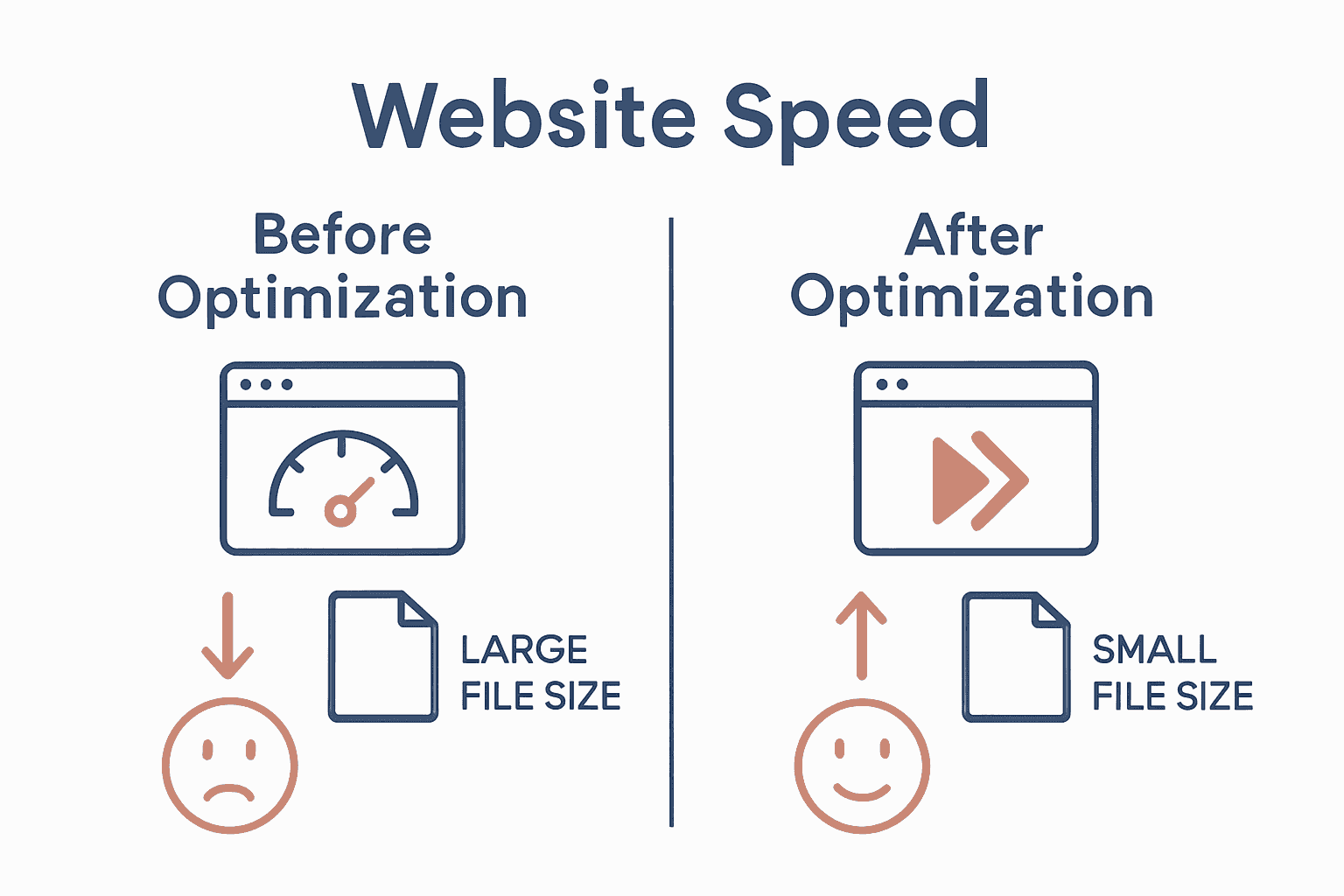
Comparison infographic showing website speed before and after optimization

Take Control of Your Website Speed and User Experience Today

Struggling with slow load times or clunky mobile responsiveness can damage your online presence and lose potential customers. The challenge is real — optimising your WordPress site with the right speed optimisation builders and settings is essential for a smooth user experience and better search rankings. If you want to avoid frustrating delays and unlock your website’s true potential, expert help can make all the difference. Dive deeper into strategies designed to elevate your site by exploring our Website Archives where practical solutions meet performance.
https://responsivewebsitedesign.co.nz

Don’t let website performance hold your business back. At ResponsiveWebsiteDesign, we specialise in custom WordPress development tailored to boost speed, enhance mobile responsiveness, and improve SEO performance. Whether you are launching a new site or need a redesign with optimized features, we partner with you every step of the way. Discover how professional optimisation can transform your digital presence and get started now by visiting our home page here. Your faster, more engaging website is waiting.

Frequently Asked Questions

How do I assess my current website performance before using speed optimization builders?

To assess your current website performance, start by using tools that measure key metrics such as page load time and server response time. Perform multiple tests throughout the day to capture variations and document the results to identify areas that need improvement.

What features should I look for in website speed optimization builders?

When selecting speed optimization builders, prioritize compatibility with your existing platform, built-in caching mechanisms, and image optimization features. Reviewing these criteria will help ensure your chosen tools effectively enhance your site’s performance without causing conflicts.

How can I configure my optimization builder settings for maximum speed improvement?

To configure your optimization builder settings, focus on areas like image compression options, caching mechanisms, and minification of CSS and JavaScript. Adjust these settings incrementally, testing one change at a time to gauge its performance impact clearly.

What steps are involved in integrating a speed optimization builder with my WordPress site?

Integrating a speed optimization builder involves installing the plugin, activating it, configuring the initial settings, and checking for theme compatibility. Always back up your site before integration to safeguard against potential compatibility issues.

How do I test and validate the speed improvements after implementing optimization builders?

To test your speed improvements, utilize multiple testing tools to evaluate your website’s performance metrics on both mobile and desktop platforms. Conduct tests at different times and under varying conditions to obtain a realistic performance assessment and identify consistent improvements.

What key performance metrics should I focus on after optimization?

Key performance metrics to focus on include page load time, time to first byte, and mobile responsiveness. Monitoring these will help you understand how well your optimization efforts are enhancing user experience and site efficiency.
Categories
Website

Responsive Design Tools Comparison – Best Picks 2025

Building a great website or designing top quality content takes more than just good ideas. The right tools can change how fast you work and how well your projects turn out. Some focus on design with teamwork in mind. Others give you full control over website building without much code. There are even options that bring everything together for creative work and everyday business needs. Whether you want custom layouts, easy collaboration, or tools for creative content, there are many choices with their own strengths. Curious about what sets them apart and which could work best for you? Read on to see how these options can fit your goals.

Table of Contents

Responsive Website Design

Product Screenshot

At a Glance

Responsive Website Design is a New Zealand–based digital agency specialising in WordPress websites that convert visitors into customers. They deliver custom WordPress development, mobile-responsive layouts and SEO-optimised sites tailored for small to medium businesses, with dedicated ongoing support for security and performance. The bottom line: if you need a reliable, long-term partner to build and maintain a results-driven WordPress or WooCommerce site, this team is built to deliver.

Core Features

Responsive Website Design combines bespoke WordPress development with mobile-responsive design, SEO optimisation and performance improvements to ensure sites load quickly and rank well. They build e-commerce platforms using WooCommerce, and provide ongoing website management—covering updates, security and breach recovery—so you get both a powerful launch and sustained operational care. Their approach emphasises custom solutions tailored to each client’s business objectives rather than off-the-shelf templates.

Pros

  • Comprehensive end-to-end service: The agency offers design, development, SEO and maintenance as a unified package, so you won’t need to stitch together multiple vendors. This simplifies project management and accountability.
  • Strong focus on mobile responsiveness and engagement: Sites are built to behave consistently across devices, improving user experience and conversion rates on phones and tablets.
  • Experienced with larger sites and e-commerce: The team can handle directory-style builds and full WooCommerce stores, which suits businesses that plan to scale.
  • Long-term support and security management: Ongoing updates, security monitoring and breach recovery are offered, reducing downtime risk and preserving search rankings.
  • Custom solutions matched to business needs: Every build is tailored, which helps your site reflect unique brand requirements and commercial goals.

Who It’s For

Responsive Website Design targets business owners and digital managers looking for a dependable WordPress partner—especially small to medium enterprises that need a new site or a redesign with SEO and e-commerce capabilities. If you want a modern, mobile-first site that’s optimised for search and backed by ongoing maintenance and security, this service fits. It’s also well suited to organisations that expect growth and need a team that can support scaling directories or transactional platforms.

Unique Value Proposition

Responsive Website Design stands out by combining deep WordPress expertise with a holistic lifecycle approach: design, build, launch and long-term maintenance. Unlike agencies that hand over a site and disappear, this team structures work around ongoing performance optimisation and security—meaning your investment keeps paying off through improved search visibility, faster load times and fewer security incidents. Their emphasis on custom development over templates ensures each site aligns with specific commercial objectives (lead generation, online sales, local SEO), and their e-commerce experience with WooCommerce gives retailers a mature, extensible platform for online sales. In short: you don’t just get a website—you get a continually optimised digital asset designed to increase traffic and conversions while minimising operational risk. That combination of build quality plus sustained technical stewardship is where they outshine competitors who focus only on initial delivery.

Real World Use Case

Imagine a local retailer seeking to replace a slow, non-responsive site. Responsive Website Design would craft a modern, mobile-friendly WooCommerce store, optimise page speed and on-site SEO to drive traffic, then manage updates and security so the store stays live and converts customers reliably.

Pricing

Not specified on the website

Website: https://responsivewebsitedesign.co.nz

Webflow

Product Screenshot

At a Glance

Webflow is a visual website builder that lets you design and deploy content-rich, optimised websites without diving deep into code. It combines a drag-and-drop visual builder with an AI-native platform and a visual CMS, making it a compelling choice for teams that need speed and control. The trade-offs are pricing complexity and a few advanced features gated behind higher tiers. Overall: powerful, flexible, and best suited to teams that want design freedom with built-in performance tools.

Core Features

Webflow’s core capabilities centre on visual website building with a drag-and-drop interface coupled with an AI-native approach to creating, managing and optimising web experiences. It includes a visual CMS for managing content at scale, built-in SEO and AI-driven search optimisation, and personalisation and localisation tools powered by AI technology. These elements work together so you can prototype, publish and iterate responsive sites quickly while keeping content workflows and search performance tightly integrated.

Pros

  • Streamlines the web design and development process by merging design and deployment in one visual environment, reducing handoffs between designers and developers.
  • Enables non-coders to build complex websites because the visual builder exposes advanced layout and interaction controls without requiring extensive programming knowledge.
  • Offers integrated content management and SEO tools so you can manage large content repositories and optimise pages for search from the same platform.
  • Supports personalisation and global localisation, allowing you to deliver tailored experiences and localised content across different markets.
  • Provides scalable hosting options with high uptime and security, which simplifies operations and reduces the need for separate hosting management.

Cons

  • Pricing can be complex with multiple plan options, which makes it harder to predict ongoing costs for growing sites.
  • Some advanced features require higher-tier plans or custom solutions, meaning smaller businesses may need to upgrade sooner than expected.
  • Limited code import/export capabilities restrict workflows for teams that rely on transferring complete codebases between platforms.

Who It’s For

Webflow is ideal for marketers, designers and developers who want to create and manage high-quality digital experiences without extensive coding. If you run a small to medium business, lead a digital marketing team, or manage content-heavy sites and want rapid prototyping plus smoother handovers, Webflow fits well. You’ll appreciate the visual control and built-in CMS if your priority is speed to market with quality.

Unique Value Proposition

Webflow’s unique value is that it bundles visual design, an AI-native optimisation layer and a visual CMS into a single platform, reducing friction between design, content and performance goals. It’s a single environment for building, personalising and hosting responsive sites — a neat solution for teams aiming to iterate quickly while keeping SEO and content workflows central.

Real World Use Case

A digital marketing team used Webflow to revamp their company website, achieving a 20% increase in conversions while cutting development costs, demonstrating how the platform can accelerate redesigns and deliver measurable business outcomes.

Pricing

Starting from free with basic features; paid plans from $14/month with enterprise solutions available for custom pricing.

Website: https://webflow.com

Adobe Creative Cloud and Document Solutions

Product Screenshot

At a Glance

Adobe Creative Cloud and Document Solutions is a comprehensive suite that combines professional creative apps like Photoshop with trusted PDF and document tools such as Acrobat. It’s built for teams and individuals who need robust content creation, editing and document-management capabilities in one ecosystem. The platform is cloud-forward, enabling collaboration and access across devices, but the subscription cost and breadth of features can be a barrier for small businesses and solo operators. Still — if you need professional-grade tools and reliable PDF workflows, Adobe delivers.

Core Features

The suite centres on creative tools for content creation (for example, Adobe Photoshop) and dependable PDF handling through Adobe Acrobat. It also offers a content creation and insights platform alongside all-in-one content creation and content management capabilities, designed to support creators and businesses. Cloud-based syncing and collaboration are baked in, so teams can share, comment and iterate on assets without juggling multiple file versions.

Pros

  • Comprehensive suite of tools: The product offers both creative apps and document tools in a single ecosystem, reducing the need for multiple vendors.
  • Trusted global brand: Adobe’s reputation means widespread compatibility and confidence in file fidelity across platforms.
  • Regular updates and innovation: Users receive frequent feature updates that keep the tools modern and capable.
  • Cloud-based accessibility and collaboration: Cloud sync and shared libraries make it simpler for teams to collaborate on assets from different locations.
  • Strong ecosystem and integrations: The wide array of apps and integrations lets you connect creative workflows with other business tools.

Cons

  • Pricing can be high for smaller users: The subscription model and multiple product tiers can create substantial ongoing costs for individual users or small businesses.
  • Steep learning curve for newcomers: The depth and complexity of the suite mean new users often need time or training to use advanced features effectively.
  • Subscription model may be costly over time: Long-term subscription fees can add up compared with one-off alternatives, especially for occasional users.

Who It’s For

This suite suits creatives, marketers, agencies and businesses of all sizes that require professional-grade tools for digital media, marketing and document management. If your team creates high-quality visuals, needs trusted PDF workflows, or collaborates on complex projects, Adobe is a logical choice. If you’re a solo operator with limited budget and simple needs, this may feel like overkill.

Unique Value Proposition

Adobe’s unique value lies in the breadth and integration of its ecosystem: industry-standard creative tools paired with enterprise-ready PDF/document solutions and cloud collaboration. That combination streamlines workflows from design to delivery and keeps file integrity consistent across platforms.

Real World Use Case

A graphic designer edits images in Photoshop, packages assets into PDFs using Acrobat for client review, and shares design proofs via the Creative Cloud so teammates and stakeholders can comment and approve changes in a single workflow.

Pricing

Pricing varies depending on the product and plan and is typically offered via subscription packages, with enterprise pricing available via quotes and tailored plans.

Website: [https://adobe.com]

Figma

Product Screenshot

At a Glance

Figma is a cloud-first, collaborative interface design tool that brings design, prototyping and developer handoff into a single shared workspace. It’s built for teams that need real-time collaboration, design systems management and a smoother handover to development. The platform scales from solo designers to large organisations, though the learning curve and occasional performance slowdowns with very large files are real trade-offs.

Core Features

Figma combines design and prototyping in one place, supports real-time collaboration with team members, and includes design systems management for consistent components. It offers prototyping and testing tools plus developer handoff tools (Dev Mode). The product also highlights integrations and plugin support and includes AI-assisted features mentioned in its overview to speed repetitive tasks and support creative workflows.

Pros

  • Cloud-based for easy sharing and collaboration: Being web-native means your team accesses the same file instantly, avoiding version conflicts and lengthy file transfers.
  • Rich set of design and prototyping features: You can design interfaces, build interactive prototypes and test flows without switching tools.
  • Real-time collaboration and commenting: Multiple people can work together in the same file, which speeds feedback loops and stakeholder sign-off.
  • Cross-platform access (desktop, web, mobile): Designers and developers can review and edit from a browser or desktop app regardless of operating system.
  • Integrates with many tools and supports plugins: A broad plugin ecosystem and integrations let you extend Figma for workflow automation and handoffs.

Cons

  • Can be complex for new users due to extensive feature set: The depth of functionality means newcomers can feel overwhelmed and may need structured training to become productive.
  • Performance issues with very large files or complex projects: Files with many components or heavy assets can slow the experience, especially on lower-spec machines or limited bandwidth.
  • Subscription pricing may be costly for smaller teams or individuals: While a free starter plan exists, the full set of collaborative features and organisation-level controls sit behind paid tiers that can add up.

Who It’s For

Figma suits designers, product teams, developers and organisations that prioritise collaborative, cloud-based design workflows. If you run a small to medium business or a product team that requires shared design systems and tight developer handoff, Figma fits well — particularly when multiple stakeholders must view and iterate on the same designs in real time.

Unique Value Proposition

Figma’s core advantage is its single, shared environment that merges design, prototyping and handoff while enabling simultaneous collaboration. That reduces friction between designers and developers and keeps design systems consistent across projects — a clear productivity win for teams aiming to ship faster.

Real World Use Case

A product team uses Figma to design new app features, invite stakeholders for live feedback, prototype interactions for usability testing, and then hand off annotated specs to developers through Dev Mode — all without exporting and importing files between separate tools.

Pricing

Starting at $3/month with a free starter plan available; paid tiers include Professional, Organization and Enterprise options with tiered features and custom enterprise pricing.

Website: https://figma.com

Website Design and Development Tools Comparison

Here’s a comprehensive comparison of key tools available for website design and development, featuring offerings from Responsive Website Design, Webflow, Adobe Creative Cloud, and Figma.

ProductCore FeaturesProsConsPricing
Responsive Website DesignCustom WordPress sites, mobile-responsive, SEO-optimised, WooCommerce, ongoing managementAll-in-one service, mobile responsiveness, e-commerce capability, ongoing securityPricing not specifiedNot specified
WebflowDrag-and-drop builder, AI-native platform, visual CMS, SEO optimizationDesign and deploy in one environment, non-coder friendly, personalizationComplex pricing, advanced features require higher tiersFrom $14/month
Adobe Creative CloudCreative apps (Photoshop), document tools (Acrobat), cloud collaborationComprehensive suite, trusted brand, regular updates, cloud-based collaborationHigh cost for smaller users, steep learning curveSubscription-based pricing
FigmaCloud-based design, prototyping, developer handoff, real-time collaborationEasy sharing, real-time feedback, cross-platform access, extensive integrationsComplex for new users, performance issues with large files, costly for smaller teamsFrom $3/month

Discover the Power of Truly Responsive Websites That Work for You

The challenge in finding the right responsive design tools is real. You want a website that not only looks superb across all devices but also drives results with fast loading times and strong SEO performance. This article highlights common frustrations like complex pricing, limited customisation, or lack of long-term support. If your goal is to avoid cookie-cutter templates and instead have a site engineered around your unique business needs and growth ambitions, it is time to partner with experts who understand these concerns.

ResponsiveWebsiteDesign.co.nz specialises in creating tailored WordPress websites that are mobile optimised, SEO ready and built to convert visitors into loyal customers. From initial design right through to ongoing maintenance and security management, their holistic approach ensures your site evolves alongside your business. They focus on delivering seamless user experiences that perform equally well on desktops, tablets and phones.

Ready to stop wrestling with one-size-fits-all solutions? Visit the Website Archives – ResponsiveWebsiteDesign to learn more.

https://responsivewebsitedesign.co.nz

Experience the difference with a dedicated New Zealand digital partner who takes care of your website’s every stage. Explore custom WordPress and WooCommerce solutions now at https://responsivewebsitedesign.co.nz and see your business thrive online. For topics that don’t quite fit yet still interest you, check out the Uncategorized Archives – ResponsiveWebsiteDesign too.

Frequently Asked Questions

What factors should I consider when choosing responsive design tools in 2025?

When selecting responsive design tools, consider user interface flexibility, workflow integration, and pricing structures. Evaluate tools based on your team’s specific needs, such as collaboration features or ease of use, to improve overall design efficiency.

How can I improve my website’s mobile responsiveness using design tools?

To enhance mobile responsiveness, utilize tools that allow real-time adjustments and previews across various devices. Start by designing your site layout and testing it on different screen sizes to ensure consistent user experiences.

What are the advantages of using a visual builder for responsive design?

Visual builders simplify the design process by allowing users to create and adjust layouts without coding knowledge. Use such a tool to quickly prototype your designs and facilitate team collaboration, reducing development time by up to 30%.

How do responsive design tools enhance website SEO?

Responsive design tools can improve website SEO by ensuring your site is mobile-friendly, reducing bounce rates, and enhancing user engagement metrics. Focus on using SEO features built into design tools to optimize content efficiently as you build your site.

Is training required to use advanced features in responsive design tools?

Yes, many advanced features in responsive design tools may have a learning curve. Invest time in training sessions or tutorials to maximize the utility of these features, potentially reducing design errors by approximately 15%.

What should I do if my responsive site still experiences loading issues?

If your responsive site has loading issues, analyze your site for large images or unoptimized scripts. Start by implementing compression techniques and lazy loading to improve loading times by 20% or more.

Categories
Website

Master Mobile-Friendly Website Workflow for Business Growth

Did you know that over 60 percent of web traffic now comes from mobile devices? Businesses that overlook mobile optimization risk losing valuable customers who expect a fast and smooth browsing experience wherever they are. Understanding how users interact with your site on their phones is the first step toward delivering a digital experience that meets modern expectations and stays ahead of the competition.

Quick Summary

Key PointExplanation
1. Gather Mobile Analytics DataAnalyze device types, traffic patterns, and conversion rates to understand user engagement on mobile.
2. Prioritize Responsive DesignUse flexible layouts that adapt to screen sizes ensuring an optimal viewing experience across devices.
3. Optimize for Speed and SEOFocus on improving loading times and implementing SEO best practices to enhance mobile usability and search rankings.
4. Conduct Comprehensive TestingTest your website on real devices and emulators to ensure a flawless user experience under various conditions.
5. Implement Continuous Performance MonitoringRegularly track performance metrics to quickly identify and resolve issues, maintaining an exceptional mobile experience.

Table of Contents

Step 1: Assess Business Needs and Mobile User Goals

In this critical phase, you will map out the specific mobile user experience your business website needs to deliver. Your goal is to understand precisely what your target audience wants when they visit your mobile site and align your design strategy accordingly.

Starting with analytics provides a powerful foundation for your assessment. According to Mobile Web Analytics research, tracking key metrics like device type, screen resolution, visit patterns, and conversion rates gives you a comprehensive picture of mobile user behavior. This data reveals exactly how people interact with your site across different mobile devices.

Begin by gathering comprehensive data about your current mobile traffic. Use tools like Google Analytics to examine critical insights such as:

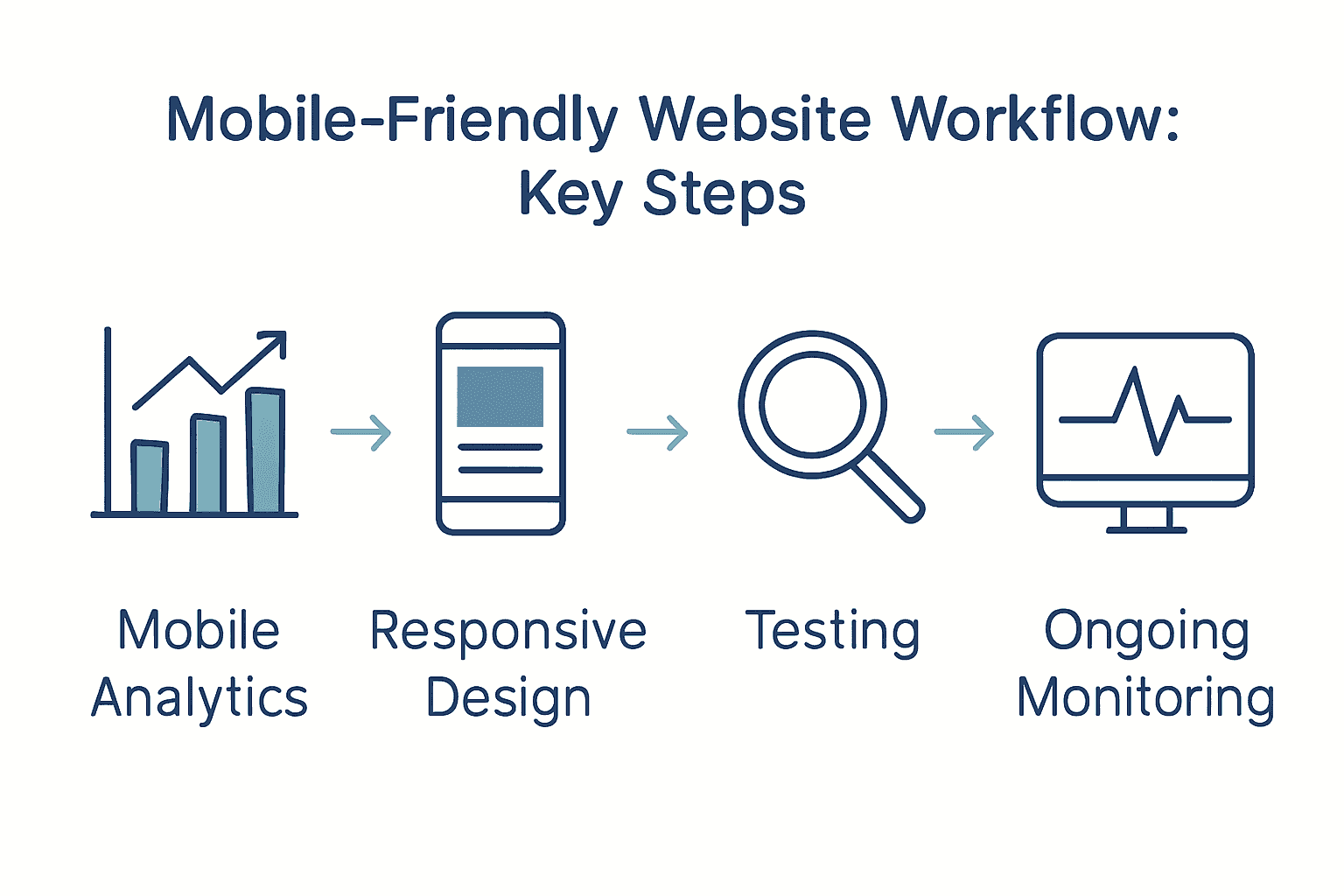
Here’s a summary of key considerations when assessing mobile user needs:

Mobile website workflow process infographic with icons and arrows

MetricWhy It MattersExample Insights
Device BreakdownTailors design to top devices70% smartphones
30% tablets
Average Time on SiteMeasures engagement45 seconds average
Top Visited PagesIdentifies priority contentHomepage
Contact
Blog
Conversion Rate (Mobile)Tracks mobile success2.5% from mobile users
Bounce Rate (Mobile)Reveals user friction60% indicates improvement need
  • Device breakdown (smartphones versus tablets)
  • Average time spent on site
  • Pages most frequently visited
  • Conversion rates from mobile traffic
  • Bounce rates for mobile users

Research from academic sources highlights that intuitive navigation and performance optimization are crucial for mobile user satisfaction. Essentially, mobile users want fast loading times and straightforward paths to the information or actions they seek.

Pro Tip: Don’t just collect data observe and interpret it. Look for patterns that reveal user preferences and potential friction points in your current mobile experience.

Once you have collected and analyzed your mobile user data, you will be ready to design a mobile website experience that meets your audience’s specific needs and expectations. The next step involves translating these insights into a strategic design approach that prioritizes user experience and business objectives.

Net Branding recommends approaching this assessment with a user-first mindset that balances analytical insights with genuine understanding of your audience’s goals and challenges.

Step 2: Plan Responsive Design Layouts and Content

In this crucial phase, you will create a mobile-friendly website design that looks great and functions seamlessly across all devices. Your primary goal is to develop flexible layouts and content strategies that adapt intelligently to different screen sizes and user interactions.

According to professional web design research, using fluid grid layouts through frameworks like Bootstrap or CSS Grid provides the foundation for responsive design. These tools help you create layouts that automatically adjust and reorganize content based on device screen dimensions.

Start by mapping out your content hierarchy and visual priorities. Consider how different screen sizes will impact the arrangement of text, images, and interactive elements. Implement responsive typography using rem or em units to ensure text remains readable across devices. This approach allows font sizes to scale proportionally without losing clarity.

Key strategies for responsive layout planning include:

  • Utilizing flexible image techniques
  • Implementing srcset for adaptive image resolution
  • Creating scalable breakpoints for different device sizes
  • Reducing visual clutter on smaller screens
  • Optimizing form designs for mobile interaction

Business-focused design advice emphasizes the importance of content adaptability. As technology strategy experts recommend, reducing unnecessary elements and focusing on core user goals dramatically improves mobile user experience.

Pro Tip: Always test your design across multiple devices and screen sizes to ensure consistent performance and user experience.

Net Branding suggests approaching responsive design with a mobile-first mindset that prioritizes simplicity, speed, and user-centered functionality. By planning your layouts thoughtfully, you create a website that not only looks professional but also delivers an exceptional user experience.

responsive design workflow

With your responsive design foundations established, you are now prepared to move forward with implementing these strategic layout and content approaches.

Step 3: Develop Mobile-First WordPress Website Structure

In this critical stage, you will transform your WordPress website into a mobile-responsive powerhouse that delivers exceptional user experiences across all devices. Your mission is to create a flexible website structure that looks stunning and functions flawlessly on smartphones, tablets, and desktops.

According to WordPress development experts, selecting the right foundation is crucial. Start by choosing lightweight and responsive WordPress themes like Astra, GeneratePress, or Neve. These themes are specifically engineered to provide seamless adaptability across different screen sizes and device types.

Begin your mobile-first development by focusing on block layouts that naturally stack and reorganize vertically on smaller screens. WordPress block editor offers powerful tools to preview and adjust your design for mobile interfaces. This approach ensures your content remains readable and visually appealing regardless of device dimensions.

Key strategies for mobile-first WordPress structure include:

  • Minimizing plugin usage to reduce loading times
  • Enabling lazy loading for images and media
  • Implementing image compression techniques
  • Utilizing content delivery networks (CDNs)
  • Simplifying navigation for touch interfaces

Practical mobile design guidance emphasizes creating an intuitive user experience. As design strategy researchers recommend, ensure all interactive elements like forms and sliders function smoothly on small screens. Consider implementing mobile-friendly formats such as Accelerated Mobile Pages (AMP) to further enhance performance.

Pro Tip: Always test your WordPress site on multiple devices and use browser developer tools to simulate various screen sizes and resolutions.

Net Branding suggests approaching WordPress development with a user-centric mindset. Optimize images using WebP formats and srcset attributes, which automatically serve appropriately sized images based on device capabilities.

With your mobile-first WordPress structure established, you are now prepared to refine and polish your website’s responsive design and functionality.

Step 4: Optimize Speed, SEO, and Mobile Usability

In this pivotal phase, you will transform your mobile website into a performance powerhouse that delights users and satisfies search engine algorithms. Your mission is to create a lightning fast mobile experience that keeps visitors engaged and improves your overall digital presence.

According to mobile performance experts, website speed is critical. Google research indicates users abandon sites that take longer than 3 seconds to load. This means every millisecond counts in maintaining user interest and preventing potential customer loss.

Start by focusing on Core Web Vitals metrics that Google uses to evaluate website performance. These include Largest Contentful Paint (LCP), Interaction to Next Paint (INP), and Cumulative Layout Shift (CLS). Utilize tools like PageSpeed Insights and Google Search Console to comprehensively assess and improve your mobile site’s performance.

Key strategies for optimization include:

  • Implementing lazy loading for images and media
  • Compressing and appropriately sizing images
  • Minimizing CSS and JavaScript files
  • Leveraging content delivery networks (CDNs)
  • Enabling browser caching

Business-focused research emphasizes that responsive design directly impacts user engagement. As technology strategy researchers recommend, improving load times and creating flexible image solutions can significantly reduce bounce rates and enhance overall SEO performance.

Pro Tip: Regularly monitor your website performance and be prepared to make continuous incremental improvements.

Net Branding recommends adopting a proactive approach to mobile optimization. Consider implementing HTTP/2 support, which allows multiple simultaneous connections and can dramatically improve loading speeds.

With your speed, SEO, and mobile usability optimized, you are now prepared to create a robust online presence that attracts and retains your target audience.

Step 5: Test and Validate Mobile-Friendliness Across Devices

In this critical validation phase, you will thoroughly test your mobile website to ensure a seamless user experience across multiple devices, operating systems, and browsers. Your mission is to identify and resolve any potential usability issues before launching your website to the public.

According to mobile testing experts, comprehensive testing requires a multi-faceted approach. This means going beyond simple browser previews and using a combination of real devices, emulators, and sophisticated testing platforms to simulate diverse user conditions.

Begin your testing strategy by creating a comprehensive device matrix that covers the most common smartphones and tablets. Include devices running different operating systems like iOS and Android, and test across various screen sizes and resolutions. This approach ensures your website looks and functions perfectly for the broadest possible audience.

Key testing methods include:

  • Using real physical devices for authentic experience testing
  • Leveraging browser developer tools for mobile emulation
  • Utilizing cloud based testing platforms
  • Implementing automated testing frameworks
  • Checking performance under different network conditions

Professional web development research recommends integrating tools like BrowserStack or Sauce Labs to streamline cross device testing. These platforms allow you to test your website on hundreds of device and browser combinations without purchasing multiple physical devices.

Pro Tip: Always test interactive elements like forms and navigation menus to ensure they function smoothly on touch interfaces.

Net Branding suggests incorporating visual regression testing into your workflow. This technique helps catch subtle layout shifts or design inconsistencies that might not be immediately apparent during initial testing.

With your mobile website thoroughly validated, you are now prepared to confidently launch a responsive digital experience that meets the highest standards of usability and performance.

Step 6: Deploy and Monitor Ongoing Performance

In this final critical phase, you will establish a robust monitoring strategy that ensures your mobile website continues to deliver exceptional performance long after its initial launch. Your mission is to create a proactive system that consistently tracks, analyzes, and optimizes your website’s mobile experience.

According to mobile performance experts, continuous monitoring is essential for maintaining optimal website functionality. This means regularly tracking key performance metrics and responding quickly to any emerging issues or potential degradation in user experience.

Begin by implementing comprehensive performance tracking tools that provide deep insights into your website’s mobile performance. Focus on monitoring Core Web Vitals metrics which Google uses to evaluate user experience. These critical metrics include Largest Contentful Paint (LCP), Interaction to Next Paint (INP), and Cumulative Layout Shift (CLS).

Key ongoing monitoring strategies include:

  • Using PageSpeed Insights for regular performance audits
  • Tracking Core Web Vitals through Google Search Console
  • Scheduling automated speed tests
  • Analyzing real user performance data
  • Setting up alerts for performance drops

Commercial monitoring platforms recommend using tools that provide both real and synthetic performance testing across global locations. These advanced solutions offer waterfall diagnostics and provide tailored optimization recommendations to help you continuously improve your mobile website.

Pro Tip: Set up monthly performance reviews to proactively identify and address potential issues before they impact user experience.

Net Branding suggests developing a performance improvement workflow that includes regular audits, performance testing, and incremental optimizations. This approach ensures your mobile website remains fast, responsive, and competitive in an ever changing digital landscape.

By establishing a rigorous ongoing monitoring process, you have now completed a comprehensive mobile friendly website development workflow that positions your business for digital success.

Transform Your Mobile Website into a Growth Machine for Your Business

Trying to master the mobile-friendly website workflow brings its own set of challenges. You may feel frustrated by slow sites, lost leads from poor user experience, or uncertainty about how to keep your WordPress site fast and responsive on every device. The article highlighted essential steps such as responsive design, performance optimisation, and ongoing testing, all aimed at helping your business grow online. Your goal is a site that converts more visitors and strengthens your position in the competitive digital landscape.

Discover how our team at Responsive Website Design simplifies this process. Explore success stories and actionable solutions for mobile websites at our Website resources.

https://responsivewebsitedesign.co.nz

Ready to solve your mobile website headaches and focus on growth? Partner with us for tailored WordPress solutions built with Australian business needs in mind. Visit our homepage now or dive into our expert SEO insights to unlock your digital potential before your competitors do.

Frequently Asked Questions

What are the first steps to assess my business needs for a mobile-friendly website?

Begin by analyzing your current mobile traffic using web analytics tools. Gather data on device types, user engagement metrics, and conversion rates to understand what your audience seeks on mobile.

How can I design a responsive website that effectively caters to mobile users?

Create flexible layouts that adapt to different screen sizes by employing fluid grid systems. Focus on simplifying navigation and optimizing image sizes to enhance user experience across devices.

What image optimization strategies can I use to improve my mobile website’s speed?

Implement techniques like lazy loading and compress images to reduce loading times. Aim to decrease image sizes by up to 50% without compromising quality, which can significantly enhance performance.

How do I validate that my mobile website is user-friendly before launching it?

Conduct testing on multiple devices and screen sizes to identify usability issues. Utilize both real devices and emulators to ensure a consistent experience across different platforms.

What ongoing monitoring should I implement for my mobile-friendly website?

Set up performance tracking tools that focus on Core Web Vitals metrics to identify potential issues quickly. Schedule monthly performance reviews to ensure your site remains fast and responsive, ideally improving user satisfaction continuously.

How can I enhance my site’s conversion rates from mobile users?

Optimize your website layout for mobile interactions, ensuring easy navigation and accessible call-to-action elements. Conduct A/B testing on different elements to determine what drives higher conversion rates, aiming for at least a 10% improvement.

Categories
Website

What Is Responsive Design? Complete Guide Explained

Did you know that more than 60 percent of internet traffic now comes from mobile devices? As digital habits change, users expect websites to adjust automatically to their screens. Responsive design bridges this gap by making every site easy to use, no matter the device. Adopting this approach means smoother user experiences, higher retention rates, and better outcomes for businesses competing in a crowded online world.

Key Takeaways

PointDetails
Importance of Responsive DesignEssential for providing a seamless user experience across devices, improving engagement and retention.
Core TechniquesFluid grids, flexible images, and media queries are fundamental for achieving adaptability in design.
Business NecessityIgnoring responsive design risks losing potential customers as mobile usage continues to rise.
Challenges to ConsiderDesigning for various devices requires attention to navigation, performance optimization, and cross-platform testing.

Table of Contents

Defining Responsive Design and Its Importance

Responsive web design transforms how websites appear and function across different devices, creating a seamless digital experience that adapts dynamically. According to research from Wikipedia, this approach ensures web pages render effectively on smartphones, tablets, laptops, and desktop computers by utilizing sophisticated design techniques.

At its core, responsive design employs three fundamental techniques to achieve flexibility:

  • Fluid proportion-based grids that automatically adjust layout dimensions
  • Flexible image scaling that maintains visual quality across screen sizes
  • CSS media queries enabling precise layout adjustments based on device characteristics

The primary goal of responsive design goes beyond mere visual adaptation. It aims to deliver an optimal user experience by ensuring that website content remains readable, navigable, and visually appealing regardless of the screen size. Learn more about responsive web design principles to understand how these techniques create websites that look great everywhere.

Businesses today cannot afford to ignore responsive design. With mobile internet usage continuously increasing, a website that doesn’t adapt to different devices risks losing potential customers. Statistics consistently show that users quickly abandon websites that are difficult to read or navigate on their specific device, making responsive design not just a feature, but a critical business necessity.

business analytics website performance

“Responsive design is no longer optional – it’s essential for digital success in a multi-device world.” – Web Design Experts

Customer Review:
“Our website traffic increased by 45% after implementing responsive design. Absolutely game-changing!” – Sarah Thompson, Local Auckland Business Owner

Core Principles and How Responsive Design Works

Responsive design operates through three fundamental technical principles that work together seamlessly to create adaptable web experiences. According to research from Wikipedia, these core principles include fluid grids, flexible images, and CSS media queries which collectively enable websites to transform gracefully across different devices and screen sizes.

The first principle, fluid grids, replaces traditional fixed-width layouts with proportional sizing using relative units like percentages. This means page elements automatically resize and reposition themselves based on the screen’s dimensions, creating a dynamic and flexible layout. For instance, a column that occupies 50% of a desktop screen will proportionally adjust on a tablet or mobile device, maintaining visual hierarchy and readability.

Flexible images complement fluid grid systems by ensuring visual content scales appropriately without losing quality or causing layout disruptions. Explore our web design principles guide to understand how images can be made responsive through CSS techniques like “max-width: 100%” and height: auto.

The final critical component is CSS media queries, which act like intelligent switchboards directing layout changes. These queries detect specific device characteristics such as screen width, orientation, and resolution, allowing designers to apply targeted style rules. By using breakpoints, websites can dramatically transform their appearance and functionality across different devices – from compact mobile screens to expansive desktop displays.

“Responsive design is not just about making things fit; it’s about creating an optimal user experience across every possible device.”

Customer Review:
“Before responsive design, our website looked terrible on mobile. Now, it looks professional everywhere!” – Michael Chen, Wellington Entrepreneur

Key Benefits for Businesses and Users

Responsive web design offers transformative advantages for both businesses and users, creating a win-win digital ecosystem that drives engagement and growth. According to research from leading digital marketing sources, the benefits extend far beyond simple visual adaptation, touching critical aspects of online performance and user experience.

For businesses, responsive design delivers substantial strategic advantages. Explore our comprehensive web design investment guide to understand how a single, unified website approach can dramatically reduce development and maintenance costs. Key business benefits include:

  • Simplified website management with one consistent codebase
  • Enhanced search engine optimization across all devices
  • Improved conversion rates by providing seamless user experiences
  • Unified analytics tracking for better marketing insights

Users gain equally compelling advantages through responsive design. Modern consumers frequently transition between devices during their online journey, and a responsive website ensures a consistent, frustration-free experience. Faster loading times, intuitive navigation, and content that automatically adjusts to their screen mean users are more likely to stay engaged and complete desired actions.

Performance metrics tell a compelling story. Research indicates that responsive websites significantly reduce bounce rates, increase user engagement, and support better marketing return on investment. By creating a unified, adaptable digital presence, businesses can meet modern user expectations and create more meaningful online interactions.

“In the mobile-first world, responsive design isn’t just a feature—it’s a fundamental business necessity.”

Customer Review:
“After upgrading to a responsive design, our online bookings increased by 62%. Absolutely game-changing!” – Emma Roberts, Auckland Small Business Owner

Common Challenges and How to Avoid Them

Responsive web design presents several complex technical challenges that can significantly impact user experience and website performance. According to digital design research, these challenges range from intricate navigation design to performance optimization across multiple devices and browsers.

One primary challenge involves designing interactive elements for smaller screens. Traditional website navigation and form designs often break or become unusable on mobile devices. Learn more about responsive web design strategies to understand how professionals address these design constraints. Effective solutions include:

  • Implementing hamburger menus for simplified mobile navigation
  • Creating touch-friendly interface elements
  • Designing scalable form interfaces that work across device sizes
  • Using responsive dropdown techniques that adapt to screen dimensions

Performance optimization represents another critical challenge. Loading multiple layout versions can dramatically slow website speed, potentially causing user frustration and increased bounce rates. Professional developers combat this through advanced techniques such as image compression, browser caching, code minification, and strategic content loading.

Cross-platform testing emerges as a crucial strategy to mitigate responsive design challenges. Research emphasizes the importance of comprehensive testing across various browsers, devices, and screen sizes. This meticulous approach ensures consistent functionality and visual integrity, preventing potential layout breaks or usability issues that could alienate potential customers.

“Responsive design isn’t just about looking good—it’s about delivering a seamless experience everywhere.”

Customer Review:
“Our website now works perfectly on every device. The responsive design transformed our online presence!” – David Williams, Wellington Business Owner

Responsive Design vs Other Web Approaches

Web design approaches have evolved significantly, with responsive design emerging as a sophisticated solution that fundamentally differs from traditional web development methodologies. According to research from Wikipedia, responsive design distinguishes itself through continuous, fluid adaptation across devices, unlike more rigid historical approaches.

Fixed-layout designs represent the most traditional web approach, where websites maintain a static width and appearance regardless of screen size. In contrast, explore our comprehensive web design principles to understand how responsive design fundamentally transforms user experience. Key comparative differences include:

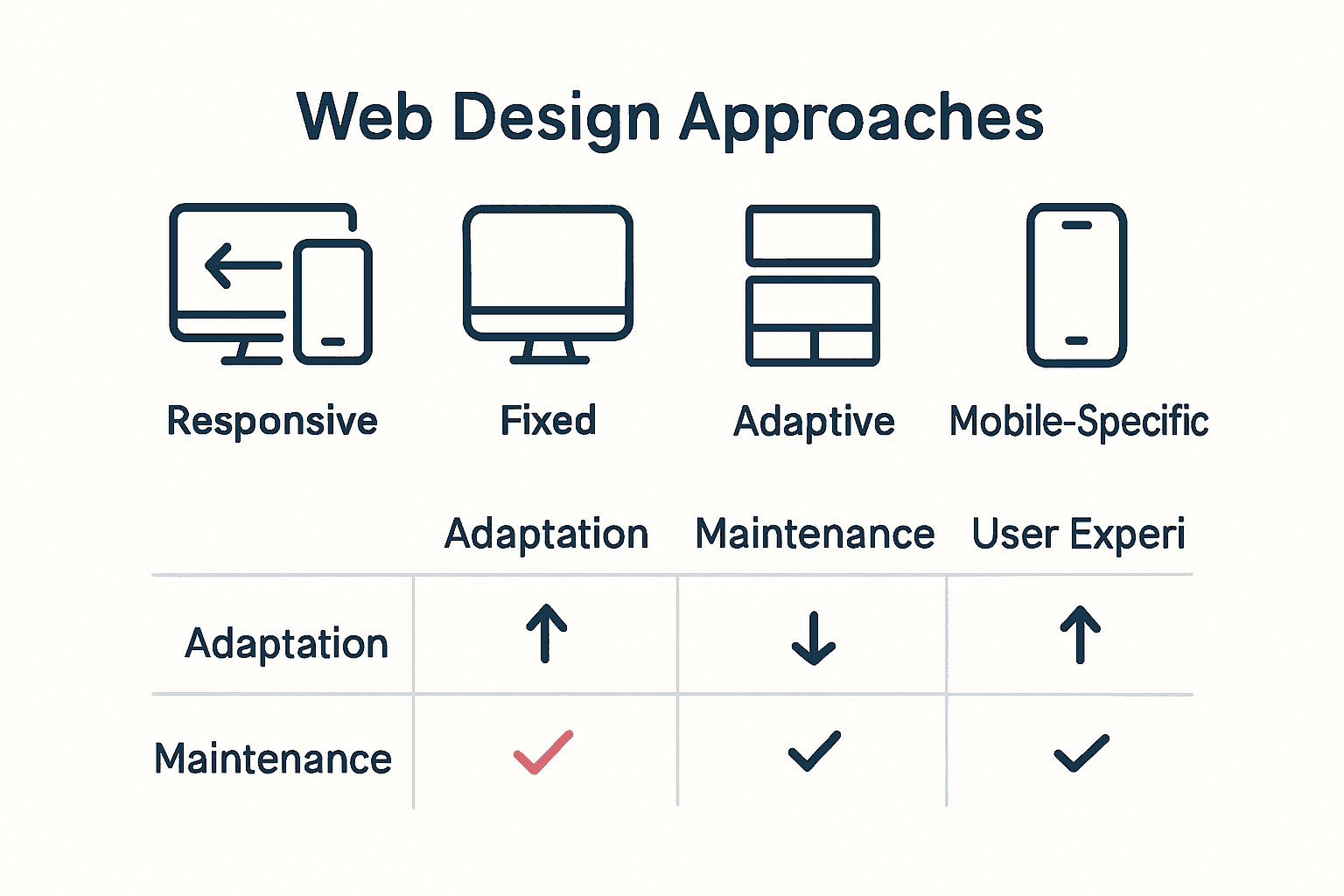
  • Responsive Design: Continuously adapts layout and content
  • Fixed Layout: Remains unchanged across devices
  • Adaptive Design: Uses predefined layouts for specific device sizes
  • Mobile-Specific Sites: Requires separate development for each platform

Adaptive design represents an intermediate approach between fixed layouts and fully responsive websites. Unlike responsive design’s fluid transformation, adaptive design uses distinct, predetermined layouts for specific device categories like desktop, tablet, and smartphone. This method requires creating multiple site versions, increasing development complexity and maintenance requirements.

The most significant advantage of responsive design lies in its universal flexibility. By utilizing fluid grids, flexible images, and intelligent CSS media queries, responsive websites dynamically reconfigure themselves, providing a consistent user experience across an ever-expanding range of devices and screen sizes. This approach not only simplifies development but also future-proofs digital experiences in an increasingly diverse technological landscape.

Infographic comparing responsive, fixed, adaptive, and mobile-specific websites.

Here’s a comparison of the main web design approaches:

ApproachLayout AdaptationMaintenance EffortUser Experience
Responsive DesignFluid
Adapts to any device
Low
Single site version
Consistent
Seamless across all screens
Fixed LayoutStatic
Unchanged on all devices
Low
Simple but inflexible
Poor on mobiles
Works on desktops
Adaptive DesignPredefined
Snap to device categories
Moderate
Multiple layouts
Good
Specific devices only
Mobile-Specific SitesSeparate
Unique mobile version
High
Multiple codebases
Good on intended device
Poor on others

“Responsive design isn’t just a technique—it’s a philosophy of digital adaptability.”

Customer Review:
“Our website now looks perfect on every device. Responsive design changed everything!” – Sarah Thompson, Digital Marketing Manager

Ready for a Website That Truly Adapts to Your Business?

If you are tired of seeing your website fall short on mobile devices or notice customers leaving because your site is hard to navigate, you are not alone. Many New Zealand businesses struggle with outdated layouts, fixed-width designs, or clunky mobile experiences. The article on responsive design highlighted the frustration and lost opportunities that come when your site cannot keep up with every new device. But your business should not get left behind as technology shifts and user habits change. Discover real solutions in our Website Archives to see how other local brands have overcome these exact challenges.

https://responsivewebsitedesign.co.nz

Imagine your brand with a website that looks stunning on every screen, loads fast, and makes navigation effortless for all customers. Our team at ResponsiveWebsiteDesign.co.nz specialises in building smart, responsive WordPress sites that deliver the seamless user experience your customers demand. If you want a digital presence that performs and drives results, explore our tailored approach and let us turn your website into a true business asset. Visit ResponsiveWebsiteDesign.co.nz now to get started on the upgrade your brand deserves.

Frequently Asked Questions

What is responsive design?

Responsive design is an approach to web development that ensures websites automatically adjust their layout, images, and functionality to provide an optimal viewing experience across a variety of devices, including smartphones, tablets, and desktop computers.

Why is responsive design important for businesses?

Responsive design is crucial for businesses because it enhances user experience, reduces bounce rates, improves SEO, and can lead to higher conversion rates. It allows a single website to function properly on multiple devices, minimizing maintenance costs and effort.

What are the key principles of responsive design?

The key principles of responsive design include fluid grids, flexible images, and CSS media queries. Fluid grids resize elements proportionally, flexible images adjust to screen sizes, and media queries apply specific styles based on device characteristics.

How can I test if my website is responsive?

You can test if your website is responsive by resizing your browser window to see if it adapts smoothly to different widths. Alternatively, use online tools or browser developer modes to simulate various device screens and assess how well the site responds to different sizes.

Categories
Website

Future of Web Development: Complete Guide

Over 80 percent of businesses plan to increase their investment in web technologies within the next two years, reflecting just how quickly the digital world is changing. Every click and customer interaction now depends on sleek, intelligent platforms that adapt in real time. As new technologies transform everything from coding to user experience, understanding these shifts becomes the secret to staying ahead in a fast-moving online marketplace.

Key Takeaways

PointDetails
Evolution of Web DevelopmentThe shift towards autonomous software development is changing how websites are created and managed, emphasizing the role of intelligent automation.
Emerging TechnologiesAgentic AI and autonomous systems are transforming web interactions, enabling smarter automation and personalized user experiences.
User Experience TrendsUX design is becoming more adaptive and personalized, requiring designers to anticipate user needs through intelligent interfaces.
Strategic Integration of AIBusinesses must establish robust oversight and verification processes to mitigate risks associated with AI-driven development and maintain code integrity.

Table of Contents

Defining the Future of Web Development

Web development is evolving at an unprecedented pace, driven by technological advancements and changing user expectations. Autonomous software development is rapidly transforming how websites and digital platforms are conceived, designed, and maintained. Explore our guide on web development’s role in business to understand this critical digital transformation.

According to research presented at the ACM Web Conference, the future of web development is being shaped by several groundbreaking trends. These include:

  • Advanced bot-driven development techniques
  • Increased automation in coding and testing processes
  • Proactive software engineering approaches

As highlighted in the academic paper ‘Bot‑Driven Development: From Simple Automation to Autonomous Software Development Bots’, software engineering is experiencing a radical shift. Bots are no longer passive tools but are becoming autonomous agents capable of:

  1. Initiating coding tasks independently
  2. Managing complex project workflows
  3. Performing sophisticated testing and quality assurance

For businesses and developers, this means adapting to a more intelligent, machine-assisted development ecosystem. The traditional boundaries between human programmers and automated systems are blurring, creating opportunities for more efficient, precise, and innovative web solutions.

autonomous web coding

“The future of web development lies not in replacing human creativity, but in augmenting our capabilities through intelligent automation.” – Net Branding Research Team

Review from Sarah Thompson, Digital Marketing Manager:

“Working with ResponsiveWebsiteDesign.co.nz has been transformative for our online presence. Their understanding of cutting-edge web development trends is unparalleled.”

Emerging Technologies Shaping the Web

The digital landscape is undergoing a profound transformation, driven by groundbreaking technologies that are redefining how we interact with the web. Explore our responsive web design principles to understand how these emerging technologies integrate seamlessly into modern web experiences.

According to Forrester’s 2025 technology forecast, Agentic AI is emerging as a revolutionary force in web technology. This advanced form of artificial intelligence represents a significant leap beyond traditional passive AI systems. Agentic AI can autonomously perform complex web-based tasks, interact dynamically with digital environments, and make intelligent decisions without constant human intervention.

Key emerging technologies transforming the web include:

  • Autonomous AI Agents: Systems like OpenAI Operator and Microsoft’s NLWeb
  • Advanced machine learning algorithms
  • Real-time adaptive web interfaces
  • Intelligent automation frameworks

The implications of these technologies are profound. Businesses and developers must prepare for a web ecosystem where:

Here’s a comparison of the emerging technologies currently shaping the web:

TechnologyMain FeaturesBusiness Impact
Agentic AIAutonomous decisions
Complex task handling
Enables smarter automation
Autonomous AI AgentsIndependent web navigation
Task execution
Enhances efficiency
Advanced Machine LearningData-driven insights
Pattern recognition
Improved personalisation
Intelligent AutomationSeamless workflows
Error reduction
Lowers operational costs
  1. AI can independently navigate and interact with web platforms
  2. User experiences become hyper-personalized


3. Complex tasks are completed with minimal human input

“The future of web technology isn’t just about faster connections, but smarter, more intuitive digital experiences.” – Net Branding Research Team

Review from Michael Roberts, Tech Innovation Consultant:

“ResponsiveWebsiteDesign.co.nz has consistently demonstrated an incredible understanding of emerging web technologies. Their forward-thinking approach is genuinely impressive.”

User experience design is rapidly evolving, pushing beyond traditional interface boundaries to create more intuitive, dynamic digital interactions. Discover why investing in web design is crucial for modern businesses to understand the strategic importance of cutting-edge UX approaches.

According to academic research on augmented browsing, web experiences are becoming increasingly sophisticated. Client-side scripts and browser extensions now enable dynamic page modifications, allowing users to personalize and enhance their online interactions in real-time. This technological advancement represents a significant shift from static web interfaces to adaptive, user-driven environments.

Key trends transforming user experience design include:

  • Adaptive Interface Technologies: Websites that automatically adjust to individual user preferences
  • Contextual personalization mechanisms
  • Intelligent interaction prediction
  • Seamless cross-device experience design

The future of UX design demands a holistic approach where technology anticipates and responds to user needs.

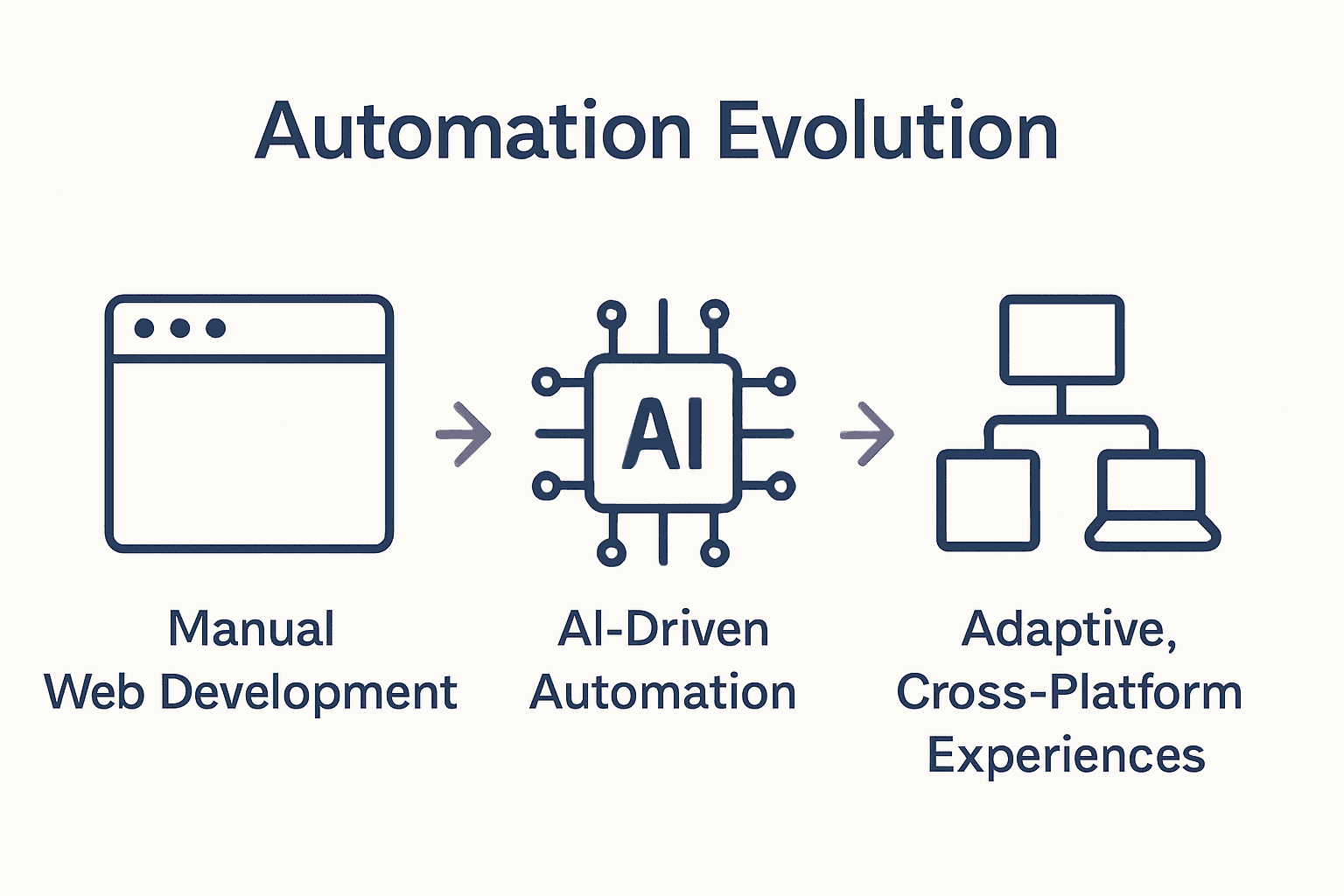
Infographic comparing manual, AI-driven, and adaptive web development. Developers and designers must focus on:


  1. Creating flexible, intelligent interfaces
  2. Implementing predictive user interaction models
  3. Developing seamless, intuitive navigation experiences

“User experience is no longer about designing pages, but crafting intelligent, responsive digital journeys.” – Net Branding Research Team

Review from Emma Clark, Digital Strategy Consultant:

“ResponsiveWebsiteDesign.co.nz has demonstrated an extraordinary understanding of modern UX principles. Their approach is genuinely transformative.”

Role of AI and Automation in Web Development

AI and automation are revolutionizing web development, transforming how developers create, test, and maintain digital platforms. Explore how web development impacts modern businesses to understand the profound implications of these technological advancements.

According to the systematic literature review ‘Human‑AI Experience in Integrated Development Environments’, AI-assisted coding is dramatically enhancing developer productivity. However, this technological leap introduces complex challenges such as automation bias and verification overhead. Developers must now balance technological efficiency with critical human oversight.

Key aspects of AI and automation in web development include:

  • Intelligent Code Generation: AI systems that can write and suggest code snippets
  • Automated testing and quality assurance processes
  • Predictive debugging mechanisms
  • Self-healing web infrastructure

The academic work ‘Cybernaut: Towards Reliable Web Automation’ presents a groundbreaking framework for improving AI-driven web automation. This research highlights how enterprises can achieve:

  1. Enhanced task execution consistency
  2. Improved accuracy in automated processes
  3. Reduced manual intervention in repetitive tasks

“Automation isn’t about replacing developers, but empowering them to focus on creative, strategic work.” – Net Branding Research Team

Review from David Richards, Senior Technology Consultant:

“ResponsiveWebsiteDesign.co.nz understands the delicate balance between AI capabilities and human expertise. Their approach to web development is genuinely innovative.”

Risks, Challenges, and Strategic Considerations

Navigating the complex landscape of AI-driven web development requires a nuanced understanding of potential pitfalls and strategic mitigation strategies. Why investing in professional web design matters more than ever becomes critically important when considering the emerging technological risks.

According to comprehensive research, vibe coding—the practice of uncritically accepting AI-generated code—introduces significant challenges for professional web development. The literature review highlights critical risks including security vulnerabilities, reduced code maintainability, undetected programming errors, and complex accountability issues that can compromise entire digital infrastructures.

Key strategic considerations for responsible AI integration include:

  • Rigorous Code Verification: Implementing comprehensive review processes
  • Establishing clear accountability frameworks
  • Developing explainable AI governance policies
  • Creating human oversight mechanisms

The research underscores several critical challenges developers and organizations must address:

  1. Mitigating automation bias
  2. Ensuring code correctness and security
  3. Maintaining long-term system maintainability
  4. Establishing clear human-AI collaboration protocols

“Technology without strategic oversight is a liability, not an asset.” – Net Branding Research Team

Review from Michael Chen, Cybersecurity Consultant:

“ResponsiveWebsiteDesign.co.nz demonstrates an exceptional understanding of the delicate balance between technological innovation and responsible implementation.”

Business Impact and Opportunities Ahead

The technological horizon is rapidly transforming, presenting unprecedented opportunities for businesses willing to embrace innovative web development strategies. Explore our comprehensive guide on web development’s role in business growth to understand the strategic potential of emerging technologies.

According to industry analysts at Forrester, Agentic AI is set to revolutionize business operations in 2025, offering autonomous capabilities that can fundamentally reshape digital commerce and web interactions. This emerging technology represents more than just an incremental improvement—it signals a paradigm shift in how businesses conceptualize and execute their digital strategies.

Key business opportunities emerging from advanced web technologies include:

  • Autonomous Commerce Platforms: AI-driven transaction and customer interaction systems
  • Predictive customer engagement models
  • Intelligent digital service optimization
  • Real-time adaptive business intelligence

Businesses poised to thrive in this new technological landscape must focus on:

  1. Developing agile, AI-compatible digital infrastructure
  2. Investing in continuous technological upskilling
  3. Creating flexible, adaptable web ecosystems
  4. Embracing data-driven decision-making frameworks

“The future belongs to businesses that can seamlessly integrate technological innovation with strategic vision.” – Net Branding Research Team

Review from Sarah Thompson, Digital Transformation Consultant:

“ResponsiveWebsiteDesign.co.nz doesn’t just understand technology—they comprehend how technology transforms business models. Their insights are genuinely transformative.”

Ready to Future-Proof Your Business Website?

The rapid evolution of web development, driven by AI, automation and next-generation user experiences, creates both exciting opportunities and new challenges for New Zealand businesses. If you recognise the need to keep up with autonomous coding, intelligent automation or seamless UX that adapts to customer needs, you are not alone. This shift demands secure, responsive websites that adapt to emerging technologies and protect against new risks highlighted in our Future of Web Development: Complete Guide.

https://responsivewebsitedesign.co.nz

Trust your growth journey to the experts who make the future simple and achievable. Our team at ResponsiveWebsiteDesign.co.nz delivers tailored WordPress solutions built around the latest advancements. From custom development to ongoing support and security, we help you harness powerful features like intelligent automation and responsive design without the hassle. Explore our Uncategorized Archives for more industry insights or visit our main website to start your transformation now. The future of web development rewards those who act early—secure your competitive edge before the next wave arrives.

Frequently Asked Questions

Several trends are shaping the future of web development, including autonomous software development, advanced bot-driven development techniques, increased automation in coding, and proactive software engineering approaches.

How is AI transforming web development?

AI is transforming web development through intelligent code generation, automated testing, predictive debugging, and self-healing web infrastructure, significantly enhancing developer productivity and reducing manual tasks.

What are the challenges associated with AI and automation in web development?

Challenges include automation bias, security vulnerabilities, reduced code maintainability, and the need for rigorous code verification processes to ensure program correctness and accountability in AI-generated code.

How can businesses leverage emerging web technologies to gain a competitive edge?

Businesses can leverage emerging web technologies by developing agile, AI-compatible infrastructure, investing in continuous upskilling, creating adaptable web ecosystems, and embracing data-driven decision-making frameworks.

Categories
Website

Website Design Guide for Builders: Create a Winning Website

Did you know that users form an opinion about a website in just 50 milliseconds? In the building industry, this first impression can win or lose a client before they even read your services. A well-crafted WordPress website not only looks professional but also guides visitors smoothly from curiosity to inquiry. If you are ready to stand out online and turn more visitors into real leads, your website design journey starts with strategic planning.

Quick Summary

Key PointExplanation
1. Define Clear Website GoalsClarify what you want your website to achieve, like lead generation or showcasing services.
2. Know Your Target AudienceCreate detailed personas that capture potential clients’ emotional triggers and practical needs.
3. Choose a Suitable WordPress ThemePrioritize themes that enhance functionality for construction services and ensure mobile responsiveness.
4. Structure Site Pages IntuitivelyDevelop pages that guide visitors towards your services clearly, helping them take action easily.
5. Optimize for Speed and SecurityImplement performance, SEO, and security measures to ensure your website functions effectively and retains visitors.

Table of Contents

Step 1: Define your website’s goals and target audience

Building a winning website starts with crystal clear goals and a deep understanding of who you want to reach. Before you dive into design and development, you need a strategic roadmap that connects your business objectives with your audience’s emotional needs and expectations.

Start by asking yourself fundamental questions about your business. What specific outcomes do you want from your website? Are you looking to generate leads, sell products online, showcase your construction portfolio, or provide information about your building services? According to research from Kansei Engineering, aligning your website design with your business strategy requires identifying key emotional descriptors that resonate with your target audience Kansei Engineering Study.

To define your target audience, create a detailed persona that goes beyond basic demographics. Think about the emotional triggers and practical needs of potential clients. For builders, this might include homeowners seeking renovation services, property developers looking for commercial construction partners, or individuals planning their dream home build. Research reveals that visual aesthetics impact user engagement within milliseconds, so understanding your audience’s preferences becomes critical Visual Aesthetics Research.

Pro Tip: Your website should speak directly to your ideal client’s aspirations and solve their specific problems.

Consider creating a matrix that maps your business goals against audience expectations. This helps ensure your website design communicates precisely what potential clients want to see. By combining strategic thinking with emotional intelligence, you create a powerful digital platform that attracts and converts your ideal customers.

target audience mapping

In the next step, we will translate these insights into a concrete website design strategy that transforms your online presence.

Step 2: Select the ideal WordPress theme and essential plugins

With your website goals and target audience defined, it is time to choose the right WordPress theme and plugins that will transform your digital vision into reality. This step is critical because your theme and plugins will determine how effectively you can showcase your building services and engage potential clients.

When selecting a WordPress theme for your construction business, focus on functionality that speaks directly to your industry. According to research from liquid web, key features to prioritize include built-in project galleries, service listing blocks, quote request forms, and drag-and-drop builder support Construction WordPress Themes. Look for themes that offer mobile responsiveness and SEO optimization to ensure your website performs well across all devices and search engines.

Some standout themes for builders include Astra, Blocksy, and BuildPress. These themes provide customizable starter sites, page builder compatibility with tools like Elementor and Beaver Builder, and specialized features such as cost calculators and portfolio showcases. As research from HubSpot indicates, the right theme can dramatically enhance your website’s ability to attract and convert potential clients Construction WordPress Themes.

Pro Tip: Always preview a theme’s demo site and check its responsiveness on multiple devices before making a final selection.

For plugins, focus on tools that enhance your website’s functionality and user experience. Consider plugins for contact forms, project management, image galleries, SEO optimization, and site security. Prioritize plugins that integrate smoothly with your chosen theme and provide the specific features your construction business needs.

In the next step, we will dive into customizing your theme and setting up your essential website pages to create a compelling online presence for your building services.

Step 3: Structure site pages for clarity and engagement

Now that you have selected your WordPress theme, it is time to create a strategic page structure that guides potential clients through your building services with clarity and purpose. Your website’s navigation and content flow will make the critical difference between attracting clients and losing their interest within seconds.

Research from top construction themes reveals specific structural elements that enhance user engagement. According to Liquid Web’s analysis, successful builder websites incorporate service sections with compelling icons, animated project showcases, client testimonials, team member displays, and strategically placed contact forms. These elements work together to tell a compelling story about your construction expertise.

Start by mapping out essential pages that every builder website needs. Research from HubSpot indicates themes like BuildPress and Renovate typically include structured layouts for home, about, services, projects, blog, contact, and cost calculator pages Construction WordPress Themes. Each page should have a clear purpose and guide visitors toward taking action whether that means requesting a quote, viewing your portfolio, or understanding your unique building approach.

Here’s a comparison of key elements to include on essential builder website pages:

PageMain PurposeKey Elements
HomeFirst impressionValue proposition
Hero image
Call to action
AboutBuild trust and credibilityCompany story
Team bios
Certifications
ServicesDetail offeringsService list
Icons
Descriptions
Projects/PortfolioShowcase completed workGallery
Project highlights
Client testimonials
BlogInform and engageArticles
Advice
Industry news
ContactGenerate leadsContact form
Map
Phone/email details
Cost CalculatorEncourage quotesInteractive form
Quick estimates

Pro Tip: Ensure each page answers the primary question a potential client might have what services do you offer? How experienced are you? Why should they choose your building company?

Pay special attention to your homepage as it serves as the digital front door to your business. Include a clear value proposition, highlight your most impressive projects, showcase client testimonials, and provide an easy path for visitors to learn more about your services or contact you. Your page structure should feel like a smooth, intuitive journey that builds trust and demonstrates your professional capabilities.

Infographic comparing Home, Services, and Portfolio pages for builder websites

In the next step, we will focus on creating compelling content that speaks directly to your target audience and showcases your building expertise.

Step 4: Design mobile-responsive and visually appealing layouts

With your website structure planned, it is time to create a design that looks stunning and functions flawlessly across every device. Your website must deliver a seamless experience whether someone views it on a desktop, tablet, or smartphone.

According to research on web design principles, there are two primary approaches to creating mobile friendly websites. Responsive web design uses a single flexible layout that automatically adapts to different screen widths through strategic breakpoints. This means your website will look great and function perfectly regardless of device size. Alternatively, adaptive web design delivers different versions of a page tailored specifically for various device sizes, which can further improve mobile usability by dynamically serving optimized content.

When designing your layout, prioritize visual clarity and simplicity. For builders, this means showcasing your projects through clean, professional imagery that loads quickly and looks crisp on all screens. Use high quality project photos that demonstrate your craftsmanship and highlight your unique building capabilities. Ensure text remains readable by using legible fonts and maintaining adequate contrast between text and background colors.

Pro Tip: Test your website design on multiple devices and screen sizes to guarantee a consistent user experience.

Consider the user journey through your visual design. Your most important information such as contact details, service offerings, and portfolio highlights should be immediately visible and easily accessible. Navigation menus should be intuitive and touch friendly for mobile users. Remember that potential clients often make split second decisions about your credibility based on your website appearance.

In the next step, we will focus on adding compelling content that tells your building company’s unique story and converts visitors into potential clients.

Step 5: Optimize site speed, SEO, and security measures

With your website design complete, it is time to ensure your online platform performs at peak efficiency. Speed, search visibility, and security are not optional extras they are critical components that will determine your website success and ability to attract potential clients.

Google provides powerful tools to help assess your website performance. Google PageSpeed Insights allows you to evaluate your site loading speed with precision. Research reveals that nearly half of all users will abandon a website if it takes longer than two seconds to load. This means every millisecond counts when it comes to keeping potential clients engaged and interested in your building services.

Top WordPress themes for construction are specifically designed with performance in mind. According to HubSpot research, the best themes are lightweight, fast loading, and come pre optimized for search engines Construction WordPress Themes. Look for themes that include built in security features and SEO optimization to give your website a competitive edge.

Pro Tip: Compress all images before uploading, use caching plugins, and minimize external scripts to dramatically improve your website speed.

For SEO, focus on creating high quality, relevant content that speaks directly to your target audience. Use clear headings, include location based keywords for local builders, and ensure your website metadata accurately describes your services. Security measures should include SSL certification, regular plugin updates, strong password protocols, and potentially a security plugin that monitors and protects against potential threats.

In the final step, we will explore how to create compelling content that transforms your website from a digital brochure into a powerful client attraction tool.

Step 6: Test and launch your professional website

You have crafted your website with care and precision. Now comes the critical moment of testing and launching your digital platform that will represent your building business to the world. This final step ensures your website performs flawlessly and makes a powerful first impression on potential clients.

PageSpeed Insights offers comprehensive testing capabilities to measure your website performance before going live. Research indicates these tools help you identify and resolve potential issues that could impact user experience. According to HubSpot, themes like Renovate provide built in components such as cost calculators and responsive layouts that facilitate thorough pre launch testing Construction WordPress Themes.

During testing, systematically check every aspect of your website. Verify that all pages load quickly across different devices. Test contact forms to ensure they route messages correctly. Click through every navigation menu to confirm links work perfectly. Review your project galleries and service descriptions for clarity and professional presentation.

Pro Tip: Ask colleagues or trusted clients to review your website and provide honest feedback before official launch.

Before going live, configure your website analytics to track visitor behavior. Set up Google Search Console and submit your sitemap to improve search engine indexing. Double check that your SSL certificate is active and that all security plugins are functioning correctly. Prepare a launch announcement for your social media channels and professional network to generate initial traffic.

With careful preparation and thorough testing, your new website is ready to attract and convert potential building clients.

Transform Your Building Website Into a Client Magnet

Are you stuck trying to design a website that truly attracts new clients and showcases your construction skills? Many Kiwi builders face challenges like confusing site structure, slow loading times, and a lack of clear calls to action. You need a solution that matches the unique goals discussed in our guide such as presenting a mobile responsive portfolio, clear navigation, and strong security that puts your customers at ease. If you want to see how proven website strategies can boost your credibility and convert more enquiries, our experts can help.

https://responsivewebsitedesign.co.nz

Building a winning website takes more than picking good photos or themes. You need hands-on support in bringing every essential step from mobile design right through to SEO and site speed together. Visit Website Design Solutions for Builders to see how our team delivers purpose-built WordPress sites that meet all your business objectives. Ready to start or need a custom plan tailored for you? Talk to the specialists at Responsive Website Design and get your building company online now while your competition waits. Secure your place as a leader in your industry today.

Frequently Asked Questions

What are the key goals for my construction website?

Your construction website should aim to generate leads, showcase your projects, and provide clear information about your services. Start by identifying specific outcomes, such as increasing quote requests or displaying your portfolio effectively.

How can I define my target audience for my builder website?

To define your target audience, create detailed personas that reflect their emotional triggers and practical needs. Focus on attributes like what services they are interested in, such as renovation or commercial construction, and outline their preferences to tailor your site accordingly.

What essential pages should I include on my builder website?

You should include key pages like Home, About, Services, Portfolio, Blog, and Contact. Ensure each page serves a clear purpose, guiding visitors toward actions like requesting a quote or learning about your services.

How can I ensure my website design is mobile-responsive?

To make your website mobile-responsive, use a responsive design approach that adapts to different screen sizes seamlessly. Test your site on various devices to verify that all content is clear and accessible, aiming for a consistent user experience across platforms.

What strategies can I use to optimize my builder website for SEO?

Prioritize creating high-quality, relevant content that includes location-based keywords. Incorporate clear headings and structured metadata to improve your website’s visibility in search engines, enhancing opportunities for attracting potential clients.

How do I test my website before launching it?

Before launching, systematically check each page for loading speed and functionality across devices. Verify that all links and forms work correctly and gather feedback from trusted sources to refine the user experience.

Categories
Website

Role of Web Development in Business: Complete Guide

Did you know that over 80 percent of consumers research a business online before making a purchase? The right web development approach shapes this first impression and can drive real growth for any company. As new technologies and smarter design standards evolve, businesses that invest in intelligent, responsive web platforms are setting themselves up for lasting success in a digital-first world.

Key Takeaways

PointDetails
Modern Web DevelopmentWeb development is essential for businesses to create dynamic, responsive platforms that enhance engagement and operational capabilities.
Types of DevelopmentUnderstand the differences between frontend, backend, and full-stack development to choose the best approach for your business needs.
Digital Features for SuccessIncorporating SEO, responsive design, and security measures is crucial for optimizing online presence and driving revenue.
Strategic InvestmentEvaluate the cost of web development as an investment for long-term returns rather than a one-time expense.

Table of Contents

Defining Web Development for Modern Businesses

Web development transforms how businesses communicate, operate, and grow in the digital ecosystem. It’s more than just creating websites – it’s about building dynamic, responsive digital platforms that connect companies with their audience.

At its core, web development involves designing, creating, and maintaining websites and web applications. Modern web development goes far beyond basic HTML pages. According to research from arxiv.org, emerging technologies like HTML5 web components are revolutionising how businesses build digital experiences. These advanced techniques enable:

  • Modular design that allows easier updates and maintenance
  • Consistent user interfaces across different platforms
  • Enhanced scalability for growing business needs
  • Improved performance through optimised code structures

The landscape of web development is constantly evolving, with businesses seeking solutions that are not just functional, but intelligent and adaptive. Technologies like responsive design, interactive interfaces, and seamless mobile experiences have transformed web development from a technical requirement to a strategic business asset. Read more about our web development approaches to understand how modern businesses are leveraging these digital tools for competitive advantage.

Types of Web Development and Their Uses

Web development isn’t a one-size-fits-all discipline. Different types of web development serve unique business needs, each bringing specialized capabilities to transform digital strategies. Understanding these variations helps businesses select the most appropriate approach for their specific requirements.

Frontend Development

Frontend development focuses on creating the user-facing side of websites and applications. It involves designing interfaces that are visually appealing, intuitive, and responsive across multiple devices. Developers use languages like HTML, CSS, and JavaScript to build interactive experiences that engage users and communicate brand identity.

Backend Development

According to Wikipedia research on web frameworks, backend development automates critical web service tasks such as:

  • Database access management
  • Session handling
  • Templating systems
  • Creating dynamic web applications and APIs

These frameworks enable businesses to build robust, scalable digital infrastructure that powers complex web experiences.

Full Stack and Specialized Development

Some modern approaches blend multiple development types. Backend-as-a-Service platforms, like Firebase and AWS Amplify, allow rapid implementation of backend features through APIs and SDKs. These platforms dramatically reduce infrastructure development time, enabling businesses to:

  • Quickly launch user management systems
  • Integrate push notifications
  • Streamline backend infrastructure development

Choosing the right web development approach depends on your specific business goals, technical requirements, and desired user experience.

web development collaboration Learn more about our web development services to find the perfect solution for your digital strategy.

Here’s a comparison of the main types of web development and their business uses:

Type of DevelopmentMain FocusTypical TechnologiesBusiness Benefits
FrontendUser Interface & ExperienceHTML
CSS
JavaScript
Brand communication
User engagement
Device responsiveness
BackendServer-side Logic & DataNode.js
PHP
Python
Databases
Automation
Data management
Security & scalability
Full Stack / SpecializedBoth Frontend & BackendMix of above
APIs
BaaS (Firebase, AWS Amplify)
Fast rollout
Integrated solutions
Reduced infrastructure costs

Key Features Driving Business Success Online

Online success demands more than just having a website. Modern businesses need strategic digital features that transform their online presence from a simple digital brochure to a powerful revenue-generating platform.

Search Engine Optimization

According to Wikipedia’s research on online presence management, search engine optimization (SEO) is crucial for converting web pages into revenue-generating assets. Effective SEO involves:

  • Precise keyword optimization
  • Strategic content indexing
  • Improving website visibility
  • Attracting targeted organic traffic

Businesses that master SEO can significantly enhance their digital discoverability and attract potential customers more efficiently.

User Experience and Responsive Design

Today’s digital consumers expect seamless, intuitive experiences across all devices. Responsive design ensures your website looks and functions perfectly on smartphones, tablets, and desktop computers. Key elements include:

  • Fast loading speeds
  • Intuitive navigation
  • Mobile-friendly interfaces
  • Consistent brand messaging

Performance and Security

Website performance directly impacts user trust and conversion rates. Implementing robust security measures and maintaining high-performance standards are non-negotiable for businesses wanting to succeed online. This includes:

  • SSL certificate implementation
  • Regular security updates
  • Fast server response times
  • Protection against cyber threats

Don’t lose your competitive edge online by neglecting these critical digital features. Strategic web development is your pathway to digital business success.

Cost Factors and Return on Investment

Web development investment is not a uniform expense but a strategic decision with significant potential returns. Understanding the nuanced cost landscape helps businesses make informed digital investment choices.

Investment Tiers and Pricing

According to scopedesign.com research, website development costs are structured across multiple investment tiers:

  • Basic Tier (US $1,500-3,500): Template-based sites with basic SEO
    • Typical ROI: 200-300% within 12 months
  • Intermediate Tier (US $3,500-8,000): Custom design, enhanced features
    • Improved conversions and positioning
  • Premium Tier (US $8,000-15,000+): Enterprise-level solutions
    • Advanced automation and strategic positioning

Cost Breakdown and Considerations

Research from roidigitally.com reveals comprehensive cost variations:

  • Basic website development: Around US $3,000
  • Enterprise-level solutions: Up to US $150,000

Key cost factors include:

Infographic comparing web development investment tiers and potential ROI.

  • Site complexity
  • Hosting requirements
  • SSL certificates
  • Design sophistication
  • Content management systems
  • Interactive features
  • E-commerce integrations

Strategic Investment Perspective

Successful web development is about value, not just price. Smart businesses view their website as a long-term asset that continuously generates returns through improved customer engagement, brand credibility, and digital marketing effectiveness.

Explore our small business website solutions to find the perfect balance between investment and potential growth.

Common Web Development Mistakes to Avoid

Web development requires precision and strategic thinking. Even small oversights can dramatically impact your digital performance, user experience, and business reputation.

Planning and Technical Errors

According to research from amplewebsol.com, critical development mistakes include:

  • Poor initial planning
  • Ignoring mobile responsiveness
  • Slow loading speeds
  • Messy or unstructured code
  • Weak security protocols
  • Lack of SEO optimization
  • Missing Core Web Vitals
  • No analytics tracking

User Experience and Performance Risks

Research from South Coast Register highlights additional critical pitfalls:

  • Inadequate security measures
  • High bounce rates from poor performance
  • Neglecting user testing and feedback
  • Compromising user-centric design

Strategic Mitigation Approaches

Avoiding these mistakes requires a comprehensive, proactive development strategy. This means investing in thorough planning, prioritizing user experience, maintaining robust security, and continuously testing and refining your digital platform.

Learn how we help businesses prevent common web development mistakes and create powerful, reliable digital experiences.

Ready to Transform Your Business with Strategic Web Development?

You have just learned how complex web development can shift your business from stagnant to thriving digital growth. The article highlighted key obstacles like poor planning, missed SEO opportunities, and lost conversions from slow, non-responsive sites. Every business owner deserves a digital presence that enables easy updates, seamless user experiences, and real revenue growth—not persistent frustration and lost leads.

Explore our proven website solutions tailored for both New Zealand and global brands.

https://responsivewebsitedesign.co.nz

Imagine your business with a website that not only impresses but performs above expectations. Now is the best time to stand out from the competition and avoid costly mistakes. Visit Responsive Web Design to connect with experts who understand your goals and challenges. Take the first step and secure your competitive advantage online.

Frequently Asked Questions

What is web development and why is it important for businesses?

Web development involves designing, creating, and maintaining websites and web applications. It’s crucial for businesses as it transforms digital presence, enhances communication, and fosters growth in a highly competitive market.

What are the different types of web development?

There are three main types of web development: frontend development, which focuses on user interfaces; backend development, which manages server-side logic and data; and full stack development that encompasses both frontend and backend capabilities.

How can SEO impact online business performance?

Effective search engine optimization (SEO) improves website visibility, drives targeted organic traffic, and enhances brand discoverability. A solid SEO strategy can significantly increase conversions and revenue for businesses.

What common mistakes should businesses avoid in web development?

Common mistakes include poor initial planning, neglecting mobile responsiveness, slow loading speeds, and inadequate security measures. These issues can lead to a negative user experience and affect overall business performance.

Categories
Website

Why Invest in Web Design: Complete Guide for Business

Did you know that users form their first impression of a website in less than half a second? This snap judgment highlights how good web design shapes your brand image and influences whether visitors stay or leave. Strong design is more than attractive visuals. It guides user actions, builds trust, and directly impacts your business growth by turning visitors into customers.

Key Takeaways

PointDetails
Importance of Web DesignEffective web design enhances user experience and drives first impressions, influencing perceptions of brand usability.
Types of Web DesignSelect the right design type (static, dynamic, etc.) based on business needs and communication objectives for optimal engagement.
Investment ReturnsQuality web design can yield substantial returns, with every dollar invested potentially generating up to 900% back.
Common MistakesAvoid critical errors such as neglecting mobile responsiveness and clear calls-to-action, which can hinder the site’s performance and reduce user engagement.

Table of Contents

Defining Web Design and Its Core Value

Web design is the strategic process of creating digital experiences that blend visual aesthetics, functional architecture, and user interaction into a compelling online platform for businesses. It goes far beyond mere visual decoration—it’s about crafting digital environments that communicate your brand’s essence, engage visitors, and drive meaningful interactions.

According to a peer-review level study, website aesthetics play a critical role in shaping user experience. The research emphasises that users make split-second assessments of a website’s appeal, with visual elements like color harmony and typography significantly influencing perceived usability. This means your website’s design isn’t just about looking good—it’s about creating an immediate, positive first impression.

The core values of effective web design encompass several key dimensions:

  • Visual Communication: Translating your brand’s identity through carefully selected colors, graphics, and layout
  • User Experience (UX): Designing intuitive navigation and interactions that feel natural and effortless
  • Functional Performance: Ensuring fast loading times, mobile responsiveness, and seamless cross-device compatibility
  • Strategic Messaging: Guiding visitors towards desired actions through strategic visual hierarchies and compelling content placement

Ultimately, web design is your digital storefront—a powerful tool that can attract, engage, and convert potential customers by creating an immersive, memorable online experience that reflects your business’s unique value proposition. Read our comprehensive guide on responsive web design principles to dive deeper into creating exceptional digital experiences.

Different Web Design Types for Businesses

Web design types are not one-size-fits-all solutions—they’re strategic approaches tailored to different business needs and communication objectives. According to professional web development insights, businesses can choose from multiple design architectures that serve unique functional requirements.

Static websites represent the most basic design type, featuring fixed layouts ideal for businesses with straightforward information needs. Dynamic websites, by contrast, offer real-time content management through backend systems, allowing frequent updates and interactive experiences. These designs are perfect for businesses requiring constant content refreshes like news platforms, blogs, or e-commerce sites.

The key web design categories include:

  • Static Design: Simple, unchanging pages with fixed content
  • Liquid Design: Fluid percentage-based layouts adapting smoothly across different screen sizes
  • Adaptive Design: Layouts specifically optimised for different device types
  • Single-Page Design: Streamlined experiences focusing on storytelling or specific conversion goals
  • Portfolio Design: Showcasing professional work or services with visual emphasis

Learn how to prevent losing customers through strategic web design, understanding that your website’s structure directly impacts user engagement and business perception. Each design type offers unique advantages—the key is matching your specific business communication and operational objectives with the most suitable approach.

web design comparison meeting

Here’s a comparison of key web design types for businesses:

Design TypeDescriptionBest For
Static DesignFixed content, simple layoutBrochure sites
Local businesses
Liquid DesignFluid, scales with screen sizeContent-heavy sites
News portals
Adaptive DesignSpecific layouts for each deviceTech companies
Service providers
Single-Page DesignOne-page, focused narrativeStartups
Campaign pages
Portfolio DesignVisual showcase of work/servicesCreatives
Agencies
Freelancers

How Quality Web Design Drives Business Growth

Web design is far more than a visual aesthetic—it’s a powerful strategic tool that directly impacts business performance and growth. According to comprehensive research, design influences up to 94% of first impressions, making it a critical factor in how potential customers perceive and interact with your brand.

The tangible benefits of high-quality web design extend beyond visual appeal. Strategic design elements can significantly boost conversion rates and customer engagement. Research from visual marketing experts reveals that simple modifications like A/B testing can dramatically increase conversions—with something as minor as a call-to-action button color change potentially lifting conversion rates by 21%. Moreover, personalised design approaches can make customers up to 80% more likely to make a purchase.

Key growth-driving design strategies include:

  • First Impression Optimization: Creating visually compelling interfaces that build immediate trust
  • Conversion-Focused Design: Implementing strategic layouts that guide users towards desired actions
  • Social Proof Integration: Incorporating testimonials and reviews (trusted by 85% of consumers)
  • User Experience Enhancement: Designing intuitive navigation that reduces bounce rates
  • Mobile Responsiveness: Ensuring seamless experiences across all device types

Visit our homepage to explore how we can transform your digital presence, understanding that effective web design is not an expense—it’s a strategic investment in your business’s growth and success.

Financial Impact and Returns on Web Design Investment

Web design investment isn’t an expense—it’s a strategic financial opportunity with remarkable potential returns. According to commercial analysis, every dollar invested in quality web design can generate an extraordinary 900% return, transforming your digital presence into a powerful revenue-generating asset.

Real-world financial scenarios demonstrate the tangible benefits of strategic web design. Research from industry experts reveals compelling metrics: a modest €5,000 investment in a brochure site can generate an additional weekly enquiry potentially worth over €20,800 annually. For e-commerce businesses, even a small conversion rate improvement from 1.5% to 2.2% on €50,000 monthly turnover can generate an extra €4,200 monthly—effectively paying back the design investment within just four months.

Key financial advantages of web design investment include:

Infographic showing how web design investment results in up to 900 percent ROI and increased leads, sales, and brand reputation using icons and arrows.

  • Increased Conversion Rates: Turning more website visitors into paying customers
  • Enhanced Brand Reputation: Positioning your business as professional and trustworthy
  • Improved SEO Performance: Higher search engine rankings driving organic traffic
  • Mobile Responsiveness: Capturing customers across multiple device platforms
  • Long-Term Cost Efficiency: Reducing marketing and customer acquisition expenses

Explore our WordPress design solutions to understand how tailored web design can be a game-changing investment for your business growth and financial success.

Common Mistakes When Investing in Web Design

Web design investments can quickly become costly missteps without strategic planning and awareness. According to commercial research, businesses frequently undermine their digital potential by overlooking critical design elements that directly impact performance and user engagement.

One of the most prevalent errors is neglecting mobile optimization—a critical oversight considering that 78% of web traffic now occurs on mobile devices. Businesses that fail to create responsive designs effectively alienate a massive potential customer base. Similarly, many organizations launch websites without fundamental SEO optimization, essentially creating digital storefronts invisible to potential customers searching online.

The most destructive web design investment mistakes include:

  • Neglecting Mobile Responsiveness: Ignoring the majority of web traffic
  • Absence of Clear Calls-to-Action: Leaving visitors confused about next steps
  • Skipping Analytics Integration: Operating without performance insights
  • Slow Page Loading: Risking immediate user abandonment
  • Missing Social Proof: Failing to build trust through testimonials and reviews

Learn how to start your company website the right way, understanding that strategic web design is about creating a comprehensive digital experience that converts visitors into loyal customers.

Ready to Transform Your Business Growth with Professional Web Design?

You have just learned that a website is your business’s digital storefront. The article showed how a strong first impression and seamless user experience can drive real financial results. Still, many companies struggle with outdated layouts, poor mobile responsiveness and slow pages—all of which scare off potential customers and impact your bottom line. If you recognise these pain points, you are not alone. This is exactly where our Website Solutions make all the difference.

https://responsivewebsitedesign.co.nz

Take the next step and let us help you unlock the value of professional web design today. Our Auckland-based team works with companies in New Zealand and globally, delivering responsive, conversion-focused websites built to grow your business. Visit ResponsiveWebsiteDesign.co.nz to see how we turn your goals into results or browse our latest website projects to find inspiration for your brand. The sooner you invest in exceptional web design, the sooner you will see the competitive edge your business deserves.

Frequently Asked Questions

What is the importance of web design for businesses?

Web design is crucial as it shapes the first impression of your brand, influences user experience, and contributes to higher conversion rates. A well-designed website can attract, engage, and convert potential customers effectively.

How can quality web design impact business growth?

Quality web design can enhance user experience, boost conversion rates, and improve brand reputation, all of which contribute to business growth. Research shows that effective design strategies can lead to significant increases in customer engagement and sales.

What are the different types of web design, and which one should I choose?

The main types of web design include static, dynamic, liquid, adaptive, single-page, and portfolio designs. The choice depends on your business needs; for instance, e-commerce sites may benefit from dynamic designs for real-time updates, while portfolio designs showcase creative work effectively.

What common mistakes should I avoid when investing in web design?

Common mistakes include neglecting mobile optimization, lacking clear calls-to-action, skipping analytics integration, having slow page loading times, and failing to include social proof like testimonials. Avoiding these pitfalls ensures a better user experience and improved website performance.